The bar across the top of every page: the period, the filters, the search box, the bell, the language and the account. What it filters, what it does not, and where to look when a page is unexpectedly empty.
Almost every "this page shows nothing" is this bar. It is worth five minutes once.
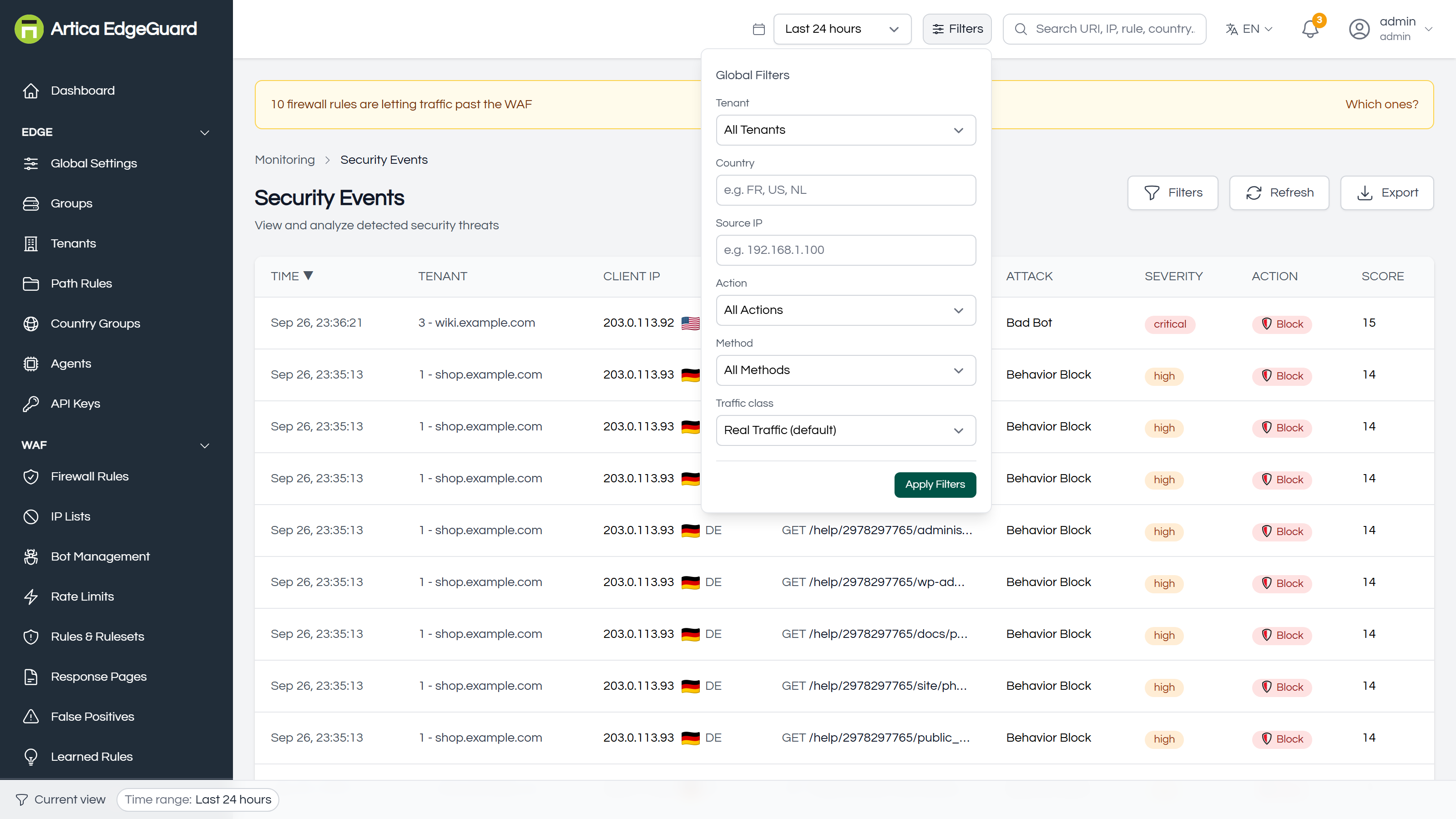
¶ The time range
A period, applied to every page that shows events: last hour, 6 hours, 24 hours, 7 days, 30 days, or a custom range. It is remembered between visits, so the range you left the console with is the one you come back to.
It does not reach configuration pages. Firewall rules, IP lists, rate limits, sites and groups are what they are now, not what they were last Tuesday. Changing the range on those pages changes nothing, deliberately.
It does not reach counters that measure since an agent started — the figures on Performance come from the agents' own counters, and that page says so.
A range wider than your event retention returns what is still stored, not an error. Events are pruned at the retention set in Global Settings, 90 days by default.
¶ The filters
Filters opens the panel above. Six of them, applied together:
| Filter | What it narrows to |
|---|---|
| Tenant | one site. The most used, and the one that explains most empty pages |
| Country | one country code, as the GeoIP lookup reports it — FR, US, NL |
| Source IP | one client address |
| Action | what EdgeGuard did: blocked, challenged, rate limited, allowed |
| Method | GET, POST, and the rest |
| Traffic class | see below |
Nothing is applied until Apply Filters — the panel edits a draft, so a half-typed address does not re-query the console on every keystroke.
¶ Traffic class
The one worth reading twice, because its default hides something:
| Choice | What you get |
|---|---|
| Real traffic (default) | real visitors only. Synthetic traffic is hidden |
| Include synthetic | real and synthetic together |
| Only synthetic | only your own monitoring |
| Bot / Human | only traffic classified as one or the other |
Synthetic traffic is what your own monitoring generates, marked with the shared secret set in Global Settings. It is hidden by default so health checks do not inflate an attack total that somebody will later quote in a meeting.
¶ Where they apply, and where they do not
The filters reach the pages that show traffic:
Dashboard · Security Events · Analytics · Attack Chains · Attack Surface · Incidents · Contained IPs · False Positives · Firewall Rules · Path Rules · Threat Intelligence
They do not reach the pages that show configuration or the fleet:
Agents · Global Settings · Groups · Tenants · IP Lists · Rate Limits · Bot Management · Rules & Rulesets · Response Pages · Learned Rules · Daily summary · Compliance Reports · Audit Log · Log Connectors · Configuration Drift · Performance · API Keys · Country Groups
That division is deliberate: a firewall rule is not something that happened in the last 24 hours, and a rule list that hid rules because of a time range would be dangerous.
¶ The bar along the bottom
Whatever is filtered is stated at the bottom of the window, as chips — the period, the site, the address. Each chip removes that one filter; Clear all removes them all.
It exists because a filter you set on Tuesday is still set on Thursday, and a page filtered to a quiet site looks exactly like a product with nothing to report. If a page is emptier than you expect, read that bar first.
¶ The search box
Type and press Enter to open Security Events searched for what you typed. It accepts a URI, an address, a rule name, a country — and an EdgeGuard ID, which is the useful one: every block page carries one, and pasting it here opens that exact request.
Search is a jump, not a filter: it does not join the chips at the bottom, and it does not persist.
¶ The rest of the bar
- Language — the console speaks eight; the choice is per account.
- Bell — conditions that need attention, and one summary of yesterday each morning. It clears when the condition clears, which is why a day of refused traffic leaves no trace there and lives in the Daily summary instead.
- Organisation selector — only for a platform administrator. See Organizations.
- Account menu — profile, password, MFA, sign out.
¶ When a page is emptier than it should be
In the order that finds it fastest:
- The bar at the bottom. A site filter from last week, or a country you were investigating.
- The time range. An hour of a quiet night shows nothing on a site that is busy by day.
- Traffic class. If you are looking for your own monitoring, the default hides it.
- The page itself — some pages are not filtered at all, and their emptiness means something else. Agents empty means agents are not reporting; Attack Surface empty usually means the module is off.