Every endpoint your sites actually serve, discovered from the traffic itself rather than from a document somebody wrote in 2019.
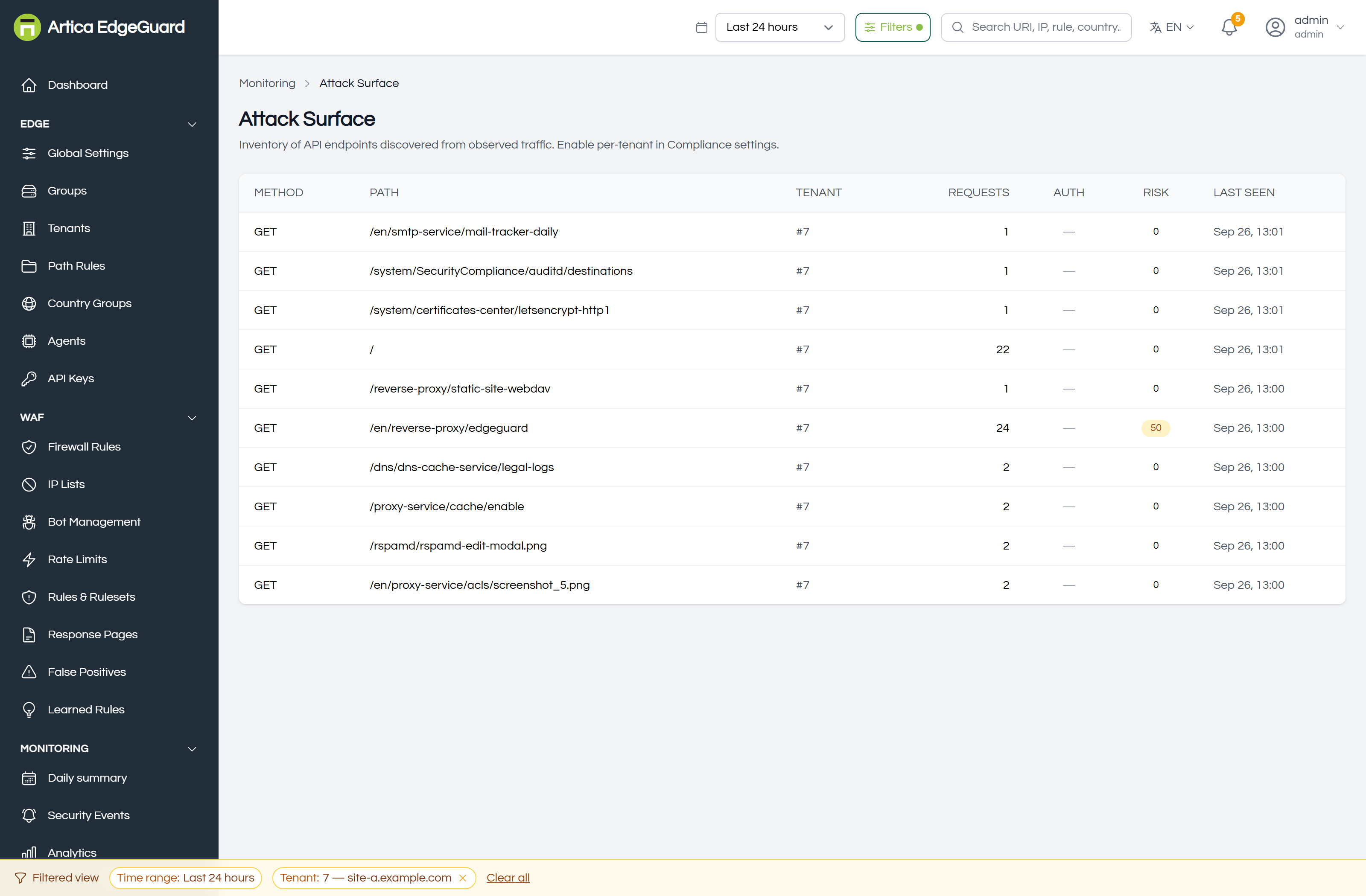
Attack Surface is an inventory. While it is enabled, each agent records every distinct combination of site, method and path it sees — GET /api/orders, POST /login — with how many requests it has taken, the names of its query parameters, whether its traffic carries credentials, and what is worth noticing about it. Central collects those inventories from every agent and lists them here.
It answers a question a WAF is unusually well placed to answer: what is actually exposed? Not what the API documentation claims, not what the load balancer config suggests — what has been asked for and answered.
¶ Turning it on
It is off by default. Global Settings → Compliance → Attack Surface Management, and the four switches mean what they say:
| Switch | Effect |
|---|---|
| Enabled | record anything at all |
| Discover Endpoints | build the inventory from observed traffic |
| Monitor Changes | note when an endpoint appears |
| Risk Scoring | score each endpoint and record its findings |
It can also be set per site, which is the usual arrangement: on for the applications you are responsible for, off for the ones you merely pass through.
Endpoints appear within a minute or two — the agent ships its inventory on a timer, not per request.
Needs engine 3.0.33 and central 2.4.26.
Two older behaviours are worth knowing about, because both look like an empty page rather than like a fault. Before 3.0.33 this switch gated only the per-request path: the manager itself was configured from the agent's own
config.json, which defaults to off — so the console recorded a preference and the agent recorded nothing. Before 3.0.32 the inventory kept the path and nothing else: no site, no parameters, and a risk score that was never assigned, so every endpoint scored 0, which reads as "safe" rather than as "not measured".
¶ Reading a row
| Column | Meaning |
|---|---|
| Method and Path | the endpoint |
| Tenant | which site it belongs to |
| Requests | how many have been observed since it was discovered |
| Auth | whether requests to it carry credentials — observed, not declared |
| Risk | 0–100, see below |
| Last seen | when it last took a request |
Open a row and it shows what the risk score is made of, and the parameter names seen at that endpoint.
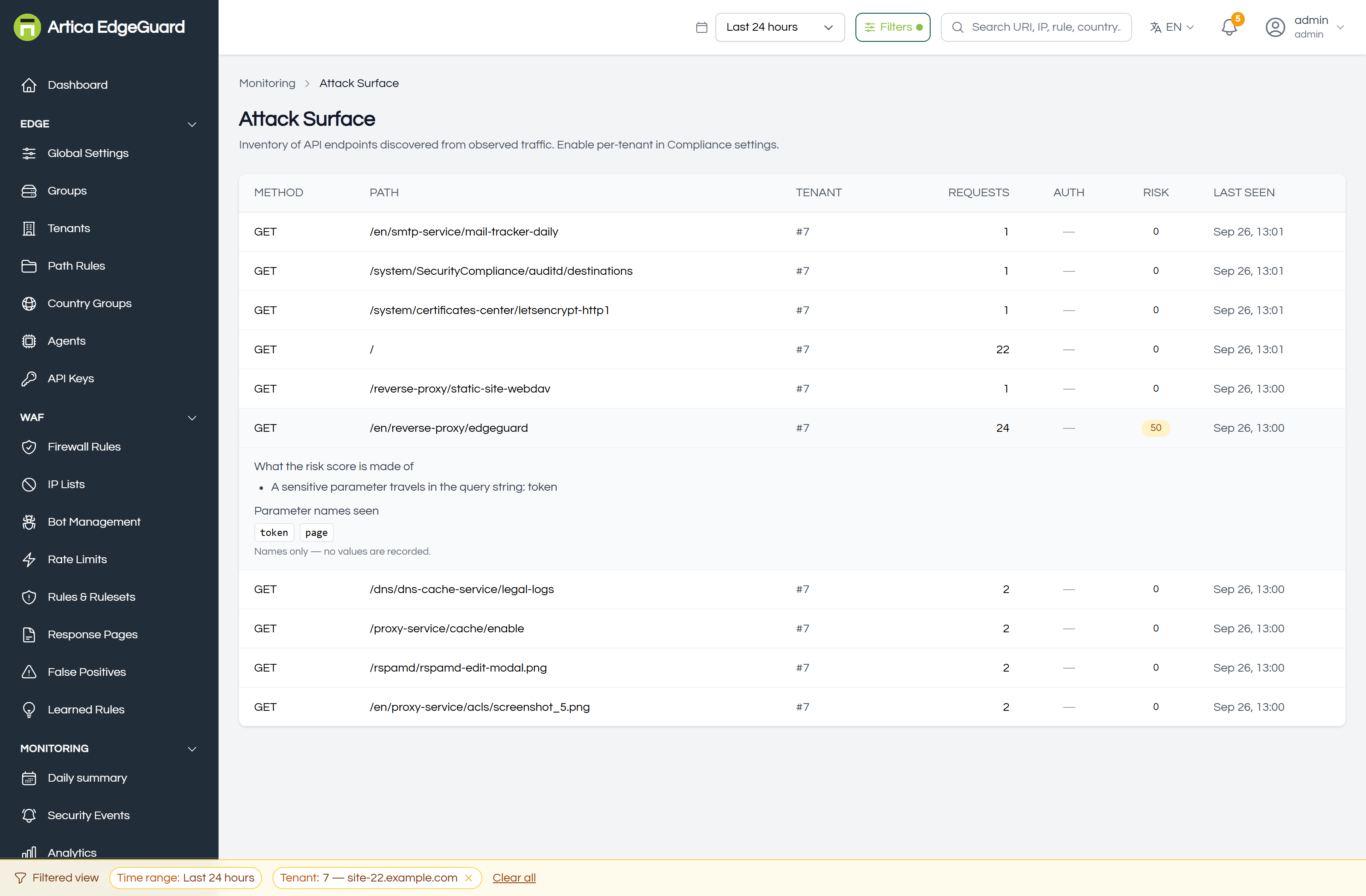
Names only: an inventory is a map of a site, not a copy of its traffic. No values are recorded, here or anywhere in this module — the row above is a real endpoint that was asked for 24 times with a token in its query string, and the value of that token is nowhere in this product.
¶ Auth is an observation
An endpoint is marked as authenticated when at least eight in ten of its requests carried a credential — an Authorization header or a session-looking cookie — over at least twenty requests. Below that it says nothing rather than guessing.
This matters in both directions. A dash does not mean "unprotected": it may mean the endpoint is quiet, or that your application authenticates in a way this cannot see. A yes does not mean "secure": it means credentials were present, not that they were checked.
¶ What the risk score is made of
Each contribution is fixed and visible in the row when you open it:
| Points | Because |
|---|---|
| 40 | a sensitive parameter name in the query string — password, token, key, secret, auth, session |
| 25 | an admin or API path with no sign of authentication |
| 15 | more than three in ten responses were errors — being probed, or broken |
| 10 | it takes parameters at all, which is where input arrives |
| 10 | it is undocumented, when a documented set has been supplied |
| 5 | high traffic: busy endpoints are worth reviewing first, all else equal |
Capped at 100. It is a triage order, not a verdict: it tells you what to look at first, and the findings beside it tell you why. A score nobody can check is just an opinion with a number on it.
A secret in a query string is the single worst thing on this list and is weighted accordingly. Query strings end up in access logs, in Referer headers sent to third parties, in browser history and in proxy logs. A token there has already leaked; the only question is to how many places.
¶ Using it
Find what you did not know you served. Sort by last seen after enabling it and read the list. Development endpoints, old API versions, a debug handler somebody added in a hurry — this is where they show up, because they are serving traffic.
Check that authentication is where you think. Filter your attention to /api/ and /admin paths with a dash in the Auth column and a real request count. Either they are public on purpose, or they are the finding.
Give it a documented set — an OpenAPI specification — and "undocumented" becomes a real signal: the endpoints serving traffic that nobody wrote down. Without one, every endpoint is undocumented and the column says nothing, which is why it scores nothing until a set exists.
Watch it after a deployment. New endpoints appearing that were not in the release notes is a useful thing to notice on a Friday afternoon.
¶ The limits, plainly
- It only knows what it has seen. An endpoint nobody has requested since you enabled discovery is not in the inventory. This is a map of live traffic, not a scan.
- It forgets. An endpoint idle for 24 hours is dropped by the agent, and each agent keeps at most 5 000 endpoints, dropping the least recently seen first. A quiet endpoint will disappear and come back when it is used again.
- It is per agent. Each agent sees what passes through it. Two agents serving the same site each discover it from their own traffic.
- Parameters are query-string names only today; body parameters are not enumerated.
¶ Verifying
1. Make an endpoint appear.
for i in $(seq 1 25); do
  curl -s -o /dev/null -H 'User-Agent: Mozilla/5.0 (Windows NT 10.0; Win64; x64) Chrome/140.0.0.0' \
    "https://site.example.com/api/docs-test?token=abc&page=$i"
done
Within a couple of minutes GET /api/docs-test is in the list, with 25 requests, the parameter names token and page, and a risk score — 40 for the token in the query string, 10 for taking parameters, 25 more if the path looks like an API and no credentials were seen.
This is not a hypothetical: the screenshot above is that test, run against a live installation. It produced exactly 50 — 40 and 10 — with the finding named and no value stored.
2. Confirm no values were stored. Open the row: you should see token as a name and nowhere the value abc. That is the design, and it is worth seeing once.
3. Watch Auth change. Repeat the loop with -H 'Authorization: Bearer test' twenty times or more, and the Auth column should turn to yes. Repeat it without, enough times to drop below eight in ten, and it goes back to a dash.
¶ Where Attack Surface is the wrong tool
- Who is attacking → Attack Chains.
- What was refused → Security Events.
- Which endpoints take the most attack traffic → the Top Targets panel in Analytics; this page counts all traffic, not just attacks.
- Enforcing a schema → OpenAPI validation and the positive security model, under Global Settings → API Security.
- A list of endpoints to give an auditor → a compliance report, which states its period and its source.