One request is an event. Forty requests from the same address, trying four different things in ninety seconds, are a campaign. This page groups the second kind.
Attack Chains takes the events in the selected period, groups them by source address, and shows each address that produced enough of them as one row: what it tried, in what order, how far it got, and how much of it was refused.
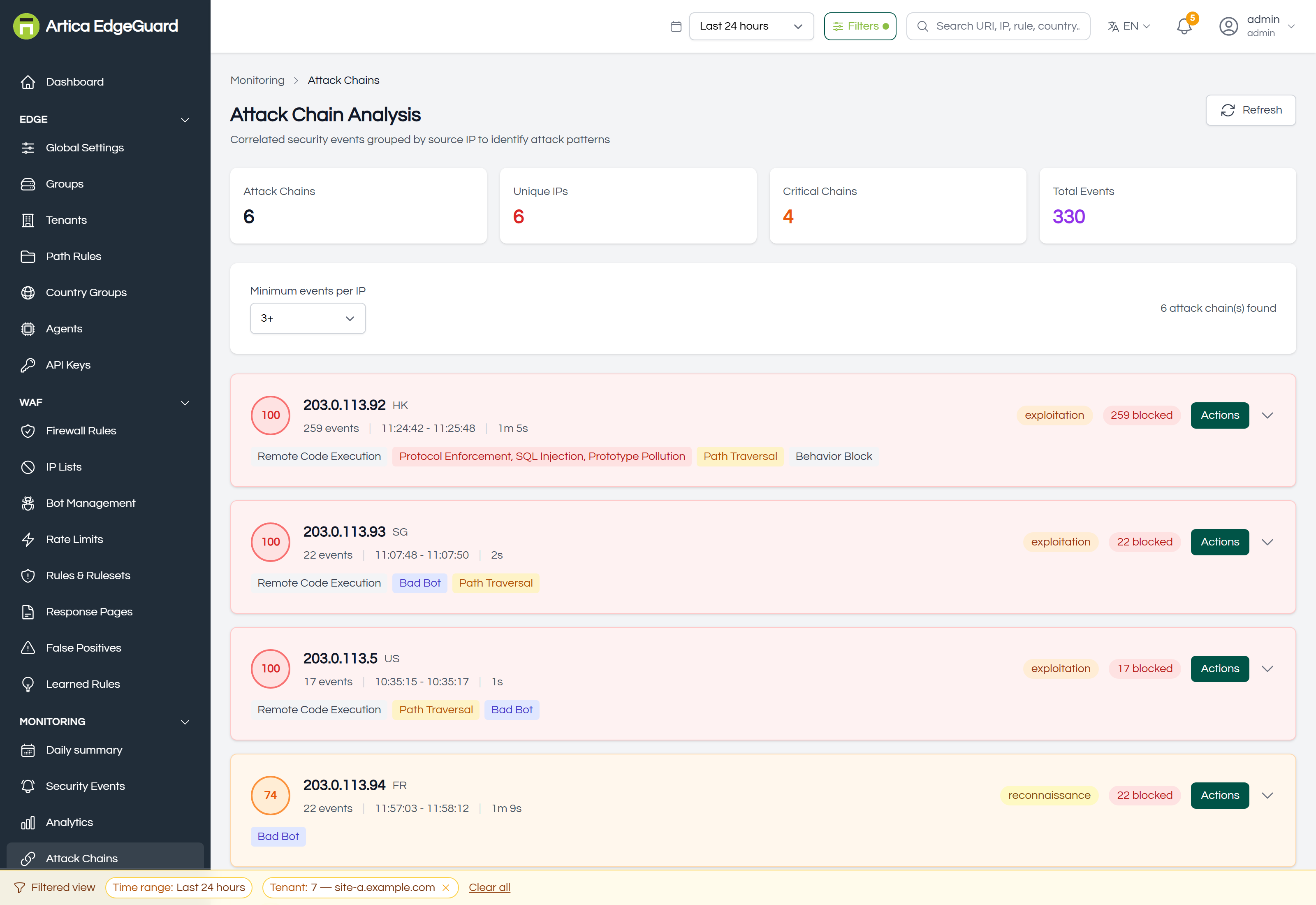
The four counters answer the first question — how much of this is going on — and the rows answer the second, which is which address to deal with first.
¶ Reading a chain
| Element | What it means |
|---|---|
| Risk score | 0–100, computed from what this address did (see below) |
| Address and country | the source, and where the lookup places it |
| Events, time span | how many, between which two timestamps, and how long that was |
| Phase | reconnaissance, exploitation or post-exploitation |
| Blocked | how many of those events were refused rather than allowed |
| Attack types | the categories that fired, as labels |
The risk score is a triage order, not a verdict. It is 15 × the number of distinct attack types + 2 × the number of events (counted to 50) + the highest single anomaly score, capped at 100. Variety weighs most deliberately: an address that tries SQL injection, then path traversal, then a web shell, is working through a list, and that is a different problem from an address that sends the same probe four hundred times.
The phase is read from the categories seen:
- reconnaissance — scanning, bad bots, probing for paths. Nothing has been attempted against the application itself yet.
- exploitation — an injection, a traversal, a remote-code attempt. The classic categories.
- post-exploitation — data exfiltration, backdoor or privilege-escalation signatures. This is the one to look at today.
An address in post-exploitation with a high blocked count was stopped. The same address in post-exploitation with allowed events in its timeline is a different conversation, and the timeline is where you find out which.
¶ The timeline
Open a chain.
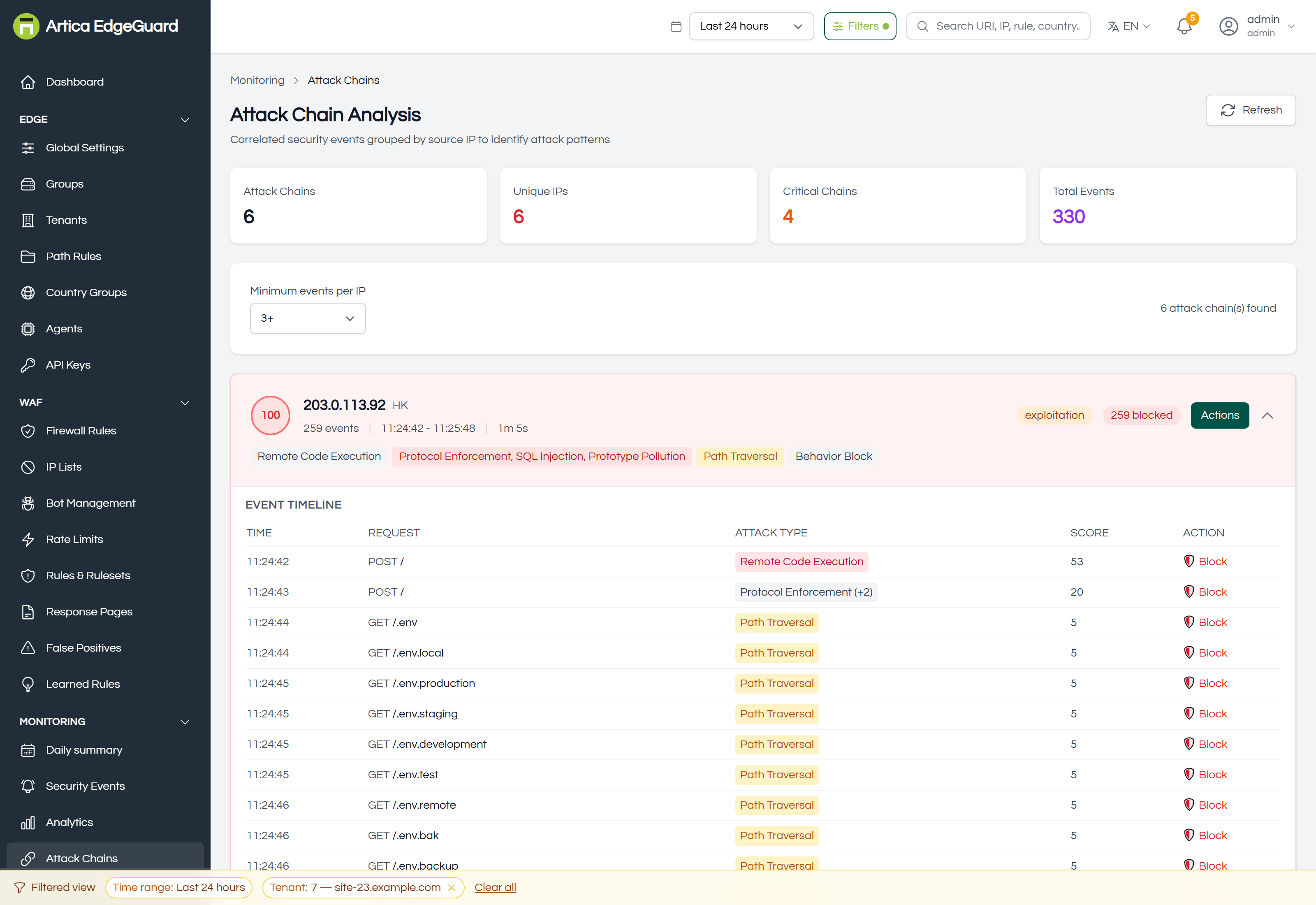
Every event from that address, in order: time, request, attack type, score and what was done about it. Read it downwards — the order is the story. A scan that finds /admin, then tries three injections against it, then stops, tells you what the attacker believed was there.
¶ Acting on one
Actions on a chain opens the address's options: block it, allow it, or add it to a list, with an expiry. It is the same mechanism as IP Lists, reached from the place where you formed the opinion.
Before blocking an address outright, check the country and the ASN in one of its events. An address that resolves to a hosting provider is a safe block; an address that resolves to a residential ISP with two hundred of your customers behind it is not.
¶ What it is computed from, and the honest limits
This page is assembled in your browser, from the events the console can fetch for the period: up to twenty pages of a hundred, so 2 000 events at most, newest first.
Three consequences, none of them visible on screen:
- On a busy install with a wide time range, chains are built from the most recent 2 000 events rather than all of them. Narrow the range, or the site, to make the picture complete rather than representative.
- Minimum events per IP (default 3) is the threshold for appearing at all. An address that made two attempts is not a chain here; it is still an event in Security Events.
- Allowed requests from an address are shown in its timeline but do not count as attack types — they are context, not attempts.
¶ Verifying
1. Make one. From a test machine, send four different refused requests within a minute:
UA='Mozilla/5.0 (Windows NT 10.0; Win64; x64) Chrome/140.0.0.0'
for p in "/?id=1' OR '1'='1" "/../../etc/passwd" "/?q=<script>alert(1)</script>" "/shell.php?cmd=id"; do
  curl -s -o /dev/null -H "User-Agent: $UA" "https://site.example.com$p"
done
Refresh: that address should appear as one chain with four attack types, phase exploitation, and a risk score around 60–70.
2. Check the arithmetic. Four distinct types is 60 from variety, four events is 8 from volume, plus the highest single score. The number on screen should be that sum, capped.
3. Compare against the events. Open Security Events filtered to that address over the same period. The counts must agree; if the chain shows fewer, you are over the 2 000-event ceiling.
¶ Where Attack Chains is the wrong tool
- One request → Security Events.
- Trends over weeks → Analytics; this page is about the last hours.
- An attacker changing address every request → the chain grouping is by address and will not see it; look at Analytics by ASN and at Bot Management.
- A formal record of an incident → Incidents, which is created and tracked rather than recomputed each time you open the page.
- What is being attacked rather than who is attacking → Attack Surface.