EdgeGuard — Learned Rules
How EdgeGuard learns the shape of each endpoint's traffic, proposes it as a rule, measures it against live traffic, and only then blocks — with configuration and verification examples.
EdgeGuard watches the normal traffic to each endpoint of a protected site, learns the shape every parameter has held over weeks, and proposes that shape as a rule in plain language.
An administrator accepts it, watches it measure itself against live traffic, and only afterwards allows it to block.
Conventional WAF rules are a negative model: they block what is known to be bad, which means they cannot see an attack for which nobody has written a signature.
Learned Rules is the opposite — a per-endpoint description of what this application's own traffic has proved to be normal, generated automatically rather than written by hand.
Automatic generation is the part that matters: positive security models have existed for twenty years and are almost never deployed, because maintaining them by hand is more work than any team has.
Nothing in this feature blocks anything without a person deciding twice.
The concept
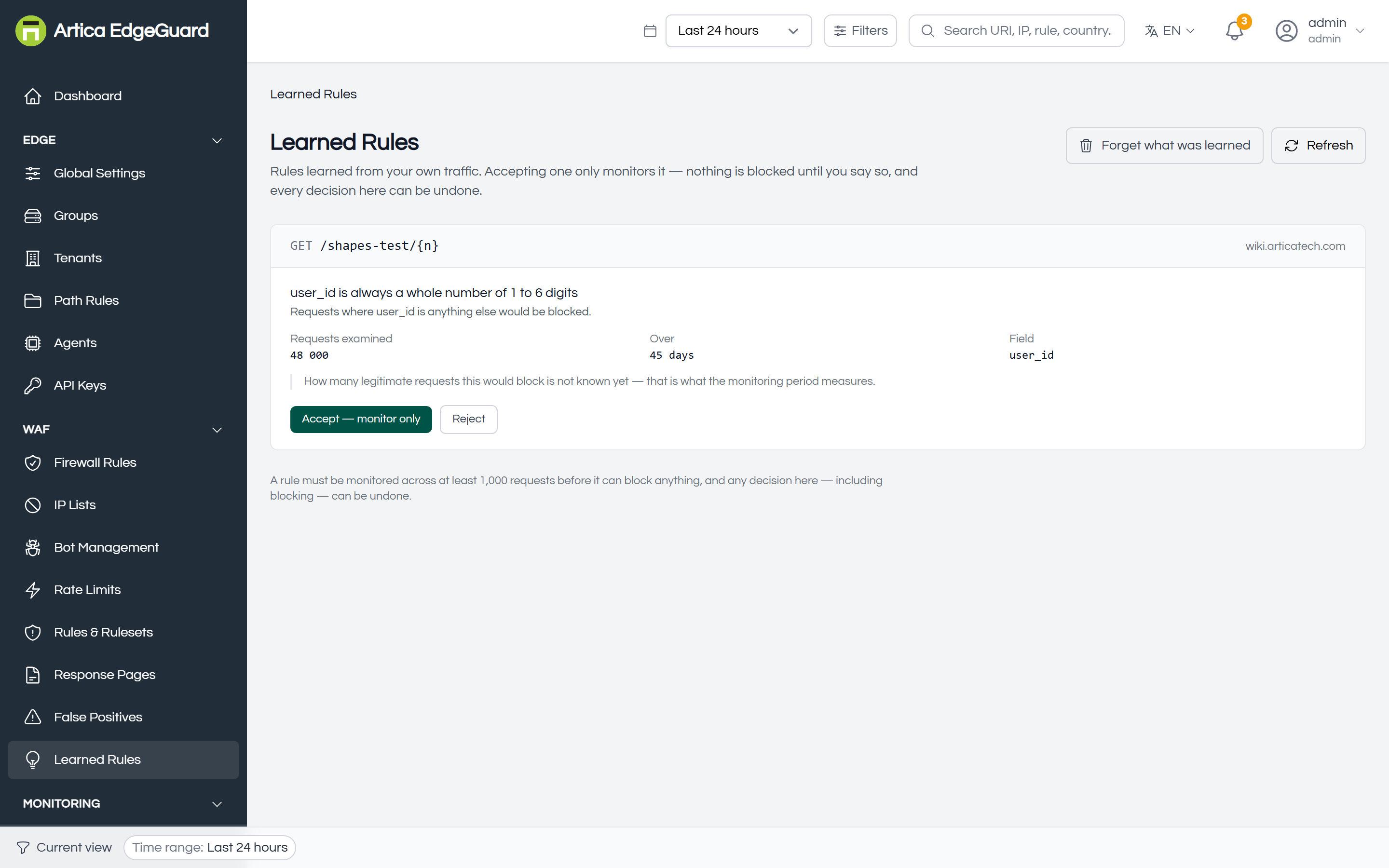
On a login endpoint, user_id has been a whole number of one to six digits across every request for the last six weeks.
That is not a rule anybody wrote; it is a fact about the application.
EdgeGuard notices it, says so in a sentence, and offers to enforce it:
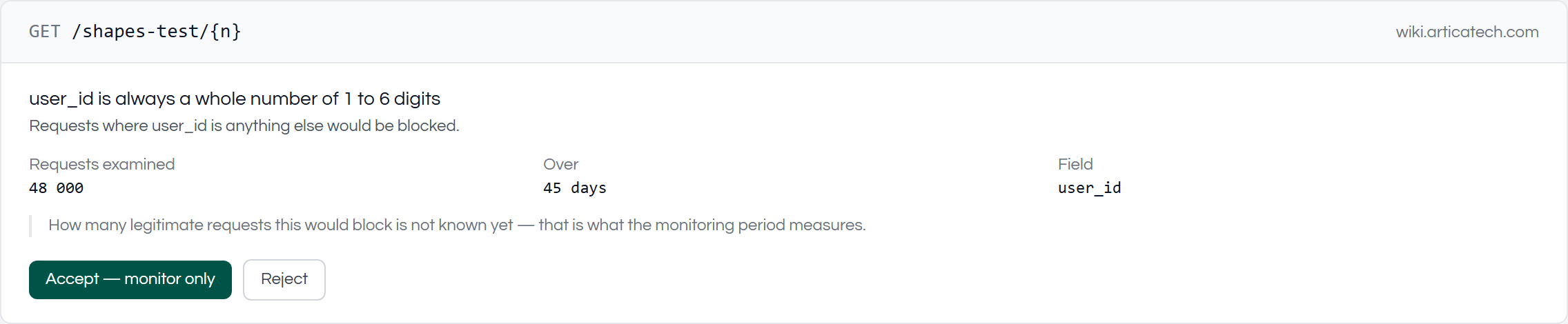
Four things in that card are worth pointing out.
- The endpoint is a pattern, not a URL.
/shapes-test/{n}covers every request to that path; identifiers are collapsed so that/api/users/48213and/api/users/7are one endpoint rather than two. - The evidence is on the card.
48,000 requests across 45 days.
A shape that has held for one afternoon is not offered at all. - The card says what accepting it would turn away, under the claim: "Refuses a value containing a quote or an angle bracket."
The claim describes the traffic; this sentence describes the consequence, and they are not the same thing. - Nobody claims to know how much it would block yet.
That question is answered by monitoring, not by a promise.
What is proposed is not everything that was measured
The measurement records the exact length range a parameter has held. The proposal deliberately does not ask for it.
A rule saying "user_id is always a whole number of one to six digits" is true of every request ever measured, and it will start refusing real customers on the day an identifier reaches seven digits.
No amount of monitoring can warn about that: the seventh digit does not exist yet, so there is nothing for the rule to be measured against. The rule would pass every test and then fail in production, once, permanently, at a moment nobody chose.
So the proposal keeps what belongs to the format and drops what belongs to this month's traffic:
| Always numeric | kept — "is always a whole number", with no digit count |
| Character classes | kept — quotes, angle brackets, spaces and non-ASCII stay refused if they have never appeared |
| A constant length | kept — a value that is always exactly 40 characters is a token, a checksum or a timestamp, and those do not grow |
| A length range | dropped — 6 to 64 characters describes the customers who have signed up so far, not the field |
This is why a claim reads "customerEmail never contains quotes or angle brackets" rather than "is 6 to 64 characters and never contains quotes or angle brackets". The second one is a stronger rule and a worse one.
How it works
1. Measurement, at the edge
- Each agent measures the shape of parameters on requests the WAF allowed: the minimum and maximum length,
whether the value is always numeric, and whether quotes, angle brackets, spaces or non-ASCII characters have ever appeared. - Parameter values never leave the edge.
What travels to the management plane is a length range and a handful of boolean flags — enough to say "this is a whole number of one to six digits",
and carrying nothing that could identify a person or leak a secret.
This matters for GDPR, and for customers who will not allow request contents off their premises. - Traffic that was blocked, challenged or rate-limited is never learned from. If an attack were folded into the baseline, the rule proposed from it would encode the compromise as policy.
2. Aggregation and proposal, on the management plane
- Every agent's measurements are merged into one baseline per (site, method, endpoint, parameter).
A baseline only ever widens:
a new value outside the known range enlarges the range, and nothing ever narrows it.
That property is what makes a long observation window safe, and it is also what makes drift detection possible later. - A proposal is written only when all of the following hold:
| At least 5,000 requests | through that one parameter |
| At least 14 days | of observation |
| Seen in the last 3 days | an endpoint that stopped receiving traffic does not produce a rule |
| Complete sample | if any agent hit its memory ceiling while measuring, the baseline is disqualified |
| Worth proposing | a shape that would refuse nothing is not offered |
| At most 10 open proposals per site | a queue nobody can empty is the same as no queue |
The generator runs hourly.
3. Accept — monitoring only
- Accepting does not block anything.
The shape is sent to every agent serving that site; each one evaluates it against live traffic, refuses nothing, and reports two numbers on its heartbeat:
How many requests it checked, and how many it would have blocked.

- This is the only way the question can be answered.
A rule cannot be back-tested against history, because allowed requests are not stored — keeping them costs hundreds of gigabytes per site per quarter.
So the rule is tried against live traffic with nothing at stake, and "how many legitimate requests would this refuse" stops being a guess. - Both numbers matter.
Ten refusals out of ten requests and ten out of ten million are not the same rule, and zero out of zero is an absent result rather than a clean one.
4. Turn on blocking — a second decision, gated by evidence
- Blocking can only be switched on once the rule has been monitored across 1,000 requests.
Below that the button is disabled and says how far along it is.
Above it, the system still refuses if the rule would already be turning away more than 1% of real traffic — that is not a rule worth enforcing, it is a shape that no longer fits the application.
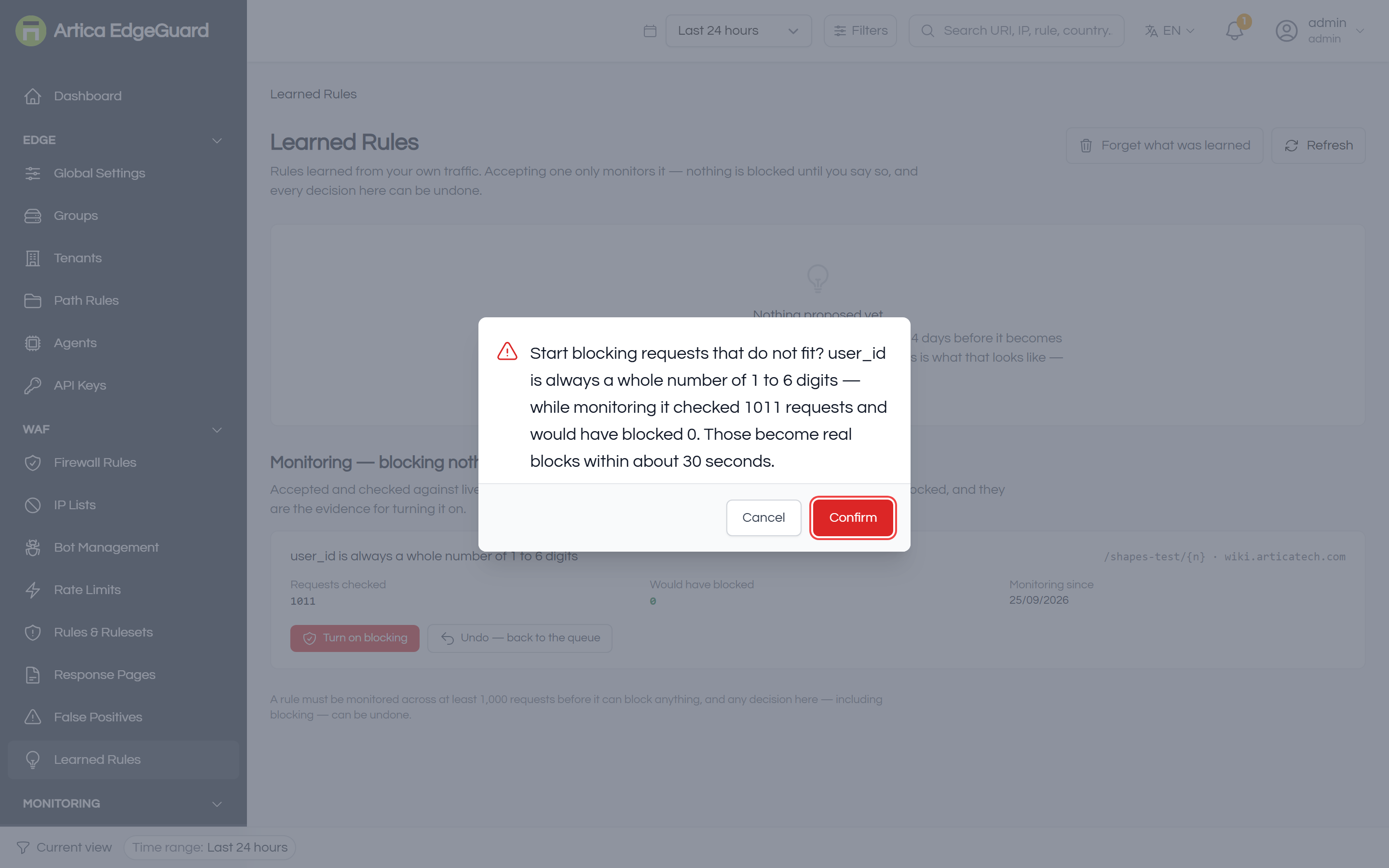
- The confirmation names the numbers the decision rests on.
After it, requests that do not fit the shape are blocked within about 30 seconds — the time for the agents to pull the new configuration.
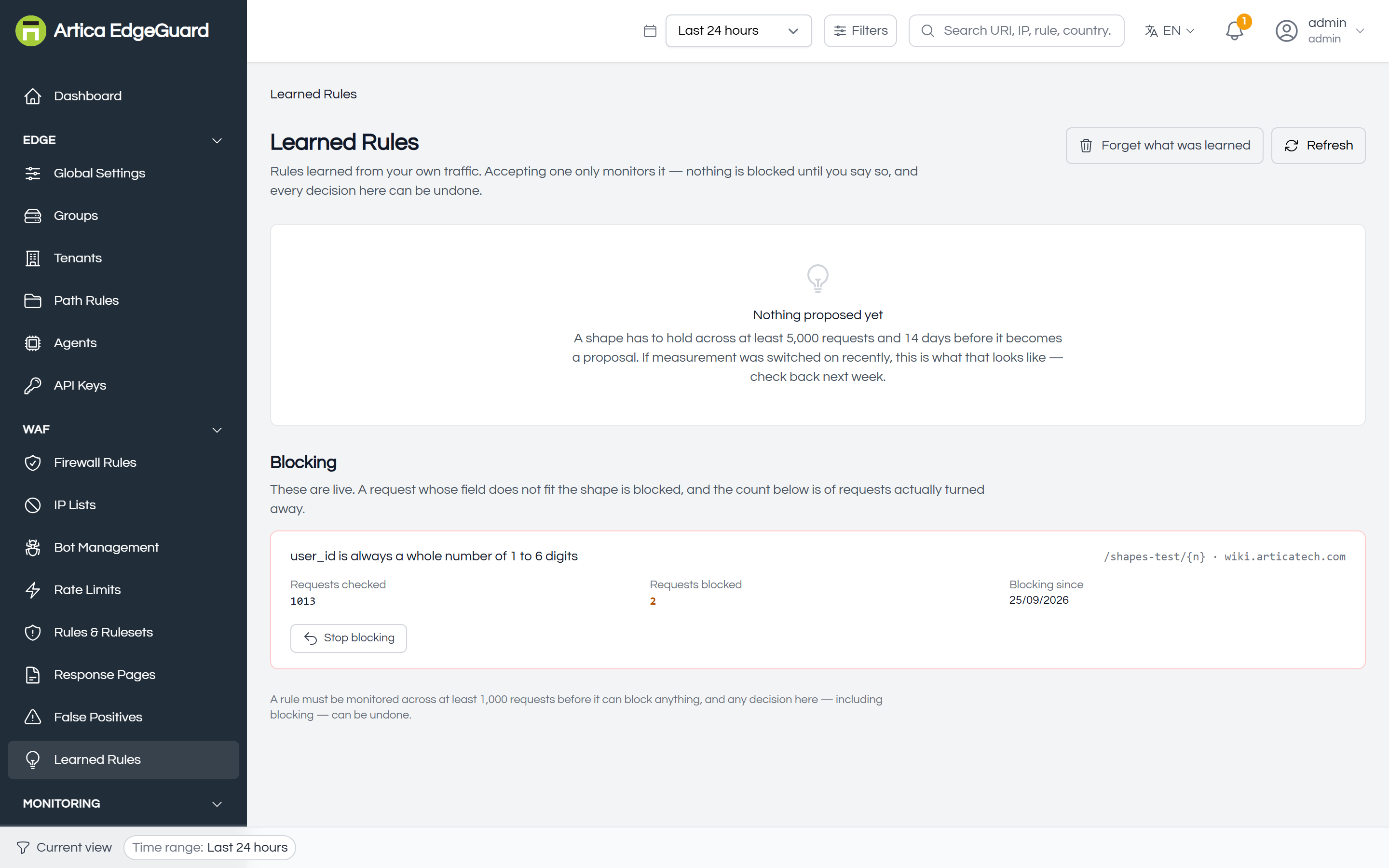
5. Every decision can be undone
- Accept, reject, and blocking itself can all be reversed from the same page, including after a rule has started blocking.
The rule returns to the queue and agents stop applying it within about 30 seconds. Its monitoring counters are cleared, so that evidence gathered under one decision is never presented as belonging to the next.
6. Drift — when the application changes
- A baseline only widens.
So a live baseline that no longer fits an accepted rule is not sampling noise and not a quiet week:
Something started sending values that were never there before, which is almost always a release.

- The warning names what changed, in words.
It is checked five minutes after the management plane starts and every six hours after that, and it is raised more prominently when the affected rule is actively blocking
Because that rule is turning people away on a description that no longer holds.
Performance
This feature was designed around a constraint stated at the outset: it must not need machine learning, a GPU, or a second database.
- The learning is aggregation
minimums, maximums, and boolean flags, computed with SQL on a schedule.
There is no model and nothing to train. - The check at the edge is arithmetic.
Comparing a length against a range and walking a string's character classes is cheaper than the injection patterns EdgeGuard already evaluates on every request. - Measurement is off the request path.
The agent parses and folds shapes on a background goroutine fed by a non-blocking channel.
When the buffer is full a sample is dropped, which for statistics is harmless. - Sampling is configurable.
By default one allowed request in twenty is measured.
Raise this first if measurement ever appears in your latency figures. - Memory is capped.
The agent's map of shapes has a ceiling; when it is reached, the count of dropped samples travels with the report so the management plane knows the sample was incomplete and refuses to propose rules from it.
Two things are worth watching after enabling it on a busy site: the
security_request_duration_secondshistogram exposed by each agent, and theslow_requestslist in the agent's status endpoint, which names the slowest decisions rather than merely counting them.
Where it improves security
Learned Rules catches what signatures cannot, because it describes the application rather than the attack.
- Parameter tampering.
An identifier field that has only ever held digits suddenly receives a 400-character payload.
It is refused for containing something that is not a digit — no signature has to recognise the payload. - Injection through a field that was never text.
A SQL or template payload in a numeric parameter fails the shape regardless of how it is encoded or obfuscated
The evasion techniques that defeat pattern matching do not make a value shorter or more numeric. - Zero-day exploitation of a known-shaped field.
An attack nobody has published a rule for still has to arrive through a parameter, and it still has to look unlike six weeks of that parameter's traffic. - Reconnaissance.
Probing a field with fuzzing payloads shows up as monitored violations long before anything is blocked, which is itself an early warning.
Equally important is what it does not do.
It does not inspect bodies that are not form-encoded, it makes no claim about endpoints it has not observed, and it will not propose a rule for an endpoint whose traffic has been inconsistent.
A shape that is not stable is not offered at all.
Configuration
Learned Rules is switched off by default.
Enable it under Global Settings → General → Learned rules, or at group or site level — the setting inherits down the hierarchy like every other, and a site that leaves it unset follows its group, which follows the global default.
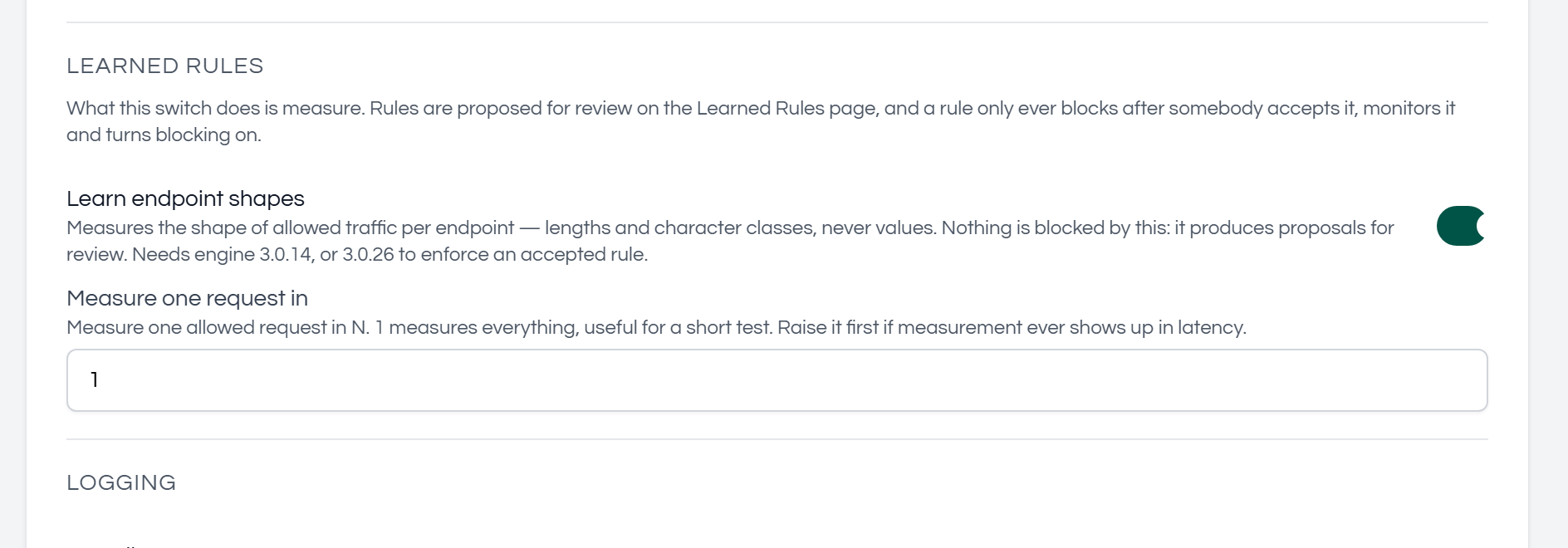
- Learn endpoint shapes
Turns measurement on.
This produces proposals for review and blocks nothing.
- Measure one request in N
Sampling rate.
The default of 20 is right for production.
Set it to 1 for a short test on a quiet site, where you want a shape to accumulate quickly;
Raise it above 20 on a very busy site if measurement ever shows up in latency.
- Versions.
Measurement needs engine 3.0.14 or newer.
Enforcing an accepted rule needs engine 3.0.26 and management plane 2.4.14.
Engine 3.0.30 or newer is recommended for any site that accepts file uploads.
Management plane 2.4.36 is what stopped proposing digit counts and free-text length ranges; it also restates proposals already waiting in the queue, so an upgrade does not leave two generations of the same rule side by side.
What the first fortnight looks like
Nothing.
A shape must hold across 5,000 requests and 14 days before it is offered, so an empty page is the correct state after enabling the feature — and the page says so rather than looking broken.
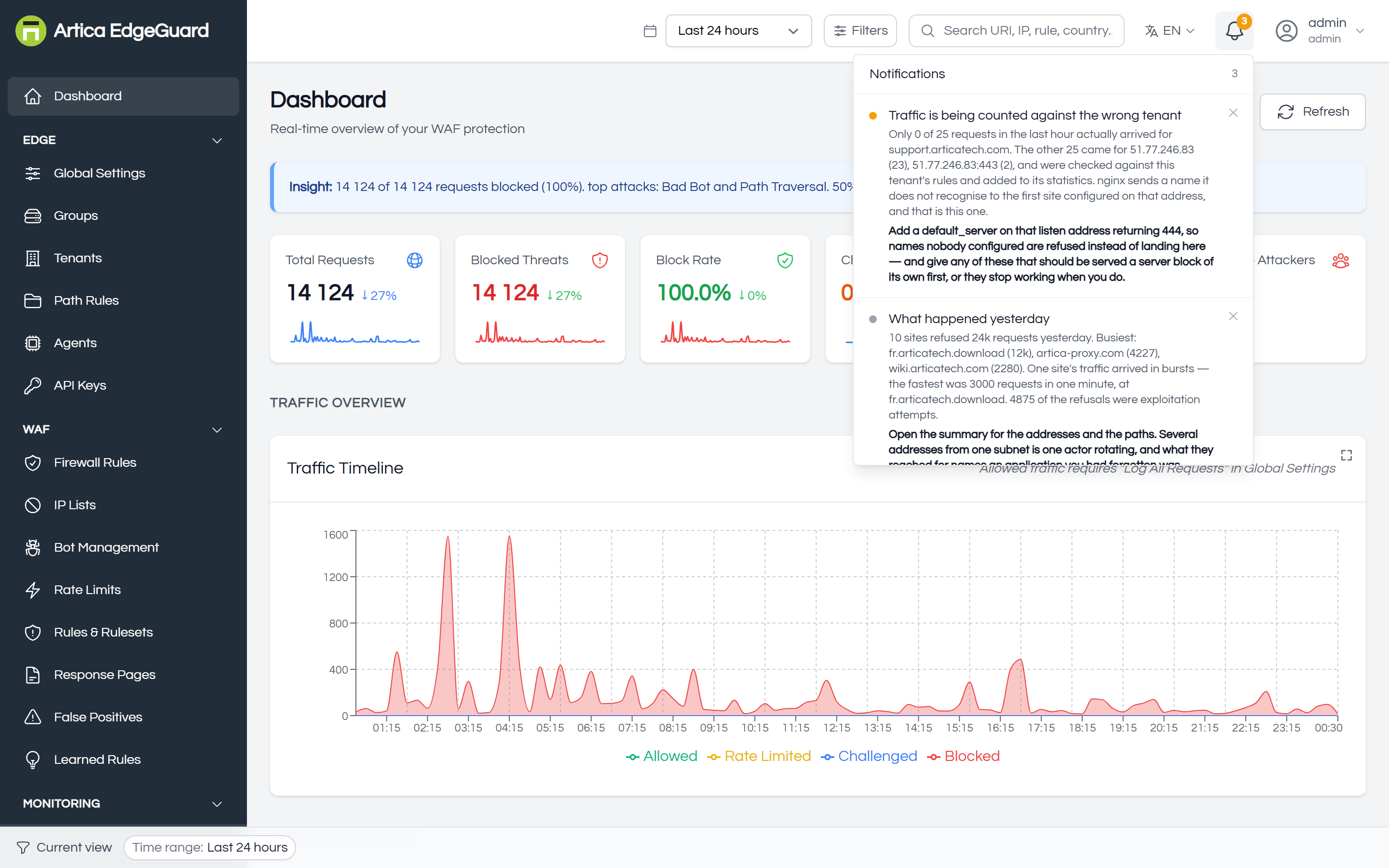
- When proposals appear, the bell announces them once per site rather than once per rule:
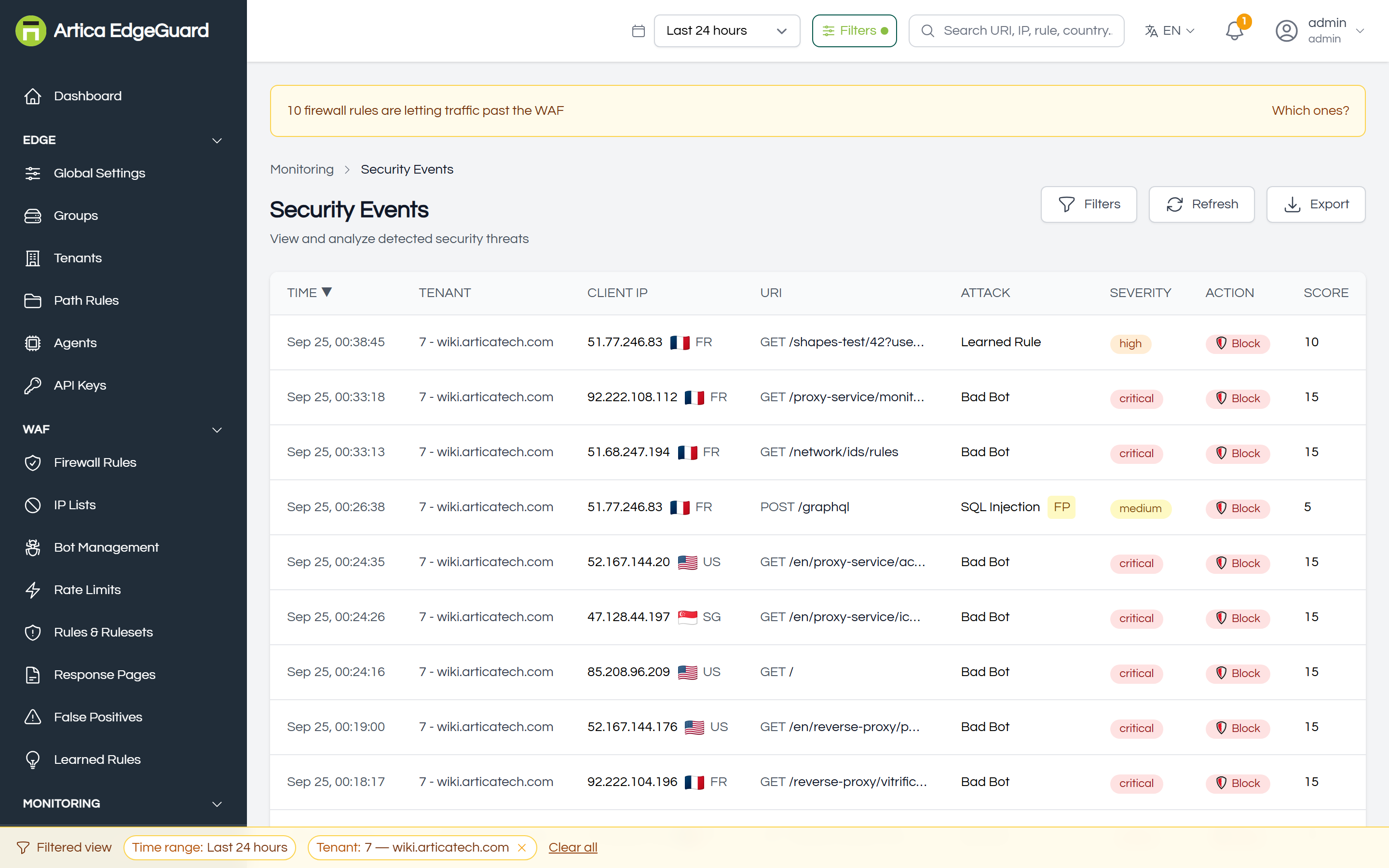
The block appears in Security Events as an attack of type Learned Rule, attributed to the proposal it came from:
Troubleshooting
- The page says "Nothing proposed yet" and has for weeks.
Check that Learn endpoint shapes is enabled for that site and that its agents are online. Remember the 14-day window: a site enabled last Tuesday cannot have a proposal. - A rule in monitoring shows 0 requests checked.
The agents have not reported for it. Confirm the agent serving that site is online and running engine 3.0.26 or newer, and that the endpoint in the proposal is one that still receives traffic. - Blocking cannot be switched on.
Either the rule has not been monitored across 1,000 requests yet — the button says how far along it is — or it would already be blocking more than 1% of live traffic, in which case the shape no longer fits and the rule should be rejected rather than enforced. - A rule is blocking something legitimate.
Undo it from the page; blocking stops within about 30 seconds. Then either reject the proposal, or forget the endpoint's baseline and let it be learned again from current traffic. - A drift warning appeared on a blocking rule.
The application is sending something the rule does not allow. Read what the warning names. If the change is legitimate, undo the rule and let the endpoint be learned again; if it is not, the rule is doing its job.