The top of the hierarchy, above everything else in this console: who the console belongs to, what they may create, and whether they may use it at all.
Most installations have one organisation and never open this page. It exists for the ones that do not: a hosting company, a managed service provider, anyone running EdgeGuard for customers who must not see each other's sites, events or rules.
An organisation owns everything else. Sites, groups, users, rules, events, reports — each belongs to exactly one, and nothing crosses between them.
Organisation
  └─ Global settings, groups, sites, path rules
  └─ Users, API keys
  └─ Events, incidents, reports
¶ Who can see this page
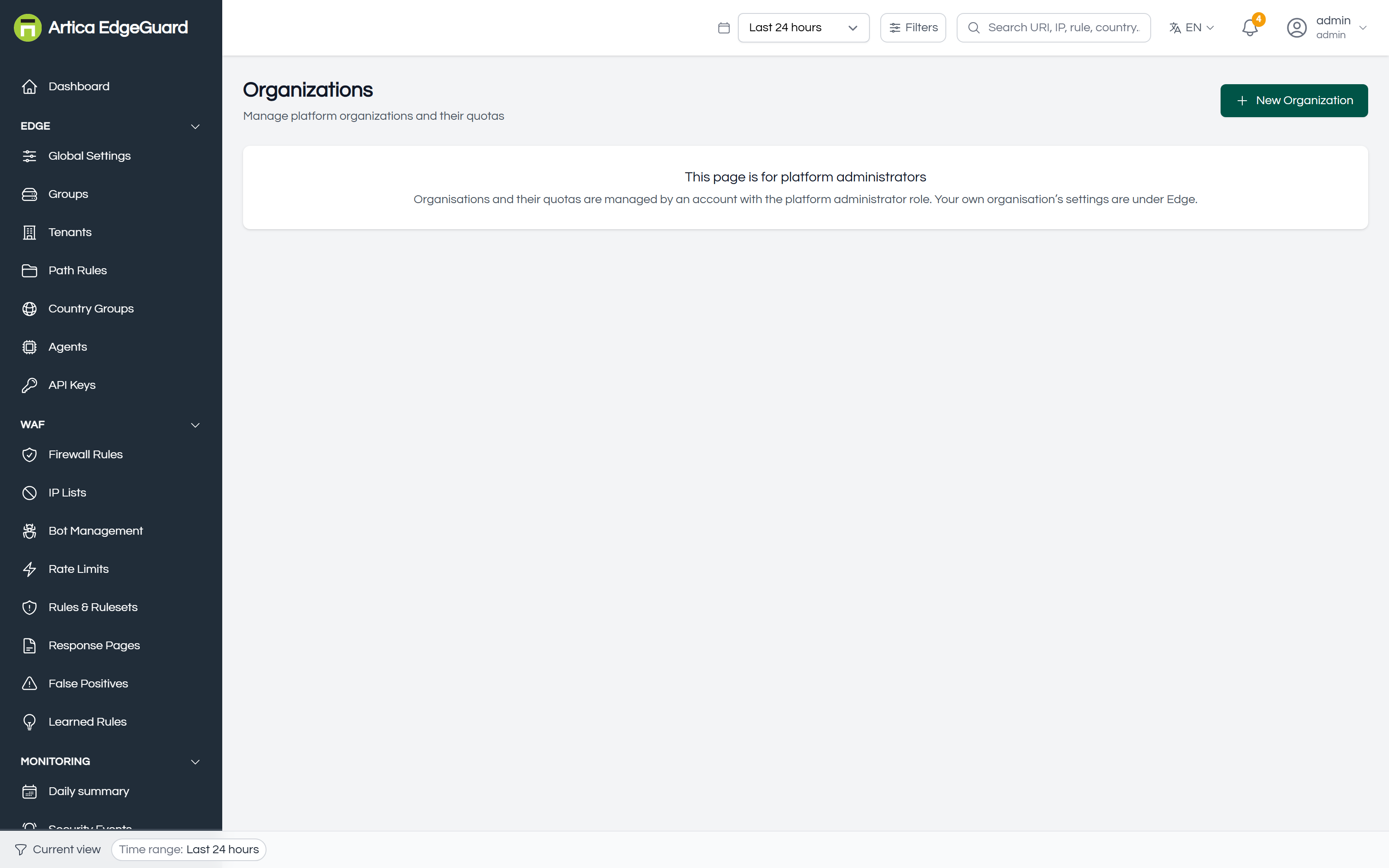
Only a platform administrator — the super_admin role. An ordinary administrator, however senior inside their own organisation, cannot list organisations or change a quota: that is the boundary between running a site and running the platform.
The entry does not appear in the menu for anyone else. If you reach the page another way, it says so rather than showing an empty table — which is what the screenshot above is: the page as an ordinary administrator sees it.
Before central 2.4.31, that refusal rendered as an empty table — which reads as "there are no organisations", a different and untrue statement.
¶ What an organisation carries
| Field | Meaning |
|---|---|
| Name | what it is called in the selector and in reports |
| Slug | the short identifier, used in URLs and APIs; one word, stable |
| Plan | free, standard, or whatever your commercial tiers are called. A label, not an enforcement |
| Status | active or suspended |
| Max Tenants / Users / Groups | how many of each may exist |
| Max Events/Day | the event volume the plan assumes |
¶ Creating one
New Organization.
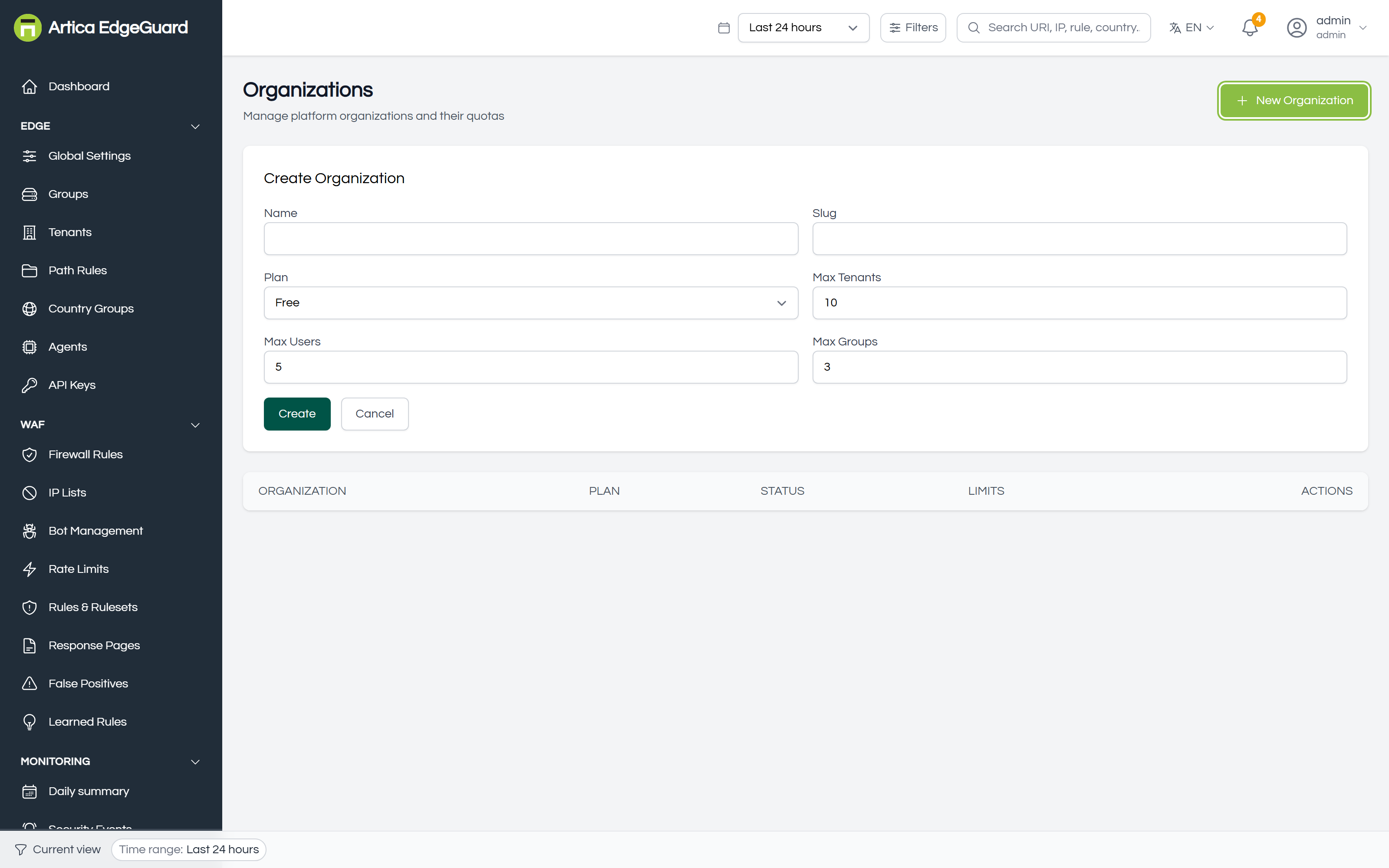
- Name and Slug.
- Plan.
- Max Tenants, Max Users, Max Groups.
- Create.
A new organisation arrives with its own global settings — the defaults, not a copy of yours — so nothing it does can be explained by another organisation's configuration.
Then create its first administrator under Users, with that organisation selected. An organisation with no users is a container nobody can open.
¶ The limits, and which of them limit
Sites, users and groups are enforced. Creating one past the limit is refused, and the refusal names the limit, the current count and where to raise it.
A limit of zero means unlimited. Organisations created before these limits existed carry zeroes, and reading those as "may create nothing" would lock an installation out of its own console on upgrade.
Refused, it reads like this — the limit, the count, and where to change it:
this organisation is limited to 2 groups and has 2.
Raise the limit under Platform → Organizations, or remove one
Enforcement needs central 2.4.30, and 2.4.33 to change a limit after the organisation was created: the edit form submitted all four quotas, the server answered 200 and applied none of them, so a limit could be set once and never again.
Max Events/Day is not enforced, deliberately. Refusing to record what the WAF has already decided would lose the evidence of an attack in order to honour a billing tier. It is a number to measure against — compare it with what Analytics reports for that organisation — not a tap that closes.
¶ Suspending one
Suspended closes the console to that organisation entirely:
| Door | While suspended |
|---|---|
| The login form | refused, and told why — not "invalid credentials" for a password that was never wrong |
| A session already open | refused on its next request |
| An API key belonging to one of its users | refused |
| A refresh token | refused, so a session cannot renew itself past the suspension |
The status is read at most once every fifteen seconds per organisation, so suspension takes effect within seconds rather than instantly — except for the administrator who pressed the button, for whom it is immediate.
Protection continues. Suspending an organisation does not take its sites off the WAF: agents keep pulling configuration and keep refusing attacks. This is a commercial state, not a kill switch — a customer who has not paid should lose the console, not their protection, and certainly not while their site is being attacked.
Enforcement needs central 2.4.30 for the login form and 2.4.34 for the rest. In between, a suspended organisation's API keys and its already-open sessions carried on working: the console was shut and the automation was not, which is a suspension in name only.
¶ Deleting one
Deleting removes the organisation and everything scoped to it. There is no undo and no export first — take a compliance report or an audit log export before you do, if anyone might ask later what that customer's WAF was doing.
Suspending is almost always the right move first. It is reversible; this is not.
¶ Working across organisations
A platform administrator gets an organisation selector in the top bar. Everything else in the console then reads as that organisation: its sites, its events, its rules. It is the single most useful control on this page, and also the one to be careful with — a firewall rule written while the selector points at the wrong customer is a real outage for somebody.
Check the selector before writing anything global.
Choosing All organisations is a real state, not the absence of one: the console holds a session with no organisation on it, and every page then reads across all of them.
Needs central 2.4.33. Before it the console sent the organisation's slug and the server read an id, so switching produced a session carrying organisation zero — which some queries read as "no filter" and others as "the organisation whose id is zero". The selector stayed on All organisations, Agents and Daily summary came back empty, and Tenants kept working. One mismatch, four symptoms, and only a platform administrator could see it.
¶ Verifying
1. That isolation holds. Log in as a user of one organisation and look for another's site in the tenant filter. It should not be there. This is worth doing once, properly, before onboarding a customer.
2. That a quota bites. Set Max Groups to the number of groups that organisation already has, then try to create another. The refusal should name the limit and the count.
3. That suspension does what you expect. Suspend a test organisation, try to log in as one of its users — refused, with the reason — and confirm that its site is still protected:
curl -s -o /dev/null -w '%{http_code}\n' \
  -H 'User-Agent: Mozilla/5.0 (Windows NT 10.0; Win64; x64) Chrome/140.0.0.0' \
  "https://their-site.example.com/?id=1' OR '1'='1"
Still 403. The console is closed; the WAF is not — verified on a live installation, with the organisation suspended, by a request EdgeGuard refused while its owner could not log in.
¶ Where this page is the wrong tool
- Settings for your own organisation → Global Settings.
- Grouping sites for shared configuration → Groups. A group is a scope inside an organisation; an organisation is a wall between them.
- Giving someone access to some sites only → a user with tenant access, under Users.
- Billing → not here. The plan is a label, and the event limit is a number to measure against.