Every administrative action in EdgeGuard: who did it, when, from where, and what changed. The counterpart to Security Events — that page records what traffic did, this one records what people did.
The audit log is written by the server, not by the person acting, and cannot be edited or deleted from the console. Every entry carries the actor, the action, the object it acted on, the address it came from, the user agent, and whether it succeeded.
¶ Where the console shows it
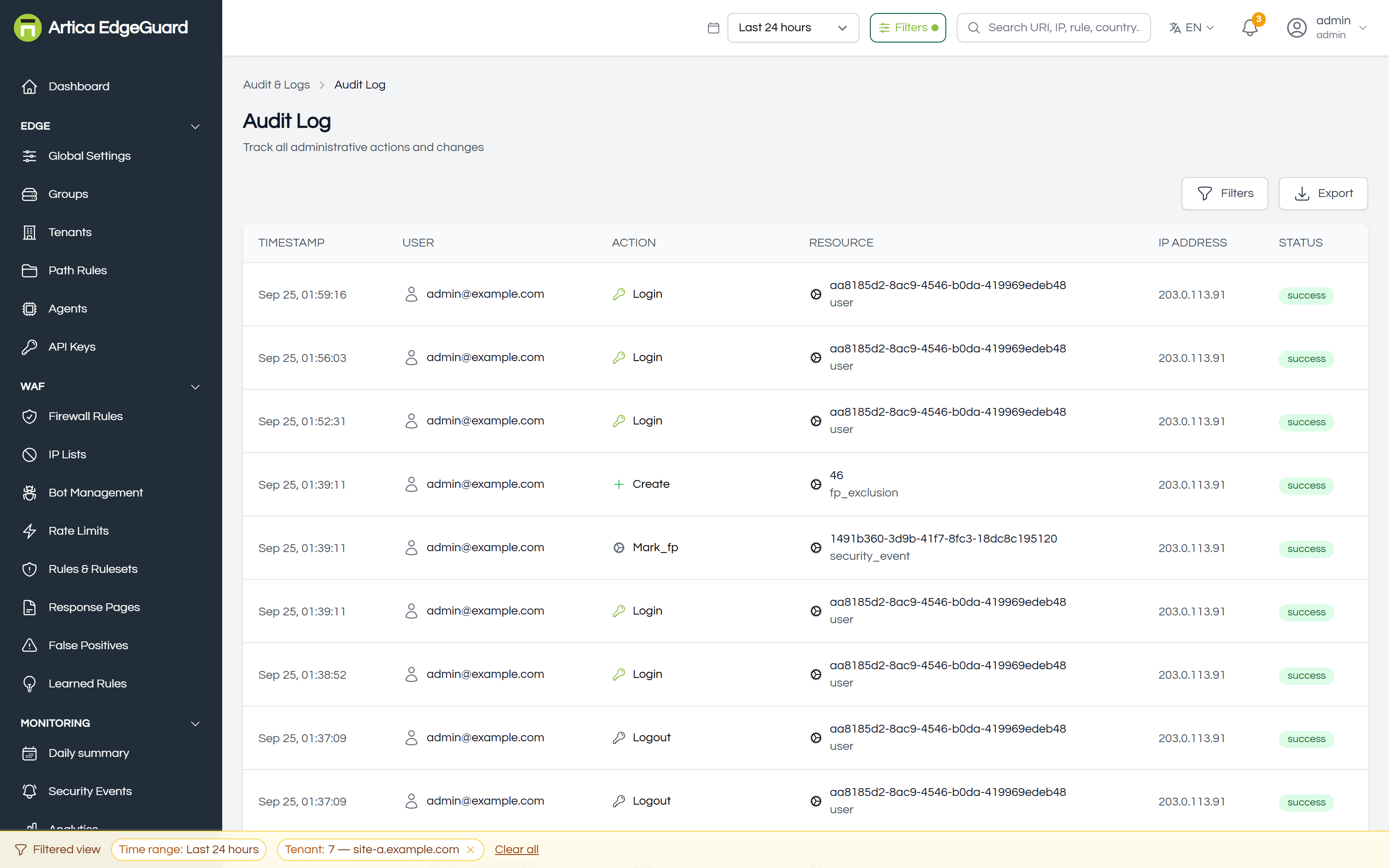
You can: filter by actor, action, resource type, status or period · open an entry to see exactly what changed · Export what is on screen.
Access is restricted to administrators. An operator can see the history of one object — the History button on a firewall rule, an exclusion, a path rule — but not the whole trail.
¶ What is recorded
Every write goes in. The resource types you will see:
| Area | Resource types |
|---|---|
| Access | user (including logins, logouts and failed logins), api_key, organization |
| Configuration | global_settings, group, tenant, path_rule, country_group |
| Protection | firewall_rule, rate_limit_rule, ip_list, allowed_bot, bot_config, ruleset, response_template |
| False positives | fp_exclusion, false_positive |
| Learned rules | rule_proposal |
| Threat intelligence | threat_feed, threat_indicator |
| Edge | agent, agent_command |
| Reporting | compliance_report, report_schedule, log_connector |
The action is the verb: create, update, delete, login, logout, generate, revoke, add_ip_blocklist, remove_ip_allowlist, and so on. Failed attempts are recorded too, with status failure — a rejected login is a line in this log, which is what makes it useful after an incident rather than only during an audit.
Entries the server wrote itself appear as system:scheduler rather than as a person: a scheduled compliance report, for example. An automatic action attributed to nobody would read as an anonymous one, and an automatic action attributed to the person who set the schedule up would be a lie about when they were at their desk.
¶ What an entry contains
Opening one shows the details object recorded with it — for a configuration change, the fields that changed. For the object's full history in one place, use the History button on the object itself: it is this same log, filtered to that resource ID.
¶ Retention
The audit trail is not pruned. Security events are deleted at the retention configured in Global Settings (90 days by default); administrative history is kept for as long as the database holds it.
This is deliberate — an audit trail with a 90-day horizon answers "who changed this?" with silence exactly when the question matters — but it means the table grows for ever. On a busy multi-tenant install, plan for it the way you would any append-only table: it is small per row, and it is the last thing you want to have deleted to save space.
¶ Exporting
Export downloads what your filters describe, as CSV or PDF, up to 50 000 entries.
The file states its own scope in a preamble: when it was exported, the period, the filters applied, and how many entries it contains out of how many matched. A filtered export that does not say it was filtered reads as the complete history, which is the one thing an audit trail must never be wrong about. If more entries matched than the file contains, the preamble says so in as many words.
# The same export over the API — CSV, one actor, one month
curl -H "Authorization: Bearer $TOKEN" \
  "https://central.example.com:8082/api/v2/audit-logs/export?actor=ana@example.com&start=2026-09-01&end=2026-09-30" \
  -o audit-september.csv

# As a PDF, every failed action in the period
curl -H "Authorization: Bearer $TOKEN" \
  "https://central.example.com:8082/api/v2/audit-logs/export?status=failure&format=pdf" \
  -o audit-failures.pdf
Export needs central 2.4.24 or later. Before that the button called a route that did not exist and downloaded an error page as a file.
¶ Shipping it elsewhere
An all-sites log connector with Ship audit logs enabled copies each entry to your SIEM as it is written. That is the way to keep the trail outside EdgeGuard, and the way to alert on it — a new administrator, a revoked key, a rule deleted at two in the morning.
A connector scoped to a single site cannot ship audit entries: they describe the whole organisation and belong to no one site.
¶ Using it
After an incident. Filter by period, then read forwards. The question is rarely "who did this" and usually "what else happened around it".
When a rule stops behaving. The rule's own History button, rather than this page. Same data, already filtered.
When a block appears from nowhere. Filter resource_type to firewall_rule and ip_list, over the last day. A block with no configuration change behind it is a detection, and belongs in Security Events instead.
Before an assessment. Export the period as PDF and attach it. The compliance reports already summarise it; the export is the underlying data when the auditor asks for it.
¶ Where the audit log is the wrong tool
- What traffic did → Security Events. Nothing a visitor does appears here.
- What one rule matched → the rule's HITS column and its events.
- Whether an agent is healthy → Agents, which has the command history per agent.
- What changed between two configurations → Configuration Drift, which compares state rather than recording actions.