A security event is one refused request. An incident is a case: one attacker, one site, everything they tried while somebody could still have been watching.
EdgeGuard raises an incident by itself when a request is refused at high severity, and folds later requests from the same address into the same incident for an hour. What you get is a case file rather than a stream: who, against what, how many attempts, and what was done about it.
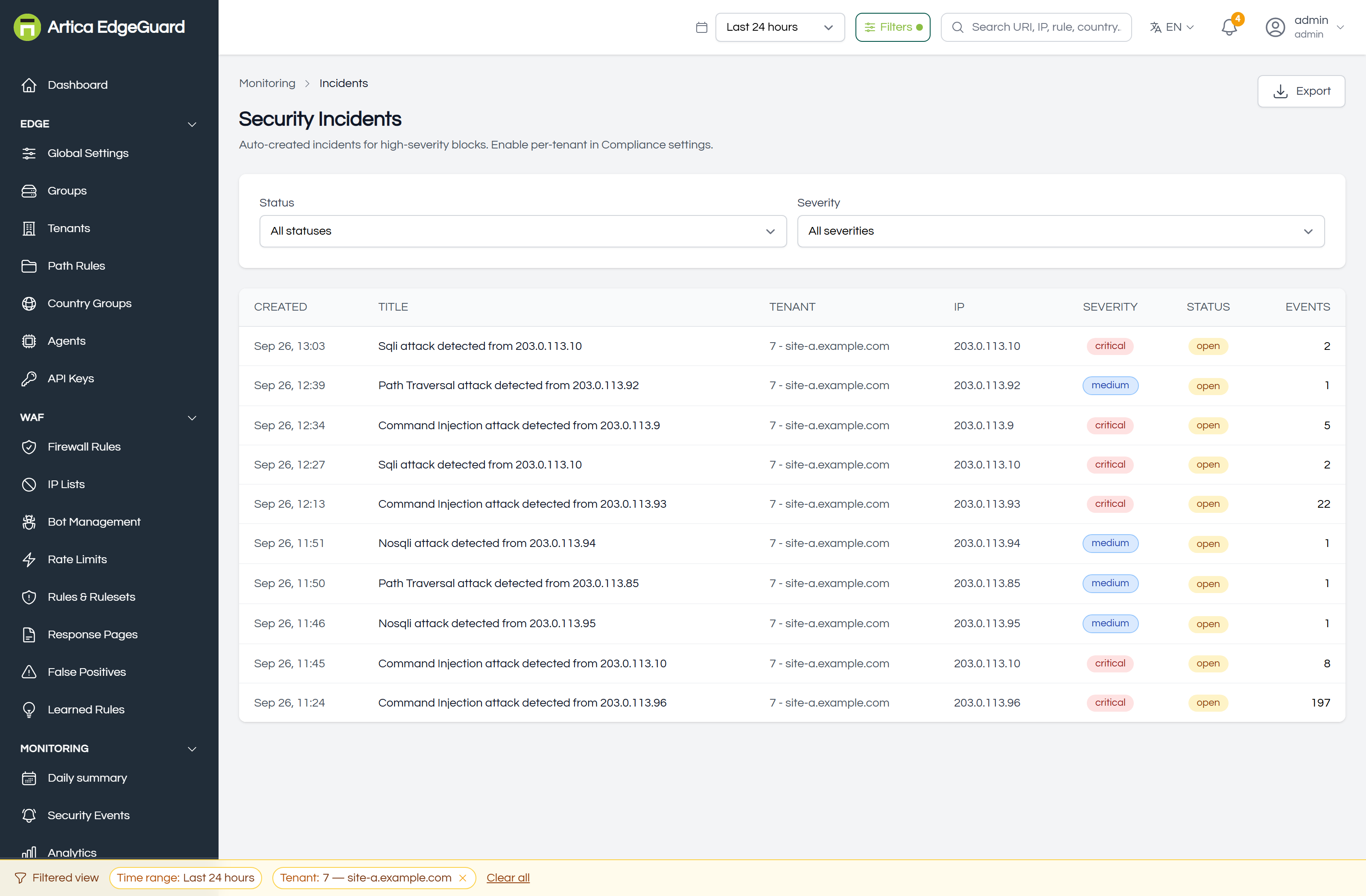
Page actions: filter by status or severity · Export CSV · open an incident to read it and change its status.
¶ Turning it on
Global Settings → Compliance → Incident Response, per site or globally:
| Switch | What it does |
|---|---|
| Enabled | raise incidents at all |
| Auto-Containment | allow an attacking address to be contained automatically |
| Block the address | on a critical incident, block that address at the edge |
| Block for (hours) | how long, default 24 |
| Auto-Escalation | escalate incidents nobody acknowledges |
| Playbooks | run the automated response playbooks |
Containment needs both switches. Auto-Containment permits it; Block the address does it. Blocking is off by default and deliberately so: a false positive that happens to score critical would take a real visitor off your site for a day.
¶ How an incident is put together
Raised when a refused request is severe enough to matter on its own.
Correlated by source address for one hour: further attempts from the same address, against the same site, join the incident instead of creating another. That window is why an hour of scanning is one incident with 197 events rather than 197 incidents.
Titled and described from the first request — "Sqli attack detected from 203.0.113.10" — with the attack type, the address and the site.
Timed. The incident records how long it took to detect, from the request to the incident being raised.
¶ Reading one
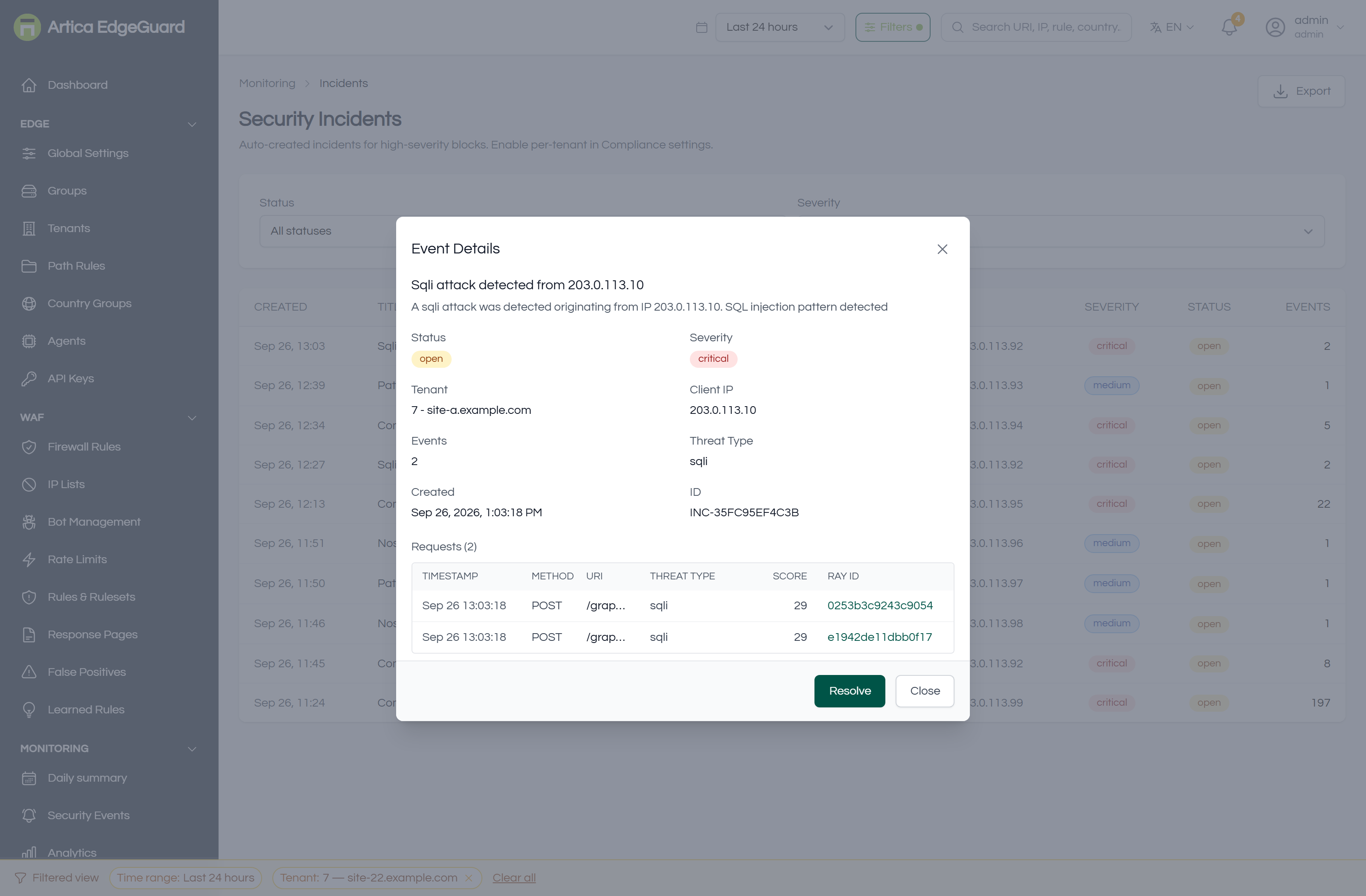
| Field | Meaning |
|---|---|
| Status | open, investigating, resolved, closed — or contained, when it blocked the address |
| Severity | the severity of the events behind it |
| Tenant | the site attacked |
| Client IP | the source |
| Events | how many requests are folded into this incident |
| Threat Type | the category that fired first |
| ID | INC-…, stable, quotable in a ticket |
Below that, Requests — every request in the incident, with its timestamp, method, URI, type, its own score, and its Ray ID. The score column is there because the incident's severity describes the whole case and says nothing about which of seventy-five requests was the serious one. Each ray ID opens that exact request in Security Events.
¶ Working one
Resolve marks it handled. Close ends it. An incident that is resolved or closed no longer absorbs new requests: the next attempt from that address starts a fresh incident, which is what you want — it is how you notice they came back.
Export CSV takes what the filters describe, one row per incident, with the requests listed in a cell in the same order the panel shows them. The export and the screen do not have to be reconciled by whoever reads both.
¶ What it is not
- Not a queue that someone must empty. On a busy public site, incidents arrive in the hundreds. The value is in the filters: critical and open, this week, this site.
- Not a block. An incident records; containment blocks, and only when both switches are on.
- Not a correlation across addresses. One attacker on ten addresses is ten incidents. For that view use Attack Chains, which groups by address too but shows them side by side, or Analytics by ASN.
¶ Verifying
1. Raise one on purpose. Send something that will be refused at high severity, twice within the hour:
UA='Mozilla/5.0 (Windows NT 10.0; Win64; x64) Chrome/140.0.0.0'
curl -s -o /dev/null -H "User-Agent: $UA" "https://site.example.com/?id=1' OR '1'='1"
curl -s -o /dev/null -H "User-Agent: $UA" "https://site.example.com/?id=1' UNION SELECT 1,2,3--"
One incident should appear with two events, not two incidents — that is the correlation window doing its job.
2. Check the ray IDs. Open the incident and follow one into Security Events. Same request, same decision, same score.
3. If you enabled containment, the incident's status becomes contained and the address appears in Contained IPs. If it does not, the second switch is off.
Incidents are created by the agent and shipped to the console about once a minute, so a new one is not instant. Events are.
¶ Where an incident is the wrong tool
- One request → Security Events.
- One attacker's whole campaign, read as a timeline → Attack Chains.
- A record for an auditor → Compliance Reports, which cite incidents rather than replacing them.
- Stopping something now → an IP list entry or a firewall rule, which take effect on the next config pull.