Firewall Rules are your own rules: block, allow or challenge a request because of where it came from, what it asks for, or what it claims to be.
They are evaluated before any attack detection, and the first one that matches decides.
Nothing else in EdgeGuard overrides them.
This page covers what they can match on, where they sit in the decision, how to write one, and how to prove it works.
Screenshots come from a live installation.
Site names and addresses have been replaced with documentation equivalents (example.com,203.0.113.x).
¶ Where they sit in the decision
A request is examined in a fixed order, and the first rule that decides ends it:
- Is the WAF enabled for this site?
- Path rule action override, if the path has one.
- IP lists — allowlist and blocklist.
- Threat intelligence — known-bad indicators.
- Geo blocking — the site's country policy.
- Firewall rules ← you are here
- Behavioural analysis, bot detection, browser integrity.
- Rate limits.
- The managed rulesets — OWASP CRS and EdgeGuard's own — and learned rules.
Two consequences worth holding on to. A firewall rule cannot rescue a request already refused by an IP list or by geo blocking, because those run first.
And an allow rule ends the examination completely: nothing after step 6 ever sees that request.
¶ The list
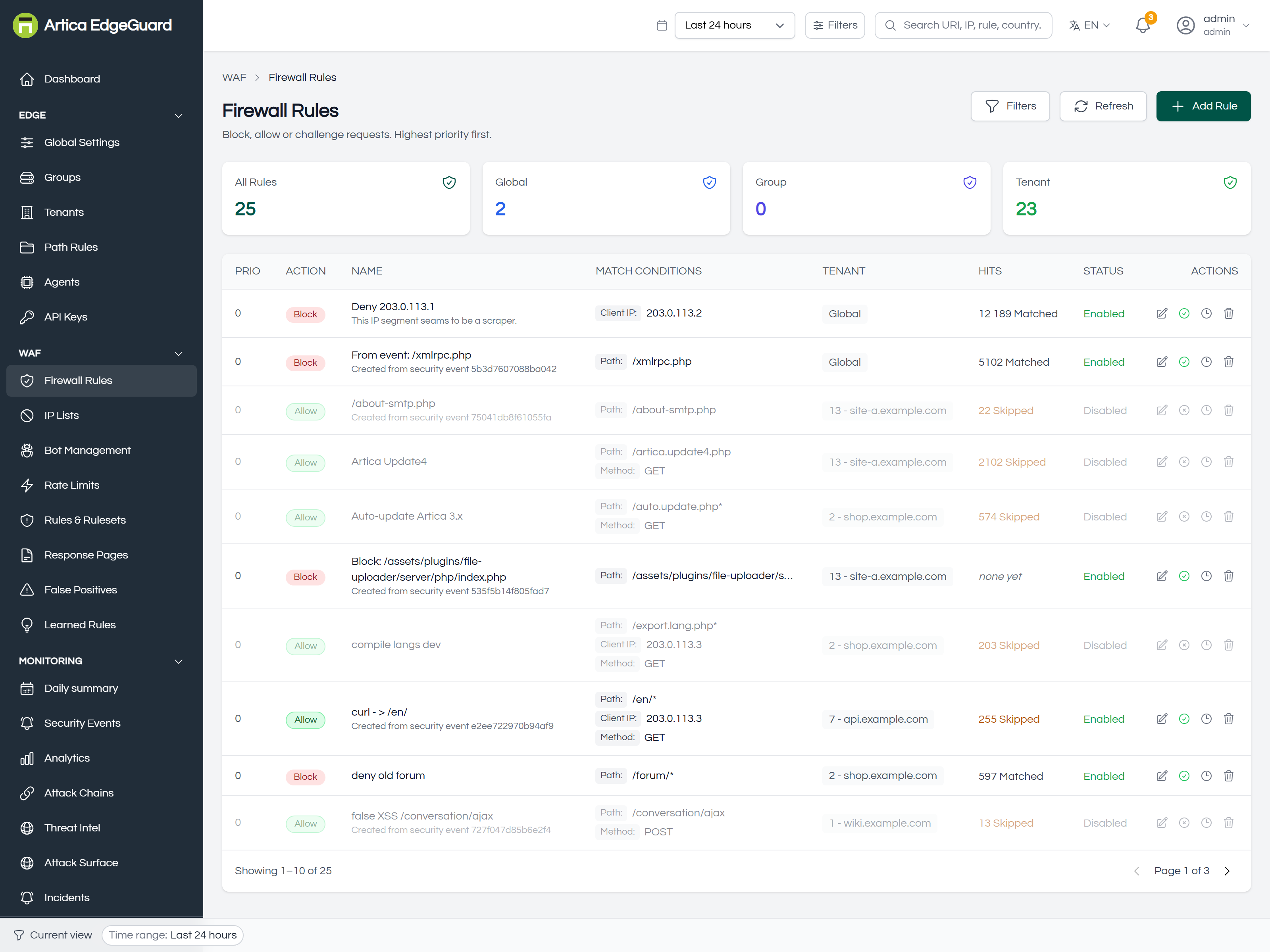
Four counters at the top say how many rules exist and at which scope: All Rules, Global, Group, Tenant.
| Column | What it tells you |
|---|---|
| PRIO | evaluation order. Higher is evaluated first |
| ACTION | Block, Allow, Challenge, Log Only |
| NAME | and its description underneath |
| MATCH CONDITIONS | every condition the rule carries, as tags. A rule with none matches all traffic |
| TENANT | the scope: Global, a group, or one site |
| HITS | how much work it is doing — see below |
| STATUS | Enabled, Disabled, Expired, or "until <date>" when an expiry is set |
¶ The Hits column, and why it is the one to read
12 189 Matched— the rule matched that many requests. Hover for when it last did.574 Skipped, in amber — an allow rule, and the number is how many requests skipped the WAF entirely because of it. Amber because that is a hole, and the number is its size.none yet— the rule has never matched. Either nothing looks like that, or the rule does not say what its author thought it said.
A rule nobody can measure is a rule nobody can retire.
Before widening a rule that "isn't working", check whether it has ever matched:none yetusually means the conditions are narrower than intended, not that the traffic is absent.
¶ Creating a rule
- Click Add Rule.
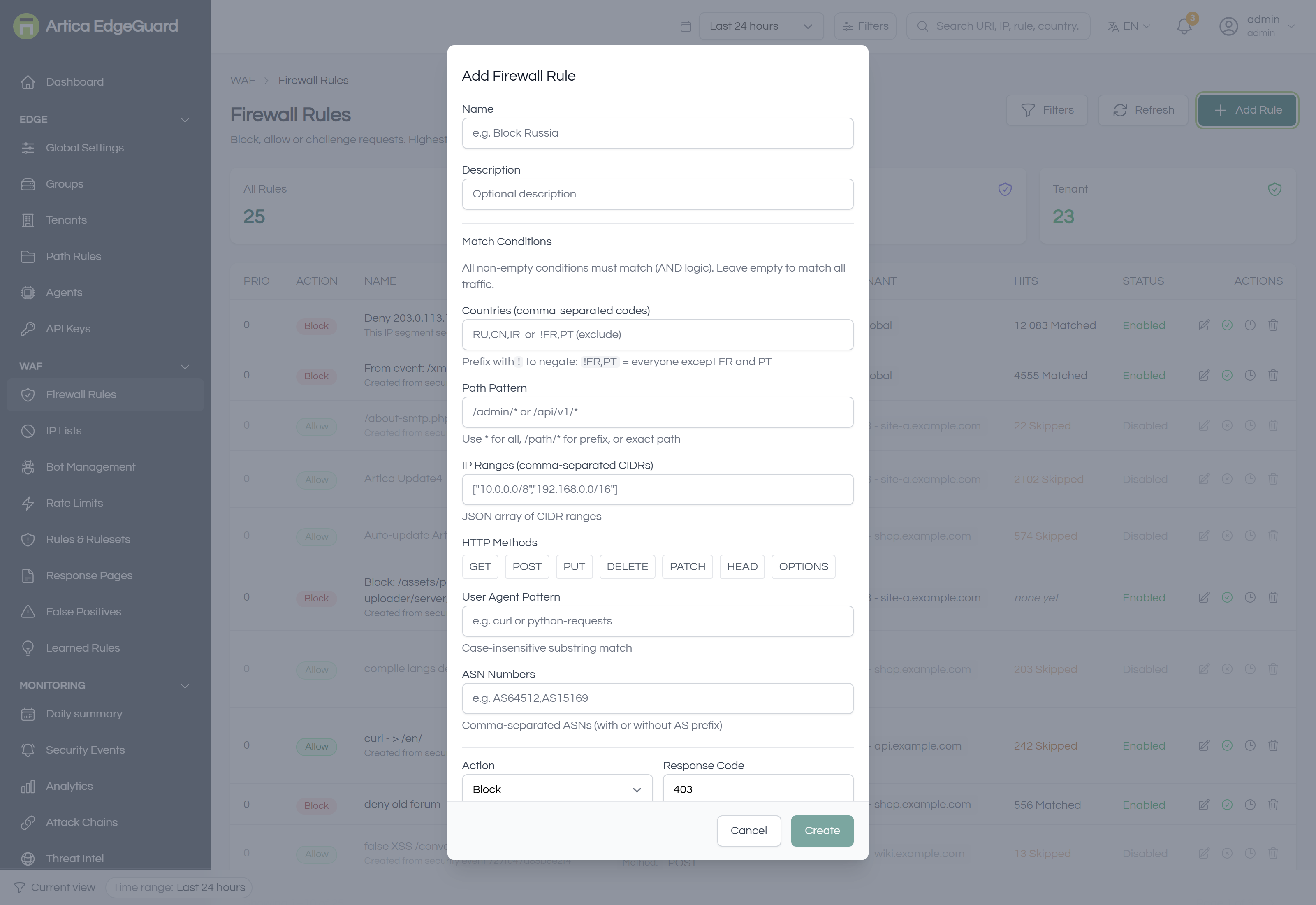
- Name and Description
e.g.Block Russia.
The description is what you will read in six months; write the reason, not the mechanism. - Match Conditions
Every non-empty condition must match (AND).
Leaving them all empty matches all traffic, which is only ever sensible with Log Only.- Countries
A comma-separated list that may mix countries, continents and named groups:RU,CN,IR,@EU,@AS,@eu27.
Prefix the whole list with!to negate:!FR,PTis everyone except France and Portugal,!@EUeveryone outside Europe.
Requires the GeoIP database; a request whose country cannot be resolved never matches a country condition, in either direction.
The@matters more than it looks — see Countries, continents and groups below. - Path Pattern —
*for all,/admin/*for a prefix, or an exact path. - IP Ranges — a JSON array of CIDRs:
["10.0.0.0/8","192.168.0.0/16"]. - HTTP Methods — click the methods to include; leaving them all unselected matches any method.
- User Agent Pattern — a case-insensitive substring, e.g.
curlorpython-requests. Not a regular expression. - ASN Numbers —
AS64512,AS15169, with or without theASprefix. The way to catch a whole hosting provider without listing its ranges.
- Countries
- Action — see the table below.
- Response Code — what a blocked request receives. Default 403.
- Priority — higher is evaluated first. Rules of equal priority are evaluated global, then group, then tenant.
- Scope — Global, Group or Tenant. A tenant-scoped rule exists only for that site.
- Create. Agents pick it up within about 30 seconds; nothing needs restarting.
¶ The actions
| Action | What happens |
|---|---|
| Block | the request is refused with your response code, and the event is recorded with the rule's name |
| Allow | the request is allowed and skips every remaining check — detection, bots, rate limits, everything |
| JS Fingerprint | a silent JavaScript challenge; a real browser passes it without noticing |
| Smart Challenge | a managed challenge, escalating by risk |
| Slider Puzzle | an interactive challenge for a human to solve |
| Log Only | nothing changes for the visitor; the match is recorded. This is how you try a rule before trusting it |
Allow is the one to be careful with.
It does not mean "this is fine" — it means "stop inspecting".
A path that is allowed is unprotected against everything, including attacks nobody has thought of yet.
Prefer a Log Only trial, a narrow exclusion on the False Positives page, or a path rule;
reach for Allow when you genuinely mean do not inspect this.
The console says so out loud: when any allow rule exists, a banner appears above the pages — "N firewall rules are letting traffic past the WAF" — with a link to the list of them.
It is deliberate, and it does not go away while the rules exist.
¶ Living with a rule
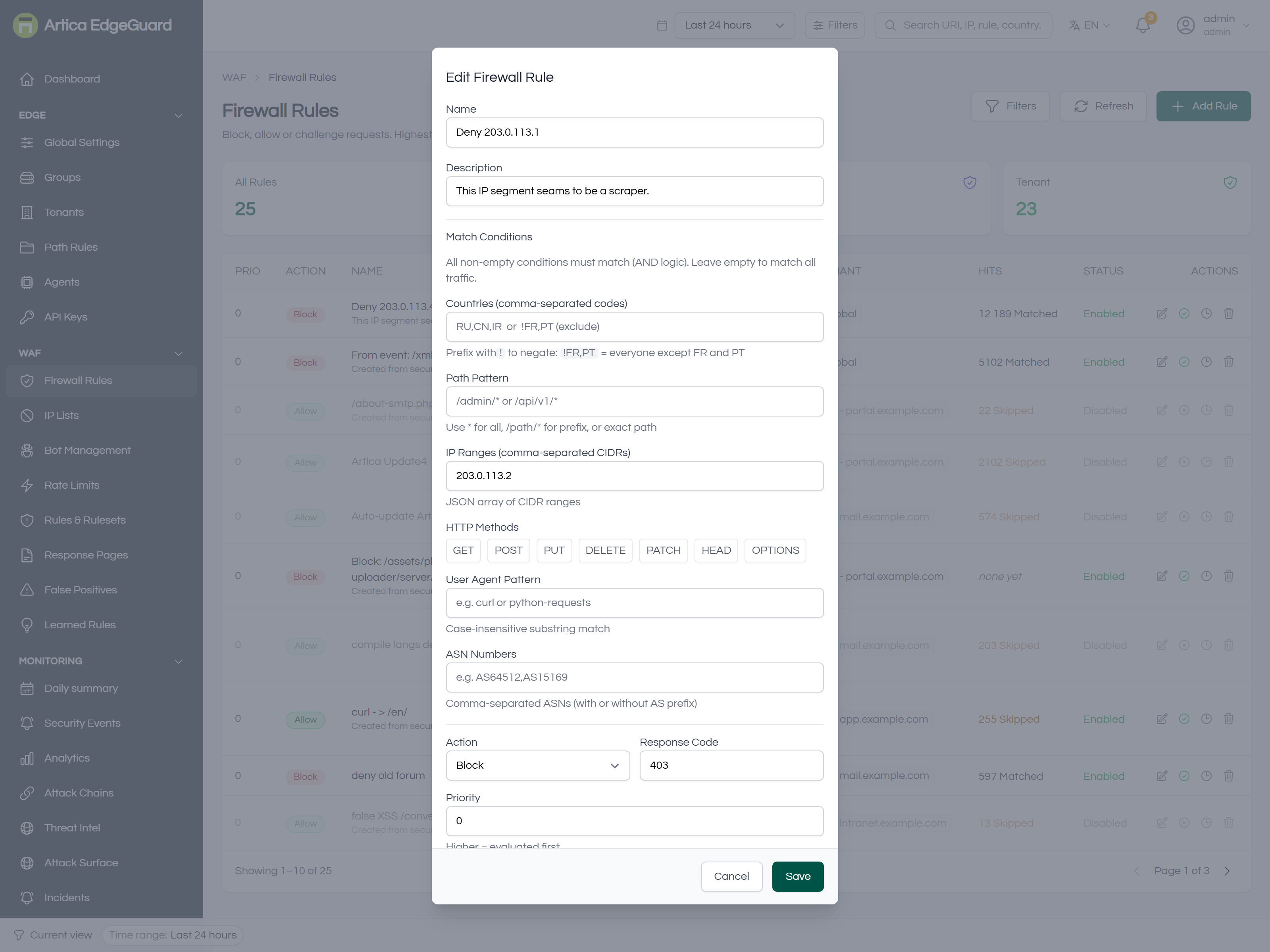
Each row carries four controls:
- Edit
Every field, including Enabled.
Changes reach the edge in about 30 seconds. - Disable
The rule stops applying but stays written down, with its hit count intact.
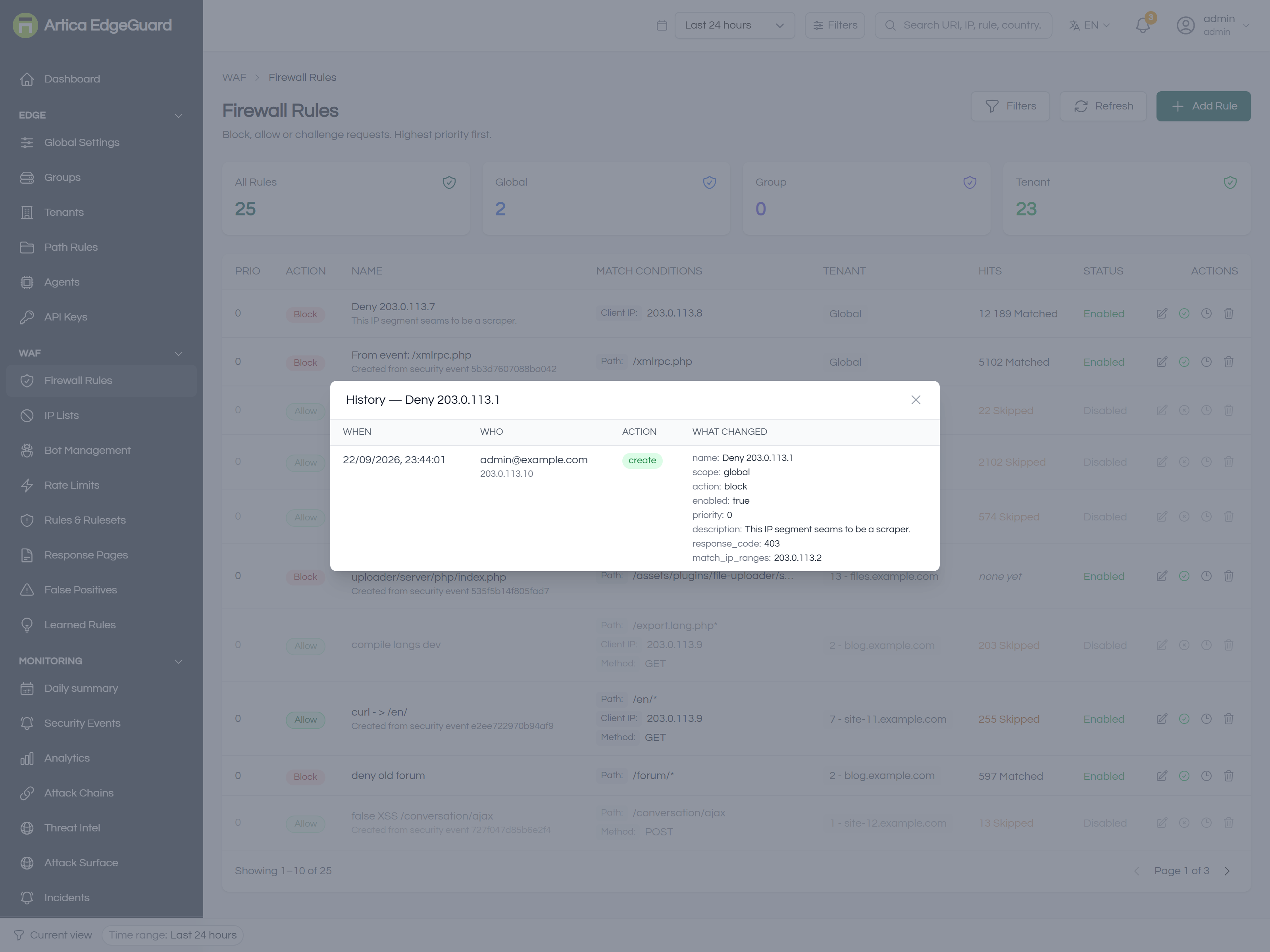
The reversible way to test whether a rule is still needed. - History
Who created or changed this rule, when, from which address, and exactly which fields changed.
A per-rule audit trail, which is usually faster than searching the global Audit Log. - Delete
Permanent, and it asks first.
Expiry.
A rule can carry an expiry date, and the list shows it as until <date>, then as Expired.
An expired rule stops matching immediately
The engine checks the expiry again on every request, not only when it loads the rules, so a rule cannot outlive its date by a caching window.
Expiries are set by the flows that create temporary rules (the Allow IP quick action on an event, and auto-containment); the Add dialog itself creates rules without one.
¶ Creating a rule from an event
Most rules should not be written from scratch.
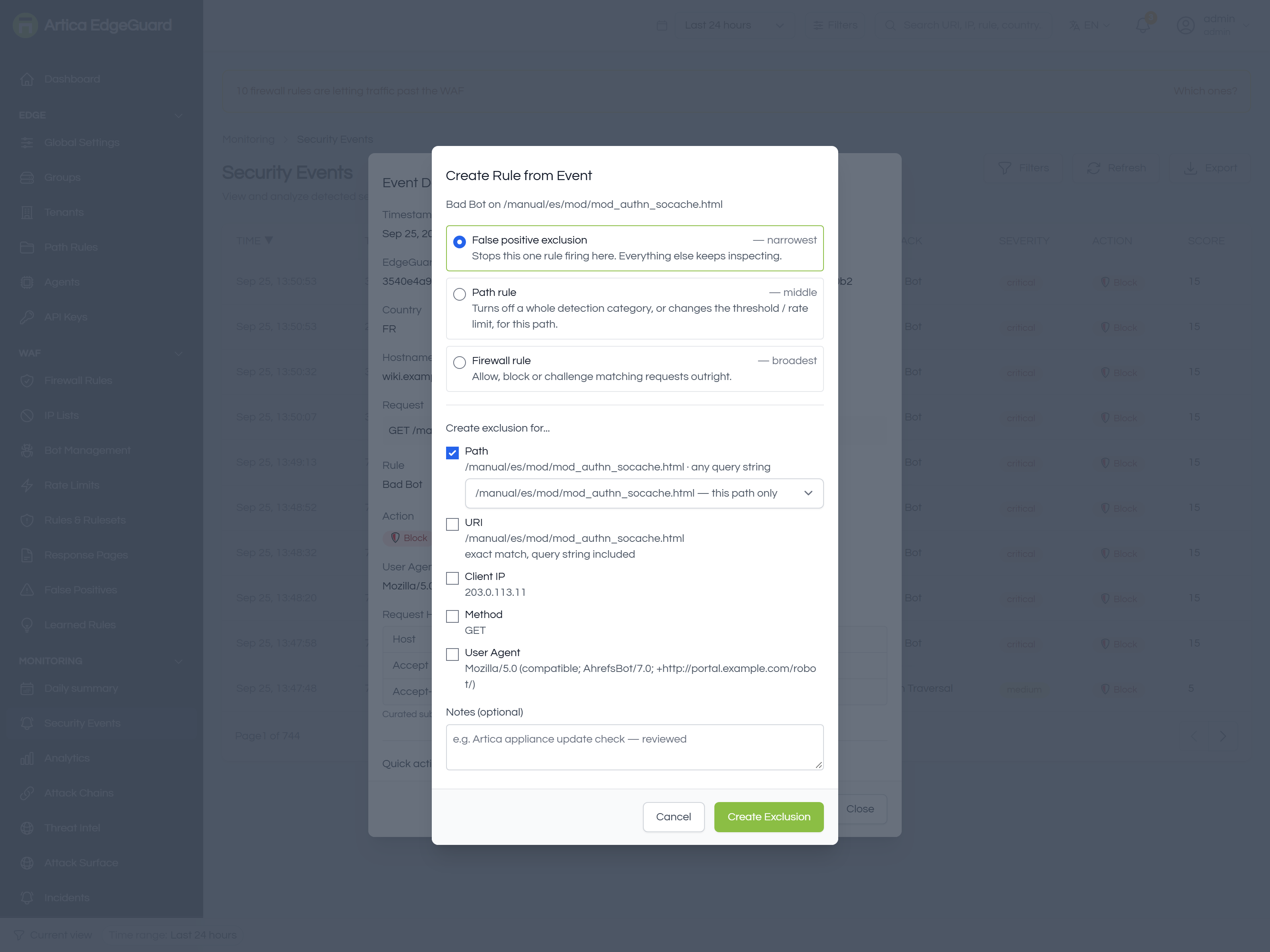
Open the block in Security Events, and the panel offers Create rule from event, which fills the conditions in from the request that prompted it and asks which of three instruments you want:
- False positive exclusion
narrowest: stops one rule firing there, everything else keeps inspecting. - Path rule
middle: changes a category, threshold or limit for that path. - Firewall rule
broadest: allow, block or challenge outright.
Start at the top of that list. Come down one step only when the narrower instrument cannot express what you learned.
¶ Verifying a rule
1. Is it live?
The list shows Enabled; give the agents 30 seconds.
2. Does it match what you meant?
Send a request that should match:
curl -o /dev/null -w '%{http_code}\n' \
  -H 'User-Agent: Mozilla/5.0 (Windows NT 10.0; Win64; x64) Chrome/140.0.0.0' \
  "https://site.example.com/admin/"
A blocking rule answers 403; a challenge answers 200 with a challenge page; Log Only answers whatever the origin would.
3. Did EdgeGuard agree it was your rule?
Open Security Events and look at the newest row: the attack column reads the rule's name, and the detail panel shows firewall_rule as the reason.
Every block page also carries an EdgeGuard ID — paste it into the global search to find that exact request.
4. Is it doing work over time?
The HITS column. none yet after a day on a busy site means the conditions are not matching what you think.
¶ Countries, continents and groups
A country condition accepts three kinds of token, mixed freely in the same field.
| You write | It means |
|---|---|
PT, RU, CN |
that country, by its ISO 3166-1 alpha-2 code |
@EU, @AS, @AF, @NA, @SA, @OC, @AN |
that continent, as the GeoIP database reports it |
@eu27, @gcc, @asean, @schengen, … |
a named country group, defined under Country Groups |
RU,CN,@AF,@eu27 is a single valid list. The leading ! negates the whole list, not one token: !@EU,PT reads not in Europe and not Portugal.
The @ is not decoration
Four continent codes are also real country codes:
| Code | As a country | With the @ |
|---|---|---|
AF |
Afghanistan | @AF Africa |
AS |
American Samoa | @AS Asia |
NA |
Namibia | @NA North America |
SA |
Saudi Arabia | @SA South America |
So a rule written to block North America as a bare NA blocks Namibia instead, and you find out from a customer.
Two bare letters are always a country.
A continent always carries the @.
¶ Continents versus groups
A continent needs no configuration:
The lookup that already resolves the country resolves the continent at the same time, so @EU costs nothing and can never fall out of date.
A group is a list somebody maintains, which is why groups live in one place and expand on screen.
They are not interchangeable.
@EU is the continent Europe — Norway, Switzerland and the United Kingdom included.
@eu27 is the European Union, which excludes all three, and includes Cyprus, which the database places in Asia.
Choose by the question you are actually asking: a legal boundary is a group, a rough geographic sweep is a continent.
¶ A name nobody has defined
@nosuchgroup matches nothing — it does not fall back to being read as a country code, and it does not match everything.
The same is true the moment you delete a group a rule still refers to: the rule stops matching rather than starting to match all traffic.
That is the safe direction, but it is silent, so delete a group only after searching your rules for its name.
Continent tokens and country groups need engine 3.0.31 on the edge and central 2.4.21.
An older engine reads@EUas a country code that does not exist, and matches nothing.
¶ Worked examples
Block a country, except your own offices.
Countries RU,CN, IP Ranges with your office ranges is not how to do it — conditions are AND, so that would mean "Russian and in the office".
Instead write two rules: an Allow at high priority for the office ranges, and a Block at lower priority for the countries.
Priority is what expresses "except".
Let an uptime monitor through.
IP Ranges of the monitor and a User Agent substring only it sends, action Allow, scope the one site, high priority.
Two conditions rather than one, so an attacker who guesses the address still does not match.
Slow down a scraper you do not want to block.
User Agent substring or ASN of the hosting provider, action Slider Puzzle, scope global.
A person who really wants the page can solve it; a scraper usually cannot.
Serve one continent only.
Countries !@EU, action Block, scope the one site.
One token instead of every country outside Europe, and it stays correct when the database gains one.
Try before you trust.
Write the rule with action Log Only, leave it a day, then read the HITS column and the events it produced.
If it matched what you expected and nothing else, change the action to Block.
¶ Where firewall rules are the wrong tool
- One rule is misfiring on one path → a false-positive exclusion, scoped to that rule and that field.
A firewall allow would switch off everything else too. - A whole category is wrong for one endpoint → a path rule.
- An address is attacking → an IP list entry, which is evaluated earlier and is cheaper to reason about.
- A crawler needs a different policy → Bot Management, which can verify the crawler by reverse DNS rather than trusting its name.
- Too much traffic rather than bad traffic → Rate Limits.