What EdgeGuard is costing you in latency, how much traffic it is handling, and whether every agent is pulling its weight.
This page answers one question the rest of the console cannot: is the WAF slow? It reports the engine's own share of each request, straight from the agents, so "the site is slow" can be answered with a number rather than a suspicion.
¶ Where these numbers come from
From the agents, not from the database. Every agent counts what it sees — requests, decisions, decision latency — and reports the counters on its heartbeat. This page sums the agents that have reported in the last two minutes.
That has three consequences, and the page states them rather than leaving them to be discovered:
- They are since each agent started, not over the time range at the top of the console. Changing the range does not change them.
- They reset when an agent restarts. An agent that came up two minutes ago has two minutes of counters, which is why the totals can drop sharply after a restart or an upgrade.
- An agent that has not reported in two minutes is not counted at all. If the page suddenly shows nothing, look at Agents before looking anywhere else.
Needs central 2.4.29. Before it, the counts came from the event summary — which counts the requests EdgeGuard acted on — while latency and throughput came from the agents. Two different populations in one table produced a block rate of 100.0% next to 0.5% allowed, a total equal to the blocked count, and an agent table two orders of magnitude away from the header. Every number was arithmetically correct and the page was wrong.
¶ The five figures
| Card | What it means |
|---|---|
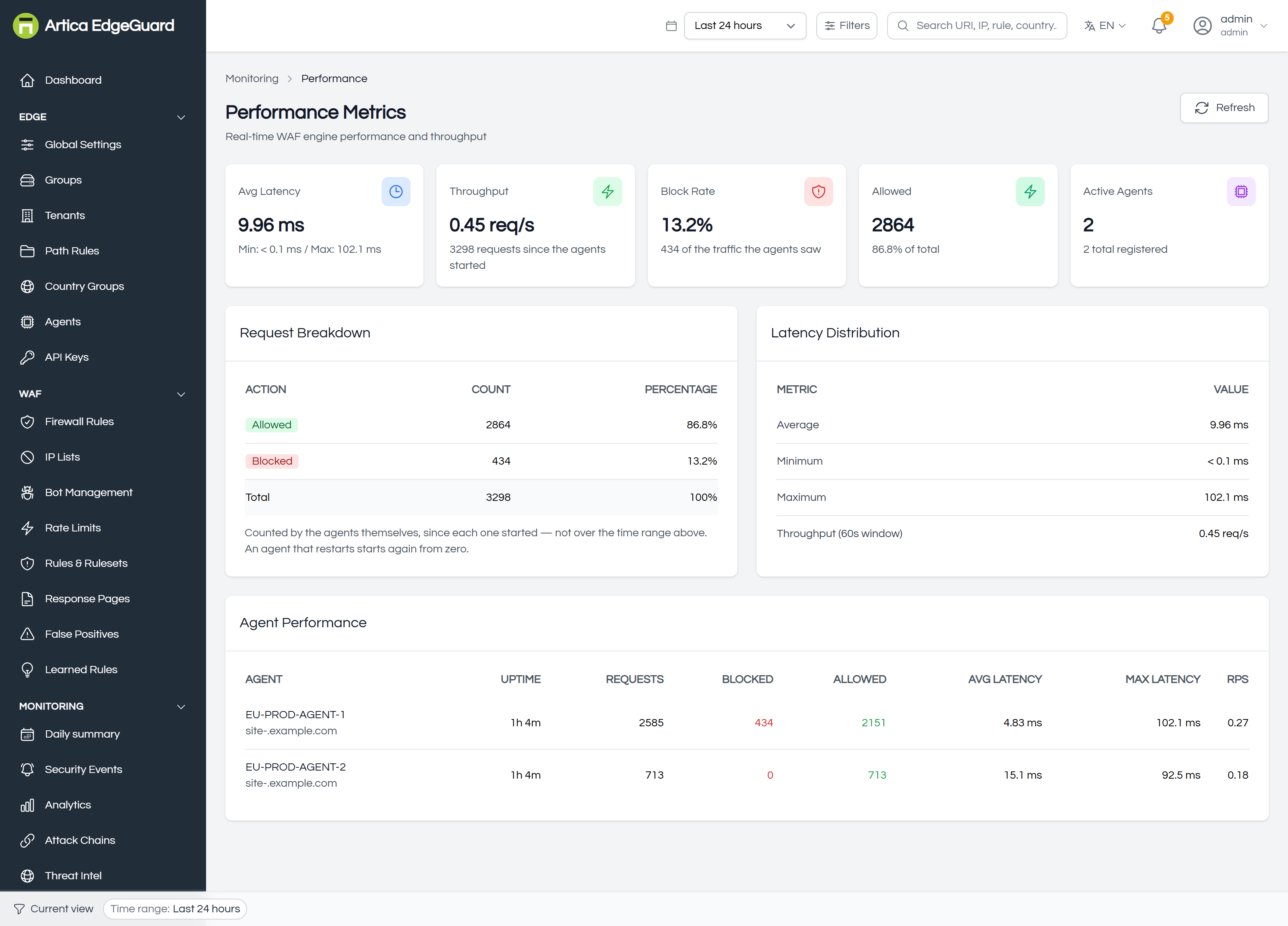
| Avg Latency | how long the engine took to decide, averaged over every decision since start, with the minimum and maximum beneath |
| Throughput | decisions per second over the last 60 seconds, with the total since start |
| Block Rate | refused as a share of everything the agents saw |
| Allowed | what went through, and its share |
| Active Agents | how many are reporting, out of how many are registered |
The screenshot above is a healthy set: 2 864 allowed and 434 refused sum to the 3 298 in the total, the two agents sum to the same, and the block rate is a share of traffic rather than of itself.
Read the maximum, not only the average. An average of 10 ms with a maximum of 48 ms is healthy. The same average with a maximum of two seconds means something occasionally takes two seconds, and that something is what your users are complaining about.
¶ Request breakdown
Allowed, blocked, and — where they apply — rate limited, challenged and learning-mode decisions, as counts and shares.
Challenges and rate limits are counted over the selected period rather than since the agents started, so they are shown as counts and labelled over the period. They are deliberately not divided into the total beside them: a share of a number that measures something else is worse than no share at all.
¶ Latency distribution
Average, minimum and maximum, plus the throughput window. The minimum is usually reported as < 0.1 ms — a decision that hit the cache or a fast path — and that is not an error.
For latency over time, and for percentiles rather than extremes, use the Decision Latency panel in Analytics. This page is the instantaneous view; that one is the trend.
¶ Agent performance
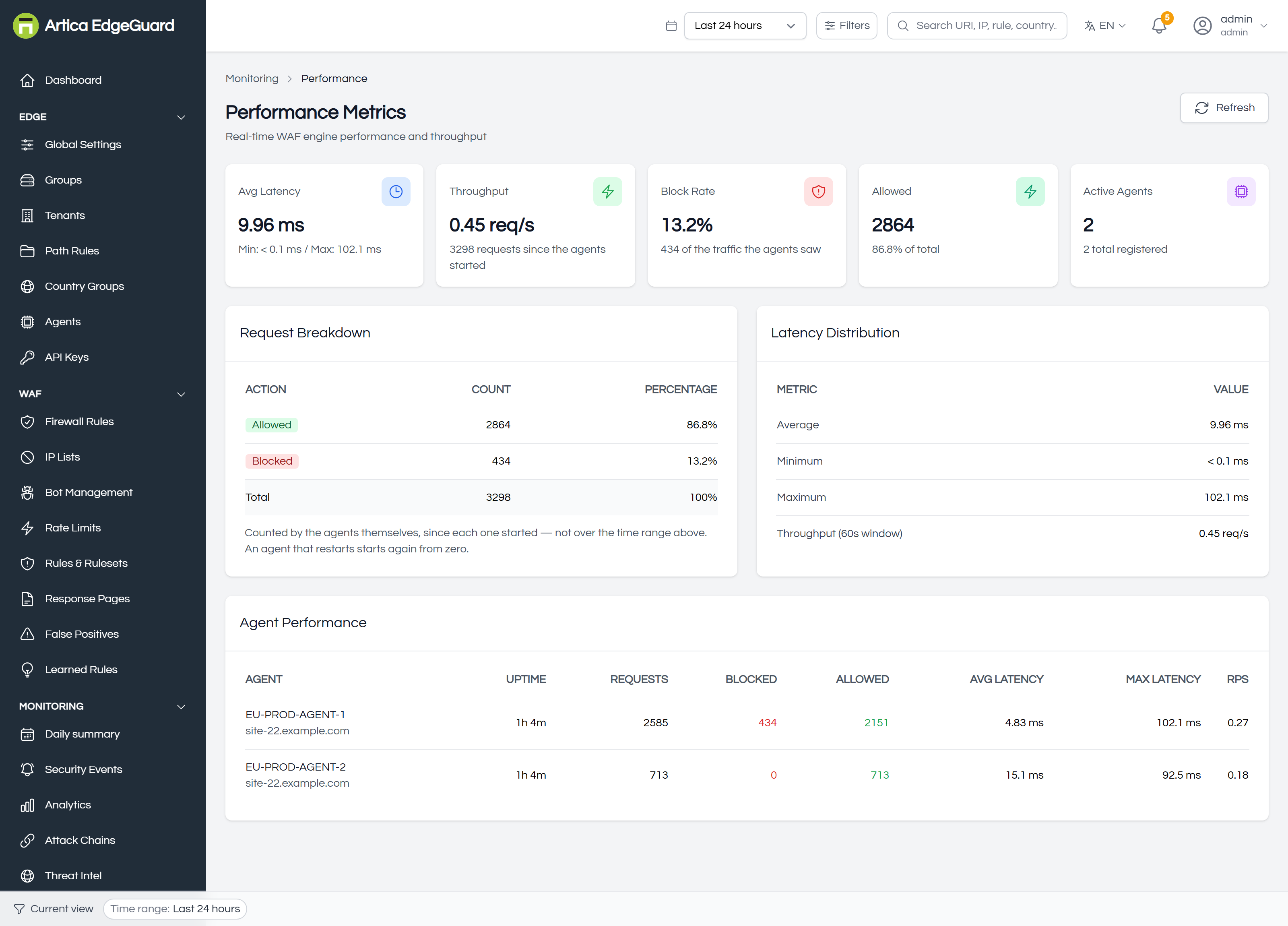
One row per agent: uptime, requests, blocked, allowed, average and maximum latency, and requests per second.
This table is the reason the page exists in a fleet. Two agents serving the same sites should look alike; when one has twice the latency of the other, the cause is on that machine — a slower disk, a busier host, a GeoIP database mid-update, a different engine version. Compare it against Agents, where the versions and database dates are.
¶ Using it
Before and after a rule change. Note the average and maximum, raise a paranoia level or enable a category, and look again the next day. This is the only place that will tell you what protection costs.
When somebody says the site is slow. If this page is flat, EdgeGuard is not the reason, and you can say so with a number. If it is not flat, the agent table says which node.
After an upgrade. Uptime tells you which agents restarted, and the latency beside it tells you whether the new engine is behaving like the old one.
On a quiet install the numbers are small and noisy. A throughput of 0.63 req/s and an average over a few dozen decisions is not a benchmark. Let it run.
¶ Verifying
1. That it is live. Make a handful of requests to a protected site and refresh. The totals should move.
2. Against the agent itself. On the agent host:
curl -s http://127.0.0.1:8083/status | head -40
It reports the same counters, plus the slowest recent decisions — which is where to look when the maximum is high and you want to know what was slow.
3. That the agents agree. If one agent shows a far higher average than the others for the same sites, that is a finding, not a rounding difference.
¶ Where this page is the wrong tool
- Latency over time, or percentiles → Analytics.
- What was refused → Security Events.
- Whether an agent is healthy → Agents: queue depth, versions, database freshness.
- Origin or network latency → not here. This measures the engine's decision, not the response your visitor waited for.