EdgeGuard — False Positives
False positives in EdgeGuard: how to record one narrowly, what the automatic suppressions are, and how to keep the list honest.
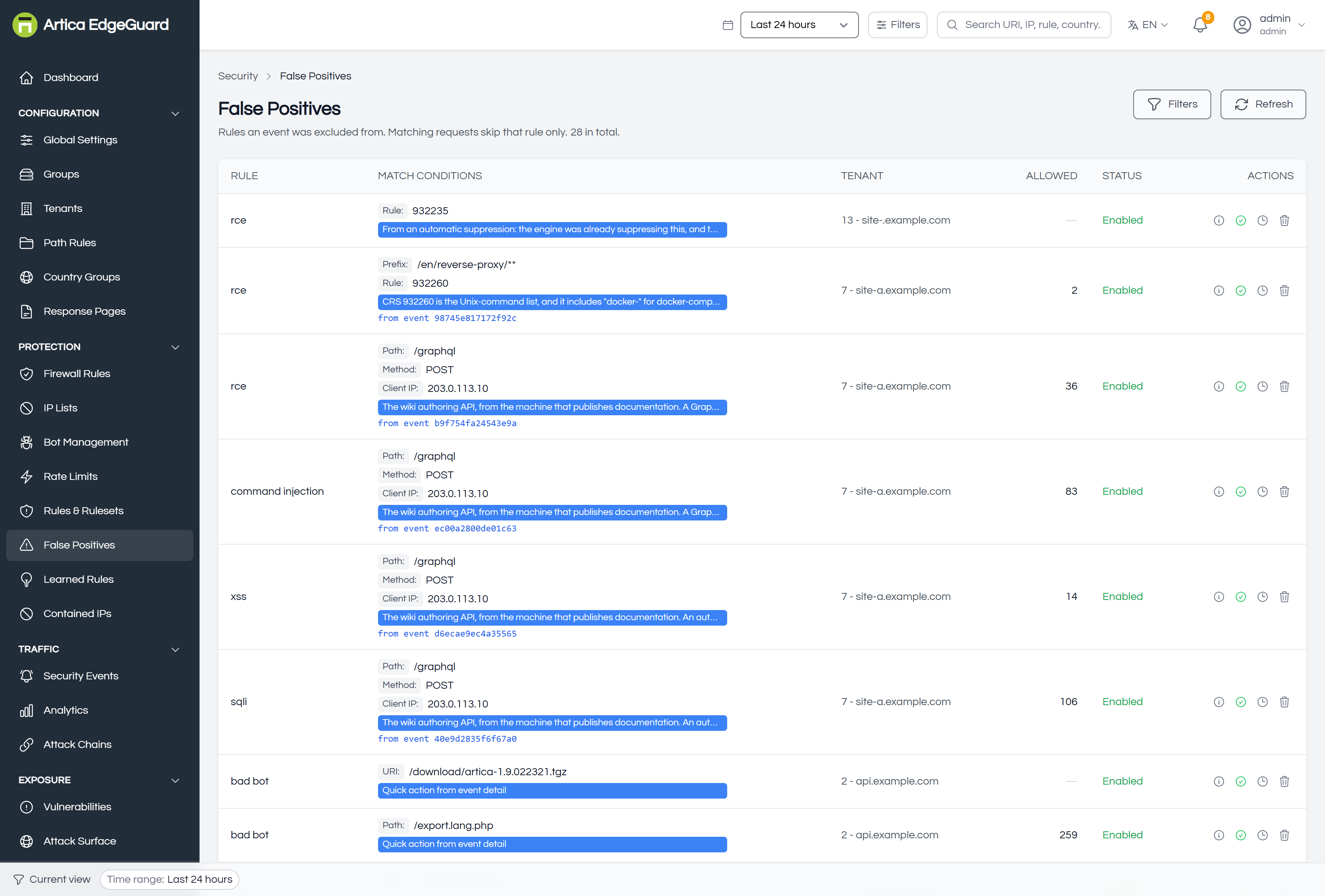
A false positive is a rule that was right in general and wrong here. This page is where that gets written down — narrowly, with an author and a date, so the rule keeps protecting everywhere else.
It holds two tables. The upper one is what people decided; the lower one is what the engine decided on its own and is waiting to be confirmed.
Where exclusions come from
Almost every exclusion should be born on the Security Events page, not here. Open the block, and the panel offers:
- Mark false positive — writes the exclusion from that event, carrying the rule, the path and the field across.
- Create rule from event — the considered version, which asks how wide an instrument you want and lets you tick exactly which parts of the request should be part of the rule.
That route is better than writing one by hand for a plain reason: it knows what actually matched. An exclusion written from memory tends to be wider than the problem.
Reading the exclusions table
| Column | Meaning |
|---|---|
| RULE | the attack class — sqli, xss, command injection — and, when the exclusion names one, the single managed rule it applies to |
| MATCH CONDITIONS | every condition the exclusion carries: path, method, client IP, user agent, field |
| TENANT | which site it applies to |
| ALLOWED | how many requests it has let through |
| STATUS | enabled or disabled |
| ACTIONS | disable, history, delete |
The ALLOWED column is the one that matters
Every exclusion is a hole somebody opened on purpose. The count is what tells you whether it is still load-bearing.
- A high count on a busy path — the exclusion is doing real work; leave it.
Has never allowed a request— either the problem went away, or the exclusion never matched what its author meant. Both are reasons to remove it, and until this column existed there was no way to tell either from a working exclusion.
What you can do to one
- Disable — it stops applying but stays written down, with its history. The reversible way to find out whether it is still needed: disable it, wait, and see whether anybody complains.
- History — who created it, when, from which address, and what changed since.
- Delete exclusion — permanent, and it asks first.
Exclusions are not edited in place. If the scope is wrong, write a new one from the event that shows the real behaviour and delete the old one — which leaves a trail of what was believed and when, rather than a row that quietly changed meaning.
How narrow can an exclusion be?
As narrow as the evidence. An exclusion can carry all of these at once, and every one you add makes it safer:
| Condition | Example | Why |
|---|---|---|
| A single rule | 942550 |
the other SQLi rules keep inspecting that path |
| A field | HOSTNAME |
the rule keeps firing on every other parameter |
| A path | /graphql, or a prefix, glob or exact URI |
everywhere else is untouched |
| A method | POST |
a GET to the same path is still inspected |
| A client IP | one address or range | everybody else still meets the rule |
| A user agent | a substring | for a specific client of yours |
A worked example from this installation: the wiki's own API was being blocked because a GraphQL query — {pages{single(id:1){…}}} — reads as SQL injection to CRS rule 942550, and a documentation page full of <img src=…> reads as XSS to 941160. Three exclusions were written, each scoped to POST /graphql and to the publishing machine's address. The same path is still fully inspected for everybody else, and every other SQLi and XSS rule still applies to the API.
Start with the narrowest thing that describes what you saw, and widen only when a second event proves you must. An exclusion that names one rule, one path and one method is a scalpel; one that names only a class is a door.
Automatic Suppressions
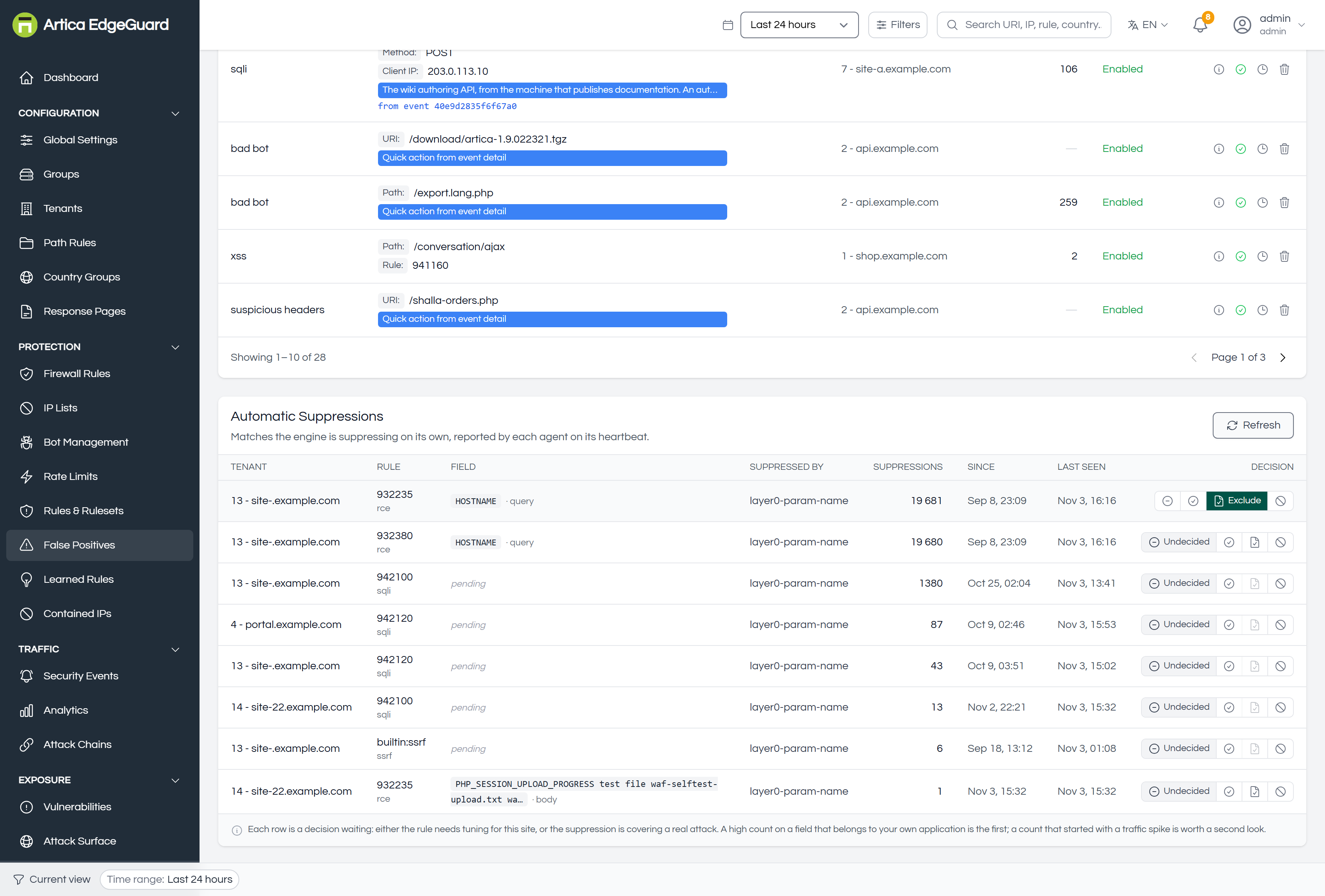
The lower table is not a list of your decisions — it is a list of the engine's.
Some rules match on a parameter's name rather than on its value. A field called HOSTNAME trips the command-injection rule that looks for the HOSTNAME shell variable, although the value is innocent. EdgeGuard notices this and suppresses the match by itself, and every row here is one of those, reported by the agents on their heartbeat.
| Column | Meaning |
|---|---|
| RULE | which managed rule was suppressed |
| FIELD | the parameter whose name caused it, and the section it came from |
| SUPPRESSED BY | which layer decided — for example the parameter-name gate |
| SUPPRESSIONS | how many times, in the window |
| SINCE / LAST SEEN | when it started and when it last happened |
| DECISION | yours, in four states |
The four states
Each row is a decision waiting, and every state can be left again — nothing here is one-way.
| State | What it does to traffic |
|---|---|
| Undecided | nothing. The engine keeps suppressing, which is what the row reports |
| Agree | nothing. It records that somebody reviewed it — a signature, not a rule |
| Exclude | writes it down as a real exclusion, scoped to that rule and that field, so it survives the semantic layer being switched off and appears in the upper table with an author |
| Block again | the rule stops being suppressed on this site and decides for itself — those requests start being refused |
Exclude is unavailable until the engine has named the field: an exclusion without one would have to cover the whole path, which silences the rule for every other field there.
Block again is the only one that asks before it acts, and the question names how many requests a week are currently being let through. It takes effect within about 30 seconds, on the agents' next configuration pull.
Why both tables exist: the upper one is policy you wrote, the lower one is a guess the engine made. The text under the table says the alternative out loud — either the rule needs tuning for this site, or the suppression is covering a real attack — and Block again is how you say the second.
Verifying an exclusion
1. Reproduce the request that was blocked. The event's detail panel shows the exact URI, method and headers; the EdgeGuard ID on the block page finds it again through the global search.
curl -o /dev/null -w '%{http_code}\n' \
  -H 'User-Agent: Mozilla/5.0 (Windows NT 10.0; Win64; x64) Chrome/140.0.0.0' \
  "https://site.example.com/the/path?field=value"
It should answer whatever the origin answers, instead of 403. Allow about 30 seconds after saving for the agents to pull it.
2. Check the counter. The ALLOWED column should start moving. If it stays at never allowed a request while the block continues, the exclusion is not matching the request — most often because the path scope is an exact URI where a prefix was meant.
3. Check what still applies. Send something that genuinely should be blocked on that same path. If it is refused, the exclusion is as narrow as you intended:
curl -o /dev/null -w '%{http_code}\n' \
  "https://site.example.com/the/path?field=%27%20OR%201%3D1--"   # expect 403
When an exclusion is the wrong tool
- The rule is wrong everywhere, not just here → disable that single rule inside its ruleset (Rules & Rulesets).
- A whole category does not belong on an endpoint → a path rule.
- You want the traffic allowed regardless of anything → a firewall rule, knowing it skips every remaining check (Firewall Rules).
- The shape of the traffic is the thing you trust → a learned rule (Learned Rules).
Keeping the list honest
Exclusions accumulate. Two habits keep them from becoming a quiet second policy nobody reads:
- Once a quarter, sort by ALLOWED and look at the ones that have never allowed anything. Disable them; delete them a month later if nothing complains.
- Write the reason when you create one. The rule number tells you what was suppressed; only the note tells you why anybody thought that was acceptable.