EdgeGuard — Rate Limits
Limiting how often one client may ask: what the allowance actually counts, why burst does not decide anything, and how to prove a limit works.
Rate limits are for traffic that is too much rather than bad. A login form being guessed at, a search endpoint being scraped, an API being used as a database — none of it looks like an attack to a rule, because each individual request is perfectly legitimate.
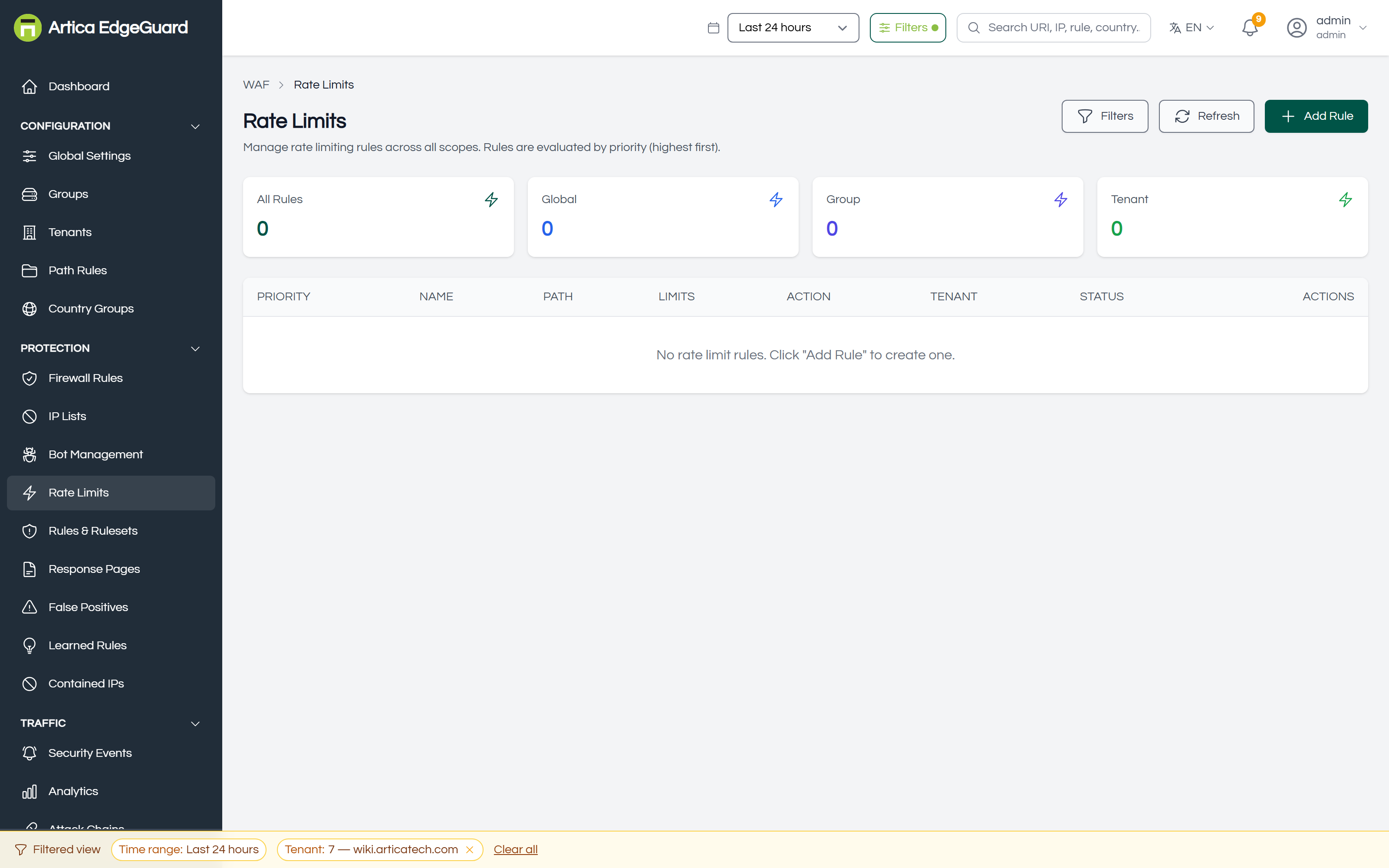
| Column | Meaning |
|---|---|
| PRIORITY | evaluation order, highest first |
| NAME | and what it is for |
| PATH | the pattern it applies to |
| LIMITS | the allowance and the window |
| ACTION | what happens when the allowance is spent |
| TENANT | scope: global, a group, or one site |
| STATUS | enabled or disabled |
How the counting works
Each rule counts per client address, per rule, per site. The counter lives in the runtime store (Valkey) with a lifetime equal to the rule's window, so it disappears on its own rather than needing to be cleaned.
- A request arrives whose path matches the rule.
- The counter for that address, that rule and that site is incremented.
- If the count has passed the allowance, the rule's action is taken.
- The counter expires when the window does, and the client starts again.
The allowance is counted over the window, not per second. With Requests per window 100 and Window 60, the policy is "100 requests per minute". The console spells the two out together as you type them.
The field was labelled Requests/sec until central 2.4.35, and the rule list rendered it as "100 req/s" — the opposite of what the engine does. If you sized a limit against that label, read it again: it was never a per-second rate.
Burst is what the X-RateLimit-Remaining header counts down from, so a client that reads the headers can slow down before it is refused.
If the runtime store is unreachable, rate limit rules are skipped. The engine does not hold up a request waiting for a counter — it has 100 milliseconds to answer and the request proceeds without the limit if it does not. Rate limiting is therefore a best-effort control, not a guarantee; do not use it as the only thing standing between an attacker and something expensive.
Where they sit in the decision
After the firewall rules, the behavioural analysis and the bot checks; before the custom rules and the managed rulesets. So an address already blocked by a list or a firewall rule never reaches a rate limit, and a request that passes the limit still meets every detection rule afterwards.
Creating a rule
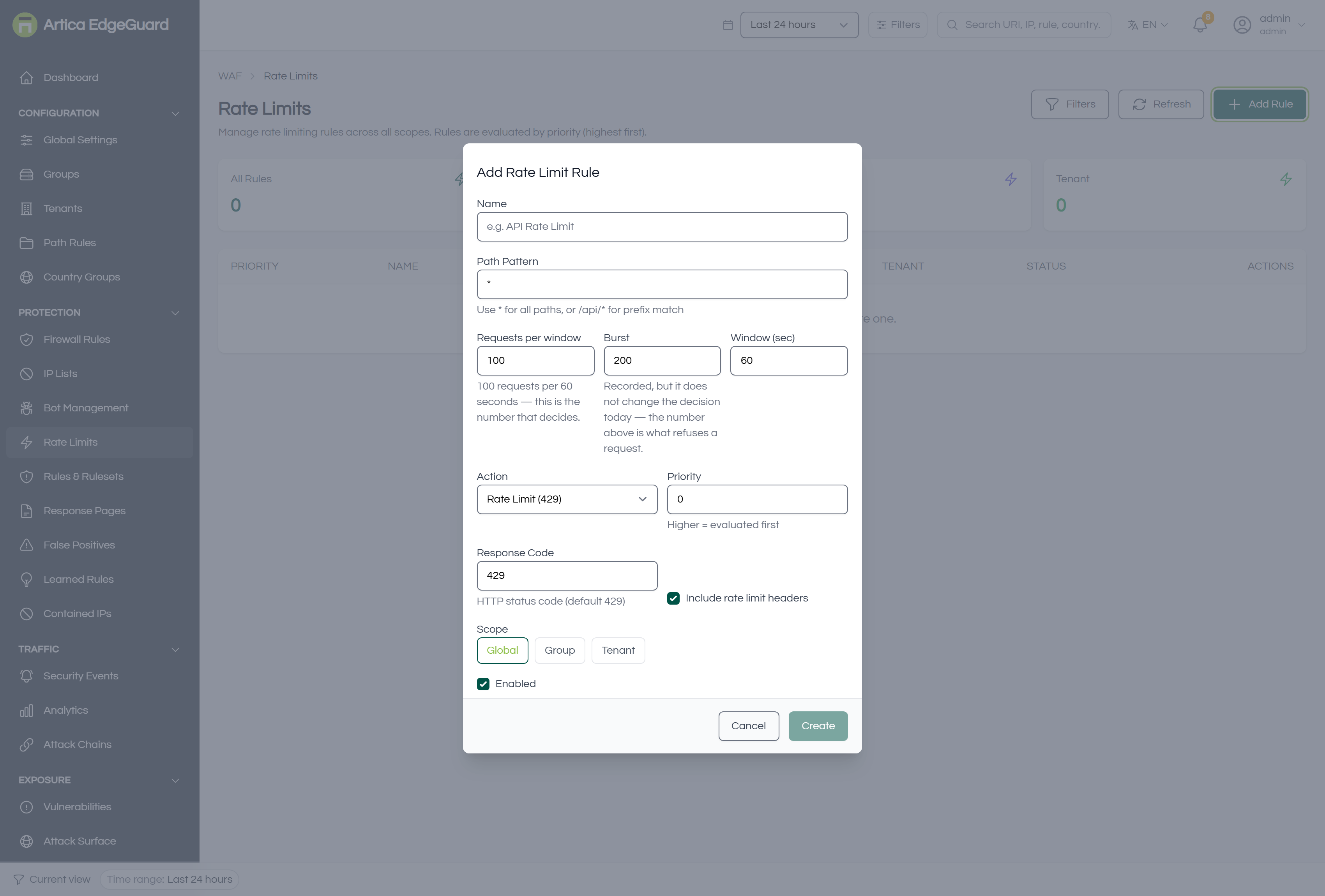
Click Add Rule.
- Name — what it protects, e.g.
Login attempts. - Path Pattern —
*for everything,/api/*for a prefix, or an exact path. A limit on*applies to assets too, which is rarely what anybody wants. - Requests per window — the allowance inside the window, and the number that decides.
- Burst — what the remaining-header counts down from.
- Window (sec) — the period the allowance is counted over.
- Action — see below.
- Priority — highest first; the first matching rule decides.
- Response Code — default 429.
- Include rate limit headers — adds
X-RateLimit-Limit,X-RateLimit-RemainingandX-RateLimit-Resetso well-behaved clients can back off. - Scope — Global, Group or Tenant → Create.
Burst
Burst does not change the decision. It is stored and shown, and the engine refuses a request when the count inside the window passes the allowance above — nothing consults Burst on the way.
Until engine 3.0.39 its one use was computing X-RateLimit-Remaining, which made that header lie in both directions: a burst below the limit told a well-behaved client it had nothing left while requests were still being served, and one above it promised room that did not exist. The header is now counted against the allowance that decides.
The field remains because it is somebody's stored configuration, and the console says what it does. A real token bucket — a short spike allowed above the average — is a change to how traffic is refused, not a rename, and it is not shipped yet.
The actions
| Action | What the client gets |
|---|---|
| Rate Limit (429) | the standard answer: Too Many Requests |
| Block (403) | a refusal that reads as a security decision rather than a quota |
| Slider Puzzle | an interactive challenge — a person continues, a script does not |
| JS Fingerprint | a silent challenge a real browser passes |
| Throttle | the response is delayed instead of refused, which slows a scraper without breaking a user |
| Queue (503 + Retry-After) | asks the client to come back later, and says when |
Throttle and Queue are the interesting ones: they degrade rather than deny, which is usually the right answer for a customer who is merely enthusiastic, and an effective one against automation that does not implement waiting.
Verifying
Send more requests than the allowance and watch the answer change:
for i in $(seq 1 30); do
  curl -s -o /dev/null -w '%{http_code} ' \
    -H 'User-Agent: Mozilla/5.0 (Windows NT 10.0; Win64; x64) Chrome/140.0.0.0' \
    "https://site.example.com/api/search?q=test"
done; echo
You should see a run of 200 and then the rule's code — 429 by default.
Run against a rule of 5 per 60 seconds, on a live installation, that reads:
request 1 → HTTP 404
request 2 → HTTP 404
request 3 → HTTP 404
request 4 → HTTP 404
request 5 → HTTP 404
request 6 → HTTP 429   limit=5  remaining=0  reset=60
request 7 → HTTP 429   limit=5  remaining=0  reset=60
(The 404s are the origin answering for a path that does not exist — the rule was
placed on one deliberately, so that proving it could not refuse a real visitor.
What matters is where the answer changes.)
The headers travel on the refusal, not on every response. X-RateLimit-Limit, X-RateLimit-Remaining and X-RateLimit-Reset appear when the rule acts; the requests it let through carry whatever the origin sent. A client that expects a countdown on every response will not get one here.
That rule was written with an allowance of 5 and a burst of 100, deliberately: before engine 3.0.39 the remaining count was computed from the burst, so this refusal would have carried remaining=95 while the engine was refusing the request.
Each refusal is recorded in Security Events with the reason rate_limit_rule and the rule's name, so you can tell a limit from a block at a glance.
Choosing limits
- Authentication endpoints — a low allowance over a long window:
10 per 300sstops guessing without troubling anybody who typed their password wrong twice. - Search and listing endpoints — a moderate allowance with Throttle, because the traffic is usually a real client that is being greedy.
- Write APIs — an allowance close to what your own client actually needs, with headers on so it can back off.
- Everything (
*) — only as a very high ceiling against floods, and prefer DDoS Protection → Adaptive Rate Limiting, which moves its thresholds with the traffic instead of holding a fixed number.
Start with the action set to Throttle or with a generous allowance, watch Security Events for a day, and tighten. A limit that is too strict produces support tickets from customers, not from attackers.
When a rate limit is the wrong tool
| Situation | Better tool |
|---|---|
| The requests are individually malicious | the rulesets — a limit would let the first ones through |
| One address is responsible for all of it | an IP list entry with an expiry |
| A crawler is polite but relentless | Bot Management: allow it and cap it there |
| A flood rather than a stream | DDoS Protection, whose adaptive limiting and slow-request defences are built for it |