← Back to the remote-control main section
The RDS Proxy (Remote Desktop Service proxy, also called RDP proxy or RDP bastion) is a gateway between your users and your Remote Desktop servers.
The real server addresses and service accounts stay hidden, and every session can be logged, recorded and sent to a SIEM.
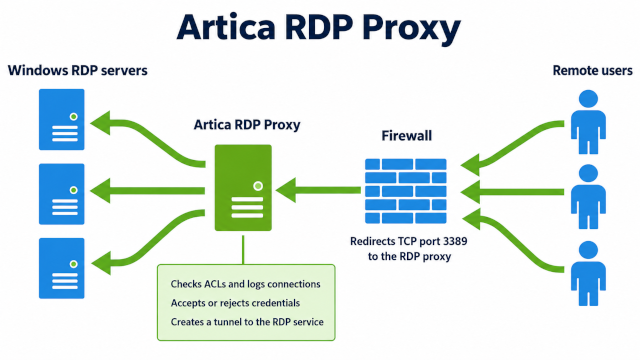
Artica checks who they are, which servers they may reach, from which networks and at what time, then opens the session to the real server on their behalf.
The gateway engine is ReDemPtion (rdpproxy).
Artica adds the policy engine (the RDP Proxy authenticator), the web console, the video conversion and the REST API.
¶ Why use a bastion instead of port forwarding
Publishing Remote Desktop servers usually means forwarding TCP port 3389 to each server, or one public port per server (3390, 3391…).
Users must remember which port leads where, every server is exposed to the Internet, and nobody keeps a record of who connected to what.
With the RDS Proxy, users only know the address of the gateway.
The servers can have private addresses or names that do not resolve on the Internet:
as long as Artica can reach them, the users can connect to them through the gateway.
¶ Features
- Policies:
Who (local accounts or Active Directory groups) may reach which servers,
from which networks and during which time slots. - Masked credentials:
Users log in with a gateway account; the account used on the real server is stored on the appliance and never shown. - Active Directory:
Authorize AD groups of users and publish AD groups of computers. - Second factor (TOTP):
Require a one-time code from an authenticator app, per policy. - IT charter:
Users accept an IT charter before reaching a server.
Each answer is logged with a fingerprint of the text. - Custom look:
Company colors, logo and a welcome text on the gateway screens (Artica license). - Session rights:
Allow or block the clipboard, drives, printers, smart cards, serial ports and sound per policy. - Session recording:
Record sessions and download them as MP4 videos. - Live sessions:
See who is connected to what, and disconnect a session. - Access events:
Every refused connection is logged with its reason. - SSH targets:
Open a terminal on Linux servers and Artica appliances from the Remote Desktop client.
Commands are recorded and checked by patterns, and files go both ways. - Web applications (WebView):
Publish one web application in the Remote Desktop session, rendered on the bastion.
Allowed sites, automatic sign-in, copy and paste, upstream proxy or PAC file per policy. - Tunnel agents:
Reach RDP and VNC servers that the bastion cannot reach, through an outbound connection opened by an agent on the server.
No inbound port on the remote site, Windows service and MSI package. - SIEM:
Stream authentications and sessions to an Artica SIEM. - REST API:
Manage members, targets, policies and sessions from scripts.
¶ Install the RDS Proxy service
- On the left menu, choose Your system » Features.
- In the search box, type
RDS. - Click Install on the RDS Proxy row.
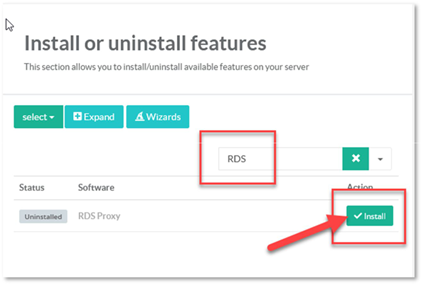
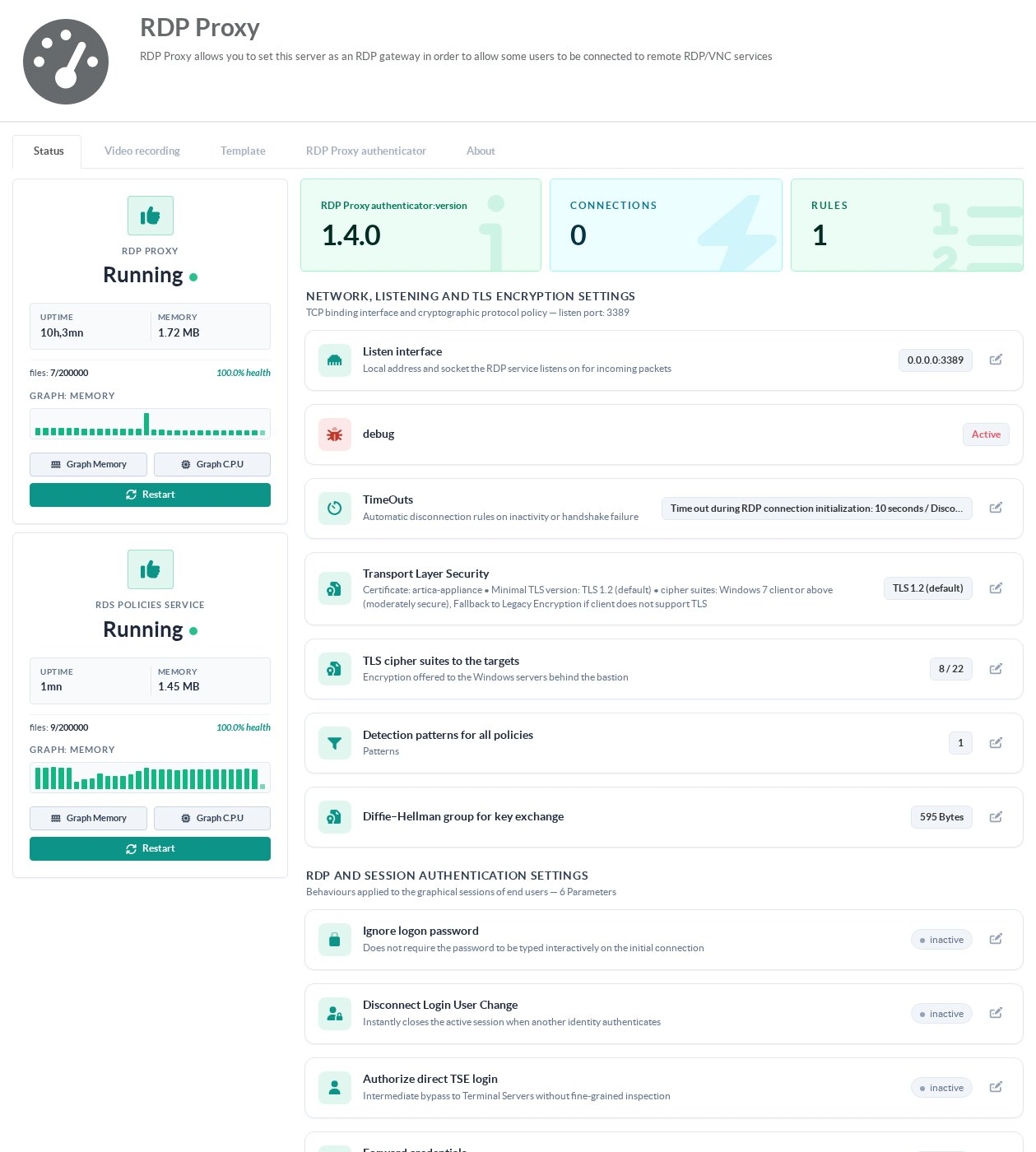
After the installation, RDS Proxy appears in the left menu. Its status page shows two services, both of which must be running:
- RDP Proxy: the Remote Desktop gateway itself (ReDemPtion).
- RDS policies service (RDP Proxy authenticator): the policy engine that allows or refuses each connection.
Keep the service up to date: see How to upgrade or downgrade the RDS Proxy service.
Video recording requires an RDS Proxy package built with video support.
¶ Quick start
- Choose the certificate presented to the users: Service settings » Transport Layer Security.
- Declare the servers users will reach: Targets.
- Create the gateway accounts, or authorize Active Directory groups: Members.
- Create a policy that links members, targets, networks and schedules: Policies.
A policy without a network refuses every connection. - Connect with any Remote Desktop client to the appliance address (port 3389 by default) using a member account.
¶ Administration pages
| Page | What it covers |
|---|---|
| Service settings | Listening address, timeouts, TLS, cipher suites, session options, error messages, login page template |
| Policies | Policies, networks, schedules, session rights and detection patterns |
| Members | Gateway accounts and Active Directory groups |
| Targets | Remote Desktop and VNC servers, NLA mode, connection test |
| SSH targets | Concepts, architecture, benefits and requirements of SSH targets |
| SSH target and policy | Create an SSH target, vault, bastion key, host key, session rights and command patterns |
| SSH client and file transfers | Connect with the Remote Desktop client, paste files to the server, Ctrl+Alt+F file explorer |
| Web applications (WebView) | Concepts, architecture, benefits, requirements and limits of web targets |
| Create a web target | Application address, allowed sites, policy, what the user sees |
| Web copy and paste | Copy and paste rights of the policy for web applications |
| Web automatic sign-in | Sign in to a web application with an account of the vault |
| Web network and proxies | Network namespace and upstream proxy per policy |
| Web PAC files | Route each address of a web session through a declared proxy or directly, test a PAC file |
| Target name banner | The band that names the target at the top of each web session |
| Web trusted certificates | Self-signed and internal certificates of web applications |
| WebView tab | Components, versions and browser parameters |
| Web events | Events of web sessions and troubleshooting |
| Tunnel agents | Principle, architecture, benefits, requirements and limits of tunnel agents |
| Install and enroll a tunnel agent | MSI package, enrollment code, Windows service, Linux, options of the agent |
| Manage tunnel agents | Agent states, new agent, revocation, receiver settings, downloads, attaching a target |
| Tunnel agent troubleshooting | Agent offline, enrollment errors, MSI exit codes, Windows events, logs, SIEM events |
| Sessions | Connected users and disconnection |
| Video recording | Recording quality, storage, retention and downloads |
| Access events | Refused connections and their reason, gateway logs |
| Second factor | TOTP enrollment, lockouts and exemptions |
| IT charter | Charter text that users accept before the list of targets, proof of acceptance in the access events |
| Custom look | Colors, logo, background color and welcome text of the login screen and the list of targets |
| SIEM | Streaming the access events to an Artica SIEM |
| REST API | Automating the RDS Proxy |
¶ Troubleshooting
- NLA authentication failed
- Connection error on Windows 7 or Windows XP
- “Please prepare credentials before connecting”
- Connect directly to a target
- Display only the RDS sessions on a wall screen
¶ FAQ
¶ Are brute-force attempts blocked?
Every refused login is written to the access events with its reason, and can be sent to your SIEM. When a policy requires the second factor, five wrong codes in a row lock the account for 15 minutes. The RDS Proxy is not connected to Fail2ban: restrict the source networks of each policy and use the second factor for accounts reachable from the Internet.
¶ Can I give someone temporary access?
Yes. Each member has an end-of-life date; after that date the account can no longer log in. The Members tab shows the accounts that expire within 15 days.
¶ Can I filter remote addresses by country?
Not in the RDS Proxy itself. Restrict the source networks of each policy, or filter at the firewall in front of the appliance.
¶ Can I manage the RDS Proxy with a REST API?
Yes: see REST API.