← Back to the RDS Proxy main page
When the gateway cannot authenticate to the target server, the user sees an error such as NLA authentication failed, CREDSSP Kerberos authentication failed, NTLM not allowed or TLS only is not allowed. Check the causes below in this order; the details are in Events » RDP Proxy.
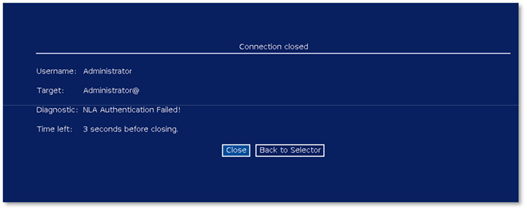
¶ 1. Wrong account on the target
The account stored in the target is wrong, its password has changed, or it is not allowed to use Remote Desktop on the server. Fix the account in the target, or add it to the Remote Desktop Users group of the server.
¶ 2. NLA mode of the target
A server addressed by its IP address, or a domain the appliance cannot reach, cannot use Kerberos. Open the target and choose NLA with NTLM, or Kerberos, then NTLM. See Network Level Authentication mode.
¶ 3. No common cipher suite
If the gateway log shows Connection reset by peer during the TLS handshake with the target, the server and the gateway share no cipher suite. This happens with Windows servers hardened with AES-GCM disabled. Select the AES-CBC suites in Service settings » TLS cipher suites to the targets; they are selected by default. To check the suites a server accepts:
nmap -p3389 --script ssl-enum-ciphers <server>¶ 4. Very old servers
Servers that do not support NLA at all need the No NLA (TLS only) mode on their target.