PHP2Shell on Debian 10: install the fixed PHP 7.3
Debian 10 appliances: install the PHP 7.3 package fixed by Freexian Extended LTS (CVE-2026-109618, CVE-2026-109619) from the System information page or from a shell.
Summary
CVE-2026-109618 and CVE-2026-109619 ("PHP2Shell") are two flaws in the PHP engine that let an unauthenticated attacker run code on the server.
The Artica Web Console runs on PHP, so every appliance is exposed until a fixed PHP is installed.
Debian no longer maintains PHP 7.3 for Debian 10 (buster).
The Freexian Extended LTS project still does, and its advisory ELA-1854-1 publishes php7.3 7.3.31-1~deb10u16, which fixes both CVEs.
On Debian 10, the System information page of the Web Console detects a vulnerable PHP and installs this package with one click.
Which appliances need this page
| System | Web Console PHP | Fixed version | How to get it |
|---|---|---|---|
| Debian 10 (buster) | php7.3 | 7.3.31-1~deb10u16 (Freexian ELA-1854-1) |
This page: the button of the System information page, or the manual procedure. |
| Debian 12 (bookworm) | php8.2 | 8.2.35-1~deb12u1 (DLA-4848-1) |
Standard Debian security updates. |
| Debian 13 (trixie) | php8.4 | 8.4.27-1~deb13u1 (DSA-6574-1) |
Standard Debian security updates. |
An appliance on Debian 10 is vulnerable while its php7.3-fpm package is older than 7.3.31-1~deb10u16.
The last version published by Debian itself is 7.3.31-1~deb10u7.
What the button does
The fix runs in the Artica daemon and takes about one minute.
Each step is written to a log you can open from the progress bar.
- It downloads the Freexian archive key from
https://deb.freexian.com/extended-lts/archive-key.gpgand installs it only if its SHA-256 checksum isa0b22152fdf1942f49cc1559ec4598bae8d8954da9ed38662d15b97a60909db8.
The key is stored in/etc/apt/trusted.gpg.d/freexian-archive-extended-lts.gpg. - It writes
/etc/apt/sources.list.d/extended-lts.listwith the linedeb https://deb.freexian.com/extended-lts buster main contrib non-free.
Artica regenerates/etc/apt/sources.liston its own schedule but never touches this file. - It runs
apt-get update. - It upgrades the
php7.3*packages already installed on the appliance, and only those.
No package is added or removed, and modified configuration files are kept. - It reads the installed version again and reports a failure if
php7.3-fpmis still older than the fixed version. - It rebuilds the PHP configuration and restarts the PHP-FPM service of the Web Console.
A full stop and start is needed: the console runs its own copy of thephp-fpm7.3binary, and a reload would keep the old engine in memory.
Running the button a second time does nothing when PHP is already fixed.
The action is recorded in the administrator tracking and in the security audit trail of the appliance.
Requirements
- An account with the System administrator privilege:
the warning and the button are only shown to these accounts. - HTTPS access from the appliance to
deb.freexian.com. - No other package installation running at the same time.
If APT is busy, the task stops before changing anything; try again a few minutes later.
Fix PHP from the Web Console SP10 Hotfix 20261022-17
Open Your system and the System information page (https://your-appliance:9000/system-info).
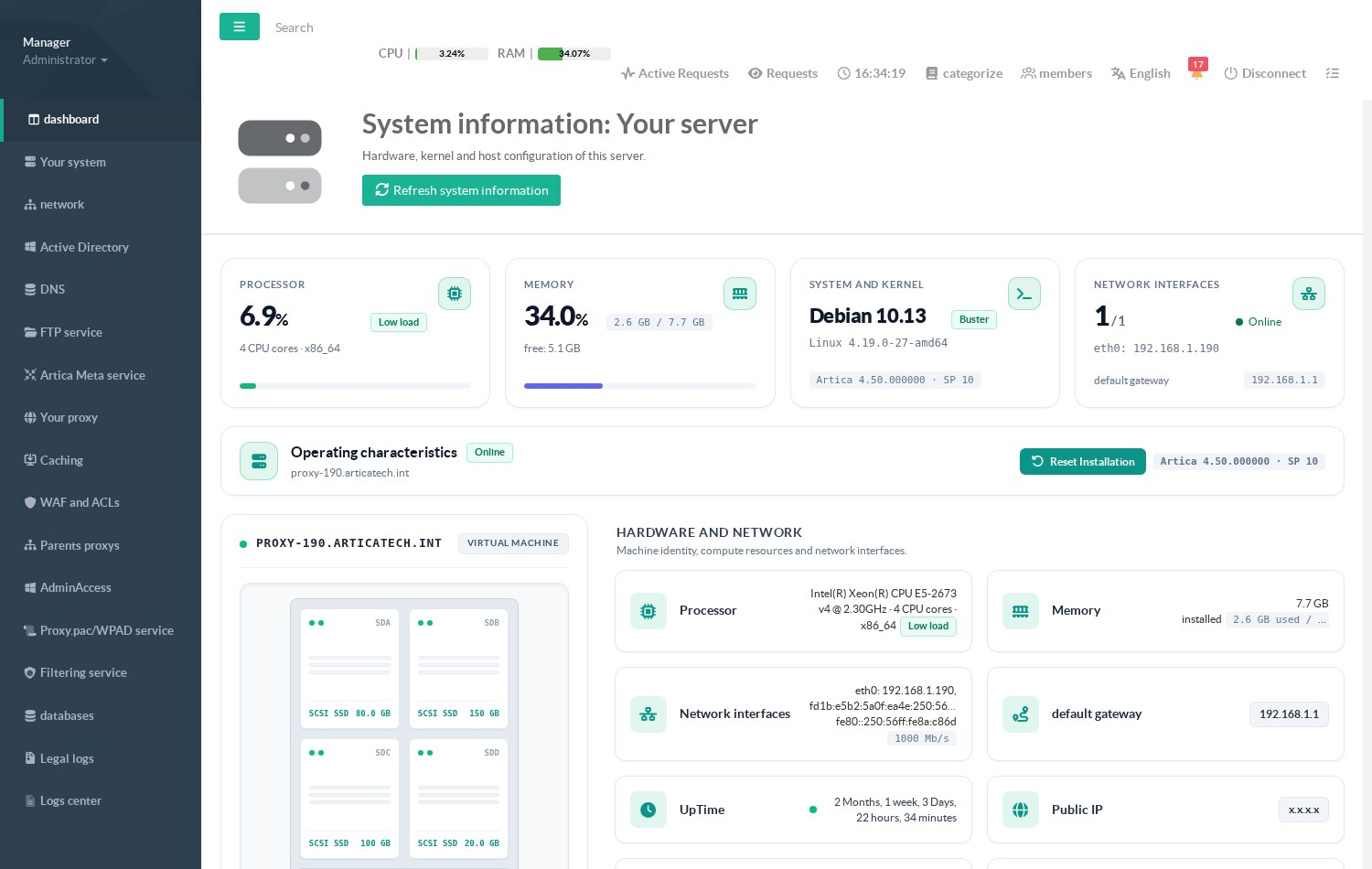
System information page of a Debian 10 appliance
When the PHP of the appliance is vulnerable, the Linux kernel and operating system section shows an orange warning with the installed version.
The PHP Version card shows a red Fix PHP2Shell badge.
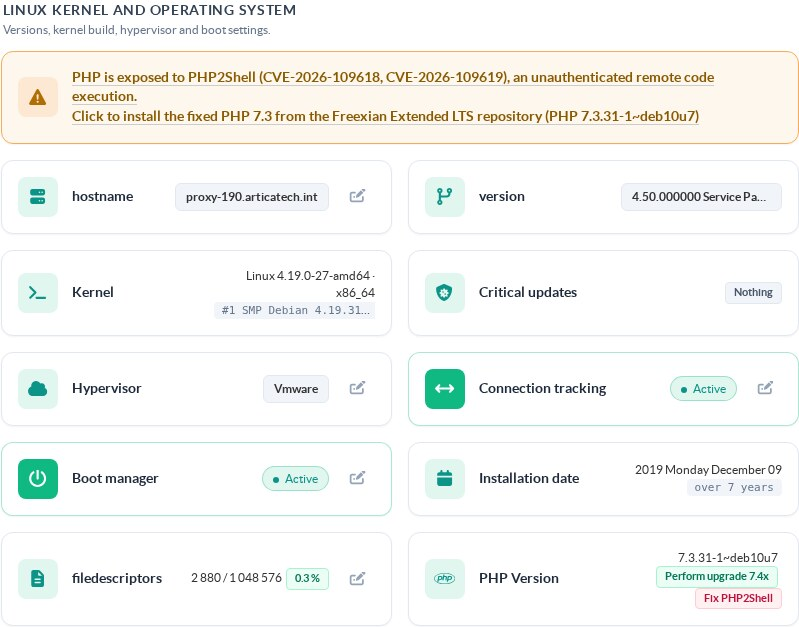
PHP 7.3.31-1~deb10u7 is exposed to PHP2Shell
Click the warning or the badge.
A confirmation dialog describes the task; click Yes, execute it.
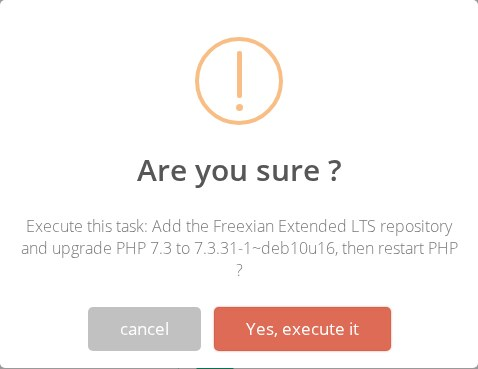
Confirmation before the repository is added
A progress bar follows the task: key and repository (up to 25%), apt-get update (35%), package upgrade (55%), PHP restart (90%).

The package list of the Freexian repository is being downloaded
At 100%, the Details link opens the log of the task.

The task completed
The page reloads by itself.
The warning and the badge are gone, and the PHP Version card shows 7.3.31-1~deb10u16.
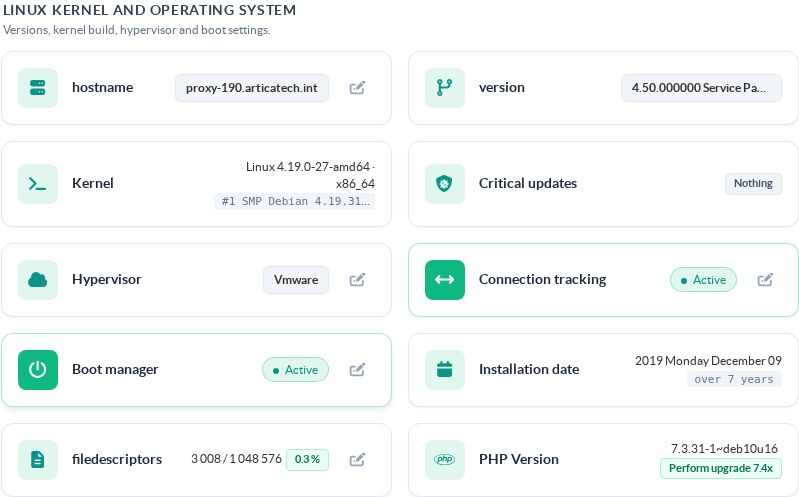
PHP is now 7.3.31-1~deb10u16
On our test appliance, the task upgraded 21 php7.3 packages. The end of its log reads:
16:34:32 php7.3-fpm installed version: 7.3.31-1~deb10u7
16:34:32 Freexian ELTS key installed (/etc/apt/trusted.gpg.d/freexian-archive-extended-lts.gpg)
16:34:32 APT source written: deb https://deb.freexian.com/extended-lts buster main contrib non-free
...
16:35:14 php7.3-fpm version after upgrade: 7.3.31-1~deb10u16
16:35:17 Artica PHP-FPM restarted
Check the result from a shell
dpkg-query -W -f='${Version}\n' php7.3-fpm
# 7.3.31-1~deb10u16

curl -s --unix-socket /usr/share/artica-postfix/bin/run/articarest.sock \
  http://localhost/system/php/elts/status
The status answer of a fixed appliance:
{
  "Info": {
    "debian_version": 10,
    "package": "php7.3-fpm",
    "installed_version": "7.3.31-1~deb10u16",
    "fixed_version": "7.3.31-1~deb10u16",
    "vulnerable": false,
    "elts_configured": true,
    "running": false
  },
  "Status": true
}
vulnerable is what the page uses to show the warning, elts_configured tells whether the Freexian key and repository file are present, and running is true while an upgrade is in progress.
Manual procedure
If the System information page of a Debian 10 appliance shows no warning while php7.3-fpm is older than 7.3.31-1~deb10u16, the appliance runs an Artica build without this feature.
Run the same steps as root from a shell:
# 1. Freexian archive key, checked before use
wget -O /var/tmp/freexian.gpg https://deb.freexian.com/extended-lts/archive-key.gpg
sha256sum /var/tmp/freexian.gpg
# must print a0b22152fdf1942f49cc1559ec4598bae8d8954da9ed38662d15b97a60909db8
install -m 644 /var/tmp/freexian.gpg /etc/apt/trusted.gpg.d/freexian-archive-extended-lts.gpg
rm -f /var/tmp/freexian.gpg

# 2. Repository
echo "deb https://deb.freexian.com/extended-lts buster main contrib non-free" \
  > /etc/apt/sources.list.d/extended-lts.list
apt-get update

# 3. Upgrade the php7.3 packages already installed, nothing else
apt-get -y -o Dpkg::Options::=--force-confold --only-upgrade --no-remove install \
  $(dpkg-query -W -f='${Package} ${Status}\n' 'php7.3*' | awk '/ installed$/{print $1}')

# 4. Restart the PHP engine of the Web Console
/usr/sbin/articarest -restart-artica-php
Do not go on to step 2 if the checksum differs.
Limits
- Freexian publishes PHP 7.3 only for Debian 10.
If the Web Console of the appliance was moved to PHP 7.4 with the Perform upgrade 7.4x button, the button upgrades thephp7.3packages but the engine of the console stays unfixed. - The Freexian repository stays configured after the fix.
A laterapt-get upgraderun by hand will also install the other Extended LTS updates for Debian 10. - The PHP engine shipped by Artica for the websites published by the reverse proxy is not a Debian package and is not concerned.
See CVE-2026-109618 and CVE-2026-109619: protect PHP websites with the reverse proxy. - Debian 10 itself is out of regular support.
This fix closes PHP2Shell; it does not replace the move to a supported Debian release (see Debian 10 upgrade status).
The interim php.ini settings described in PHP2Shell: impact on Artica and interim mitigation stay in place after the upgrade.
REST API
Both routes answer on the local socket /usr/share/artica-postfix/bin/run/articarest.sock and on the REST port of the appliance with its API key.
| Route | Effect |
|---|---|
GET /system/php/elts/status |
Returns the state shown above. Read only. |
GET /system/php/elts/upgrade |
Starts the fix in the background and answers {"Status":true,"Info":"upgrade started"}. If a fix is already running, the answer carries "Running":true and nothing new starts. Refused with HTTP 403 when the REST access control does not allow the caller. |
Progress and log are written to /usr/share/artica-postfix/ressources/logs/web/php.elts.progress and php.elts.log in the same directory.
Troubleshooting
| Message in the progress bar or the log | Cause and action |
|---|---|
download https://deb.freexian.com/extended-lts/archive-key.gpg: ... |
The appliance cannot reach deb.freexian.com over HTTPS. Check DNS, the default route and the outgoing firewall rules. |
Freexian key checksum mismatch (got ..., expected ...): key refused |
The downloaded file is not the expected key, for example a page returned by an intercepting proxy. Nothing was installed. Check the path to the Internet, then try again. |
apt-get update: timeout after 10m0s, or apt-get php7.3-...: timeout after 20m0s during the upgrade |
The download was too slow. Run the button again: packages already downloaded are kept in the APT cache. |
php7.3-fpm is still ... after the upgrade |
APT did not install the fixed version. Open the log and look for the APT error, then check apt-cache policy php7.3-fpm: the Freexian repository must offer 7.3.31-1~deb10u16. |
no php7.3 package installed |
No Debian PHP 7.3 package is installed on this appliance. This fix does not apply. |
References
- Freexian Extended LTS: https://www.freexian.com/lts/extended/
- Freexian advisory for php7.3 on Debian 10: ELA-1854-1
- PHP2Shell: impact on Artica and interim mitigation