The NMI watchdog
Detects System Hangs and Deadlocks
The NMI (Non-Maskable Interrupt) Watchdog is a hardware- or software-based monitoring mechanism that helps detect and debug system hangs, freezes, or deadlocks in Linux systems, particularly in kernel code.
This feature is available with Artica v4.50 Service Pack 1 or Artica v4.50 Hotfix 20241221-22
This feature is incompatible with Artica running in a virtual environment such as VMware or Hyper-V.
It Monitors the system for unresponsive states (e.g., kernel deadlocks or infinite loops) and helps administrators identify and debug issues when the system becomes unresponsive.
- The NMI Watchdog periodically checks whether the CPU is responsive.
- If the CPU fails to respond (e.g., stuck in an infinite loop), an NMI interrupt is generated, forcing the kernel to execute recovery code or log debugging information.
- It is implemented via performance monitoring counters (PMCs) in modern CPUs, ensuring low overhead.
Enable the NMI watchdog
On the left menu, navigate to “Your System > System information”
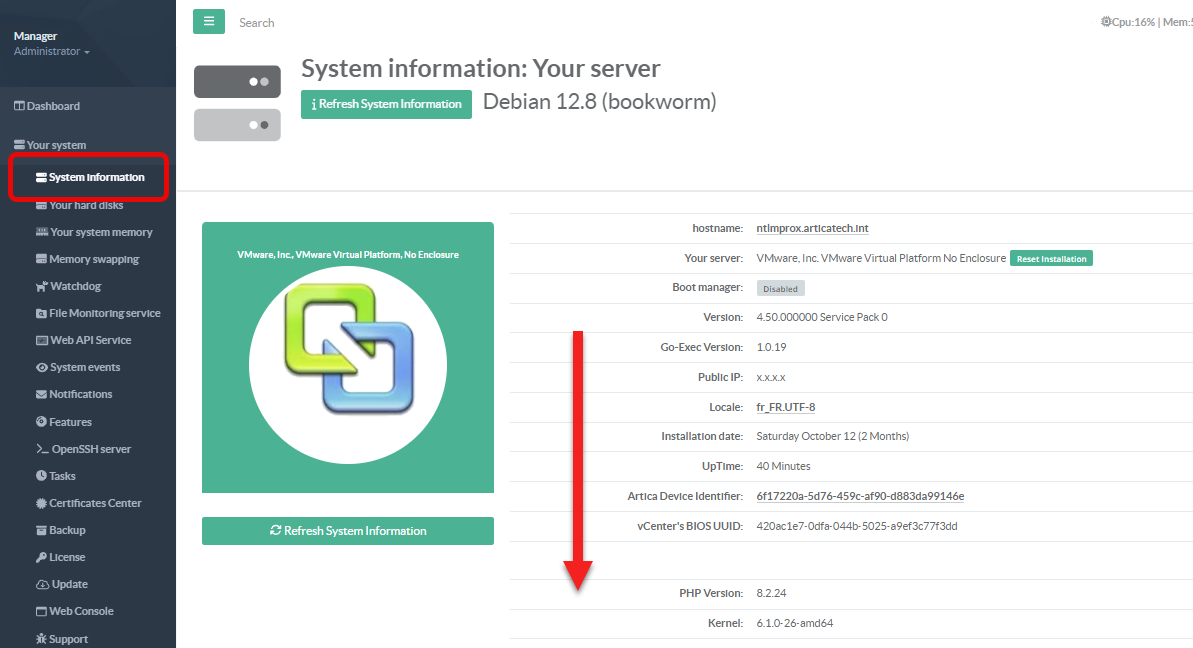
- Down to NMI Watchodg and click on it to turn it to green.
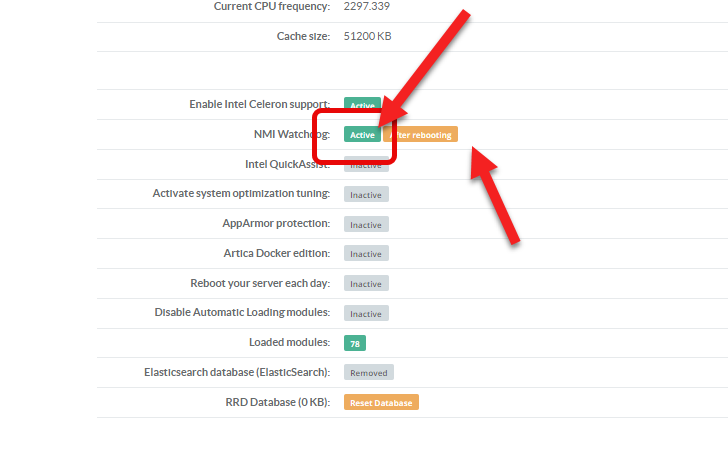
- You will see a lable “After rebooting”, that means you need to reboot the server in order to activate the feature.