Artica can relay your outbound e-mail through Microsoft 365, Google Workspace / Gmail, or any OAuth 2.0-capable SMTP provider
Authenticating with OAuth 2.0 / XOAUTH2 bearer tokens instead of a static password.Microsoft and Google have deprecated password-based SMTP authentication ("basic auth"). This feature lets your Artica SMTP service keep sending through those providers, with tokens that are minted and refreshed automatically — no cron scripts, no manual token pasting, no service interruption when a token expires.
This feature is available Artica v4.50 Service Pack 7 or Artica v4.50 Service Pack 6 Hotfix 20260704-16.
The feature is managed from the web console: SMTP Router > Outgoing rules > OAuth.
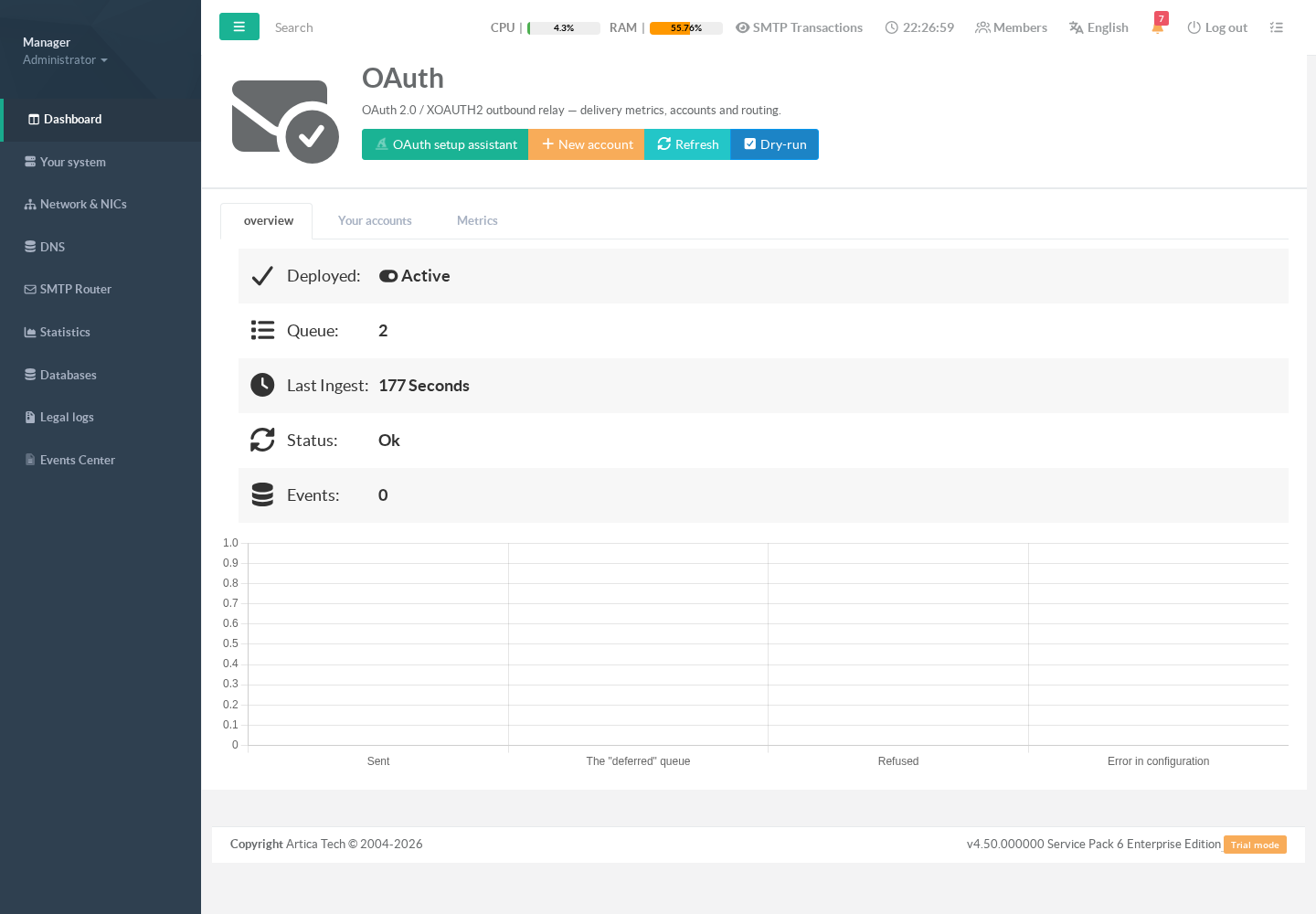
¶ Benefits ?
- No more SMTP passwords
Complies with Microsoft's and Google's removal of basic authentication.
Credentials are OAuth client id/secret + a refresh token — revocable at the provider at any time, without touching your mail flow for other accounts. - Automatic token refresh
Access tokens (which expire after ~1 hour) are minted and cached automatically from your durable OAuth credentials. No scheduled scripts to maintain. - Validate before you save
When you create or edit an account, Artica performs a live authentication test against the provider.
An account with wrong credentials is never saved — you cannot break your mail flow with a typo. - Guided setup assistant
A step-by-step wizard explains what to prepare on the provider side (Azure / Google Cloud), what each credential is, and pre-fills the provider-specific technical values (token endpoint, scopes). - Queue-safe by design
Any transient failure (network, provider outage, expired token) makes Postfix defer and retry — mail is delayed, never lost.
Permanent bounces happen only if you explicitly opt in per account. - Secrets are never displayed or logged
Client secrets and tokens are write-only: they never appear on screen, in URLs, in logs, or in error messages. - Multi-account routing
Route different senders or recipients through different provider accounts with per-account match rules (by sender address, sender domain, recipient address, or recipient domain), plus a default account. - Built-in metrics
Sent / deferred / refused counters and per-account delivery history are visible directly in the console.
¶ Use cases
- Microsoft 365 tenant as smarthost
your applications, scanners, and servers send throughsmtp.office365.comusing a licensed mailbox, without storing a mailbox password anywhere.
- Google Workspace relay
Send throughsmtp.gmail.comwith a Gmail API OAuth client, including for domains where "less secure apps" access is disabled (which is now always the case).
- Application / device mail (no-reply, alerts, invoices)
Appliances, monitoring systems, ERP or business applications submit mail to Artica on your LAN;
Artica authenticates to the cloud provider with OAuth on their behalf. - Multi-brand / multi-domain organizations
One account per sending domain or brand, each with its own provider identity and routing rules, plus a default account for everything else.
- Migration cushions
While migrating mailboxes between providers, route@old-domainsenders through one provider account and@new-domainthrough another, from a single relay.
- High-volume transactional mail (M365)
theclient_credentialsgrant supports Microsoft's high-volume mode (requires tenant-side enablement by a Global Admin).
¶ Requirements
Before creating an account, you need OAuth credentials from your provider:
- Microsoft 365
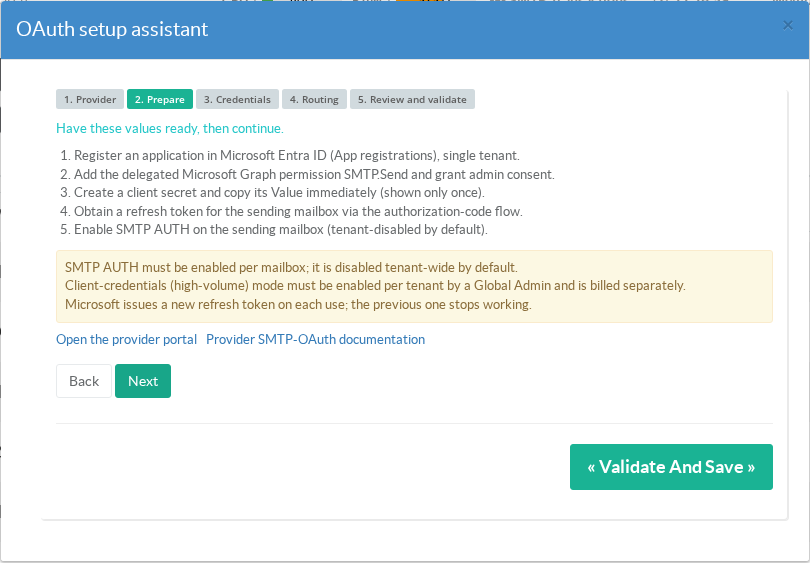
An Azure AD (Entra ID) app registration with the delegatedSMTP.Sendpermission, a client secret, a refresh token for the sending mailbox, and SMTP AUTH enabled on that mailbox.
- Google Workspace / Gmail:
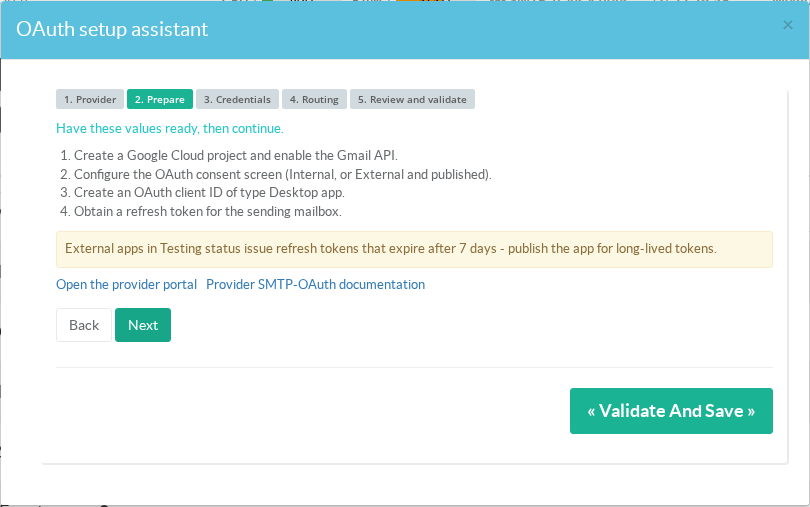
A Google Cloud project with the Gmail API enabled, an OAuth client ID (Desktop app), and a refresh token for the sending mailbox.
- Generic provider: client id/secret, the provider's token endpoint URL, the send scope, and (for the delegated flow) a refresh token.
The setup assistant lists these prerequisites for the selected provider, in order, with links to the provider portals.
You do not need to leave the console to know what to prepare.
¶ Creating an account with the setup assistant
On the OAuth relay page, click OAuth setup assistant in the header. The wizard walks you through five steps.
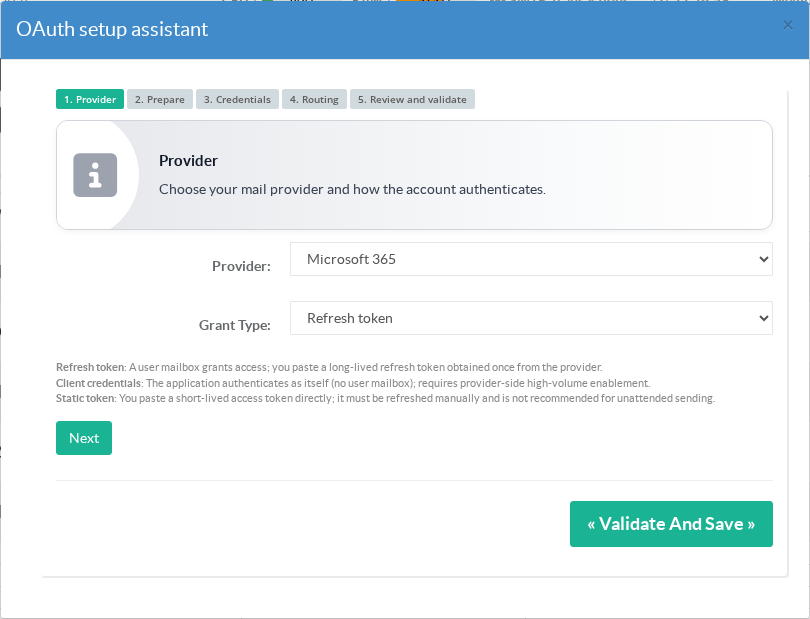
Step 1 — Provider and grant type
Choose your mail provider and how the account authenticates:
- Refresh token (recommended)
a user mailbox grants access once;
Artica trades the long-lived refresh token for short-lived access tokens automatically. - Client credentials
The application authenticates as itself, without a user mailbox (Microsoft high-volume mode; requires tenant enablement). - Static token
You paste an access token directly.
It expires after about an hour and must be refreshed manually — only for testing.
Step 2 — Provider prerequisites
The assistant shows the ordered provider-side preparation steps, the operational caveats that commonly break setups later, and links to the provider portal and documentation.
For Microsoft 365:
For Google Workspace / Gmail (note the 7-day expiry warning for OAuth apps left in Testing status):
Step 3 — Credentials
Paste the credentials obtained from the provider.
The token endpoint and scope are pre-filled for Microsoft 365 and Gmail
You only adjust them for a generic provider.
Every field carries a plain-language explanation of what it is and where it comes from.
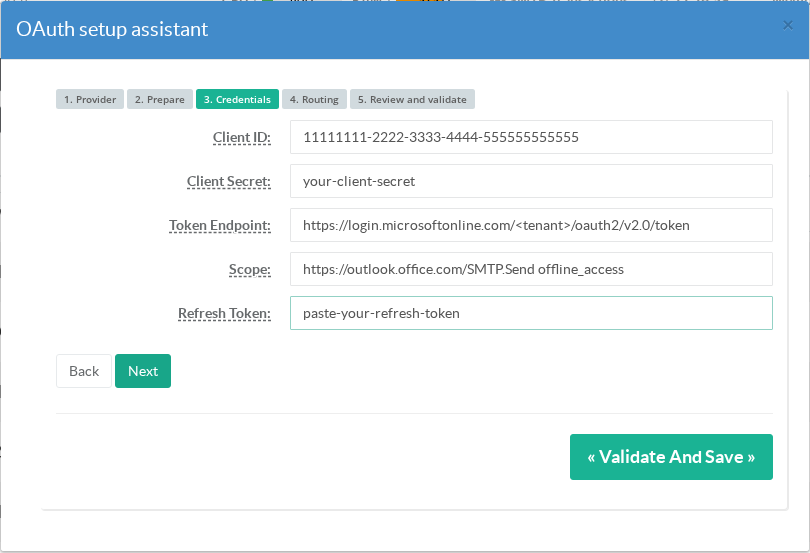
When editing an existing account, secret fields are shown empty — leave them blank to keep the stored value.
Step 4 — Routing
Name the account, set the upstream SMTP server (pre-suggested per provider), the SASL username (the sending mailbox), and the match rules deciding which mail uses this account:
sender_exact:user@example.com— a specific envelope sendersender_domain:example.com— any sender in a domainrecipient_exact:/recipient_domain:— recipient-based routing- Default account — used when no rule matches
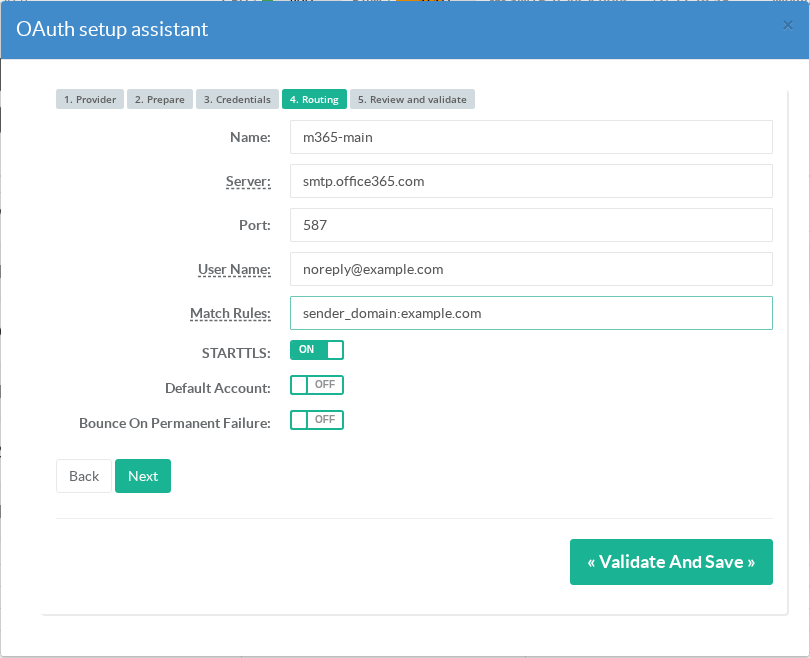
If an account has no match rule and is not the default, the assistant warns you that it will never receive any mail.
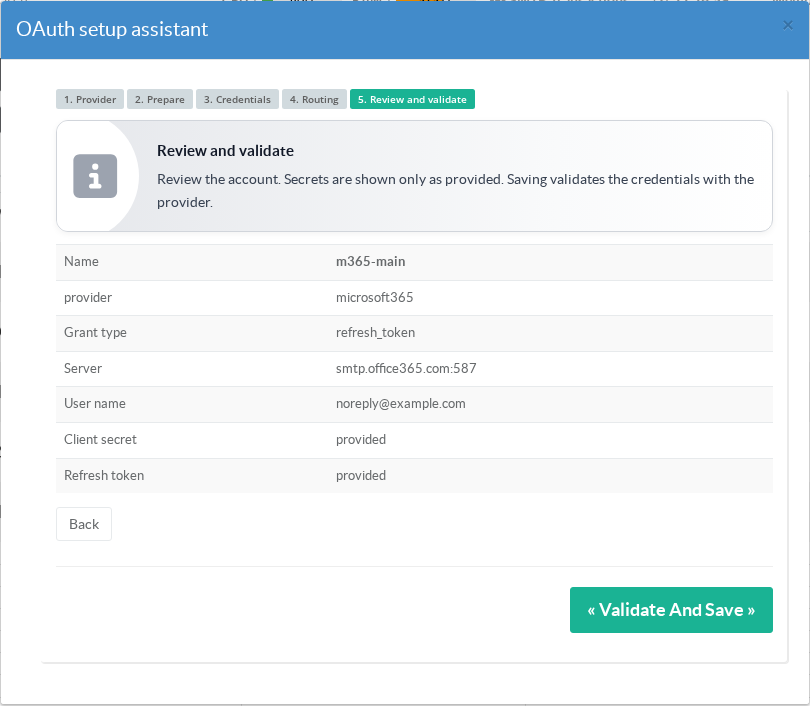
Step 5 — Review and validate
The summary shows every routing value. Secrets are shown only as provided
Their values are never displayed.
Clicking Validate and save performs a live token mint against the provider.
If the provider rejects the credentials, the account is not saved and you get a plain-language explanation of what went wrong (credentials rejected, endpoint unreachable, invalid values…)
never a cryptic error code.
¶ Managing accounts
The Accounts tab lists all configured accounts with their server, username, provider, STARTTLS status, match rules and token state. Each row offers:
- Edit
Reopens the form (secrets stay hidden; leave blank to keep). - Test credentials
Re-runs the live provider authentication on demand, and reports a classified pass/fail. - Delete
Removes the account, its credential file and its token cache.
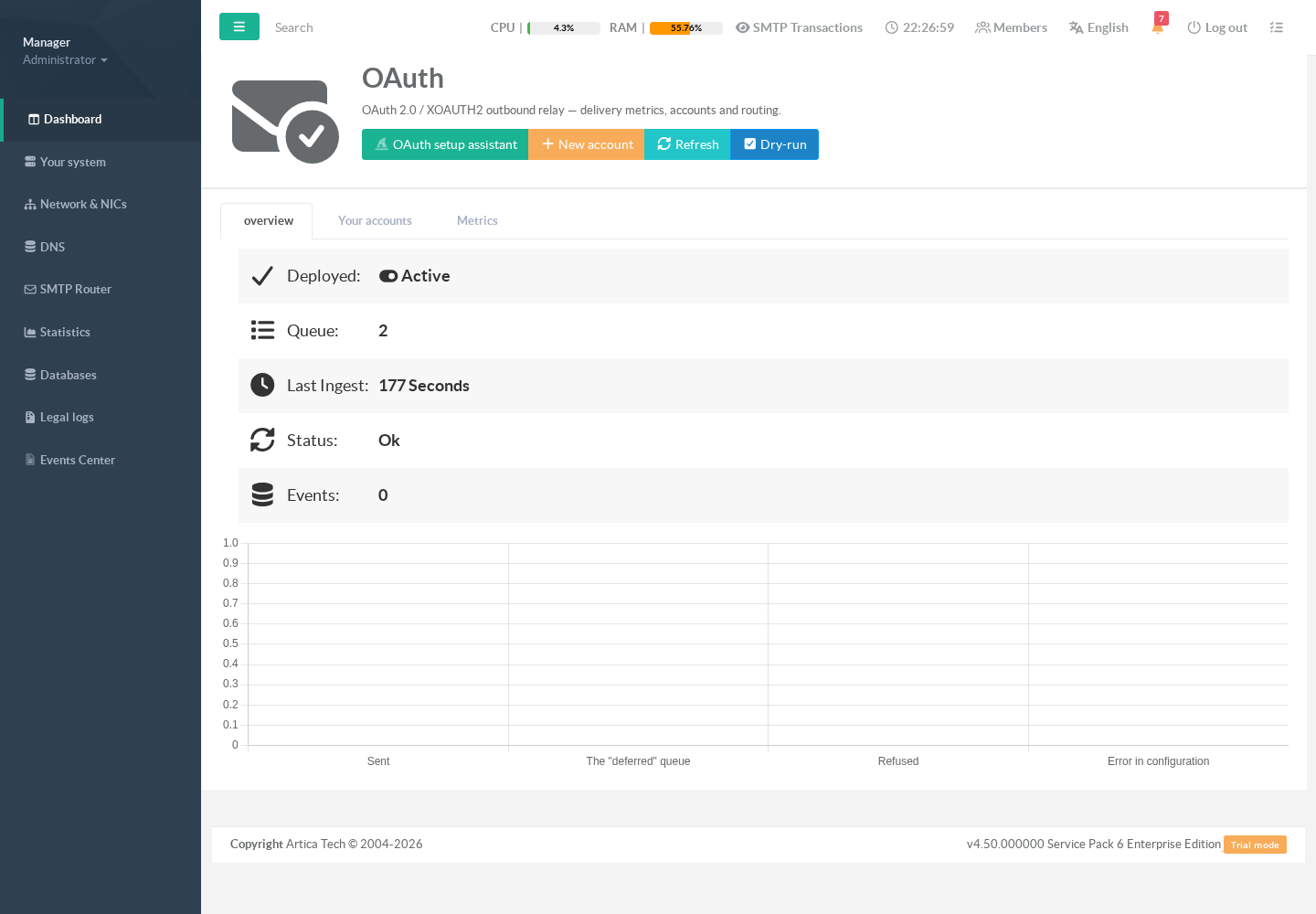
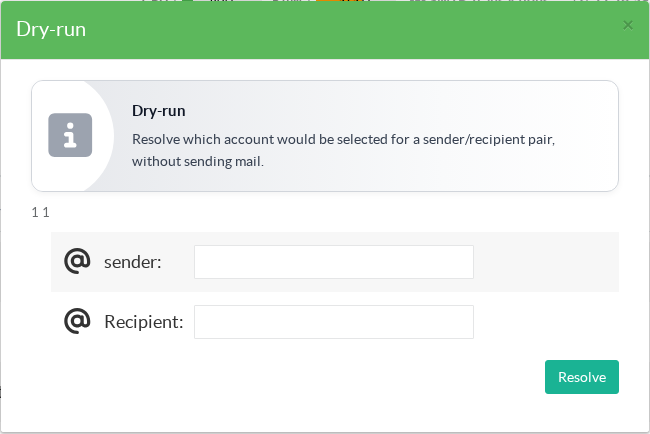
¶ Testing your routing (dry run)
The Dry run button lets you ask, without sending anything:
"Which account would this sender/recipient pair use?"
ideal for verifying match rules before going live.
¶ How failures are handled
Artica applies a strict defer-over-bounce policy:
Network problem, provider 4xx/5xx, timeout
Mail is deferred; Postfix retries on its normal schedule.
Token expired
A new token is minted automatically on the next attempt.
Provider rejects the credentials
Deferred by default.
The account can opt in to permanent failure (bounce) explicitly.
Configuration error
Deferred with a classified reason in the mail log (reason=bad_config,reason=auth_rejected, …).
Every delivery attempt writes exactly one structured key=value record to the mail log (/var/log/mail.log, tag postfix-oauth)
Sender, recipient, account, status, duration and a classified reason. Raw provider responses and secrets are never logged.