Create New DNSBL/RBL databases
A database is associated with a DNS server response with the address 127.0.0.x. This means you can create 255 databases.
A database is associated with a DNS server response with the address 127.0.0.x.
This means you can create 255 databases.
Two default databases are non-negotiable: the blacklist and whitelist databases, which respond to 127.0.0.2 and 127.0.0.9.
- On the top button of the “
Databases” section, click on “New Database”- - Select the DNS IP address Response
- Give your database name.
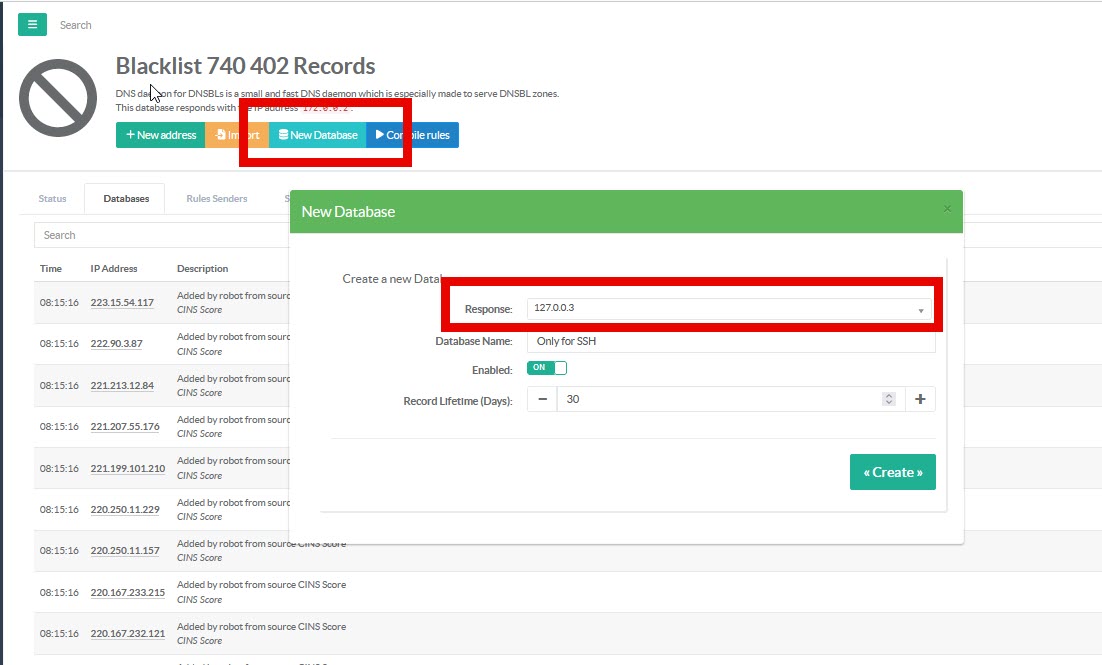
- Record lifetime:
Indicate the lifetime of records in days in this database.
If you use external sources or APIs to enrich this database, you can make it more dynamic to avoid permanently banning addresses.