Data Loss Prevention (DLP)
Inspect messages and attachments for credit cards, IBAN, social-security numbers, credentials or confidential keywords, and act on a match.
Data Loss Prevention (DLP) inspects outgoing (and optionally incoming) messages — subject, body and attachments — for sensitive content such as credit-card numbers, IBANs, social-security numbers, credentials or confidential keywords, and applies the action you choose: log, reject, discard, quarantine, forward to a supervisor, duplicate, BCC or tag the subject.
This feature is available Artica v4.50 Service Pack 7 or Artica v4.50 Service Pack 6 Hotfix 20260704-16.
Benefits
- Validated detectors, few false positives:
Credit cards are Luhn-validated, IBANs are MOD-97-validated, French NIR numbers are checked against their control key — a random digit string does not trigger the rule. - Attachments are really inspected:
text is extracted from ZIP archives (recursively), Word/Excel/PowerPoint (docx/xlsx/pptx), OpenDocument (odt/ods/odp), plain-text files and — optionally — PDF.
Extraction is protected against zip bombs (recursion depth, file count, per-message decompression budget). - Score-based decision:
Each match adds its score; the rule only acts when the total reaches your threshold.
One keyword can be informative while two matches become a violation. - Privacy-safe evidence:
Matched values are stored redacted (411111******1111,FR76****0189,[redacted:23]...) in logs and events
The DLP trail never leaks the very data it protects. - Graduated response:
From silent logging to hard reject, including two quarantine modes (copy and continue or hold and discard) with optional storage of a compressed copy of the message. - One-click templates:
Ready-made rules for credit cards, social-security numbers, IBAN, passwords/credentials and confidential keywords. - Dry-run API:
Test any text against the active policy with/dlp/simulatebefore enforcing it.
Use cases
- PCI-DSS:
Block or quarantine any outbound e-mail carrying a credit-card number, including inside an attached spreadsheet. - GDPR / privacy:
Detect e-mail addresses, phone numbers, social-security numbers (French NIR and generic formats) leaving the organization in bulk. - Banking data:
Stop invoices or files containing IBAN account numbers from being sent to unapproved recipients. - Credential hygiene:
Catch passwords, API keys, bearer tokens and private-key blocks (-----BEGIN ... PRIVATE KEY-----) pasted into e-mails. - Classification enforcement:
Quarantine any message whose body or attachments carry the "confidential" / "internal use only" watermark.
Create a DLP rule
Open MTA Mail system » Access Control Lists, click New Rule and select DLP — or use the DLP templates button for a ready-made rule:
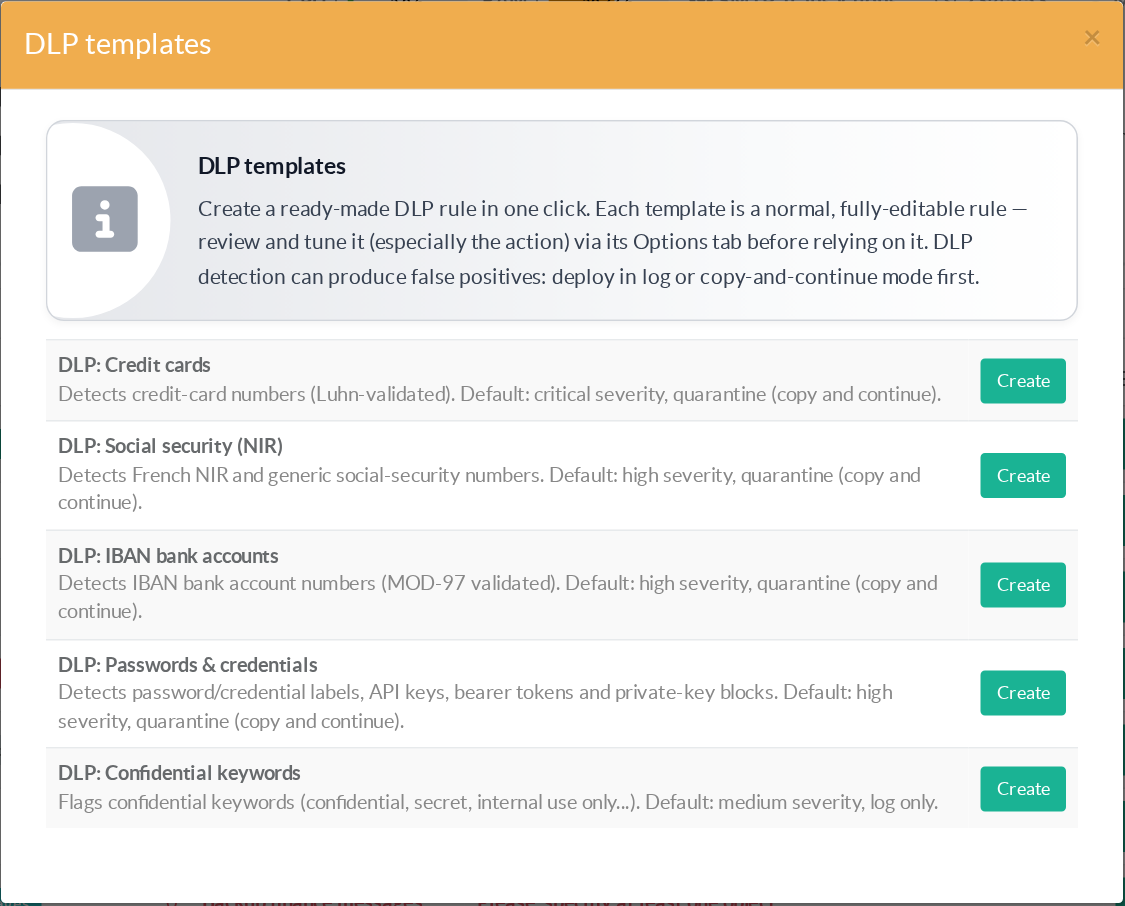
Each template creates a normal, fully editable rule with non-destructive defaults (quarantine copy and continue, or log-only for keywords). Review the action in the rule's Options tab before relying on it.
Configure the policy
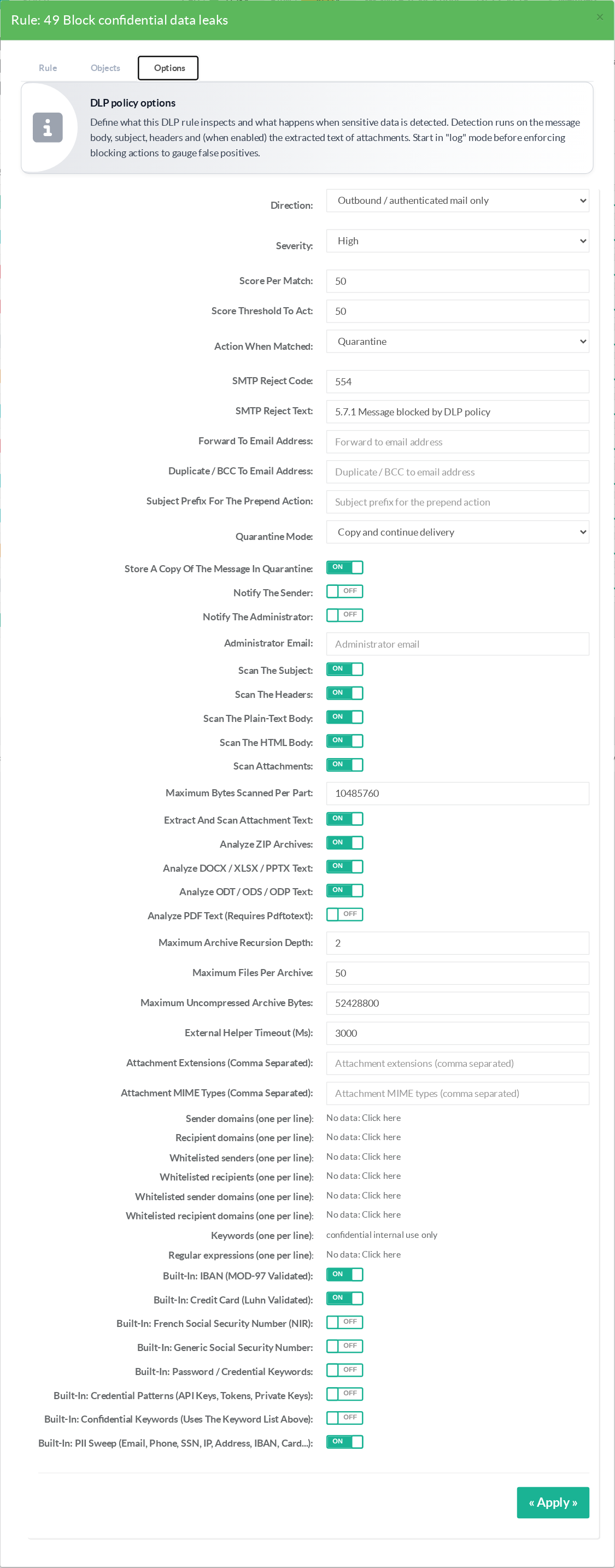
Scope and decision
| Option | Meaning |
|---|---|
| Direction | Inspect outbound / authenticated mail only (typical), inbound only, or both. |
| Severity | Label recorded with each incident (low → critical). |
| Score per match / threshold | Each detector match adds its score; the action fires when the total reaches the threshold. |
| Action | log, reject (SMTP code + text configurable), discard, quarantine, forward (redirect to a supervisor), duplicate/BCC (deliver + copy), prepend (tag the Subject). |
| Quarantine mode | copy and continue (deliver and keep a copy) or hold and discard (withhold delivery — the message is only discarded once the incident is safely recorded). |
| Whitelists | Sender / recipient addresses and domains that bypass this rule. |
Detection
| Detector | Validation | Score |
|---|---|---|
| Keywords / Confidential keywords | case-insensitive, multi-word phrases supported | rule score per match |
| Regular expressions | your own patterns | rule score per match |
| IBAN | ISO 13616 MOD-97 checksum | 50 |
| Credit card | Luhn checksum (Visa, Mastercard, Amex...) | 50 |
| French social security (NIR) | control-key validated | 40 |
| Generic social security | format-based | 40 |
| Password / credential keywords | policy terms (password, api_key, mot de passe...) | 20 |
| Credential patterns | password: x, api_key=x, Authorization: Bearer x (30) — private-key blocks (90) |
30 / 90 |
| PII sweep | e-mail, phone, SSN, IP, street address, ZIP, PO box... | 50 per finding |
Scores are cumulative across all matches of the message (body, subject, headers and attachment text). Set the threshold according to how many findings should constitute a violation — e.g. score 50 / threshold 50 acts on the first hit, threshold 100 requires two.
Attachment analysis
| Option | Meaning |
|---|---|
| Scan attachments / extract text | Enable attachment inspection and text extraction. |
| ZIP / Office / OpenDocument | Analyze archives (recursively) and office documents. |
Optional, requires the pdftotext helper on the system. |
|
| Limits | Max bytes scanned per part, archive recursion depth, files per archive, total uncompressed budget — safe defaults protect the gateway against decompression bombs. |
Recommended rollout
- Create the rule (or a template) with action = log and realistic detectors.
- Watch the incidents in the logs / metrics for a few days and tune keywords, thresholds and whitelists.
- Switch to quarantine (copy and continue) to build confidence without stopping mail.
- Only then move to reject, hold and discard or forward for enforcement.
Testing without sending mail
The control socket exposes a simulator that runs the active per-instance policy against any text — no message is sent, no incident recorded:
curl --unix-socket /usr/share/artica-postfix/bin/run/artica-milter.sock -X POST http://x/dlp/simulate -H 'Content-Type: application/json' -d '{"instanceid":0,"subject":"test","text_body":"pay to DE89 3704 0044 0532 0130 00 today"}'
The response tells you whether the policy matched, which rule and detectors fired (with redacted values), and the resulting action.
Metrics are available on /dlp/metrics and inside /stats (see Monitoring & REST API).
Incident trail
Every acting DLP decision is recorded in PostgreSQL (events, and quarantined copies when enabled) with redacted match details, and an operator-facing verdict line is written to Postfix's mail.log (milter-reject ... rule=dlp:<id>:<name>), so existing log pipelines and SIEM ingestion keep working.