VirtualBrowser and relays: X-Forwarded-For and X-Authenticated-User
Show the real workstation IP and user name behind a VirtualBrowser cluster or another relay, with X-Forwarded-For and X-Authenticated-User.
Some networks place a relay between the browsers and the Artica proxy.
A VirtualBrowser cluster is a common example: users browse inside a remote, isolated browser, and the VirtualBrowser servers send the web requests to Artica.
A load balancer or a parent proxy in front of Artica behaves the same way.
Without any setting, Artica only sees the relay.
Every request in Realtime requests, in the logs and in the statistics shows the IP address of a VirtualBrowser server.
The real user and the real workstation are lost.
The relay usually sends this information in two HTTP headers:
X-Forwarded-Forcarries the IP address of the user's workstation.X-Authenticated-Usercarries the name of the user authenticated by the relay.
Artica can read both headers.
Benefits
- Realtime requests, access logs and statistics show the real workstation IP and the real user name instead of the relay address.
- Rules based on IP addresses and per-user rules apply to the real user, not to the relay.
- Reports and legal logs show who visited a site, even when every request goes through VirtualBrowser.
- Users logged in on VirtualBrowser do not authenticate a second time on the proxy.
- The proxy trusts the headers only from the relays you declare.
It ignores them when a workstation forges them.
Nobody can impersonate another user or hide behind a fake IP address. - Changes apply with a proxy reload.
Connections in progress are not cut.
How it works
- You declare the IP addresses of the relays in Follow sources clients addresses.
- When a request comes directly from a declared relay, the proxy takes the client IP address from
X-Forwarded-For.
Logs and IP-based rules use this address. - When the option User from the X-Authenticated-User header is enabled, the proxy marks the requests that come from a declared relay.
The Filtering service readsX-Authenticated-Useronly on marked requests and hands the name back to the proxy. - A request from any other address is never marked.
Its headers are ignored, and the proxy keeps the real source IP address.
The proxy checks the address of the machine connected to it.
The content of the headers cannot change that address.
A user authenticated by the proxy itself (Kerberos, NTLM, LDAP) always takes precedence over the header.
Requirements
- The relays connect to the proxy from fixed IP addresses.
- The relays send
X-Forwarded-Forand, for the user name,X-Authenticated-User.
Check the relay documentation: the header names must match exactly. - For the user name, the Filtering service connector must be active: menu
Filtering service > Proxy connector. - The X-Forwarded-For part needs nothing else.
Step 1: declare the relays
Open Your proxy > Global settings.
In the Events section, the card Follow sources clients addresses lists the declared relays.
The card User from the X-Authenticated-User header shows the state of the option.
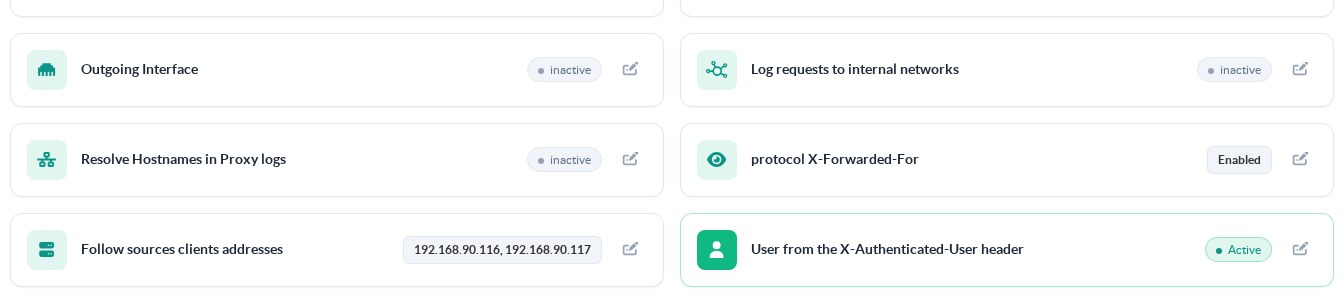
The Events section of the proxy global settings.
Click the card Follow sources clients addresses to open the list of relays.
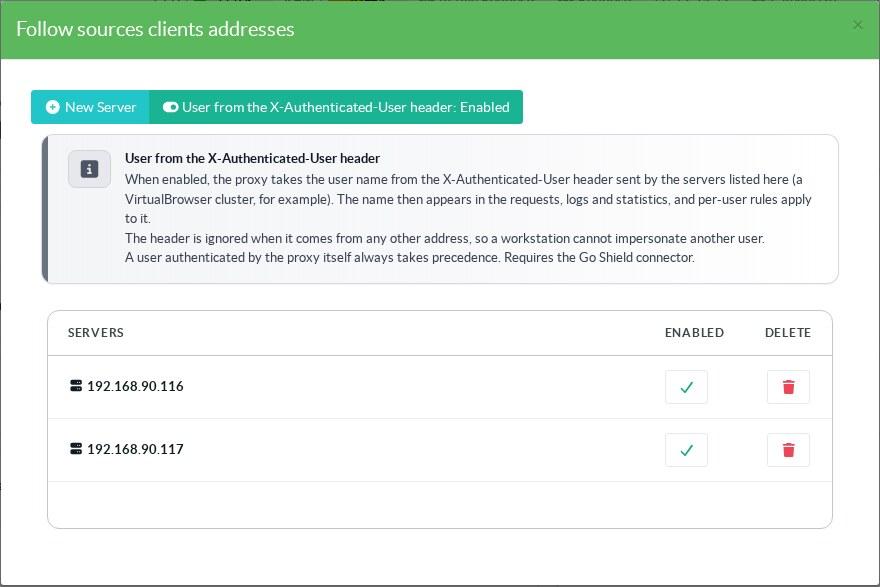
Two VirtualBrowser servers declared as trusted relays.
Click New Server and type the address of a relay.
Repeat for each VirtualBrowser server.
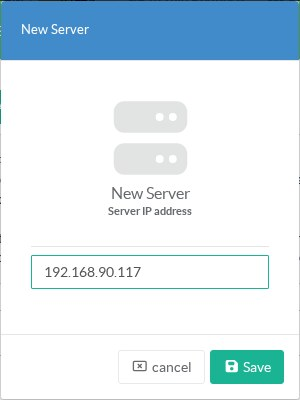
Add a relay.
Three formats are accepted:
- A single address, for example
192.168.90.116. - A network, for example
192.168.90.0/24. - A range, for example
192.168.90.116-192.168.90.117.
Declare only the relays.
Every declared address is trusted to tell the proxy who the user is.
The check box in the Enabled column suspends a relay without deleting it.
Each change reloads the proxy.
Step 2: take the user from X-Authenticated-User
In the same window, click User from the X-Authenticated-User header.
The button switches between Enabled and Disabled, and the proxy reloads.
The option has no effect while no relay is declared.
When the option is disabled, the proxy still follows X-Forwarded-For from the declared relays.
Step 3: check the result
Click Requests in the top bar to open Realtime requests.
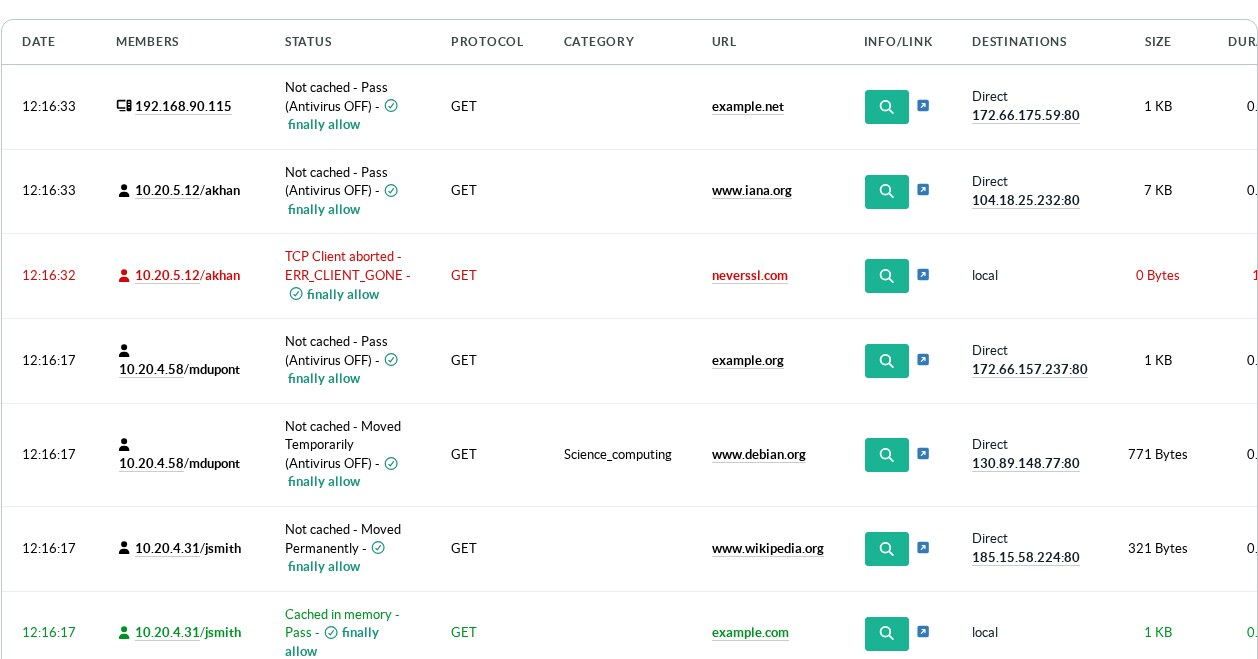
Requests from VirtualBrowser with the real workstation and user.
In this example, every request comes from the VirtualBrowser server 192.168.90.116.
- The Members column shows the workstation and the user:
10.20.4.31/jsmith,10.20.4.58/mdupont,10.20.5.12/akhan. - The first line comes from
192.168.90.115, an address that is not declared.
It sentX-Forwarded-For: 10.20.9.9andX-Authenticated-User: administrator.
Both headers were ignored: the line shows the real source address and no user.
To find the requests of one user, see How to find an IP address and/or an user or a domain in realtime monitor.
Not to be confused with "protocol X-Forwarded-For"
The card protocol X-Forwarded-For, next to the relays, is a different setting.
It controls the header that Artica sends to the web sites, not the header it receives from the relays.
| Value | Header sent to the web sites |
|---|---|
| Enabled | Artica adds the client IP address to the header. |
| Disabled | Artica adds unknown instead of the client IP address. |
| pass | Artica forwards the header unchanged. |
| anonymous | Artica removes the header. |
| hide | Artica replaces the header with the client IP address only. |
Both settings are independent.
The relays you declare are taken into account whatever the value of protocol X-Forwarded-For.
REST API
The same settings are available on the local REST socket.
SOCKET=/usr/share/artica-postfix/bin/run/articarest.sock

# List the relays
curl -s --unix-socket $SOCKET http://localhost/proxy/balancers

# Add a relay, then apply (rebuild and one reload)
curl -s --unix-socket $SOCKET -X POST -d '{"ipsrc":"192.168.90.116"}' http://localhost/proxy/balancers
curl -s --unix-socket $SOCKET http://localhost/proxy/balancers/apply

# Suspend or resume relay 2, delete relay 2
curl -s --unix-socket $SOCKET -X PUT http://localhost/proxy/balancers/2/toggle
curl -s --unix-socket $SOCKET -X DELETE http://localhost/proxy/balancers/2

# State of the X-Authenticated-User option
curl -s --unix-socket $SOCKET http://localhost/proxy/balancers/xauthuser
{"Status":true,"Error":"","Data":{"enabled":true,"supported":true,"sources":2}}

# Enable it (the proxy reloads by itself)
curl -s --unix-socket $SOCKET -X PUT -d '{"enabled":true}' http://localhost/proxy/balancers/xauthuser
supported is false on proxy versions older than 5.
sources counts the enabled relays.
Limits
- The user name comes from the relay.
Rules based on Active Directory group membership still need the proxy's own authentication. - The name is read when the Filtering service checks the request.
A request answered by the proxy before that check is logged without a user. - A relay that forwards a header received from the user's browser passes it to the proxy.
Configure the relay so that it replacesX-Authenticated-Userwith its own value.
Troubleshooting
| Symptom | Check |
|---|---|
| Requests still show the relay address. | The relay is declared with the address it uses to connect to the proxy. The relay sends X-Forwarded-For. |
| The real IP address appears but no user. | The option User from the X-Authenticated-User header is enabled. The Proxy connector is active. The relay sends X-Authenticated-User with this exact name. |
| A relay entered as a range is ignored. | Versions before October 2026 dropped ranges silently. Update Artica, or declare each address. |
| The option button does not appear. | The proxy version is older than 5. Only X-Forwarded-For is available. |