Overview
A PAC rule can download its
proxy.pacfrom a central PAC server.
The Artica proxy fetches the file on a schedule and serves it locally to browsers.
If the central server cannot be reached, the proxy keeps serving the last valid copy.
Browsers always get a PAC file, even when the link to the data center is down.
¶ Concept
Many organizations maintain one proxy.pac on a central server in the data center.
Global changes are made in a single place.
The risk is the dependency on that server.
When the WAN link fails, browsers cannot fetch the PAC file and lose their proxy settings.
With the Remote PAC option, each on-premises Artica proxy becomes a local relay of the central file.
- The Artica proxy downloads the central
proxy.pacat the interval you choose. - It checks that the content is a real PAC script.
- It stores the file on disk as the last valid copy.
- Browsers ask the local Artica proxy for the PAC file, not the data center.
- If a download fails, the copy stays in place and a new attempt is made 15 minutes later.
The option is set per rule.
A rule still selects its clients by source IP address, browser or proxy name.
You can mix rules generated by Artica and rules synchronized from a central server.
Until the first synchronization succeeds, the rule serves the PAC file generated locally from its own settings.
The rule is never left without content.
¶ Benefits
¶ Availability
- A WAN or data center outage no longer breaks proxy auto-configuration on the site.
- The last valid copy has no expiration. It is served for as long as the outage lasts.
- The copy is stored on disk. It survives a restart of the service or of the appliance.
- A faulty answer never replaces a valid copy. An error page, a captive portal page or an empty file is rejected.
¶ Performance
- Browsers are answered on the LAN.
The PAC file is fetched from the local proxy.
No request crosses the WAN when a browser starts. - The PAC file is served from memory.
The Artica PAC service keeps the content in memory and answers without reading the disk. - Browsers revalidate cheaply.
The local service sends anETag.
An unchanged file is answered with304 Not Modifiedand no body. - The central server receives far fewer requests.
It is asked once per proxy and per interval, not once per workstation. - Synchronization costs almost nothing.
The proxy sends a conditional request. When the central file has not changed, the server answers304and nothing is downloaded. - Downloads never slow down browsers.
They run in the background, one rule at a time, outside the path that serves PAC requests.
¶ Use cases
- Branch offices with a central PAC server.
Each site keeps working during a WAN outage.
Global changes still come from one place. - Managed service providers.
One PAC file is maintained for all customers.
Each customer proxy pulls it and stays autonomous. - Frequent global changes.
Set a short interval, for example 15 or 60 minutes, to propagate changes quickly. - Mixed policies.
Use the central file for standard workstations and an Artica rule for a specific network or browser. - Migration.
Keep an existing central PAC server while moving sites to Artica, with no change on workstations other than the PAC URL. - Relieving a busy PAC server.
Thousands of workstations no longer query the central server directly.
¶ Requirements
- The Proxy Pac service is installed.
- The Artica proxy can reach the central server in HTTP or HTTPS.
- The central file is a standard PAC script that contains the
FindProxyForURLfunction.
¶ Configure a rule
On the left menu, open Proxy.pac/WPAD service and display the WPAD rules.
Click on New Rule, or click on the name of an existing rule and stay on the Settings tab.
Go down to the Remote PAC section.
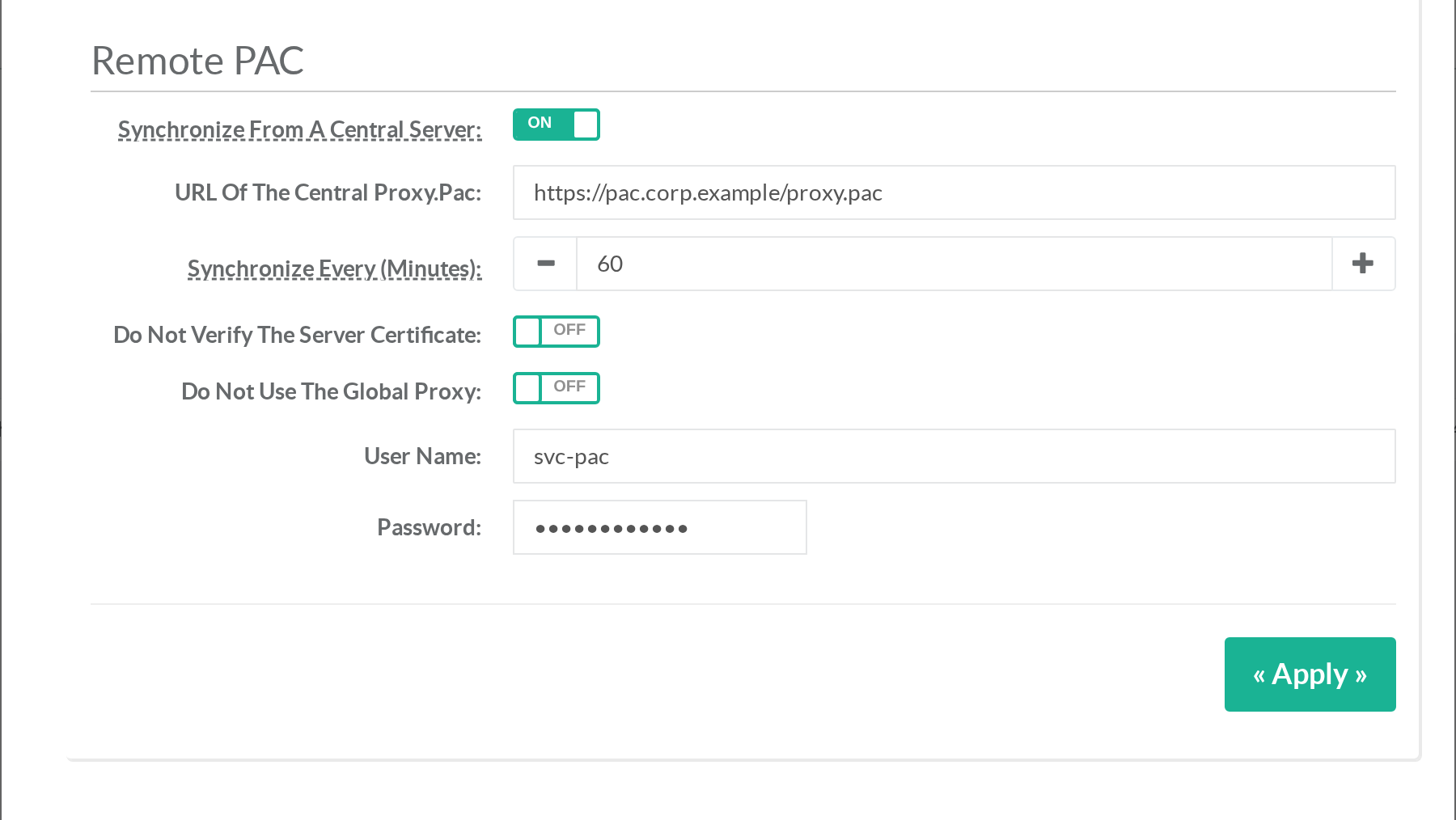
| Field | Description |
|---|---|
| Synchronize from a central server | Turns the remote source on for this rule. A URL is required when the option is on. |
| URL of the central proxy.pac | An http:// or https:// address.A query string is accepted, for example ?site=branch.Do not put a user name or a password in the URL. Spaces, quotes, <, > and braces are refused. |
| Synchronize every (minutes) | Time between two synchronizations. The default is 1440 minutes, once a day. The value must be between 15 and 10080 minutes. |
| Do not verify the server certificate | Accepts a self-signed certificate or a private authority. Leave it off when the central server has a trusted certificate. |
| Do not use the global proxy | Forces a direct connection to the central server. Use it when the central server is an internal host that the global proxy cannot reach. |
| User name and Password | Optional HTTP Basic authentication. The password is never displayed again. Leave the password empty to keep the stored one. Clear the user name to remove both. |
Click on Add or Apply to save the rule.
The rule also needs its sources, like any PAC rule.
See Use this article to create your first PAC rule.
¶ Apply the rules
A new remote rule shows Apply rules to activate in the Remote PAC column.
Click on Apply rules.
Do the same after each change of the rule.
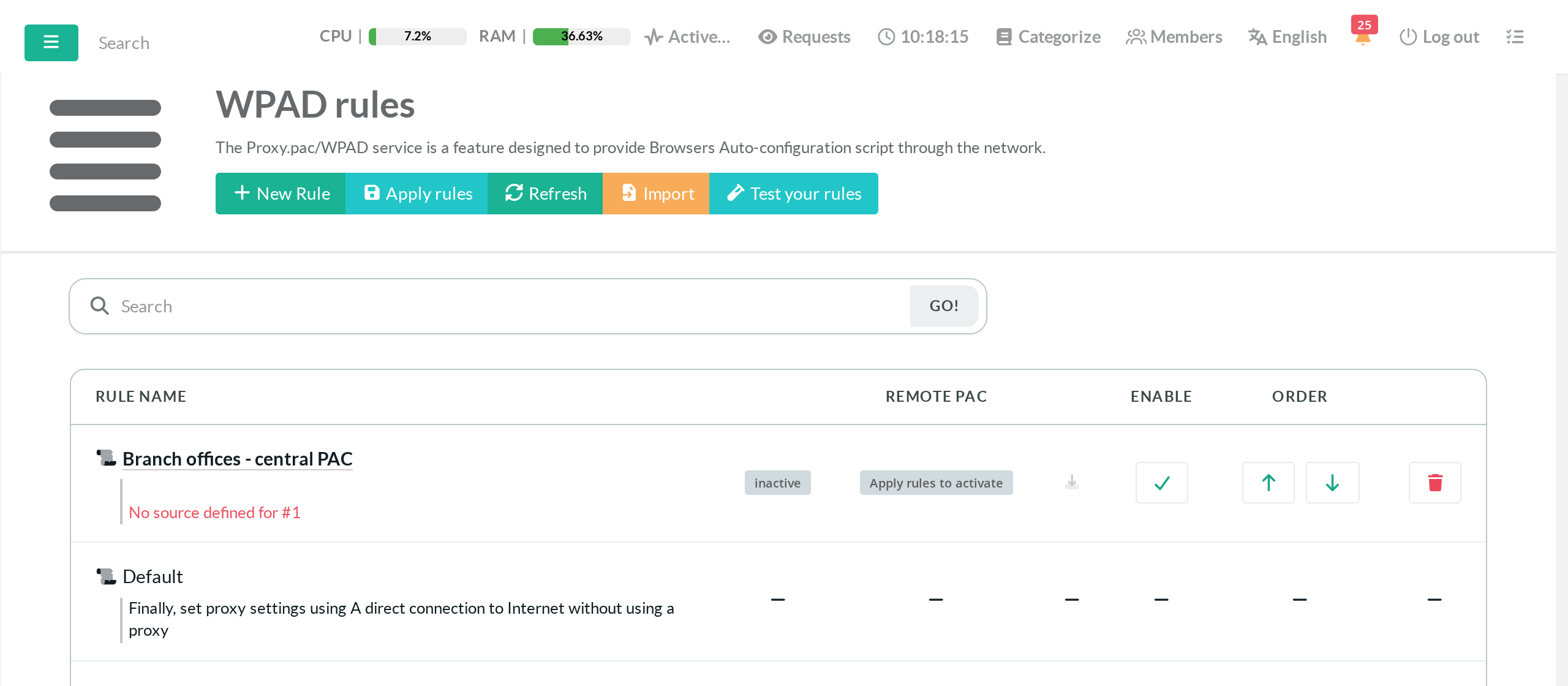
The first download starts within one minute.
The column then shows Synchronized with the date of the last success.
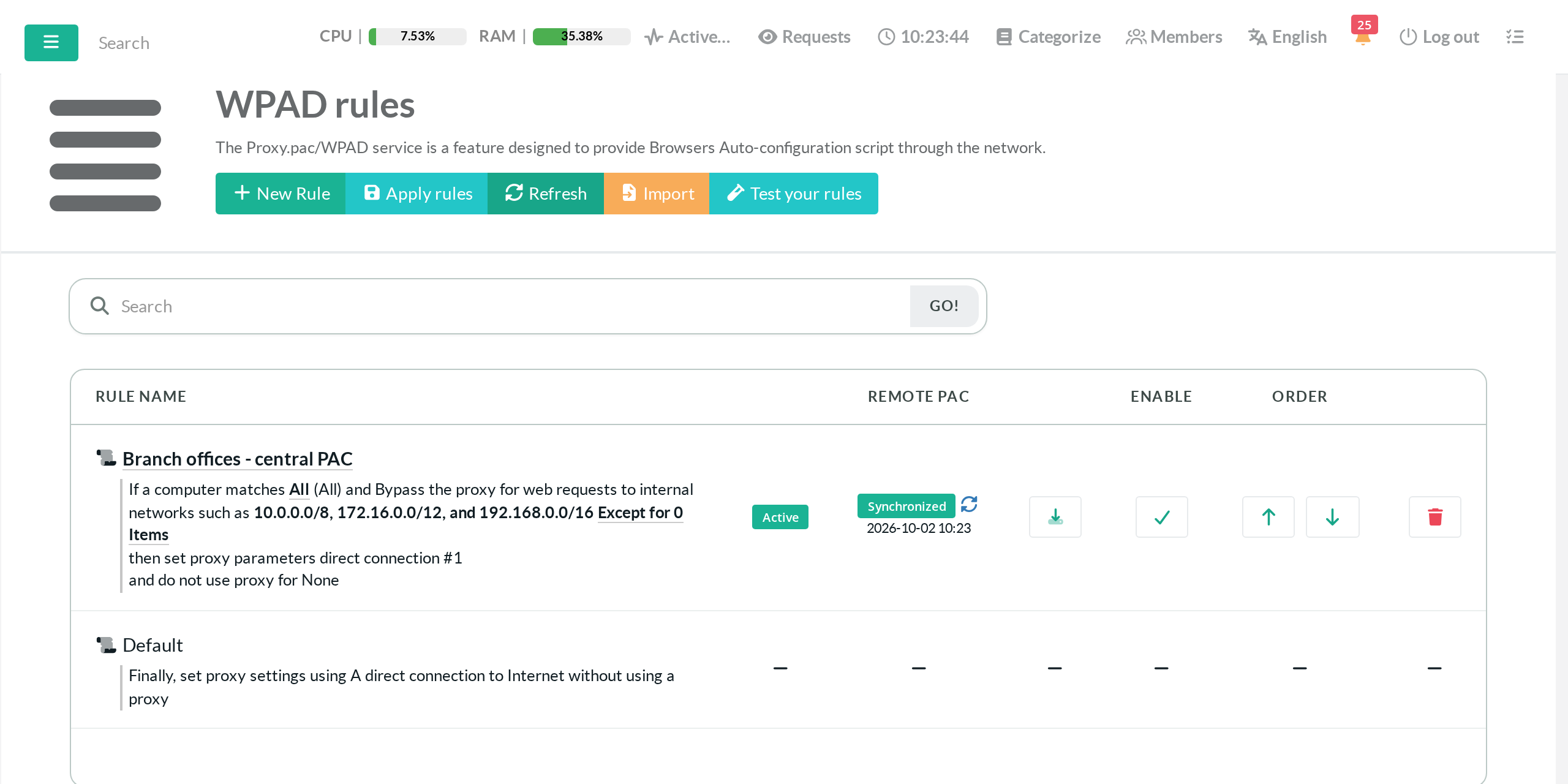
The round arrows icon starts a synchronization immediately.
Use it to test a URL without waiting for the schedule.
¶ Read the status
| Status | Meaning |
|---|---|
| Apply rules to activate | The rule is saved but not applied yet. |
| Waiting for the first synchronization | The rule is applied. The first download has not run yet. The local PAC is served. |
| Synchronized | The central file is served. The date is the last successful synchronization. |
| Synchronization failed, serving the last valid copy | The last download failed. Browsers still receive the last valid central file. |
| Synchronization failed, serving the local PAC | No download has succeeded yet. Browsers receive the PAC generated locally by the rule. |
¶ When the central server is unreachable
The rule turns to Synchronization failed.
Move the mouse over the red label to read the error.
The date shown is the date of the copy that is still served.
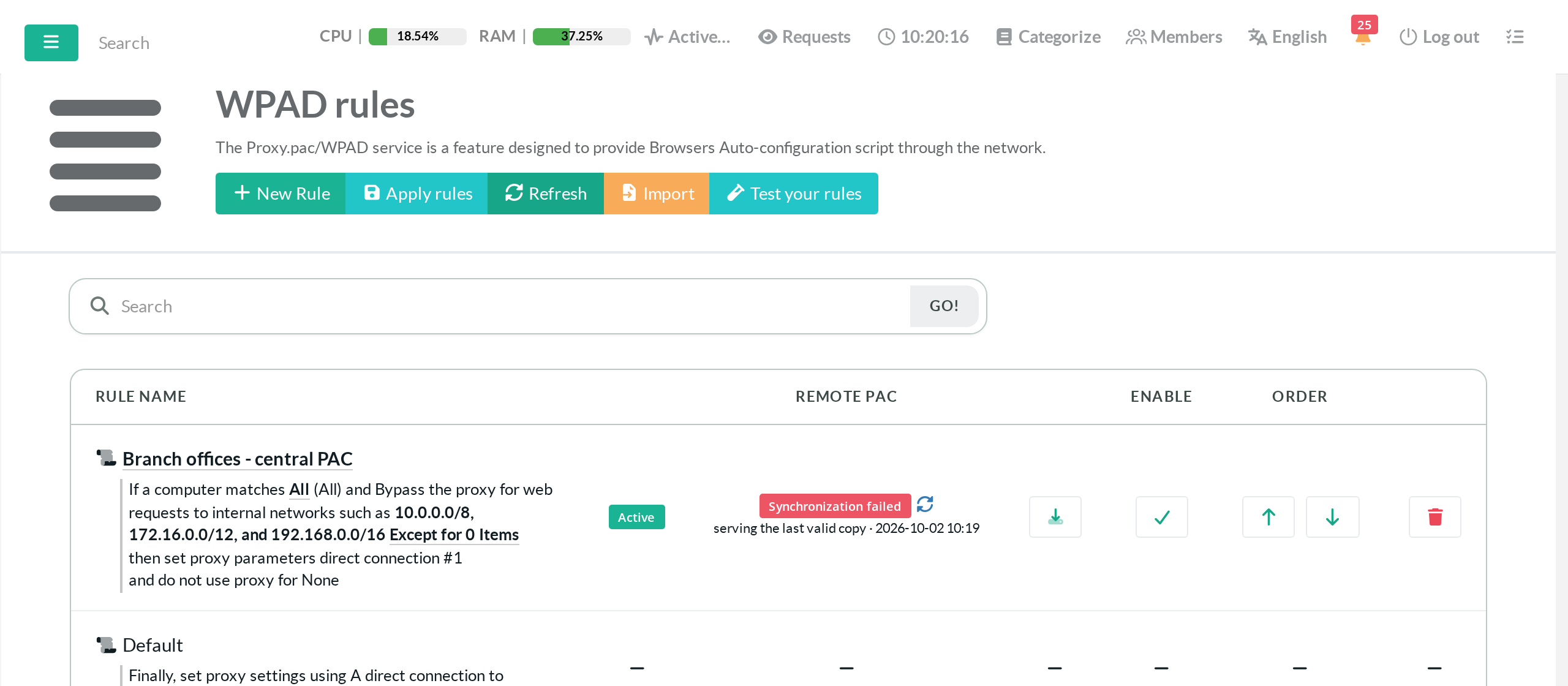
- Browsers keep receiving the last valid copy.
- A new attempt is made every 15 minutes, whatever the interval of the rule.
- Restarting the service or clicking on Apply rules during the outage does not remove the copy.
- The status returns to Synchronized at the first successful attempt.
¶ Content and security checks
A downloaded file replaces the current copy only if it passes all these checks.
- The server answers with the HTTP status 200.
- The content is not empty.
- The content is not larger than 1 MB.
- The content does not start with
<. This rejects HTML and XML pages. - The content contains
FindProxyForURL.
A redirection from HTTPS to HTTP is refused.
This prevents the password and the PAC file from travelling in clear text.
¶ Proxy used for the download
The download follows the proxy settings of the Artica system, in this order.
- No proxy when Do not use the global proxy is on for the rule.
- The global proxy of Artica when it is enabled.
- The local proxy service when it is active and used for system downloads.
- A direct connection otherwise.
¶ Troubleshooting
| Error shown on the red label | Probable cause |
|---|---|
connection refused, timeout, no such host |
The central server is down or unreachable. Check the network, the DNS and the proxy option of the rule. |
unexpected http status 401 or 403 |
The user name or the password is wrong, or the account has no right on the file. |
unexpected http status 404 |
The URL is wrong. |
| A message about a certificate | The certificate is private or expired. Fix the certificate or turn on Do not verify the server certificate. |
starts with a markup tag |
The server returns an HTML or XML page, for example an error page or a captive portal. |
FindProxyForURL not found |
The server returns something that is not a PAC script. |
redirect from https to http refused |
The central server redirects to an unencrypted address. Use the final HTTPS URL. |
Synchronization events are written to the system log with the tag proxy-pac-sync.
grep proxy-pac-sync /var/log/syslog | tailCheck the file that browsers receive from the Artica proxy.
curl -A "Mozilla/5.0" http://<artica-proxy>/proxy.pac¶ Go back to a local rule
Turn off Synchronize from a central server in the rule and click on Apply rules.
The synchronized copy is removed.
The rule serves the PAC file generated by Artica again.
Back to Proxy Pac Service.