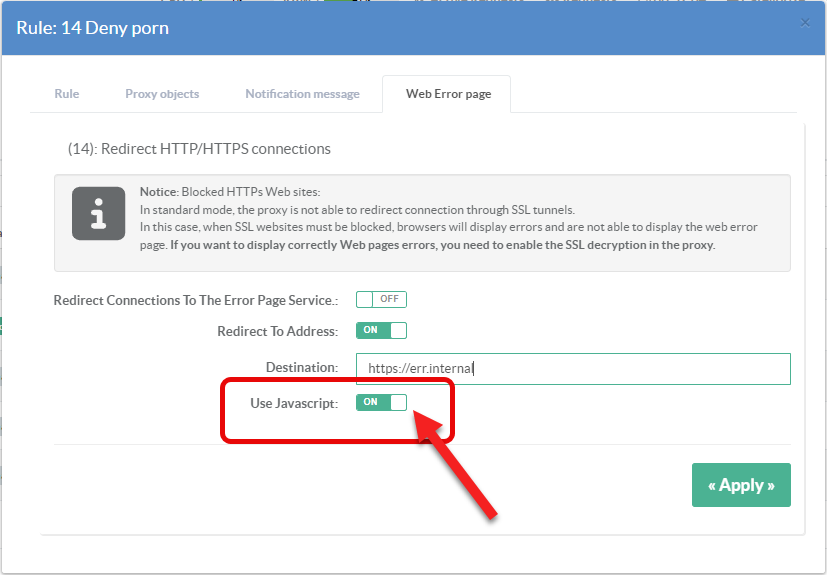
URL redirect using Javascript.
When a rule blocks a request, you can configure the proxy to force redirect to a custom web page of your choice. Leveraging JavaScript minimizes the frequency of redirects, enhancing performance and user experience.
When you block a request and redirect to a URL, you typically use the HTTP protocol with a 301 (permanent) or 302 (temporary) status code.
All HTTP-compliant agents can process this protocol-level redirection.This feature is available on Artica v4.50 Service Pack 3 or Artica v4.50 Service pack 2 Hotfix 20250427-21
While this approach is technically reliable and secure, it has a drawback:
it indiscriminately redirects all clients, including those with no relevance, to the error page.
For example, non-browser HTTP agents, such as Facebook bots or antivirus software, may also be redirected and follow the link.
By using JavaScript for redirection, you ensure that only actual web browsers interpret and follow the redirect to the intended web page.
This significantly reduces unnecessary traffic to the error page, improving efficiency and user experience.
Select your rule.
- Choose Web Error page tab.
- Enable the Redirect to Address option.
- Set the URL to the error page.
- Enable to “
Use Javascript” option.