Decoy targets
Fake targets in the bastion selector that raise a SIEM alert and block the source address when someone opens them.
A decoy target is a fake entry in the target list of the bastion.
It looks like a real server, for exampleSRV-BACKUP-VEEAMorDC-ADMIN-TIER0.
No real administrator has any reason to open it.
When someone opens it, the bastion raises an alert and blocks the source address of that user.
Decoys catch an intruder who uses a stolen bastion account.
The intruder passed the password and the second factor.
For the bastion, this is a legitimate user.
A real administrator knows which servers they manage.
An intruder explores the list and opens what looks valuable.
Benefits
- No false positive: a decoy has no legitimate use, so every alert deserves a look.
- An immediate reaction: the source address is blocked on the appliance and its other sessions are closed.
- Nothing to install on the servers: a decoy holds no host and opens no network connection.
- Central management: Artica Meta pushes the decoys and their settings to every bastion of a policy.
How it works
- The administrator creates a decoy and links it to one or more policies, like any target.
- The members of these policies see the decoy in the target selector.
Nothing tells it apart from a real target. - A user selects the decoy.
The bastion never connects anywhere.
The user gets the same error message as for a target that fails:Error, Internal Error, please contact your administrator. - The bastion sends a
DECOY HITalert to syslog and to the Artica SIEM. - The bastion blocks the source address of the user on the appliance for 24 hours by default.
All sessions already open from this address are closed within about 30 seconds. - The event appears in the bastion history with the reason Decoy target opened.
What is blocked
The block applies to all traffic from the source address to the appliance.
The workstation can no longer reach the bastion, and it loses the DNS and proxy services of the appliance if it uses them.
The rest of the network is not affected.
Traffic that goes through the appliance to other hosts is not blocked.
The trusted networks of the firewall are blocked too.
On a default appliance every private network is trusted.
An exemption would mean that no LAN workstation is ever blocked.
Some addresses are never blocked.
For these, the bastion raises the alert only.
| Address | Reason shown in the alert |
|---|---|
| The appliance itself (loopback and its own addresses) | appliance |
| An address listed in Shared networks | shared_ip |
| An unreadable or missing client address | no_client_ip |
The block works whether the Artica firewall is enabled or not.
When the firewall is disabled, the bastion adds its own rule.
The blocks survive a restart of the service and a reboot of the appliance, with the time that remains.
Requirements
- An Artica license to create decoys and change their settings.
Existing decoys keep blocking if the license expires. - RDS authentication service (authhook) 1.11.0 or later.
With an older version the decoys stay hidden from users, and nothing is raised or blocked.
The Decoys page shows a warning in that case.
Before you start: shared networks
The bastion blocks the address it sees.
If many users reach the bastion through the same address, one decoy hit blocks all of them for 24 hours.
This happens with a NAT gateway, a load balancer in front of the bastion, a VDI or Citrix farm, or a proxy.
List these addresses in Shared networks first.
A hit from such an address raises the alert only.
Create a decoy
- Open RDP Proxy > Policies and add a new target.
- Give it a name and a description that look real.
Use the naming rules of your company. - Tick Decoy target.
The host, credential and connection fields disappear.
A decoy needs none of them. - Choose the protocol shown in the selector: RDP, SSH or WEB.
For a WEB decoy you can type a URL to make the entry look real.
The bastion never opens it. - Save, then link the decoy to the policies whose members should see it.
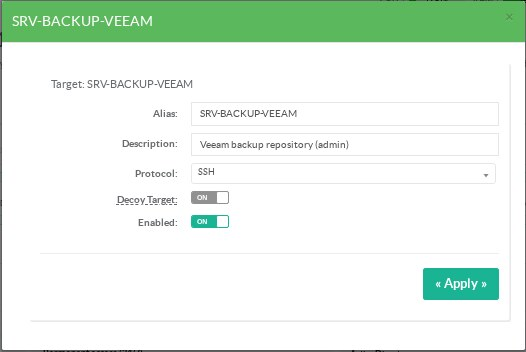
A decoy target: only the name, the description and the protocol remain.
A decoy cannot be turned back into a regular target.
Delete it and create a new target instead.
The Enabled switch of a decoy hides it from the selector or shows it again.
It does not touch the addresses already blocked.
The Decoys page
Open RDP Proxy > Decoys.
The page has two tabs.
Blocked addresses
The table lists every address blocked by a decoy: address, user, decoy, policy, start time and end time.
Click the padlock button (Lift the block) to unblock an address before the end time.
The sessions that were closed do not come back.
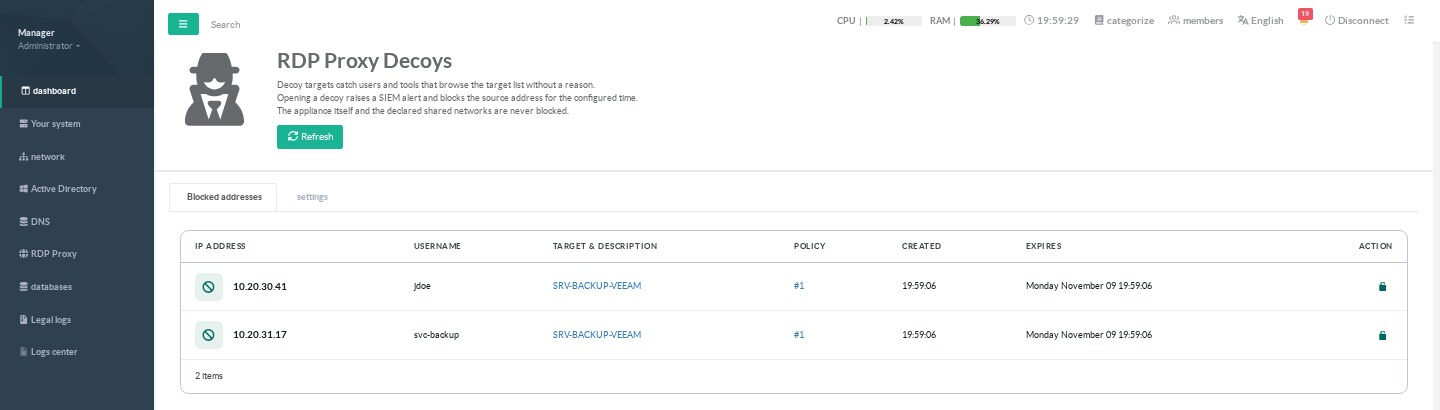
Two addresses blocked after a decoy hit.
The padlock button lifts the block.
The list stays usable when the bastion is managed by Artica Meta.
Blocked addresses are local to each bastion.
Settings
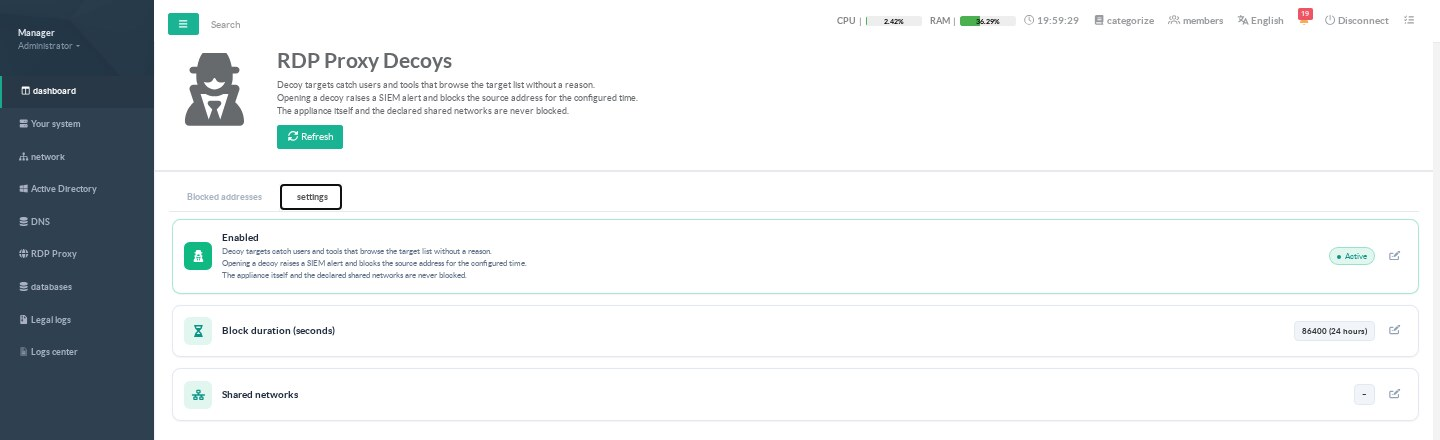
The three decoy settings.
| Setting | Default | Meaning |
|---|---|---|
| Enabled | Yes | When disabled, decoys are hidden from users. Addresses already blocked stay blocked until they expire or are lifted. |
| Block duration (seconds) | 86400 | From 300 to 604800 seconds (7 days). |
| Shared networks | Empty | IP addresses or CIDR ranges, IPv4 or IPv6, separated by commas or line breaks. These addresses are never blocked. |
When you add an address to Shared networks, a block already in place for it is lifted within 5 minutes.
The alert
The alert goes to syslog with the program name rdpproxy.
The forwarding rules of Syslog > Remote servers send it to your SIEM, for example Splunk.
rdpproxy[4022044]: DECOY HIT user=quentin.touzeau ip=192.168.1.142 target=SRV-BACKUP-VEEAM id=124 policy=1 blocked=true reason=none expires=1794244651
blockedtells whether the address was blocked.reasonexplains why it was not blocked, ornone.expiresis the end of the block, as a Unix timestamp.
The Artica SIEM receives the same event as decoy_hit.
The history also records a refused access with the reason decoy_target.
Artica Meta
The RDS Proxy policy of Artica Meta carries the decoys with the targets, and the three settings in the Decoy targets section.
In the Meta targets editor, tick Decoy target to create one.
Upgrade the bastions before you add decoys to a Meta policy.
An older bastion does not know the decoy flag.
REST API
| Method and route | Use |
|---|---|
POST /rdpproxy/targets with "decoy":"1" |
Create a decoy. |
GET /rdpproxy/decoys/bans |
List the blocked addresses. |
DELETE /rdpproxy/decoys/bans/{ip} |
Lift a block. |
GET /rdpproxy/decoys/settings |
Read the settings. |
POST /rdpproxy/decoys/settings |
Change the settings. Refused with 423 when the bastion is managed by Artica Meta. |
Limits
- A user who types the name of a decoy instead of choosing it in the selector gets a plain refusal, with no alert.
- An insider who knows the decoys can avoid them.
Vary the names and keep the list confidential. - An administrator who opens a decoy out of curiosity triggers a real block.
Lift it from the Decoys page.