Explaining and optimizing the Artica AI appliance
Where the time of an Artica AI appliance goes, what Artica does for speed, and how to tune the model server, the hardware and the client appliances.
This page explains where the time of an Artica AI appliance goes, and how to make it answer faster.
It is meant for administrators who already run an AI appliance.
For the concepts and the installation, read Artica AI appliance first.
How the AI appliance works
The AI appliance runs Ollama with the model qwen2.5:7b-instruct.
The model is stored in 4 bits per weight (about 4.4 GB) and stays loaded in memory.
It is computed by the processor, with the AVX2 instructions.
Ollama listens on 127.0.0.1:11434 only.
The other appliances reach it through an HTTPS gateway on port 11443, which checks their address first.
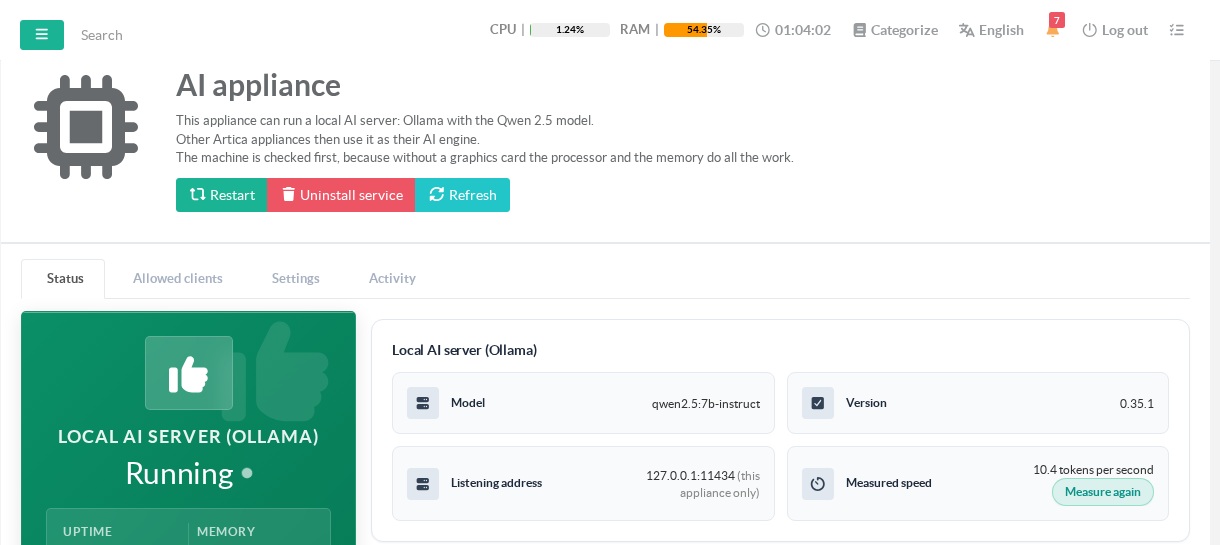
The Measured speed is the writing speed of the model, measured on a short answer.
Measure again runs the test once more, for example after a change of hardware.
Where the time goes
Every answer has two phases.
| Phase | What happens | Order of magnitude on a processor |
|---|---|---|
| Reading | The model reads the text it receives: instructions, question, results of the checks. | 40 to 50 tokens per second |
| Writing | The model writes its answer, one token after the other. | 6 to 10 tokens per second |
A token is about three quarters of a word.
The Artica AI assistant sends long instructions: its rules and the list of the checks it may run, about 9000 tokens.
Read from scratch, they take three to four minutes.
Then each step of an investigation reads a few hundred new tokens and writes 50 to 200.
A step therefore takes about 20 to 30 seconds, and a short diagnosis 20 to 60 seconds.
Figures measured on a virtual machine with 16 vCPU (Intel Xeon E5-2673 v4, 2.3 GHz) and 15.6 GB of memory.
What Artica already does for speed
- Instructions read once.
The instructions are identical from one question to the next.
The AI appliance keeps the result of their reading, and each new question only reads what changed. - Warm-up.
Each client appliance sends its instructions when its Artica AI service starts, then every 10 minutes.
While they are kept, this costs a few seconds.
After a restart of the model server, the warm-up pays the minutes of reading instead of the next administrator. - Compact instructions.
The list of checks is sent without any layout space. - No time limit in the terminal.
The Web console asks the question in the background and fetches the answer when it is ready. - Tolerant reading of the answers.
Small formatting slips of a local model are corrected instead of ending the investigation.
Client appliances of the same version share the same instructions.
Appliances of different versions each need their own warm-up.
Settings of the model server
Open Your system > AI appliance > Settings.
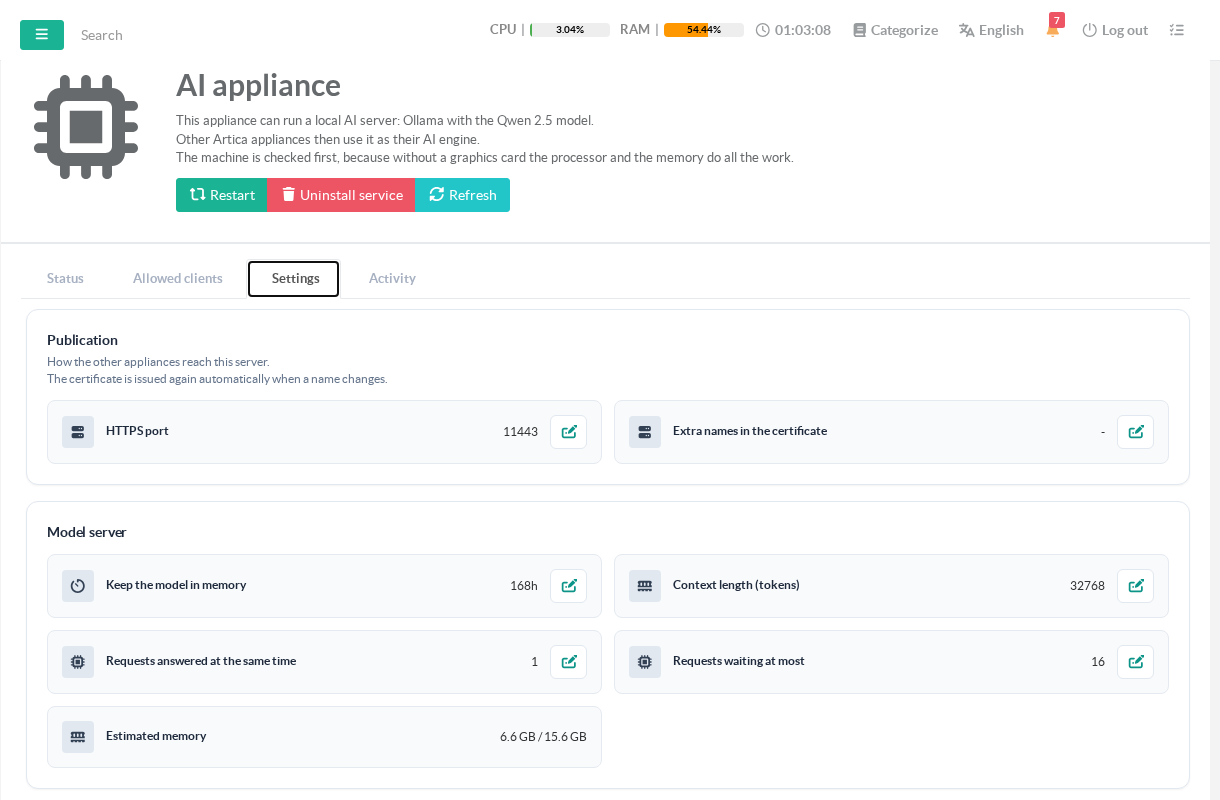
Click a value of the Model server section to change it.
Saving restarts the model server: answers in progress are lost.
Hover a label to read its explanation.
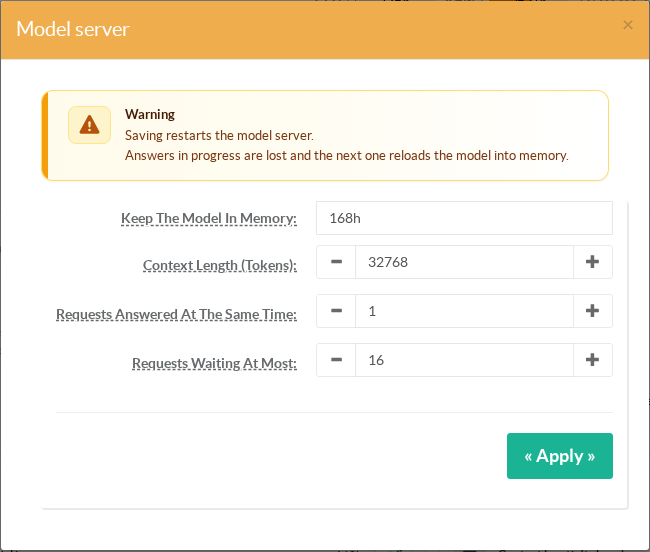
| Setting | Recommended | Why |
|---|---|---|
| Keep the model in memory | 168h (the default and the maximum) | A model that leaves memory also loses the instructions it had read. The next answer then waits for the model to load and for the instructions again. |
| Context length (tokens) | 32768 (the default) 16384 at least |
The context must hold the instructions, the question and every step of the investigation. Below 16384, the model only sees the end of the instructions and every investigation ends in a protocol error. The page then shows Too short for the Artica AI assistant. |
| Requests answered at the same time | 1 | On a processor, two questions at once share the same cores. Each one is slower, and the memory of the context is reserved twice. |
| Requests waiting at most | 16 (the default) | Questions above this number are refused at once with a "busy" answer. Raise it only with many client appliances. |
Estimated memory adds the model, the context and the server itself.
With the recommended values it is about 6.6 GB.
Each additional 1000 tokens of context costs about 57 MB.
Appliances installed before the current defaults may still have a context of 8192 and 24h in memory.
Change both values on these appliances.
Hardware and virtualization
The Hardware check of the Status tab compares the machine with what the model needs.
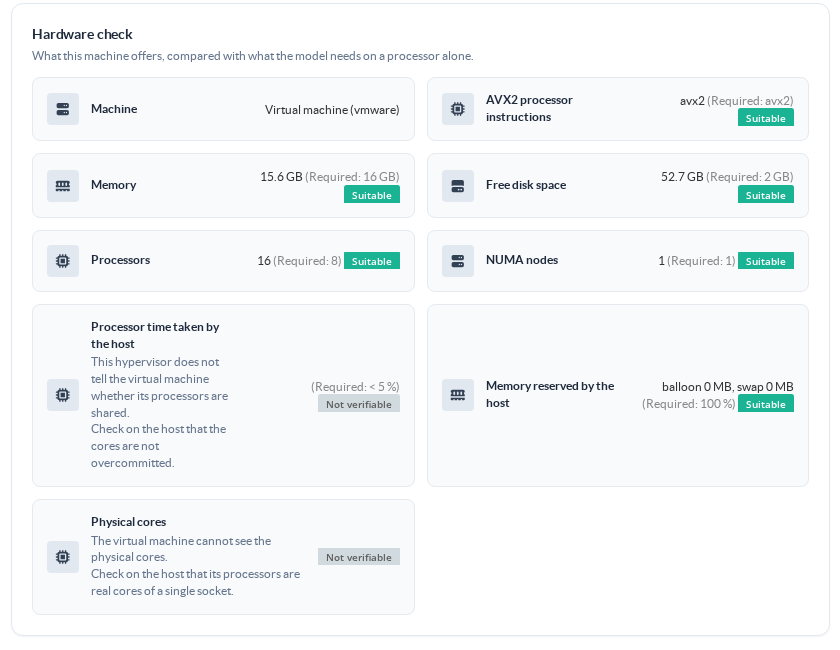
- Memory bandwidth decides the writing speed.
Each written token reads the whole model in memory.
A host with more memory channels and faster memory writes faster. - Cores decide the reading speed.
Give the virtual machine real cores of one socket, not hyper-threads of several sockets.
Ollama uses all of them: on the test machine, 16 threads read 51 tokens per second, 12 threads 40, and 8 threads 28. - Reserve the processors.
An overcommitted host takes processor time away from the model.
The virtual machine cannot always see it: Not verifiable means you must check it on the hypervisor. - Reserve the memory.
Ballooning or swapping on the host makes every token slower.
Set a full memory reservation for the virtual machine. - One NUMA node.
A model spread over two memory nodes pays the link between them on every token. - The disk does not matter once the model is loaded.
The model is already stored in the format best suited to AVX2 processors.
Changing its quantization would bring almost nothing.
Settings of the client appliances
On each client appliance, in Your system > Artica AI:
- Answer timeout (card Engine and language model): 600 seconds, set by the quick connection.
- Investigation timeout (card Assistant agent): 600 to 900 seconds.
The investigations started by incidents need more time with a local model than with a hosted API. - Incident investigations per hour: each one occupies the AI appliance for about a minute.
With many client appliances, lower it so that questions asked by administrators are not queued behind them.
See Connecting an Artica appliance to the Artica AI appliance for the connection itself.
Monitoring
- The Activity tab counts the answered and refused requests of each client appliance.
- The model server writes its log in
/var/log/artica-localia/ollama.log.
Linesprompt eval timeandeval timegive the reading and writing speeds of each request.
A linetruncating input promptmeans that the context is too short.
Troubleshooting
| Symptom | Cause and fix |
|---|---|
| Every investigation ends in a protocol error | The context is too short. Set it to 32768. |
| The first question after a restart is very slow | The instructions are read again. Wait for the warm-up of the client appliances, a few minutes. |
| Answers are slow every morning | The model left memory overnight. Keep it in memory 168h. |
| Clients receive "busy" answers | Too many questions at once. Raise Requests waiting at most, or lower the incident investigations per hour on the clients. |
| The measured speed dropped | The host takes processor time or memory away from the virtual machine. Check the reservations on the hypervisor, then click Measure again. |
See also
- Artica AI appliance: concepts, prerequisites and use cases.
- Installing an Artica AI appliance.
- Connecting an Artica appliance to the Artica AI appliance.
- Artica AI.