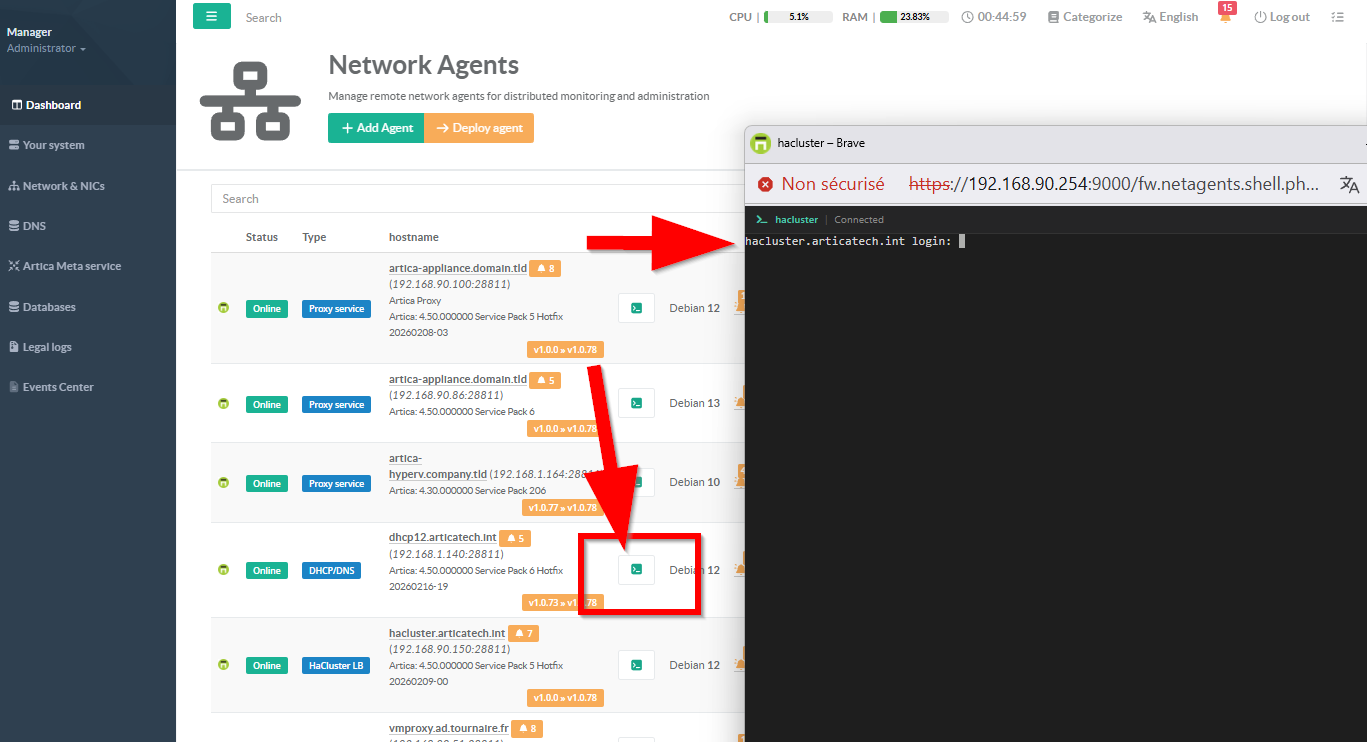
Artica Meta: Remote Shell — Instant Terminal Access
Open a secure interactive terminal to any managed server directly from the Artica Meta Administration Console
Get a Full Unix shell access over WebSocket — not a restricted command runner, not a web-based file manager.
This feature is available on Artica v4.50 Service Pack 7 or Artica v4.50 Service Pack 6 Hotfix 20260223-00
and requires remote Agent v1.0.78 ( available in Hotfix )
Provide a real terminal with:
- Full PTY allocation (colors, cursor control, tab completion)
- Instant keystroke delivery (no polling, no delays)
- Dynamic terminal resize (adapts to your browser window)
Access to the terminal is limited to 5 sessions at the same time.
Unlike SSH, which relies on a single password or key, Remote Shell stacks multiple independent security layers:
- TLS 1.3 encryption (ECDSA P-384)
- mTLS certificate authentication (client + server)
- IP whitelist filtering (network boundary)
- Unix /bin/login authentication (OS credentials + PAM)
- On the main agent table, you will see a
shell green icon. - Click on it in order to get access to the remote shell of the target server