Artica Meta InstantServicePack
InstantServicePack is a feature that allows you to quickly upload an Artica Service Pack in order to deploy it to a group of clients.
InstantServicePack is a feature that allows you to quickly upload an Artica Service Pack in order to deploy it to a group of clients.
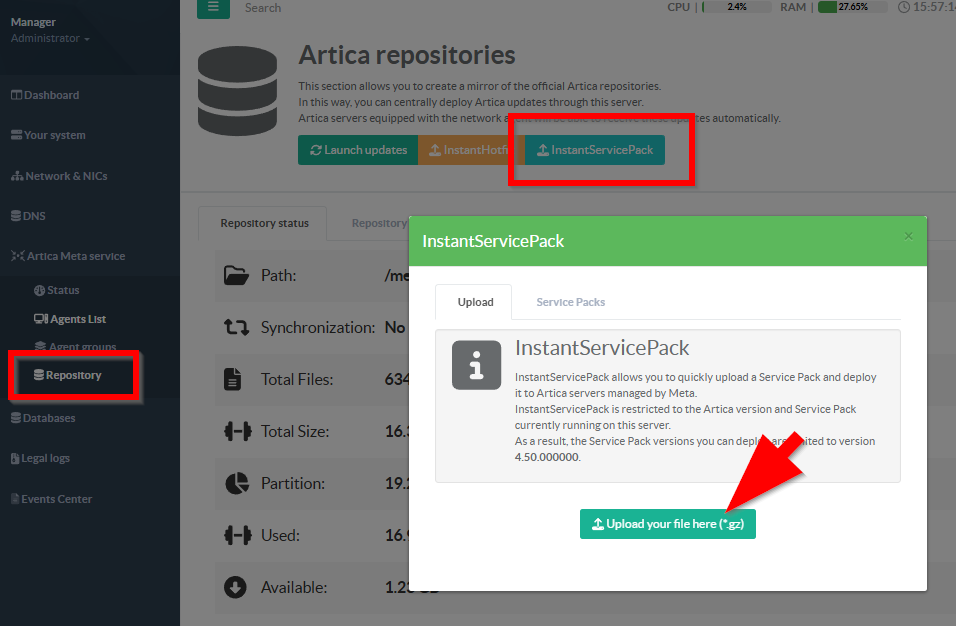
InstantServicePack allows you to quickly upload a Service Pack and deploy it to Artica servers managed by Meta.
Limitation: InstantServicePack is restricted to the Artica version and Service Pack currently running on this server.
Upload the Service Pack into the system
- On the left menu, got to
Artica Meta Service > Repository - Click on the InstantServicePack button
- Click on Upload Your file here, and select the file
ArticaPXX.tgzfile downloaded from the Service Packs section
Deploy the Service pack to clients
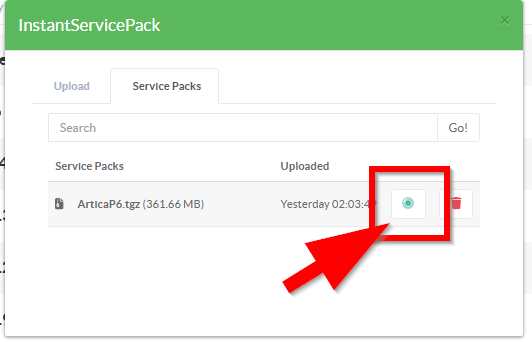
- Click on the Service Packs tab
- Click on the CD-ROM icon.
- In the Agents, check nodes you want to upgrade and click on Push update button
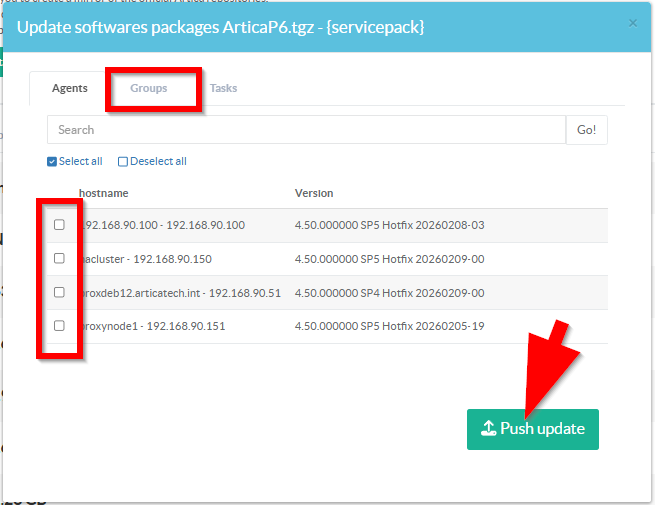
- If you want to launch the update to a node group, use the Groups tab.