Why rsyslog shows open UDP ports
Why rsyslogd shows up on random UDP ports in the Open ports page, and what to check instead
On the Open ports page (
Your system > Network interfaces > Open ports) you will usually find several UDP entries owned by rsyslogd, on high, apparently random port numbers, each flagged Publicly exposed.
Their numbers change every time the syslog service restarts.This is expected, and those ports are not services.
This page explains what they are, why the console shows them, how to confirm it on your own appliance, and what actually deserves your attention instead.
What you are looking at
A typical listing on an appliance looks like this:
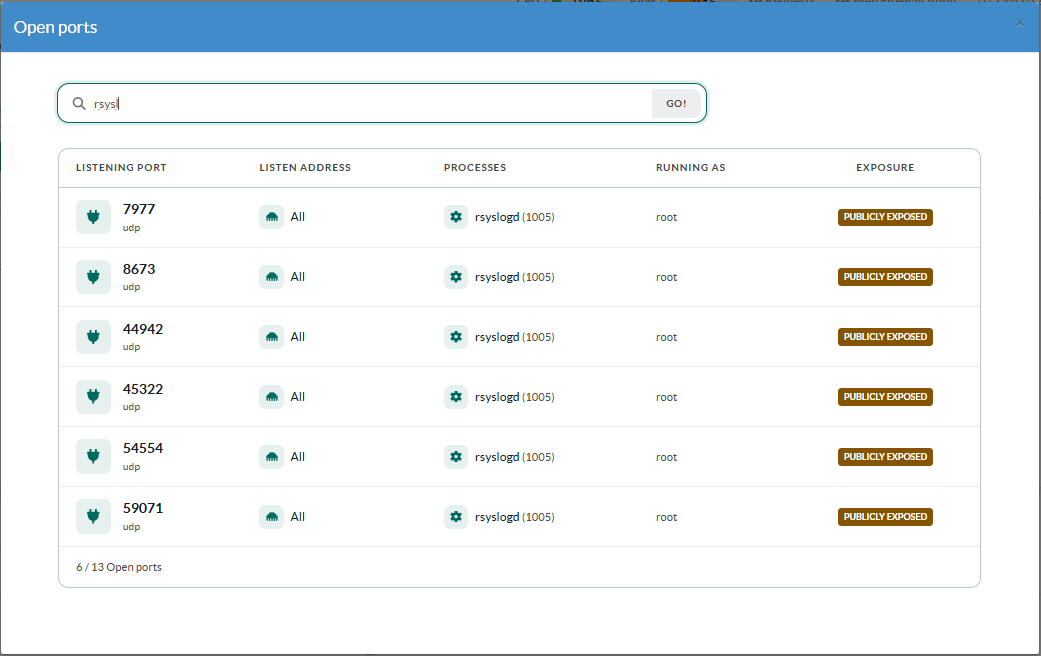
Every one of these is a sending socket: the socket rsyslog writes out of, not one it reads from.
Nothing on the appliance is offering a service on those ports.
Why rsyslog holds these sockets
Artica routes its internal events through rsyslog.
Roughly twenty rsyslog actions forward messages to the Artica daemon over UDP — the proxy access events, the eight DecisionIP rule sets, the authentication log, the DNS firewall, CrowdSec, Redis, and so on. Each one is declared in configuration to listens 127.0.0.1
Three consequences follow, and together they produce exactly what the console displays:
- One socket per active action.
rsyslog opens the socket the first time an action actually emits a message, so you see fewer sockets than you have actions declared
only the log sources that have produced traffic since the last restart. - No source address is specified,
The kernel binds the socket to0.0.0.0(all interfaces) and picks any free port.
That is where the Publicly exposed badge comes from: the console reports the bind address, and0.0.0.0means "every interface". - The destination is always
127.0.0.1:5516,
The Artica daemon's own ingest socket.
The traffic itself never leaves the appliance — only the socket is bound broadly.
Why the port numbers look the way they do
Two details surprise administrators, and both have a simple explanation.
The numbers change after every restart.
These are ephemeral ports assigned by the kernel, not configured values.
Restart the syslog service and you will get six different numbers.
Nothing can depend on them, and no firewall rule should ever reference them.
Some of them are surprisingly low — 7977 or 8673 sit well below the range most administrators expect.
That is because Artica widens the ephemeral range:
# sysctl net.ipv4.ip_local_port_range
net.ipv4.ip_local_port_range = 1024 65535
The Linux default is 32768 60999;
Artica sets 1024 65535 in /etc/sysctl.conf so that a busy appliance never runs out of source ports.
A four-digit port is therefore not evidence of a service on an Artica appliance.
Check this setting before drawing any conclusion from a low port number.
Why the console lists them at all
The Open ports page reads the kernel socket tables directly (/proc/net/tcp, tcp6, udp, udp6) and maps each socket back to its process through /proc/<pid>/fd.
For TCP, a socket is only reported when it is in the LISTEN state — established connections are filtered out, because they are not a service the machine offers.
UDP has no equivalent.
It is connectionless: there is no LISTEN state, and the kernel exposes no flag distinguishing a socket a process reads from one it only writes to.
A sending socket and a real UDP server are indistinguishable in /proc/net/udp — and in the output of ss, netstat or nmap, which face the same limitation.
Any UDP socket bound to a non-loopback address is therefore listed.
Sockets bound only to
127.0.0.1or::1are excluded from the page, since they cannot be reached from the network.
rsyslog's forwarding sockets are not in that case only because no source address was requested.
Is this a security risk?
No datagram sent to those ports is ever processed.
rsyslog never reads from a forwarding socket — it only writes to it.
A packet arriving from the network sits in the socket's receive buffer, which is bounded by the kernel, and is then discarded.
There is no path by which an outside party can inject log entries, reach a parser, or influence the appliance through these ports.
What remains is unnecessary attack surface in the strict sense:
a port scan will report them, and they will appear in an audit as open UDP ports with no matching service.
That is a reporting nuisance, not an exploitable weakness — but it is a fair question to raise, and it points at the check that genuinely matters.
Conversely, on an appliance with a normal firewall policy these sockets are unreachable from outside and the entry on the Open ports page is purely informational.
Summary
- The UDP ports shown for rsyslogd are outbound sockets used to forward internal events to the Artica daemon on
127.0.0.1:5516. - They are bound to
0.0.0.0because no source address is requested, which is why the console marks them Publicly exposed. - They appear on the page because UDP has no LISTEN state — no tool can distinguish a sending socket from a server.
- Low port numbers are normal: Artica sets the ephemeral range to
1024–65535. - Nothing reads them, so no traffic sent to them is processed.
- The meaningful check is your firewall's INPUT policy, not these individual ports.