Transport Security lets you publish, host, validate and continuously monitor the four modern e‑mail transport‑security standards for every mail domain your Artica SMTP gateway serves — from a single page, without hand‑editing DNS zones or Postfix configuration files.
The four standards it manages are:
- MTA‑STS (RFC 8461) — tells sending servers that mail to your domain must use verified TLS, and stops silent fall‑back to clear text.
- TLS‑RPT (RFC 8460) — asks the big providers to send you daily reports about the TLS sessions they open to your domain, so you can see failures before they hurt.
- DANE / TLSA (RFC 7672) — on outbound mail, verifies the recipient server against its published certificate fingerprint and defers rather than downgrades when verification fails.
- BIMI — publishes your organization’s logo so it appears next to your messages at BIMI‑capable providers.
You reach it from the WebConsole under the SMTP service — the page is titled Transport security.
¶ Why it matters — benefits
- No more silent TLS downgrade.
Attackers on the path can strip STARTTLS and read your mail in clear. MTA‑STS (inbound) and DANE (outbound) close that hole.
- Copy‑paste, no zone‑file surgery.
The appliance generates every DNS record as an exact value and hosts the artifacts that must be hosted (the MTA‑STS policy document is served over HTTPS for you).
You only paste the records at your DNS provider.
- It watches your back 24/7.
The gateway validates every published record and document from the outside and raises an alert the moment something drifts — in particular when a mail‑server certificate change breaks a published TLSA record, before senders start refusing your mail.
- Visibility you never had.
TLS‑RPT reports turn “is anyone failing TLS to us?” into a dashboard with per‑reporter, per‑failure‑type trends.
- Safe by design.
Outbound DANE is opportunistic and preflight‑gated:
it never downgrades and never blocks a whole queue — it only defers to destinations that publish DANE and fail verification.
- Per Postfix instance.
Everything is scoped to the selected instance, so multi‑instance gateways keep each tenant’s posture isolated.
- Brand trust.
The BIMI assistant gets your verified logo into inboxes once your DMARC posture qualifies.
¶ The four standards at a glance
| Standard | Direction | What it does | What you publish / host |
|---|---|---|---|
| MTA‑STS | Inbound | Forces verified TLS to your domain; senders refuse to downgrade. | A _mta-sts TXT record + an HTTPS‑hosted policy document (hosted by the appliance). |
| TLS‑RPT | Inbound | Receives daily aggregate TLS reports from providers. | A _smtp._tls TXT record pointing at the reporting address the gateway manages. |
| DANE / TLSA | Outbound | Verifies recipient servers against DNSSEC‑signed certificate fingerprints; defers on failure. | A _25._tcp.<mx> TLSA record per mail host (and the enforcement toggle on the gateway). |
| BIMI | Inbound (brand) | Shows your logo beside your messages at supporting providers. | A default._bimi TXT record + the SVG logo (hosted by the appliance). Requires DMARC at enforcement. |
¶ The dashboard
The Overview tab is a matrix: one row per mail domain, one column per standard, with a colour‑coded state in each cell so you can read your whole estate at a glance.
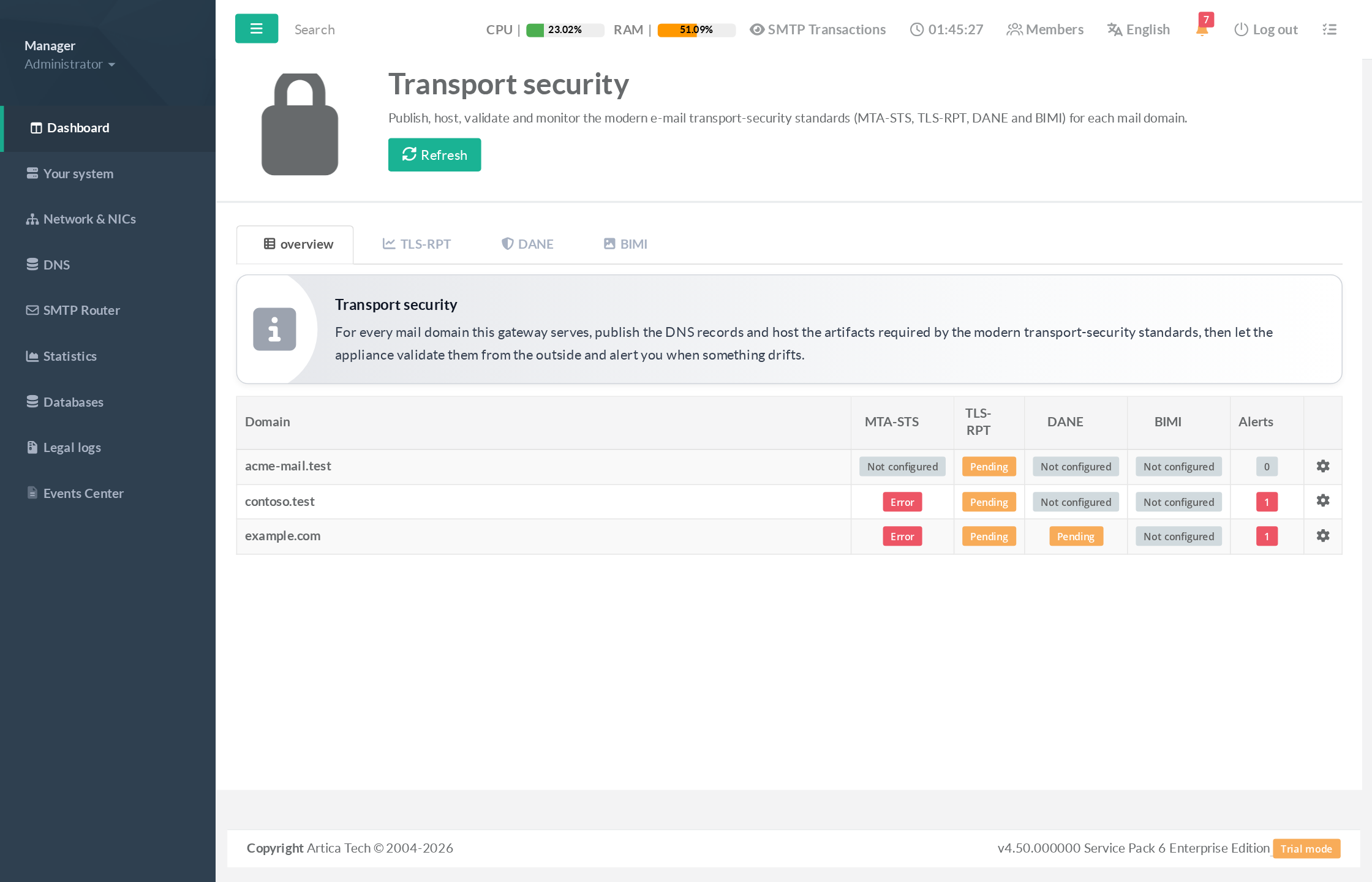
Cell states:
- Not configured — the standard is off for that domain.
- Pending — configured, waiting for the DNS record to appear / propagate (this is normal right after setup, not an error).
- Testing / Enforced — MTA‑STS is live in that mode and validated.
- Error — something needs attention (for example, no certificate covers the policy host — see below).
The Alerts column shows how many open issues each domain has.
Click any row to open its setup.
¶ Configuring a domain (MTA‑STS, TLS‑RPT, TLSA)
Clicking a domain opens the per‑domain setup. Turn on the standards you want, list your mail hosts (MX), pick the certificate for the policy host, then apply.
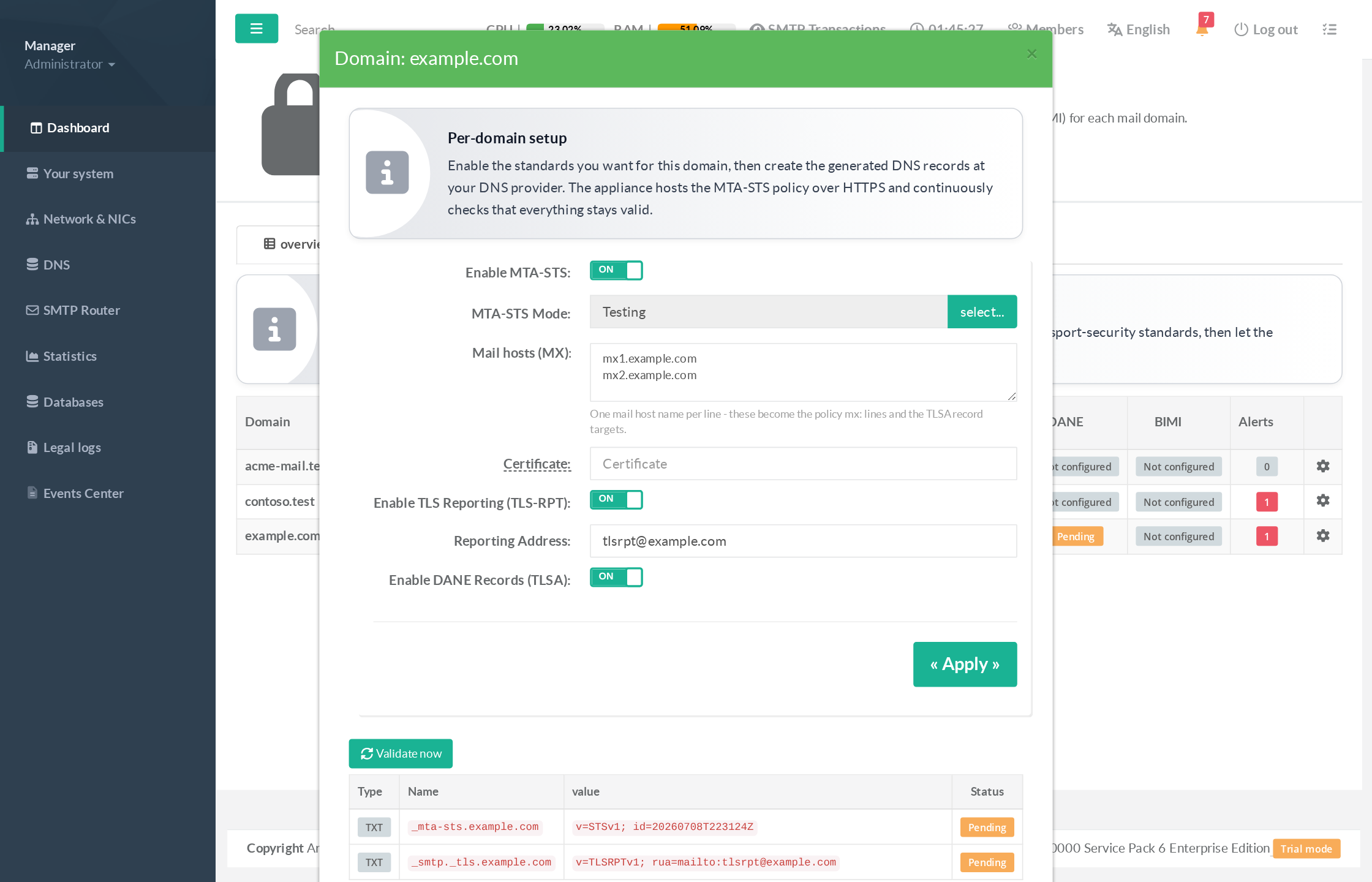
- Enable MTA‑STS and choose a mode: Testing (recommended first — failures are reported but mail still flows) or Enforce once your reports are clean.
- Mail hosts (MX) — one host per line. These become the policy
mx:lines and the TLSA record targets. - Certificate — the name of the certificate (from the Certificates Center) that covers
mta-sts.<your‑domain>.
If none covers it, the domain is flagged blocked so a broken policy is never published — create or import one first. - Enable TLS Reporting and, optionally, adjust the reporting address (defaults to
tlsrpt@<domain>). - Enable DANE Records (TLSA) to generate the
3 1 1fingerprint records for each mail host.
The records table below the form gives every DNS value to copy‑paste, with a live status badge per item.
Create them at your DNS provider, then click Validate now:
The appliance fetches each record and the hosted policy from the outside and turns the badges green.
Certificate‑rotation guard.
After a domain is live, if a mail‑server certificate is replaced and its published TLSA record no longer matches, the gateway raises a TLSA drift alert — with the corrected record value to publish — before senders start refusing your mail.
¶ TLS‑RPT reporting dashboards
Once the TLS‑RPT record is published, large providers start mailing daily aggregate reports to the address the gateway manages. Artica ingests them off the mail path, de‑duplicates them, and charts them.
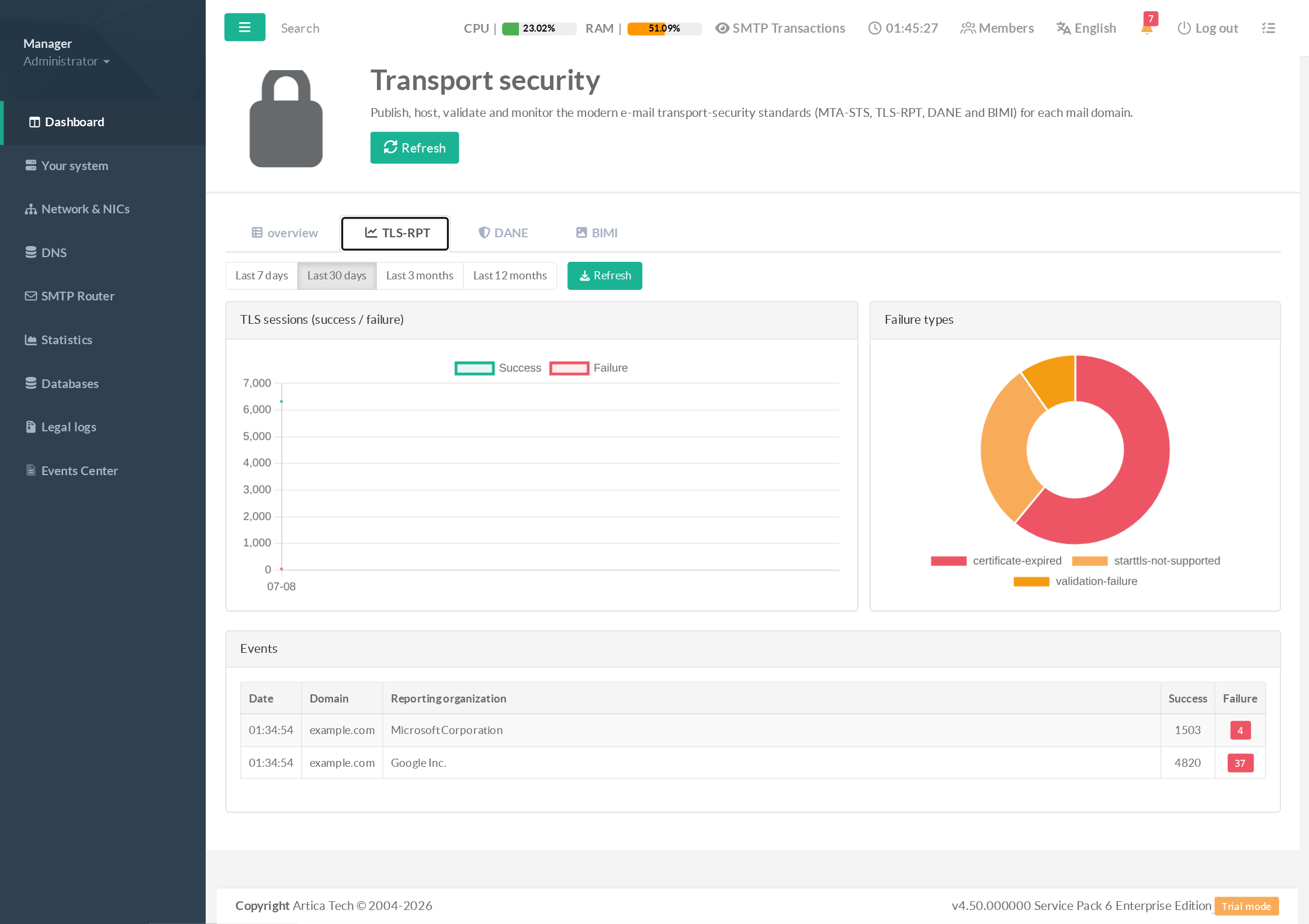
- TLS sessions — successful vs. failed sessions over the selected period (last 7 days / 30 days / 3 months / 12 months).
- Failure types — a breakdown (certificate‑expired, starttls‑not‑supported, validation‑failure, …) that points straight at the root cause.
- Events — the individual reports, per reporting organization (Google, Microsoft, …), with success/failure counts.
When the failure ratio for a domain exceeds your configurable threshold, an alert is raised naming the domain, the dominant failure type and the top reporter — this is the feedback loop that tells you it is safe to move MTA‑STS from Testing to Enforce.
¶ Outbound DANE enforcement
The DANE tab protects the mail you send: when a recipient domain publishes DANE (TLSA) records, the gateway verifies the presented certificate against them and defers delivery instead of downgrading when verification fails.
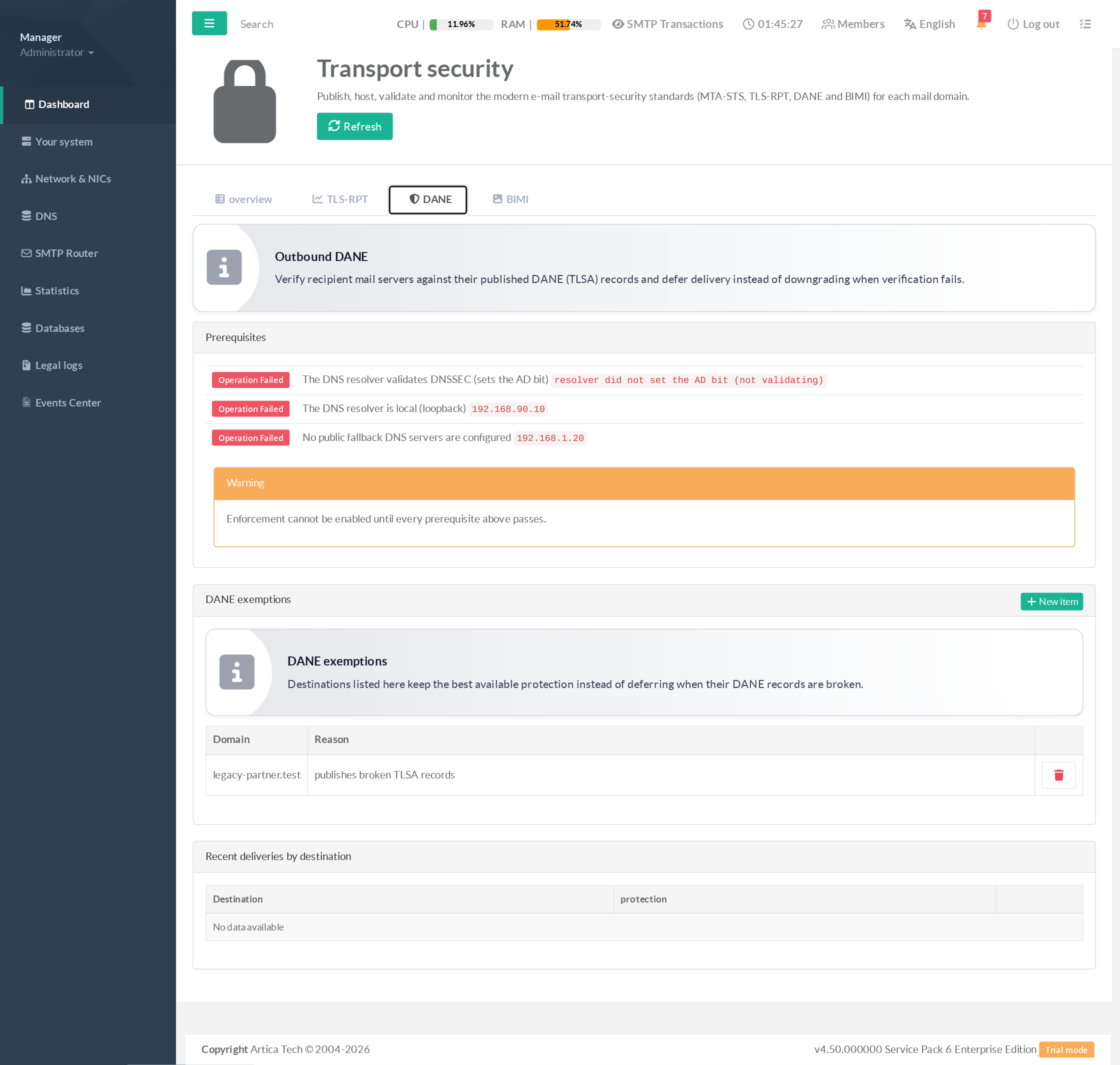
- Prerequisites (preflight).
DANE trust depends on DNSSEC validation.
The page checks that your resolver validates DNSSEC (sets the AD bit), is local, and has no public fallback that would answer without validation.
Enforcement cannot be enabled until every prerequisite passes — this prevents a false sense of security.
- Never downgrade.
Enforcement is opportunistic: destinations that publish DANE get mandatory verified TLS (and defer on failure);
Everyone else keeps normal opportunistic TLS. It never blocks a whole queue.
- Exemptions.
If a specific destination publishes broken records, add it to the exemption list — it keeps the best available protection instead of deferring.
Each exemption records who added it and why.
- Recent deliveries by destination shows the protection level actually applied to your outbound mail, so you can prove verified delivery.
¶ BIMI assistant
The BIMI tab helps you get your organization’s logo into inboxes at supporting providers.
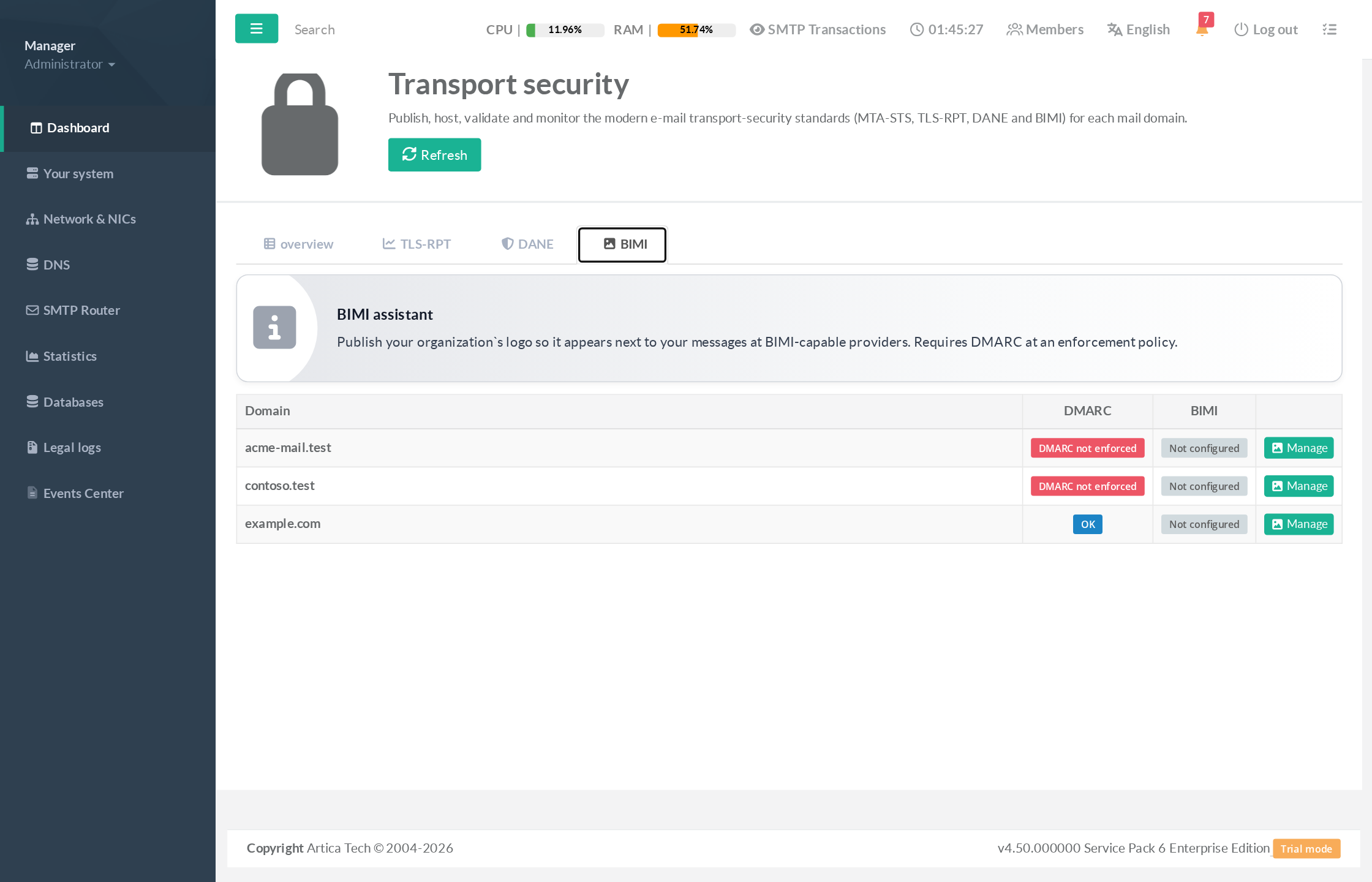
- DMARC prerequisite.
BIMI requires DMARC at an enforcement policy (p=quarantineorp=reject).
The assistant checks each domain’s live DMARC and blocks setup with a clear reason when it is not enforced — you cannot publish a logo that providers will ignore.
- Logo & record.
Upload the logo in the required SVG Tiny‑PS profile (validated for you: no scripts, no external references, size‑limited); the appliance hosts it and generates the exactdefault._bimirecord to publish.
¶ Typical use cases
- “Make our inbound mail un‑downgradable.”
Enable MTA‑STS in Testing, publish the records, watch TLS‑RPT for a week, then promote to Enforce in one click.
- “A partner complains our TLS keeps failing.”
Open the TLS‑RPT dashboard, filter to the domain, read the dominant failure type (expired cert? no STARTTLS?) and the reporter — root‑cause in minutes instead of weeks.
- “We must guarantee verified delivery to sensitive recipients.”
Fix the resolver so the DANE preflight passes, enable outbound DANE, and use Recent deliveries by destination as proof.
- “We rotated a mail‑server certificate.”
The TLSA‑drift alert tells you immediately if the published record no longer matches, and gives you the corrected value — no surprise NDRs.
- “Marketing wants our logo in Gmail/Yahoo.”
Once DMARC is at enforcement, the BIMI assistant validates, hosts the logo and hands you the record.
- Multi‑tenant gateways.
Configure each Postfix instance independently — the whole page is scoped by instance‑id, so one tenant’s domains and enforcement never leak into another’s.
¶ Continuous validation & alerts
You don’t have to remember to re‑check anything. The gateway re‑validates the drift‑prone items every few minutes and does a full pass hourly. Any published item that becomes invalid — an unreachable policy document, a mismatched TLSA record, a TLS‑RPT failure spike — raises an alert on the affected domain, and clears it automatically when the item is healthy again.
¶ Prerequisites summary
- MTA‑STS / BIMI hosting: a certificate covering
mta-sts.<domain>(from the Certificates Center). Without it, publishing is blocked (never broken). - DANE enforcement: a local, DNSSEC‑validating resolver with no public fallback (the preflight verifies this).
- BIMI: DMARC at
p=quarantineorp=reject, and a conforming SVG Tiny‑PS logo. - DNS: you publish the generated records at your own DNS provider — the appliance never writes to DNS, only generates and validates.