Address Rewriting lets your SMTP gateway rewrite e-mail addresses on the fly — the sender, the recipient, or both — as messages pass through SMTP gateway.
The most common use is to turn a locally valid address such as
user@server01.internal.laninto a globally valid one such asuser@company.comwhen mail leaves your organisation for the Internet.
Everything is driven from the Web console page Address Rewriting, per Postfix instance. Artica stores your rules, renders the underlying Postfix map files, compiles them with postmap and reloads the service for you — there is no manual editing of /etc/postfix and no shell command to run.
¶ Benefits
- One clean external identity
Applications, printers, scanners and legacy systems often send asservice@host.internal.lan. Rewrite those addresses to your public domain so recipients — and anti-spam reputation systems — always see a consistent, deliverable sender.
- Transparent domain migration & rebranding
Move a whole domain (@old-brand.com→@new-brand.com) without reconfiguring a single mail client. The gateway rewrites addresses for you during the transition.
- Central recipient redirection
Redirect or normalise incoming recipients (for example a role address to a distribution list) at the gateway, independently of the mailbox server.
- Privacy & compliance
Strip internal host names and non-routable domains from outbound mail so your internal topology is never exposed on the Internet.
- Zero-file administration
Nopostmap, no hash files, nomain.cfediting. Add a rule, click Apply configuration, and Postfix is reloaded.
- Per-instance
Each SMTP instance (the SMTP Master and any additional instances) keeps its own independent rewriting table.
¶ The three rewriting modes
Every rule maps a Source pattern to a Destination pattern. You then choose one or more modes with the three switches. A rule may combine several modes at once.
| Column / switch | Postfix map | What it rewrites |
|---|---|---|
| Generic (« Outgoing Messages Only ») | smtp_generic_maps |
Rewrites addresses only on mail leaving the gateway to a remote destination (the SMTP client side). Perfect to expose a public identity to the Internet while keeping the internal address untouched for local delivery. |
| Sender | sender_canonical_maps |
Rewrites the sender address (envelope and From: header) on all mail — incoming and outgoing — as soon as Postfix ingests the message. |
| Recipient | recipient_canonical_maps |
Rewrites the recipient address on all mail, effectively redirecting messages for one address to another at the gateway. |
Rule of thumb: use Generic / Outgoing only to change how you look on the Internet without disturbing internal routing; use Sender or Recipient canonical maps when the rewrite must apply everywhere, including local traffic.
¶ Pattern syntax
Both the source and the destination accept the standard Postfix rewriting syntax:
user@domain.tld— an exact address.@domain.tld— every address of that domain (the local part is preserved when the destination is also written as@domain.tld).user— a bare local part, matching that user in any domain.
¶ Regular-expression rules (regex)
Beyond exact and domain patterns, a rule can be a regular expression. Turn on the Regular expression switch and one line matches an unbounded set of addresses, using standard Postfix regexp syntax — capture groups in the source (( … )) are replayed in the destination as $1, $2, …
The classic example is stripping a « plus » tag (sub-addressing). To turn any local+anything@domain back into local@domain:
| Field | Value |
|---|---|
| Source Pattern | ^([^+@]+)\+[^@]+@([^@]+)$ |
| Destination Pattern | $1@$2 |
| Regular expression | ON |
| Outgoing Messages Only | ON |
With that single rule, john.doe+newsletter@company.com leaves the gateway as john.doe@company.com, while john.doe@company.com is delivered unchanged.
Delimiters are optional — enter the bare expression (
^([^+@]+)\+…$) and Artica wraps it in the Postfix/ … /delimiters for you; you may also type the delimited form yourself.
¶ Preview / Test before you apply
A malformed pattern must never reach the mail flow. In the rule window, type a sample address and click Preview / Test: Artica validates the expression with Postfix’s own engine (postmap) and shows either the rewritten address or the exact error — before anything is applied. An invalid expression is refused, so a bad rule can never break delivery.
Scope — in this version the regular-expression mode applies to the Generic / Outgoing map only (the outbound rewrite). The Sender and Recipient canonical maps remain exact-match. Exact and regex rules live side by side: exact (hash) matches are consulted first, then the regular expressions.
¶ Create a rewriting rule
Click New Rule, fill in the source and destination patterns and turn on the mode(s) you need.
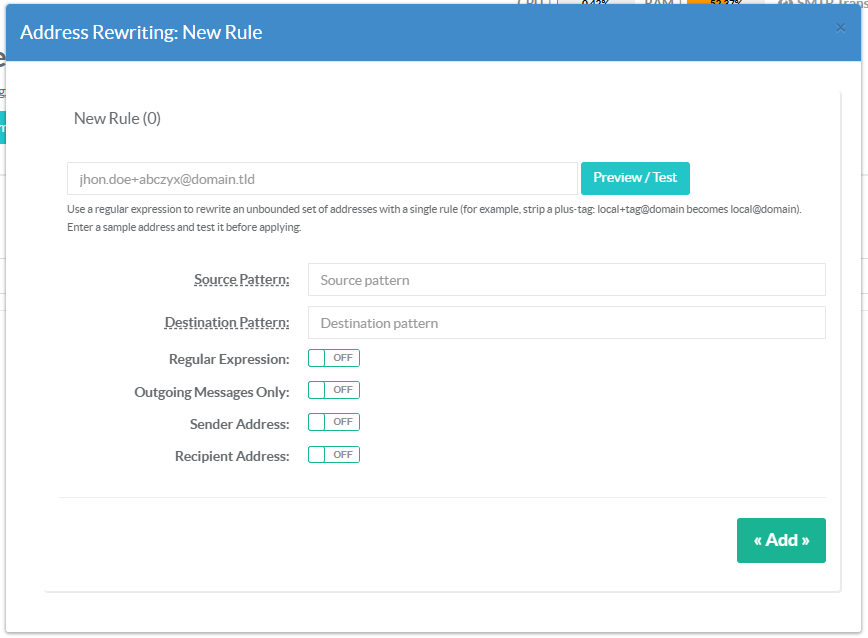
- Source Pattern — the address (or domain) to look for.
- Destination Pattern — the address (or domain) to write instead.
- Regular expression — treat the source as a regex pattern (with
$1,$2back-references in the destination); leave it off for a plain exact / domain rule. See Regular-expression rules above. - Outgoing Messages Only — enable the generic map (outbound rewrite only).
- Sender Address — enable the sender canonical map.
- Recipient Address — enable the recipient canonical map.
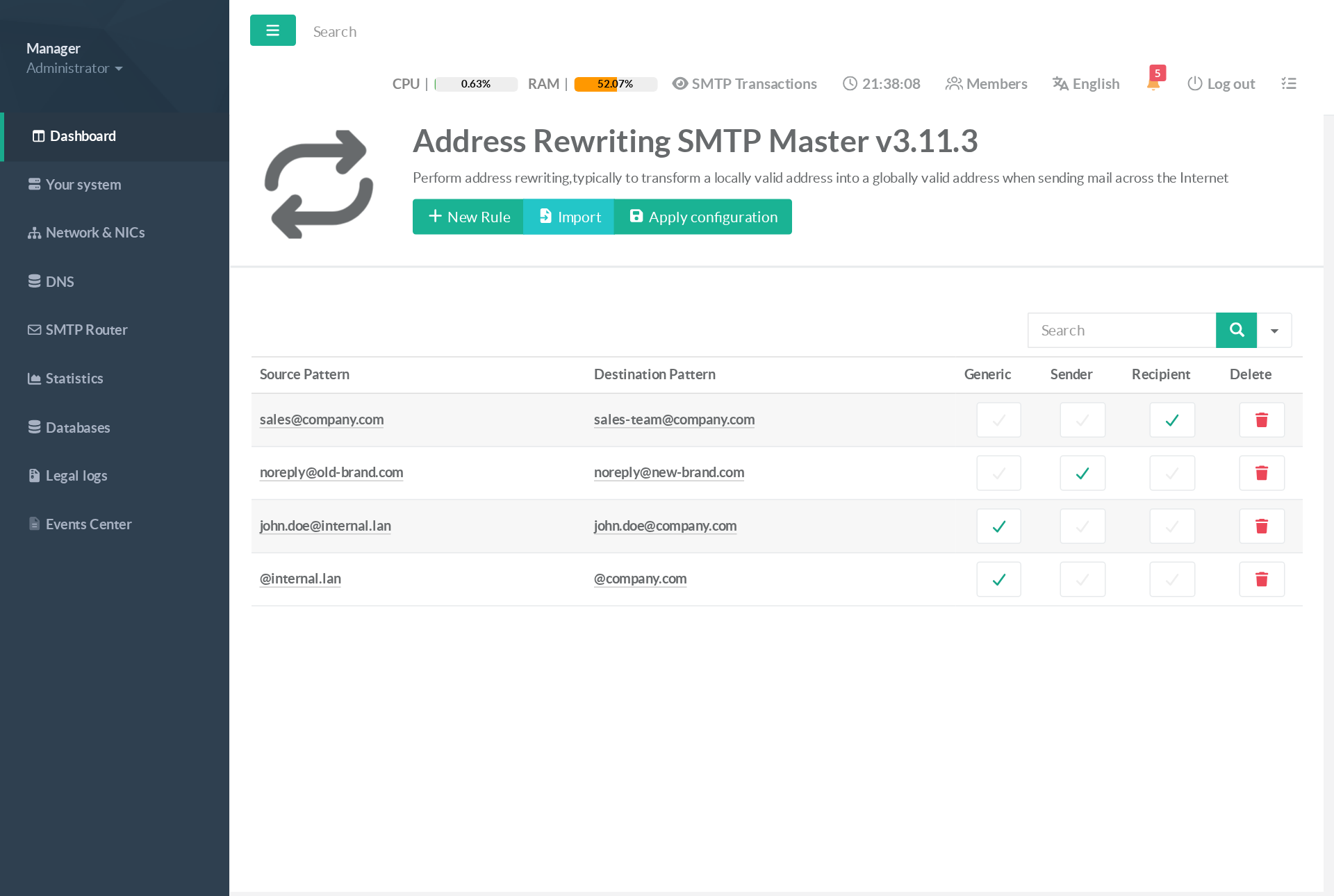
Existing rules are shown in the table; the three central columns show, at a glance, which map(s) each rule feeds. Click a source or destination cell to edit the rule, or the trash icon to remove it.
¶ Import rules in bulk
Use Import to paste many rules at once, one per line, as comma-separated values.
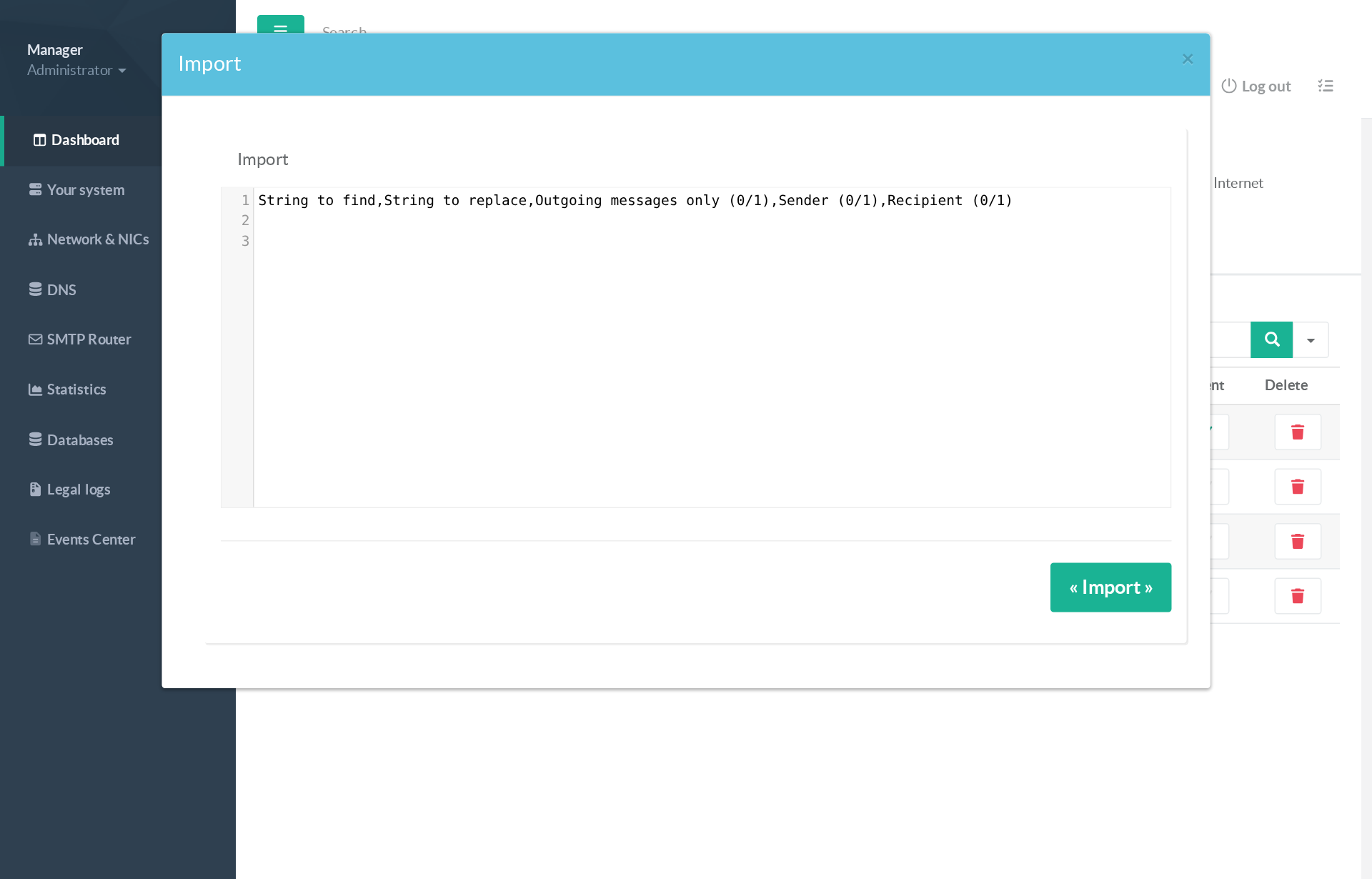
Columns, in order:
String to find , String to replace , Outgoing only (0/1) , Sender (0/1) , Recipient (0/1) , Regex (0/1)
For example:
@internal.lan,@company.com,1,0,0,0noreply@old-brand.com,noreply@new-brand.com,0,1,0,0sales@company.com,sales-team@company.com,0,0,1,0^([^+@]+)\+[^@]+@([^@]+)$,$1@$2,1,0,0,1
The instructional header line and any blank line are ignored, so you can paste your data directly under the example without creating empty rules.
¶ Apply the configuration
Adding, editing or importing rules updates the database only. Click Apply configuration to compile the Postfix maps (sender_canonical, recipient_canonical and generic) and reload Postfix. The new rules take effect immediately for the next message.
Your rules are preserved. The console is the single source of truth for the generic map: your exact and regular-expression rules are kept intact across every configuration rebuild and reload — nothing is ever silently overwritten.
¶ Use cases
- Strip « plus » sub-addressing
Normalise tagged addresses such asjohn.doe+newsletter@company.comback tojohn.doe@company.comon outbound mail with a single regular-expression rule, so external systems always see the canonical mailbox.
- Present a public sender identity
Multifunction printers and monitoring tools send asscanner@fl2-copier.lan. A Generic / Outgoing only rule rewrites them tonoreply@company.comso external recipients receive a clean, deliverable address.
- Domain migration / rebranding
During a rename, a single@old-brand.com → @new-brand.comrule (Sender + Recipient) keeps mail flowing under the new domain while users are gradually migrated.
- Recipient redirection at the gateway
Redirect a public role addresssales@company.comto an internal distribution listsales-team@company.comwith a Recipient rule — no change on the mailbox server.
- Hide internal host names
Rewrite any@*.internal.lanaddress leaving the gateway to your public domain for privacy and compliance, so your internal naming never appears in received headers on the Internet.
- Normalise bounce / no-reply addresses
Force all automated mail to a single, monitorednoreply@company.comidentity, regardless of which internal system produced it.
Note — Generic maps are the SMTP client-side rewrite Postfix applies only when relaying to a remote server; they never affect local delivery. When a rewrite must apply to every message (including internal mail), use the Sender and/or Recipient canonical maps instead.