A client that repeatedly sends threats, spam, or mail your server refuses stops reaching the mail ports altogether — for a while — and then regains access on its own.
The block happens in the firewall, before Postfix is involved at all.
- Console:
Incoming mail > SMTP AutoBlock.
¶ Why you would want it
Postfix already refuses bad mail.
The problem is what refusing costs.
Every rejected message is still a full TCP connection, a TLS handshake, a policy lookup, an RBL query, sometimes a content scan — and a host hammering your server with thousands of attempts an hour pays you nothing while consuming all of it.
Refusing at the SMTP layer is correct, and it is also the most expensive way to say no.
AutoBlock says no earlier, and much more cheaply:
- The abuser stops costing you anything.
The packet is dropped by the kernel. No process is forked, no session is opened, no log line is written.
A dictionary attack that was consuming a measurable share of your MTA becomes invisible.
- All the mail ports at once.
25, 465, 587, 143 and 993.
A client blocked on SMTP cannot simply move to submission or IMAP — which is exactly what credential-stuffing tools do when one port stops answering.
- It ends by itself.
Every block has a timer. Nobody has to remember to lift it, and a compromised machine that gets cleaned up regains access without anyone filing a ticket.
- It reacts to refusals, not to opinions.
Only mail your server actually refused counts.
A sender whose mail was delivered to a Junk folder was not refused, and is never blocked for it.
- Per Postfix instance.
On a multi-instance appliance, a client abusing one service can be blocked there while the others keep serving it.
- Everything is recorded.
Locally on the appliance and, optionally, in Artica SIEM — with who blocked what, why, and when it ended.
¶ Where it sits
The inbound chain, in the order a connection meets it:
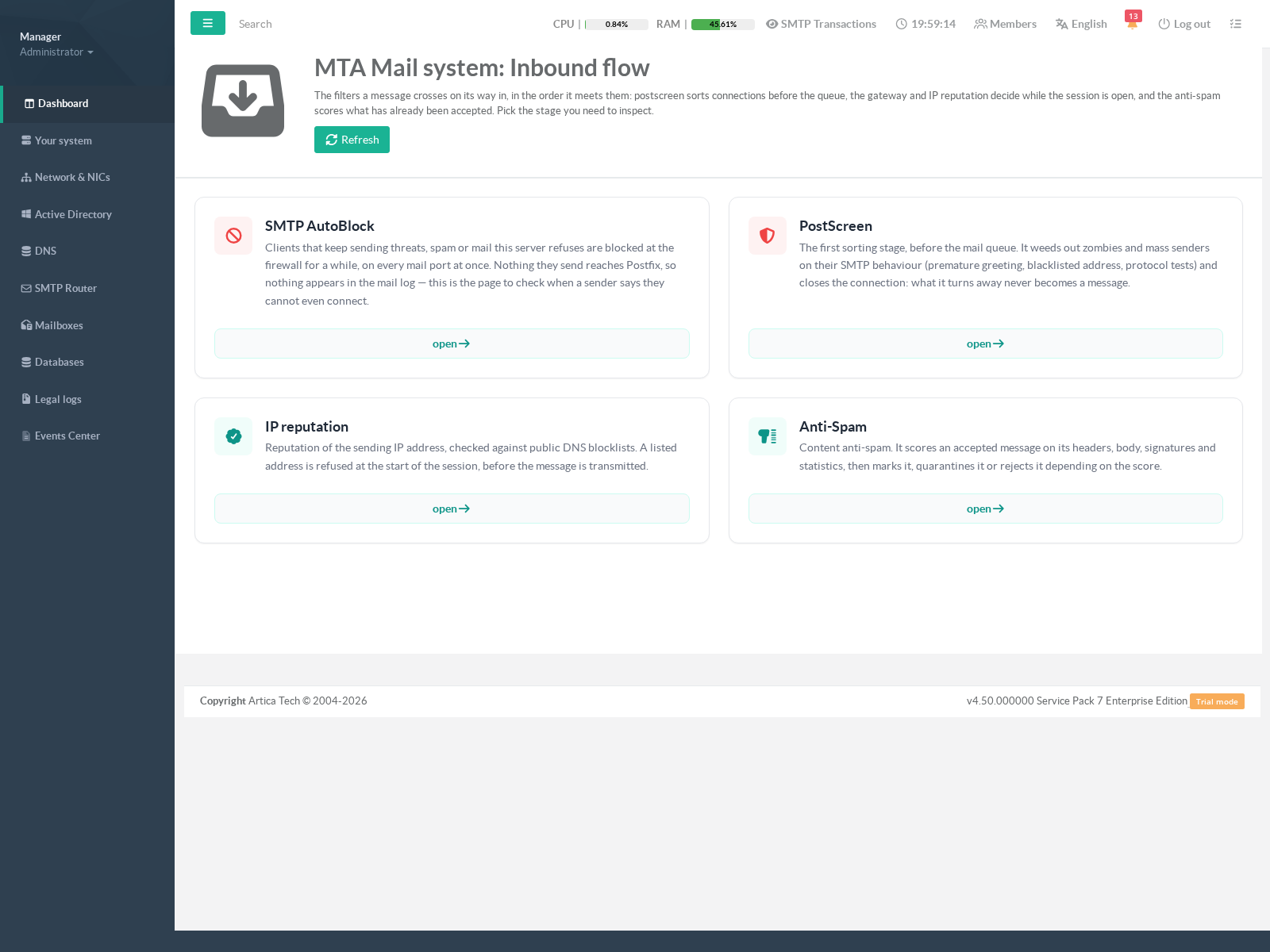
- SMTP AutoBlock — the firewall. The packet never arrives.
- Postscreen — refuses the session before the queue.
- Secure Mail Gateway / IP reputation — decide as the session opens.
- Anti-spam — scores what has already come in.
This ordering matters when you troubleshoot.
AutoBlock is the only stage that leaves nothing at all in mail.log:
the traffic is dropped before Postfix can log a connection.
If a sender tells you they cannot even connect and your mail log shows no attempt from them, this is the page to open — every other tool you would reach for is reading a log the traffic never reached.
¶ Turning it on
The feature is off until you ask for it.
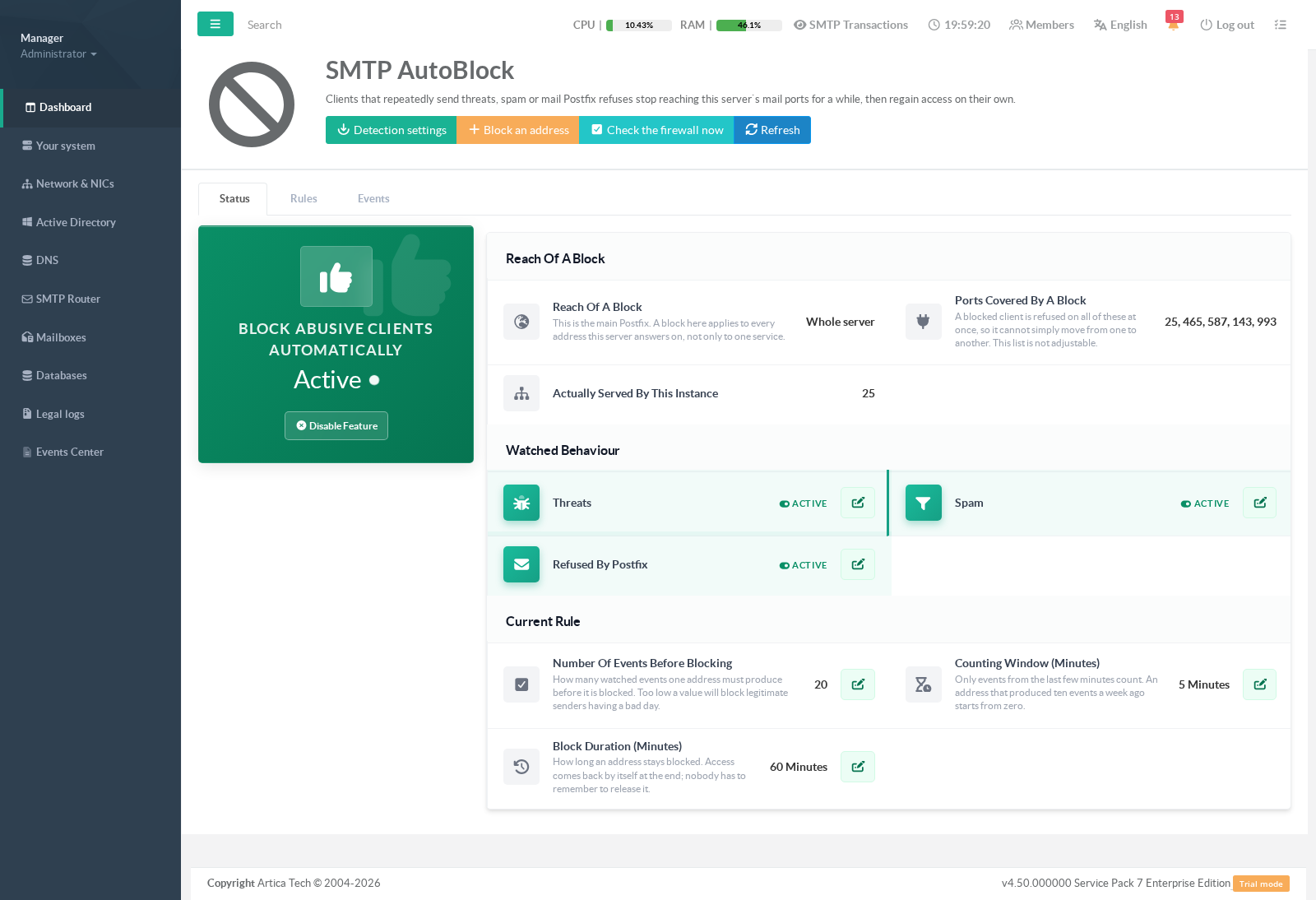
On the Status tab, the widget on the left is the master switch; the card on the right is the tuning.
- Click Enable the feature.
The widget refreshes on its own and turns green when the appliance has actually started watching — enabling is not instantaneous, so trust the widget rather than the click.
- Review Watched behaviour.
Three independent switches:
threats, spam, and everything else Postfix refuses.
- Review the Current rule:
how many events, over what window, for how long a block.
¶ Choosing the numbers
| Setting | Default | What moving it does |
|---|---|---|
| Number of events before blocking | 20 | Lower blocks sooner and catches more, but a legitimate sender having a bad afternoon a misconfigured mailing list, a colleague’s laptop with a stale password — can reach a low threshold honestly. |
| Counting window | 5 minutes | Only events inside the window count. An address that produced ten refusals last week starts again from zero. A wider window catches slow, patient scanners; a narrower one only reacts to bursts. |
| Block duration | 60 minutes | How long access is withheld. Long enough to make an attack unprofitable, short enough that a false positive resolves itself over a coffee. |
Start wide and narrow down.
The default 20 events in 5 minutes blocks essentially nothing but a machine that is clearly misbehaving.
If you tighten it, watch the Events tab for a few days before tightening again:
- an address that appears there and should not have is much easier to see than mail that silently never arrived.
¶ Instance 0 is the whole server
This is the one thing to read twice.
AutoBlock is configured per Postfix instance.
For every instance except the first, a block is restricted to that instance’s own listening address:
- a client blocked on instance 3 can still reach instance 5.
Instance 0 is the main Postfix, and its block carries no such restriction.
It applies to every address this machine answers on — including the ones other instances serve.
That is deliberate: on the ordinary single-instance appliance there is nothing to scope to.
But an administrator who reads “instance 0” as “the default one” will block a client server-wide while believing they scoped it to one service.
The status page says Whole server in the reach panel.
Believe it.
Consequence: an instance that has no listening address of its own cannot be scoped, so nothing is applied for it.
The block is recorded and visibly not applied, and the page tells you why.
This is intentional — emitting the rule without its restriction, so that blocking “works”, would silently turn one instance’s block into a server-wide one.
A visible non-block is safer than an invisible over-block.
¶ What is counted, and what is not
| Category | Counts |
|---|---|
| Threats | Messages refused because they carried a virus or a known threat. |
| Spam | Messages refused as spam, including refusals by a DNS blocklist. |
| Refused by Postfix | Every other refusal: unknown recipient, invalid address, failed check. |
Two things are deliberately not counted:
- Mail that was accepted and merely scored as spam.
AutoBlock reacts to a client being told no.
A sender whose message was delivered to a Junk folder was not told no, and cutting them off at the firewall would sever a correspondent the server chose to accept.
- Aborted connections.
A client that disconnects mid-session leaves alost connectionline carrying no refusal.
Counting those would block people with unreliable networks.
¶ Use cases
- Password guessing on submission
A host tries thousands of logins against port 587.
Each attempt costs a TLS handshake and a SASL lookup.
With threats and rejects watched and the defaults in place, the source crosses the threshold within minutes and disappears
from 587 and from 465, 25, 143 and 993, so the tool cannot fall back to another port.
It is released an hour later; if it is still hostile it is blocked again within minutes, and if the machine has been cleaned nobody had to do anything. - Directory harvesting
A sender walks through invented recipient names looking for which ones exist.
Every attempt is a legitimate Postfix rejection, so nothing is “wrong”
there are simply thousands of them.
This is the case the Refused by Postfix category exists for, and the one a spam filter will never catch, because no spam was ever accepted. - One infected machine on a customer network
A single address starts pushing malware-bearing mail.
Blocking it at the firewall stops the scanning cost immediately, and the hour-long block gives the customer time to react.
Because the block expires by itself, a cleaned machine is not left locked out over a weekend. - A named offender, blocked by hand
You already know the address.
Block an address, give it a duration and a reason. It behaves exactly like a detected block
same expiry, same release, same history — and the reason you typed is what your colleague reads next month.
Manual blocks work even while automatic detection is switched off:
the switch governs whether the appliance decides on its own, and you have already decided. - A legitimate sender got caught
The case that matters most.
Go to the Rules tab, find the address, click the release icon. Access returns at once.
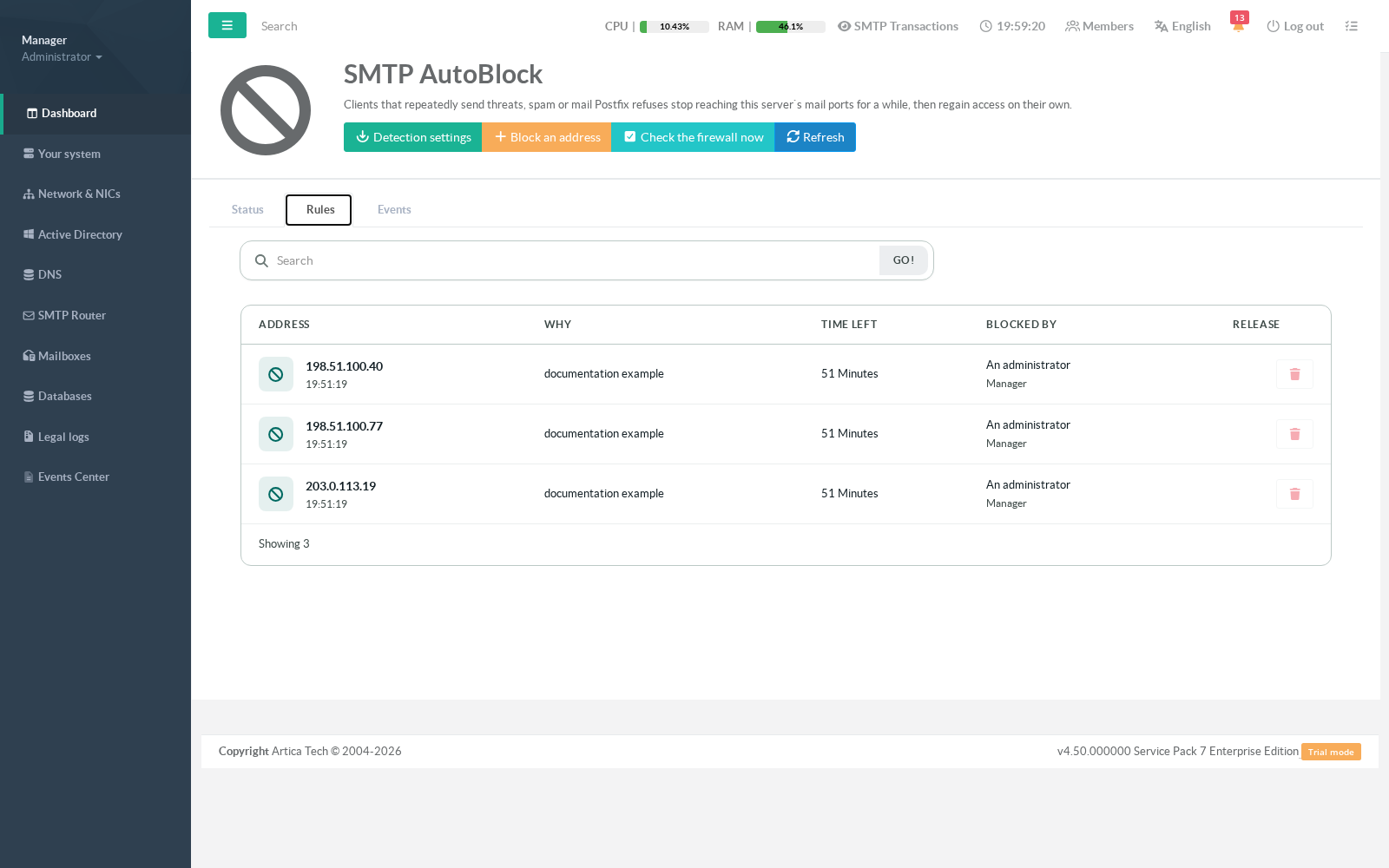
Releasing is safe to repeat:
clicking twice is harmless, and releasing an address that is not blocked succeeds.
Both are deliberate, because the administrator reaching for that button is usually being told on the phone that mail is not getting through. Every release records who did it and why.
¶ The history
The Events tab answers the question asked after the fact:
why was this customer cut off on Tuesday, and by whom.
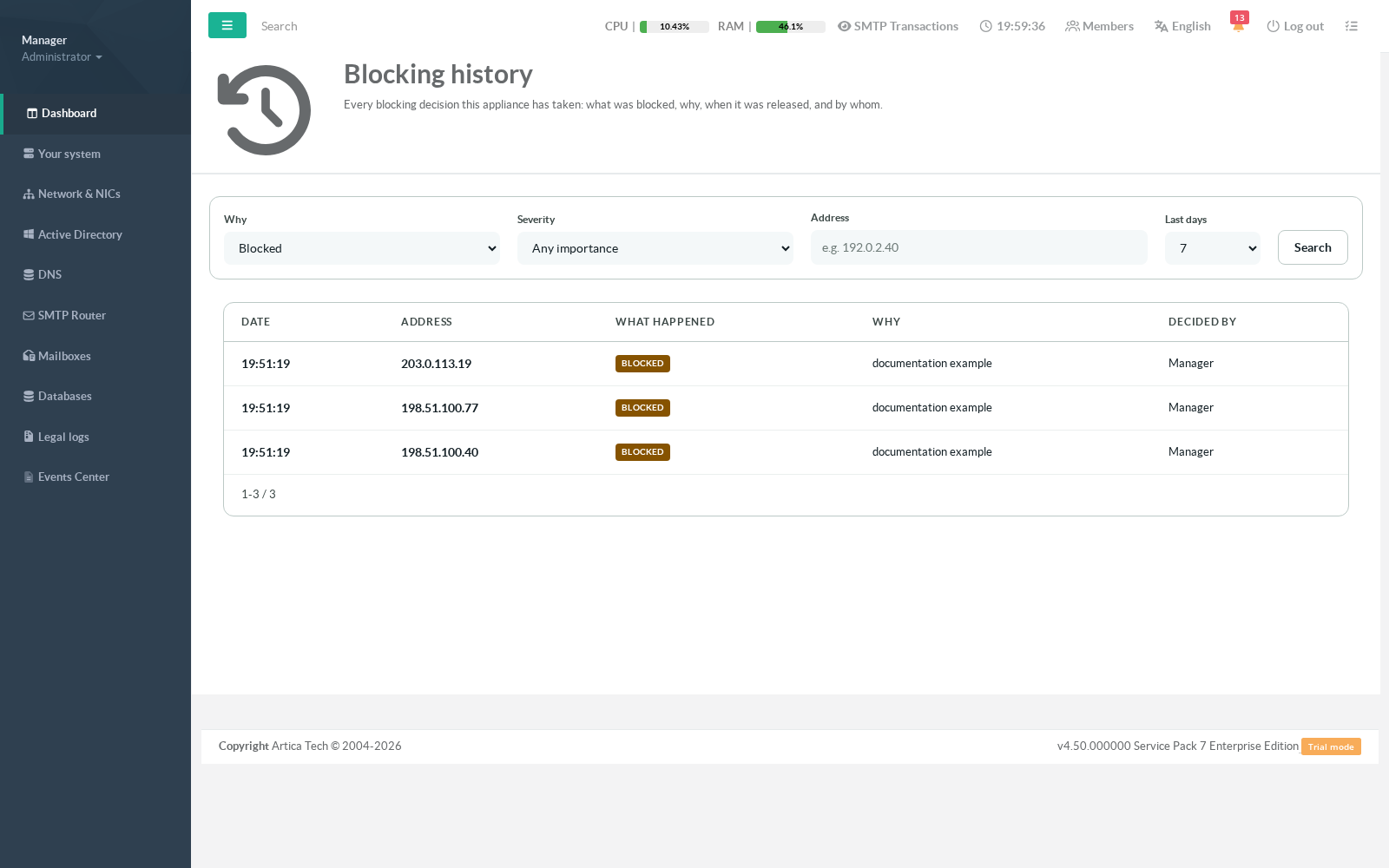
Filter by event type, importance, address and period.
The view opens on Blocked on purpose:
every block eventually produces a release, so showing everything by default buries the events you came for under the routine ones.
Event types you will see:
- Blocked / Released — a decision, automatic or by an administrator.
- Released automatically — the timer expired. The normal end of a block.
- Blocking restored — something removed the firewall rule and the appliance put it back. Rare, and worth a look if it repeats.
- Could not be blocked — the firewall refused. This one always deserves attention: the address is listed and the traffic is flowing.
The same records are written to
/var/log/artica-postfix/smtp-autoblock.log(JSON Lines, one object per event) and, when SIEM export is configured, forwarded to Artica SIEM where they are searchable by address, instance, action, category, severity and period.
If the SIEM is unreachable the events are queued and delivered when it returns — an outage delays them, it never loses them.
No message content anywhere. No subject, recipient, body or header is stored, logged or exported by this feature. There is no field for it in any of the three destinations.
Checking that it is really working
The health view distinguishes five components, because this feature can be half-working in ways that look identical from outside:
curl --unix-socket /run/artica-postfix.sock http://localhost/postfix/autoblock/health
| Component | What a failure means |
|---|---|
| detector | Never fails. At worst refusals are being missed under heavy load. |
| storage | The list of blocks cannot be read: nothing is repaired or released. |
| firewall | Operations are being refused. Addresses shown as blocked are not blocked. |
| firewall_rules | Addresses are recorded and held, but no firewall rule refers to them. See below. |
| watchdog | The maintenance pass has stopped. Blocks are no longer repaired or released. |
| siem_outbox | Never fails. Blocking is unaffected; only the record is late. |
An unreachable SIEM is degraded, never failed:
every abusive client is still being dropped and the local log still has the record.
A firewall refusing everything is failed: the console lists blocked addresses and none of them is blocked. The distinction is there so you spend an incident looking at the right system.
“Blocked” but nothing is dropped
AutoBlock stores the addresses; the Artica firewall carries the rule that acts on them. Two things must be true for a block to be enforced, and each fails in its own way:
- The Artica firewall must be enabled. With it off, AutoBlock records blocks that are never applied — the addresses are listed, the countdowns run, the kernel holds them, and the traffic flows. Enable it under Your system → Firewall.
- The rule must sit in a chain the system actually runs. A rule can exist, reference the right addresses, and still never execute if the firewall's interface configuration leaves its chain unentered. This has been observed on an appliance with no per-interface firewall configuration, where the rules land in a fallback chain that nothing enters.
The firewall_rules component checks both, and names the chain when it finds the second:
artica-postfix -autoblock-status firewall_rules failed autoblock.health.rule_unreachable in_ALL
If you see that, review the firewall's interface configuration and rebuild it. You can confirm the state by hand — the second command must show the chain being entered from INPUT:
# The kernel's own count of rules using the address set:ipset list artica_sab_0_v4 | grep References# The rule, and the chain it lives in:iptables-save -t filter | grep SMTPAUTOBLOCK# Is that chain entered at all? (replace in_ALL with the chain shown above)iptables -S INPUT | grep in_ALL
This distinction matters because everything else looks correct in both cases. The address is listed in the console, the timer counts down, the ipset holds it — and no packet is dropped.
Trusted networks are never blocked
Sources listed in the firewall's trusted networks are accepted before any block is evaluated.
An address inside a trusted range can be recorded as blocked, appear in the list with a running countdown, and still reach the mail ports.
This is correct — a trusted network is trusted — but it surprises people testing the feature from their own LAN, which is trusted on most installations.
If a block appears to have no effect, check the source against the trusted ranges before suspecting anything else:
ipset test trustednet <address>
Turning it off, and undoing it
Switching detection off stops new automatic blocks and releases the ones detection had decided.
Manual blocks are kept — the switch governs detection, and it does not undo a decision an administrator made deliberately.
Re-enabling never resurrects old blocks: you are starting a new watch, and an address that is still abusive will be blocked again within minutes.
To remove the feature’s effects entirely: switch detection off, release any remaining addresses from the Rules tab, and the appliance removes its own firewall objects within a minute.
Nothing else needs doing.
The cleanup touches only this feature’s own objects — its address sets are named artica_sab_<instance>_<family> and its rules carry the comment SMTPAUTOBLOCK.
Your other firewall rules, the proxy’s anti-flood lists and any hand-written rules are never touched.
Command line
# Health and countersartica-postfix -autoblock-status# Run one maintenance pass now (expire, repair, reconcile)artica-postfix -autoblock-maintenance
Counters are also exposed in Prometheus format at /postfix/autoblock/metrics on the daemon socket. Client addresses are deliberately never used as metric labels: under the kind of attack this feature exists to stop, an appliance sees tens of thousands of distinct addresses an hour, and each would create a permanent time series in your monitoring — which would fall over during the very incident you added the metrics to observe.