Attachment auto-compress lets your gateway automatically repackage selected outgoing attachments into standard ZIP archives while the message is in transit.
The compression is applied before the message is S/MIME-signed, so the signature always covers the final, compressed message.Rules decide which attachments are compressed based on the sender, the recipient, the domain, the file name, the declared and the real (magic-byte) MIME type, and the attachment size.
The feature runs inside the outbound mail pipeline in this order, so a signature — when signing is enabled — is computed over the already-compressed body:
raw message > disclaimer injection > attachment auto-compress > S/MIME signing > delivery
¶ Why use attachment auto-compression?
- Smaller messages, faster delivery.
Office documents, CSV exports, logs and many PDFs shrink dramatically once zipped (often by 70–95 %), which reduces queue pressure, bandwidth usage and storage on both sides.
- Fewer size-limit rejections.
Recipients frequently enforce a maximum message size.
Compressing large attachments on the fly keeps messages under those limits without asking users to change anything.
- One predictable, universal format.
Every recipient receives a single, standard.ziparchive that opens natively on Windows, macOS and Linux — no proprietary tooling required.
- Transparent for end users.
Senders keep attaching their files normally.
The gateway does the work; there is no plug-in to install and no habit to change.
- Policy-driven and centralised.
Compression is expressed as rules managed from the console, per SMTP instance, instead of being left to individual mail clients.
- Safe by design.
The engine is fail-open: if anything cannot be compressed, the original attachment is delivered unchanged. Mail is never blocked, delayed or dropped because of this feature.
¶ Common use cases
- Compress invoices and reports to partners.
Automatically zip every PDF over a given size sent to a partner domain, so recurring billing runs stay small and consistent.
- Shrink heavy Office documents.
Target Word, Excel and PowerPoint files above a threshold (for example 2 MB) that compress well but are often sent uncompressed.
- Normalise mixed attachments.
Convert a variety of large attachments into a single archive format for downstream systems that expect ZIP.
- Protect already-compressed archives.
Use a high-priority bypass rule so ZIP, RAR, 7z and GZIP files — which cannot shrink further — are never re-zipped.
- Exclude a sensitive sender or recipient.
A targeted bypass rule can carve out a specific mailbox or domain from an otherwise broad compression policy.
¶ Managing compression rules
Open SMTP Router > Outgoing rules > auto-compress.
The page is organised in three tabs — Status, Rules and Events — and is scoped to the selected Postfix (MTA) instance.
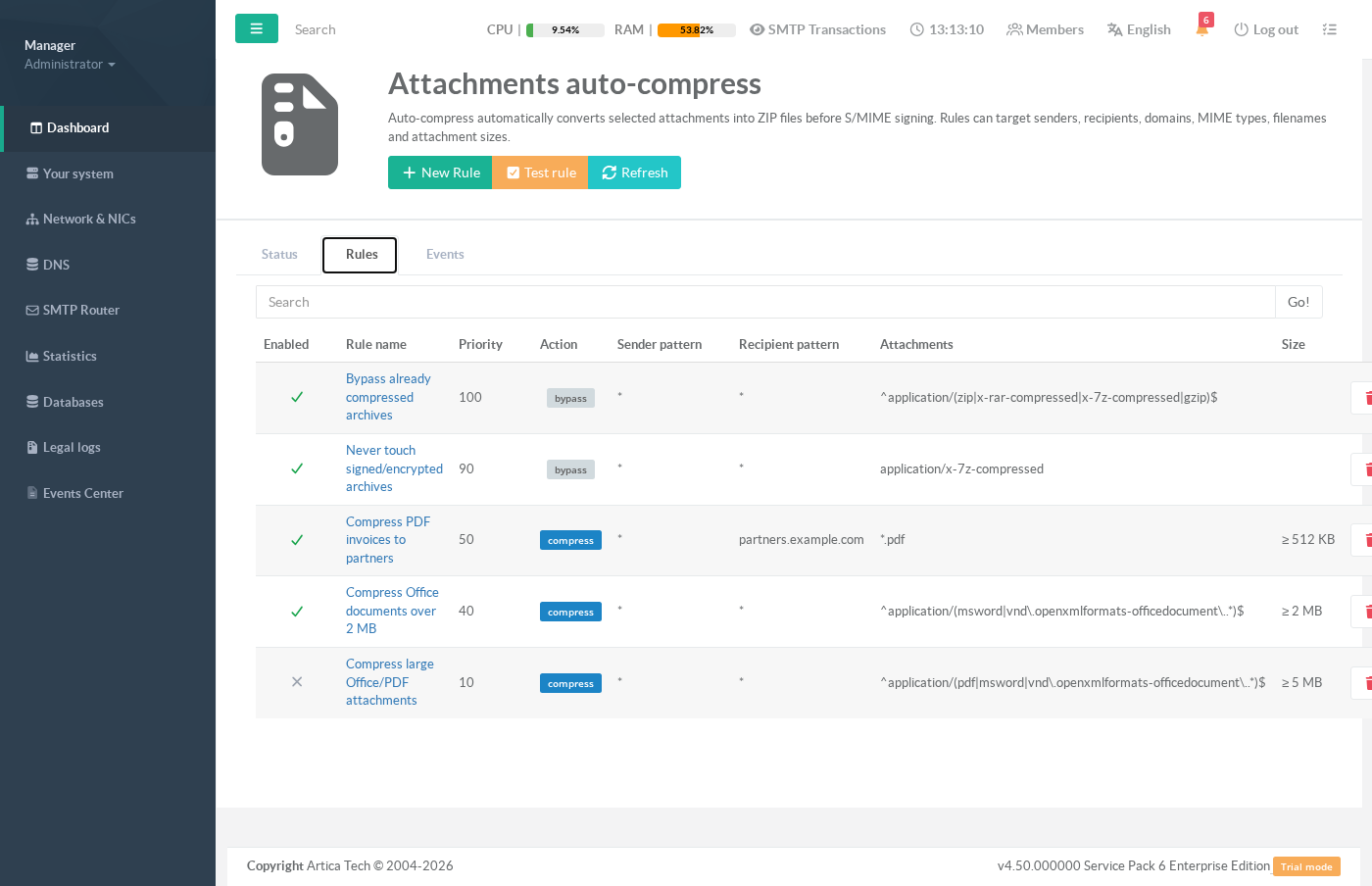
The Rules tab lists every rule, ordered by priority.
¶ Creating or editing a rule
- Click New Rule (or a rule name to edit it) to open the rule editor.
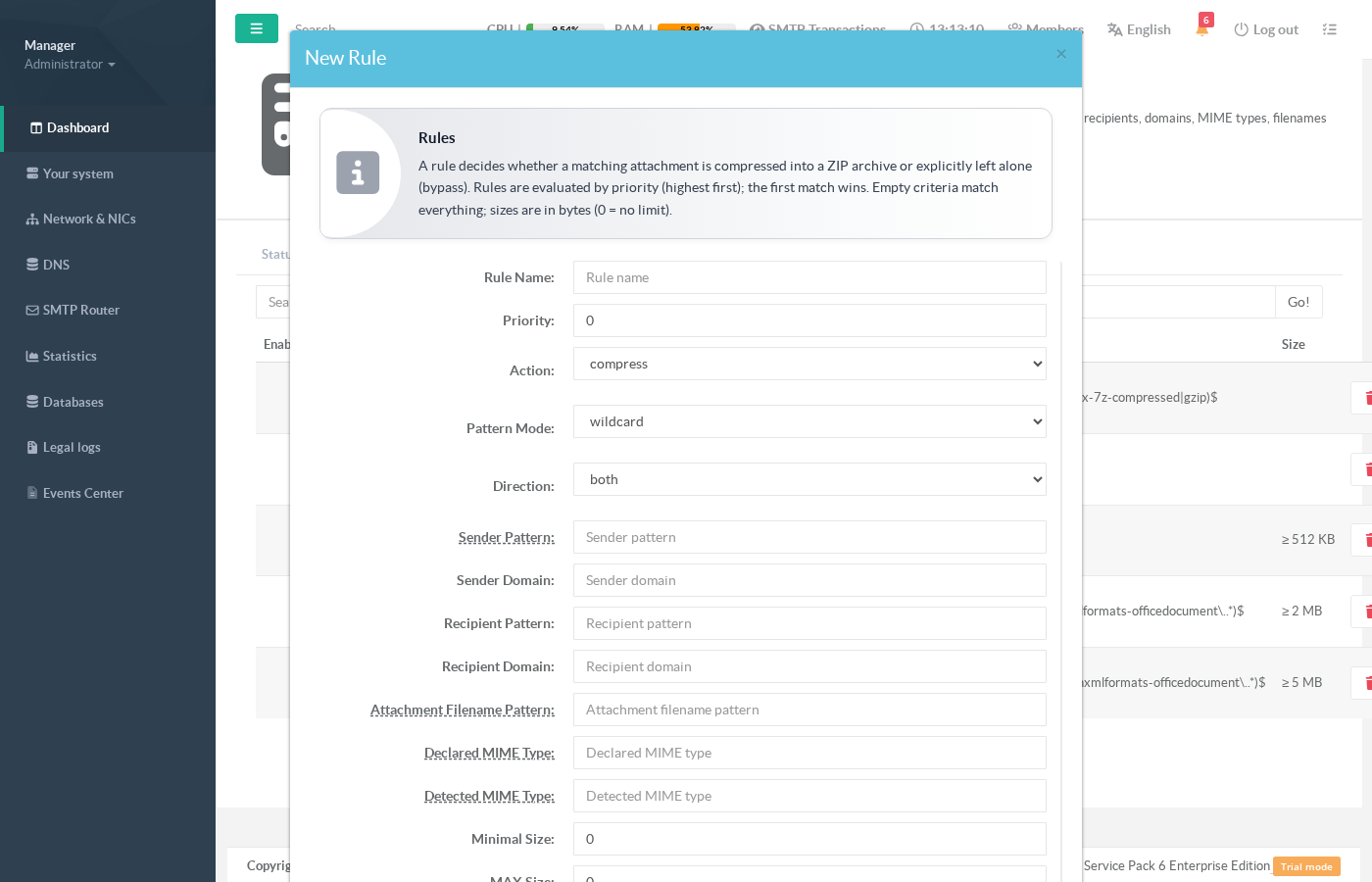
The following fields are available. Empty criteria match everything, and every size is expressed in bytes (0 means « no limit »).
| Field | Meaning |
|---|---|
| Rule Name | A human-readable label shown in the list and the logs. |
| Priority | Rules are evaluated from the highest priority to the lowest; the first matching rule decides the outcome for an attachment. |
| Action | compress zips a matching attachment; bypass explicitly leaves it alone (and stops lower-priority compress rules from acting on it). |
| Pattern Mode | wildcard — the * character means « any string » (for example *.pdf); regex A full regular expression : for example ^application/(msword|vnd\.openxmlformats-officedocument\..*)$). |
| Direction | Restricts the rule to outbound, inbound or both. Outbound submission mail is what the gateway processes today. |
| Sender / Recipient pattern | Match the envelope sender or recipient address against the pattern (wildcard or regex). |
| Sender / Recipient domain | Match the sender or recipient domain exactly (case-insensitive). |
| Attachment filename pattern | Match the attachment file name, for example *.pdf or *.docx. |
| Declared MIME type | Match the Content-Type declared by the mail client. |
| Detected MIME type | Match the real type detected from the file’s leading bytes (magic bytes). This cannot be spoofed by a misleading extension or header. |
| Minimal / MAX Size | Only compress attachments within this size window (in bytes). If the size is unknown, only rules without a size criterion can match. |
| Compression level | 0 stores without compression; 1 (fast) to 9 (smallest) select the DEFLATE effort. 6 is a good default. |
| Archive filename suffix | Suffix appended to the archive name (default .zip). |
| Skip already compressed files | When enabled, attachments detected as ZIP, RAR, 7z or GZIP are left untouched (recommended). |
| Remove original extension | Produce document.zip instead of document.pdf.zip. |
| Enabled | Turn the rule on or off without deleting it. |

¶ How matching works
- Rules are ordered by priority (highest first), then by creation order.
The engine walks each attachment against that list and applies the first rule that matches.
- A high-priority bypass rule therefore shadows any lower-priority compress rule — this is how you carve out exceptions.
- Detection uses the file’s real content, not only its declared type: a file renamed
report.pdfbut that is really a ZIP archive is recognised as an archive.
- Recipient criteria match when at least one recipient of the message satisfies them.
- If a produced archive would not be smaller than the original, the original attachment is kept — compression never makes a message bigger.
¶ Monitoring activity
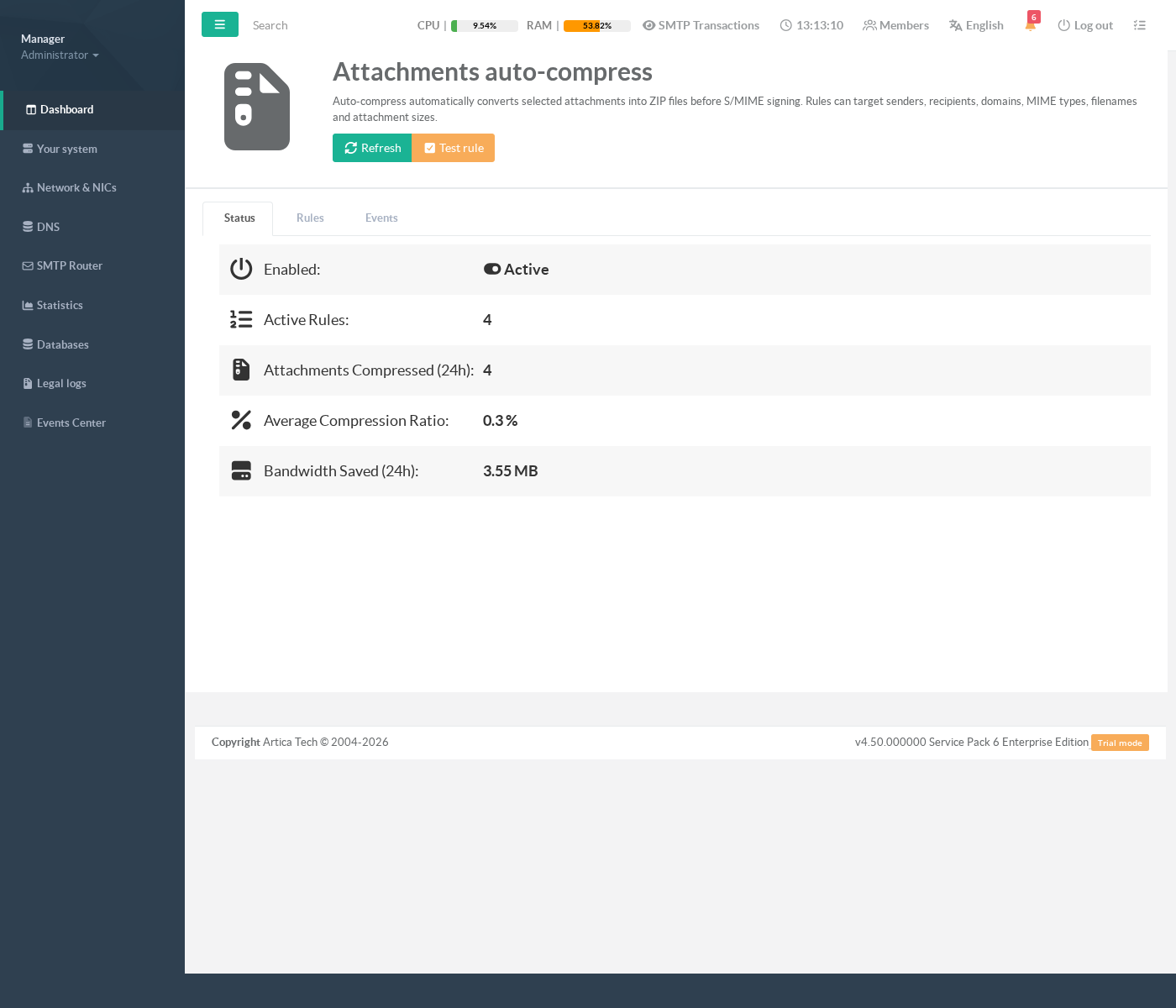
The Status tab summarises the feature at a glance: whether it is active, how many rules are enabled, how many attachments were compressed in the last 24 hours, the average compression ratio and the bandwidth saved.
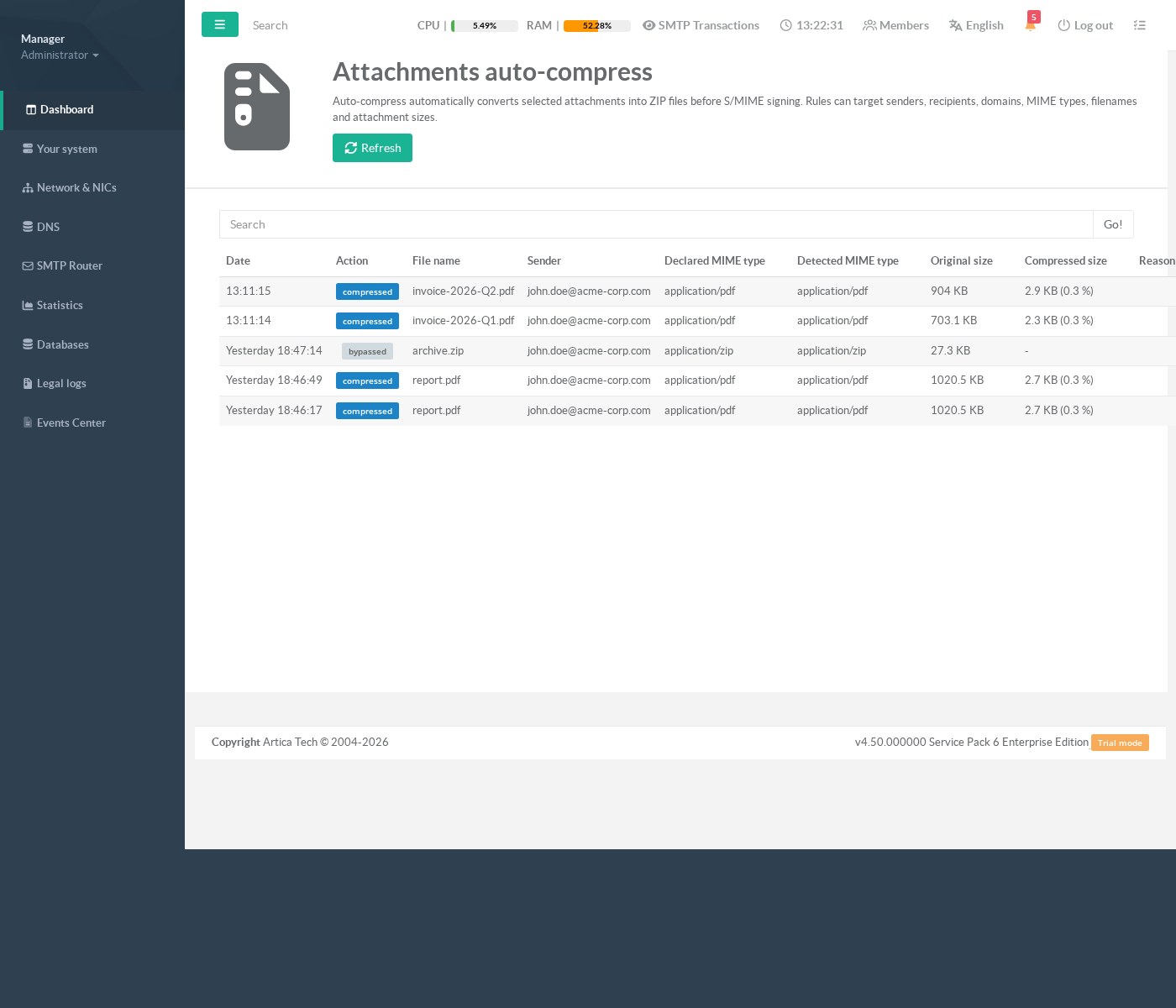
The Events tab records one line per processed attachment — the action taken (compressed, bypassed, skipped or error), the file name, the sender, the declared and detected MIME types, the original and compressed sizes with the achieved ratio, and the reason when an attachment was skipped. No message body or attachment content is ever stored in the logs.
¶ Testing a rule before enabling it
Use the Test rule button to simulate an attachment without sending any e-mail. Describe a hypothetical sender, recipient and file (name, declared type, detected type and size), then run the test: the console reports which rule would match, the action that would be taken and the exact criteria that matched.
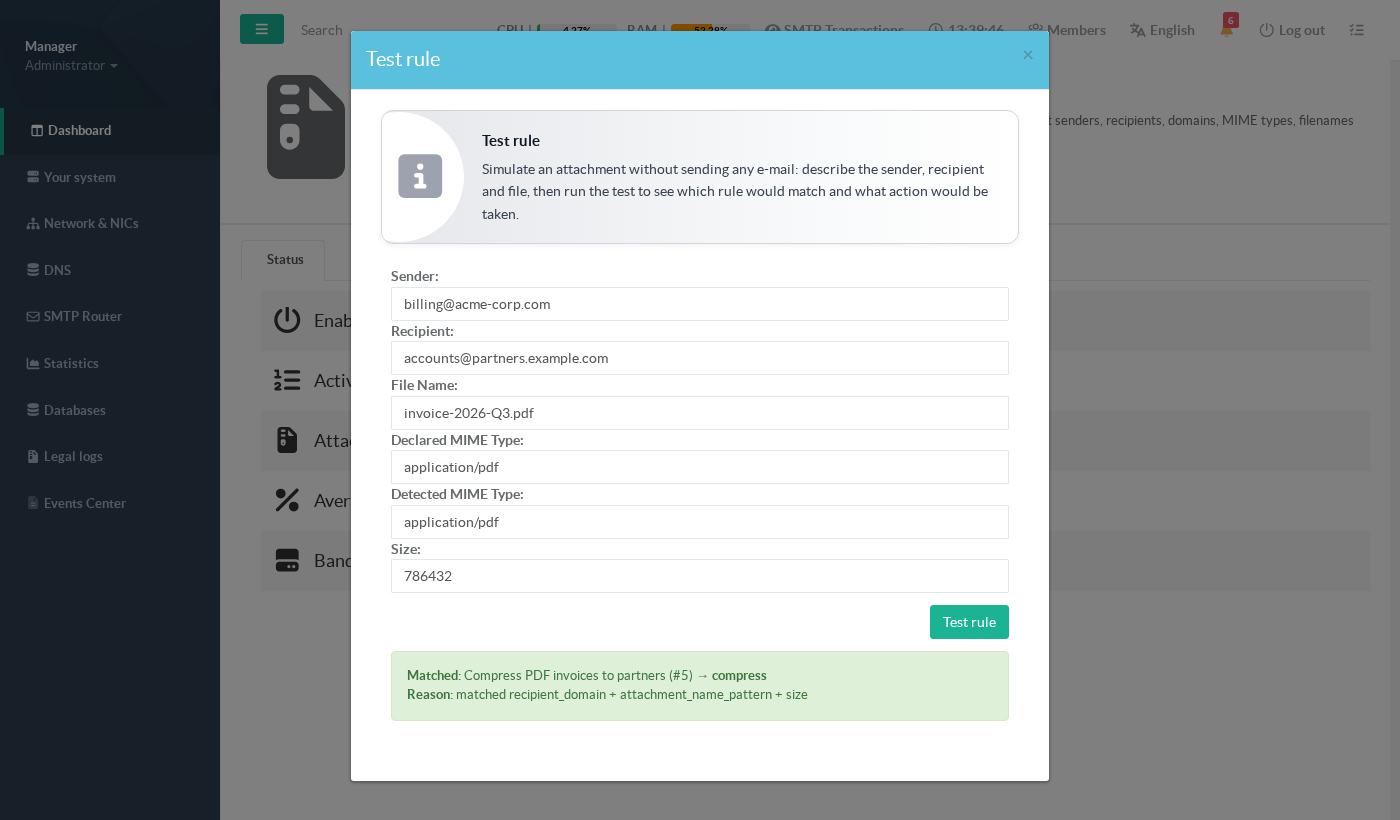
This is the safest way to validate a new policy: confirm it matches the files you expect — and, just as importantly, that it does not match the ones it should leave alone — before switching the rule on in production.
¶ Default rules
The feature ships with two rules for the default instance:
- Bypass already compressed archives (enabled) — a high-priority rule that leaves ZIP, RAR, 7z and GZIP attachments untouched.
- Compress large Office/PDF attachments (disabled) — a ready-made example that compresses PDF and Office documents over 5 MB. It ships disabled, so nothing changes until you review and enable it (or create your own rules).
¶ Safety and privacy
- Mail keeps flowing. The compression step can only ever compress an attachment or leave it alone; it has no way to reject or defer a message. Any internal error falls back to delivering the original attachment.
- Signed and encrypted mail is never modified. Messages that are already S/MIME or PGP signed or encrypted, and cryptographic parts inside a message, are left exactly as they are — so no existing signature is ever invalidated.
- Signature-safe ordering. When S/MIME signing is enabled, compression runs first, so the signature covers the compressed message the recipient actually receives.
- No content ever leaves the pipeline. Attachments are processed in memory only; they are never written to disk, and logs and statistics contain file names, types and sizes only — never the content.