Backend mirroring duplicates a copy of every incoming request to one or more additional backend servers, without waiting for or returning their responses to the client.
Visitors are always served by the primary backend exactly as before; the mirrored copies are processed in the background and their responses are discarded.This is the classic shadow traffic (or traffic tee) pattern: you send real production traffic to a second server to validate, benchmark, analyse or debug it — with zero impact on your users.
¶ Benefits
- No impact on visitors.
Mirrored requests are asynchronous and their responses are ignored.
If a mirror backend is slow, returns errors, or is completely down, the client never notices — the primary response is unaffected. - Real production traffic.
You test against genuine live requests (methods, headers, bodies, query strings, edge cases) instead of synthetic load that never quite matches reality. - No client-side changes.
Mirroring happens entirely inside the reverse proxy. Nothing changes for your users, your DNS, or your applications. - Multiple targets at once.
Each mirror server receives its own independent copy of every request, so you can shadow several candidates simultaneously. - Instant on/off per target.
Enable or disable any mirror without deleting it — convenient for short capture windows. - Protocol-faithful.
The original request headers are preserved and, when the site is served over HTTPS, the mirrored request is also sent over HTTPS.
¶ Use cases
- Blue/green & canary validation.
Shadow a new backend, application version or infrastructure with live traffic and compare its behaviour before you cut over.
If the new stack misbehaves, only your logs know — visitors are untouched.
- Migration rehearsal.
Replay real production traffic against a new platform (new OS, new framework, new datacentre) to surface incompatibilities and warm caches ahead of go-live.
- Performance & capacity testing.
Drive a staging or candidate backend with realistic, correctly-shaped traffic to measure latency and throughput under true conditions.
- Analytics & traffic capture.
Feed a copy of the request stream to an analytics, logging or data pipeline without adding any latency to the serving path.
- Security & WAF testing.
Send a duplicate stream to a WAF, IDS or sandbox to tune rules against live traffic without any risk to production.
- Debugging & reproduction.
Mirror requests to a debug instance to reproduce hard-to-catch, traffic-dependent issues on real inputs.
¶ How it works
For every request that reaches the site, the reverse proxy issues a background sub-request to each enabled mirror server.
The key behaviours are:
- Fire-and-forget.
The proxy does not wait for the mirror response and never sends it to the client.
Each mirror target is independent — every enabled target receives its own copy of the request.
- Full request preserved.
The request body is included, and the following headers are forwarded so the mirror backend sees the original request context:
Host— the original hostX-Real-IP— the client IP addressX-Forwarded-ForX-Forwarded-ProtoX-Original-URI— the original request URI
- SSL follows the front end.
If the site is served to clients over HTTPS, the mirrored request is sent to the target over HTTPS as well, using the original host name for SNI. Certificate verification on the mirror path is not enforced, so self-signed staging backends work out of the box.
- Bounded and non-blocking.
Mirror delivery is capped with a short timeout and a limited number of retries, so a failing or slow mirror cannot delay or back-pressure the serving path.
Important — side effects. Because responses are discarded, mirroring is intended for observation or idempotent workloads. Be careful when mirroring to a backend that performs side effects (writes to a shared database, sends e-mails, charges payments…): every mirrored request triggers those effects a second time. For migration rehearsals, always point mirrors at an isolated copy of the data.
¶ Configuring mirror servers
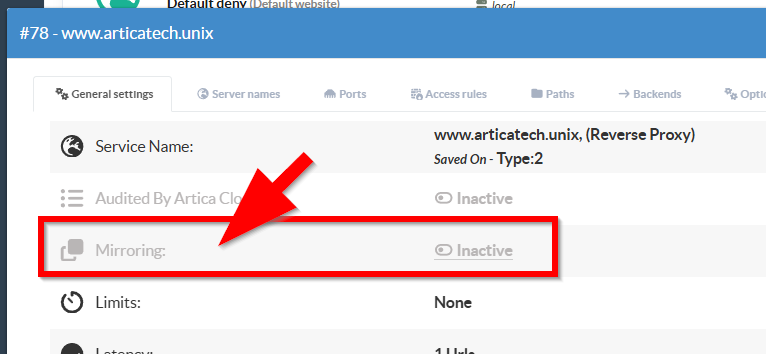
Open the reverse-proxy site you want to mirror and start the Mirroring panel.
- It lists the mirror servers already defined for that site.

For each mirror target the table shows:
- Hostname — the address of the mirror backend (blurred in these screenshots).
- Port — the TCP port the copy is sent to.
- Enabled — whether the target currently receives traffic. A green dot / Yes means active; a red dot / No means paused.
- Comment — a free-text label describing the purpose of the target.
- A delete button (trash icon) to remove the target.
¶ Adding or editing a mirror server
- Click + New Server to add a target (or click an existing row to edit it), fill in the form and click Apply.

- Hostname — the mirror backend host (IP address or DNS name).
- Port — the destination port (defaults to 443).
- Enabled — toggle the target on or off. Disabled targets stay in the list but receive no traffic.
- Comment — an optional description.
Changes are applied immediately: the site configuration is rebuilt and reloaded, and the target starts (or stops) receiving mirrored traffic within a few seconds.
No service restart and no visitor interruption is required.
¶ Removing a mirror server
Click the trash icon on the target’s row and confirm.
The target stops receiving traffic immediately.