TCP BBR (Bottleneck Bandwidth and Round-trip propagation time) is a TCP congestion-control algorithm.
Artica lets you switch the appliance from the default algorithm (CUBIC) to BBR with a single click on the proxy status page.
The change applies immediately, needs no reboot and does not restart the proxy.
Available from Artica 4.50 SP8 with update 20260923-18 or later.
¶ Concept
Every TCP connection has a sender that decides how fast to push data.
The congestion-control algorithm is the logic that makes this decision.
- CUBIC (the Linux default) is loss-based:
it speeds up until packets are dropped, then cuts its sending window sharply.
On a link that loses a few packets for reasons unrelated to congestion (Wi-Fi, 4G/5G, long-distance or VPN links), it keeps slowing down for nothing.
It also tends to fill router buffers before it detects a problem, which adds latency for everybody sharing the link (bufferbloat).
- BBR is model-based:
It continuously measures the bottleneck bandwidth and the minimum round-trip time of the path, and sends at that rate.
A random packet loss does not make it collapse, and it keeps router queues short.
Important: BBR acts on what the appliance sends
Congestion control is a sender-side mechanism.
On a proxy, this means:
- Improved:
Everything the proxy sends.
Mainly the web pages and downloads it delivers to its users, and the uploads it forwards to Internet servers. - Not changed:
The speed at which an Internet server sends data to the proxy.
That direction is governed by the algorithm of the remote server.
The biggest gain is therefore on the proxy-to-user leg when users sit behind a slow, distant or lossy link:
branch offices over WAN or VPN, remote workers, Wi-Fi or mobile networks.
¶ New connections only
The algorithm is chosen when a TCP connection opens.
Connections that already exist keep their algorithm until they close; every new connection uses the new one.
Nothing is interrupted, which is why no proxy restart is needed.
¶ Performance benefits
- Higher throughput on lossy links.
A 1% packet loss is enough to cut CUBIC's throughput dramatically on a long-distance path;
BBR keeps close to the real available bandwidth.
- Better use of high-latency links.
On paths with a large round-trip time (intercontinental sites, satellite, VPN concentrators), BBR reaches full speed faster and holds it.
- Lower latency under load.
Because BBR does not fill router buffers, interactive traffic (web browsing, VoIP, remote desktop) sharing the same link stays responsive while large downloads run.
- Faster start of transfers.
Large downloads delivered by the proxy ramp up quicker, which shortens the time users wait for big files.
- No cost on a clean LAN.
On a fast, loss-free local network, BBR and CUBIC perform about the same.
Enabling BBR does not degrade such a network.
¶ Use cases
| Situation | Benefit of BBR |
|---|---|
| Central proxy serving branch offices over MPLS, SD-WAN or IPsec/OpenVPN tunnels | High. Pages and downloads delivered to remote sites are no longer throttled by occasional losses on the WAN. |
| Remote workers connected through a VPN to the proxy | High. Home Internet and 4G/5G links lose packets; BBR keeps delivery speed stable. |
| Guest or HotSpot proxy for Wi-Fi users | High. Wireless losses are not congestion; BBR does not slow down for them. |
| Proxy in a data center serving users on another continent | High. Long round-trip times are where CUBIC is slowest to reach full speed. |
| Uploads through the proxy (cloud storage, backups, large attachments) | Medium to high. The proxy is the sender toward the Internet server. |
| Saturated Internet access where browsing becomes sluggish during big transfers | Medium. Shorter queues keep interactive traffic responsive. |
| Users on the same fast, clean LAN as the proxy | Low. No harm, little gain. |
| Slow downloads from a given Internet site | None. That direction depends on the remote server's algorithm. |
¶ Enabling TCP BBR
- On the left menu, open
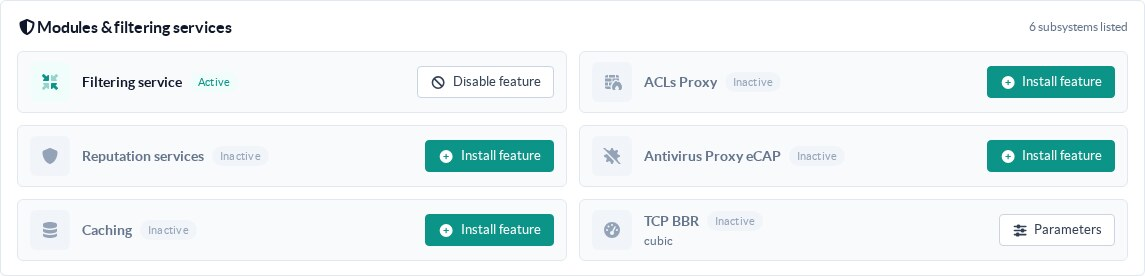
Your proxy > Status. - In the Modules & filtering services card, find the TCP BBR tile and click on Parameters.
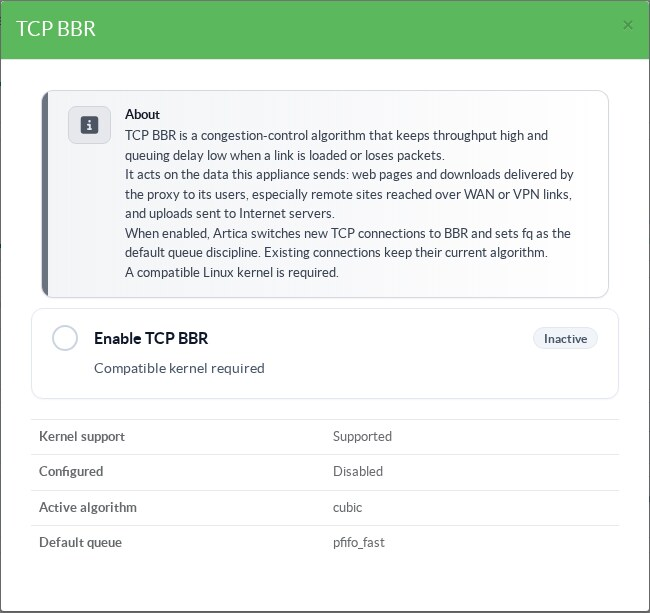
- The dialog explains the feature and shows the current state read from the kernel.
Here BBR is disabled: the active algorithm iscubic.
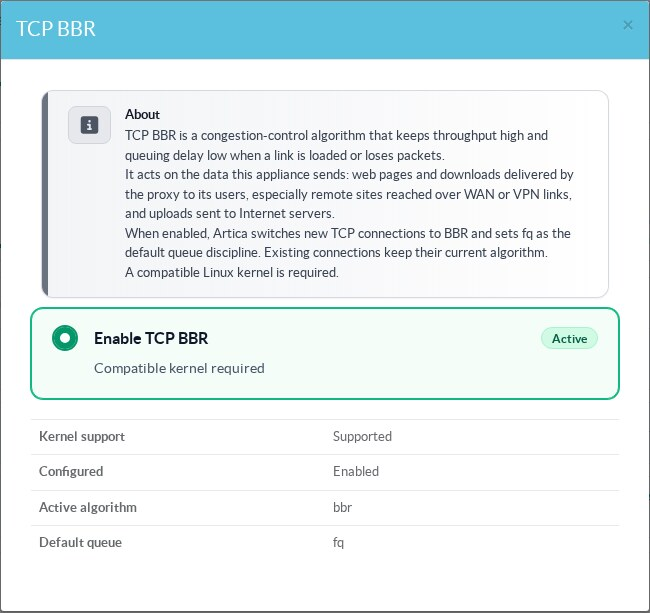
- Click on Enable TCP BBR.
The setting is saved and applied at once.
The diagnostic block is refreshed with the real kernel values: Active algorithm: bbr, Default queue: fq.
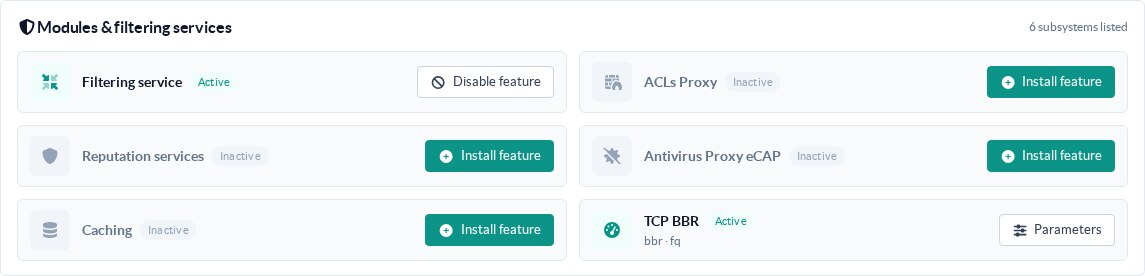
- Close the dialog: the tile now shows Active and the values in use.
To go back to CUBIC, open the same dialog and click on the switch again.
¶ Reading the status
| Tile badge | Meaning | What to do |
|---|---|---|
Active (green), bbr · fq |
The kernel is using BBR for new connections. | Nothing. |
Inactive, cubic |
BBR is disabled; the standard algorithm is in use. | Enable it if one of the use cases above applies. |
| Not supported (orange) | BBR is enabled but the kernel cannot load tcp_bbr. The appliance stays on CUBIC. |
See Troubleshooting below. |
| Configured but could not be applied (red) | The setting is saved but the kernel value differs from it. | Open the dialog and toggle again; check the logs. |
| Sub-title starting with HaCluster | This proxy is a HaCluster node and the load-balancer decides its BBR setting. |
Change it on the load-balancer (see below). |
¶ REST API
The feature is driven by the articarest REST service (Unix socket /usr/share/artica-postfix/bin/run/articarest.sock, or the REST port with the usual access restrictions).
| Method and path | Action |
|---|---|
GET /system/bbr/status |
Returns the configured value and the real kernel state. Read-only. |
POST /system/bbr/1 / POST /system/bbr/0 |
Enables or disables BBR, applies it and returns the resulting state. Any other value is refused with HTTP 400. Refused with HTTP 409 when the load-balancer manages this node. |
GET or POST /system/bbr/apply |
Re-applies the stored setting (for instance after a kernel change) and returns the resulting state. |
Example:
# curl -s -X POST --unix-socket /usr/share/artica-postfix/bin/run/articarest.sock http://localhost/system/bbr/1
{
  "success": true,
  "outcome": "applied",
  "data": {
    "configured": true,
    "cluster_managed": false,
    "cluster_mode": 0,
    "supported": true,
    "active": true,
    "state": "active",
    "available": ["reno", "cubic", "bbr"],
    "current_cc": "bbr",
    "current_qdisc": "fq",
    "message": ""
  }
}The outcome field tells you what really happened:
applied: the kernel now matches the setting.saved_unsupported: the setting is saved, but the kernel cannot run BBR.apply_failed: the setting is saved, but the kernel value differs from it.
The state field is one of active, inactive, unsupported or error.
¶ Proxies behind a HaCluster load-balancer
On a HaCluster, BBR is best managed from the load-balancer: a single switch applies it to the load-balancer itself (which delivers the data to users) and to every proxy of the cluster. While the cluster manages BBR, the tile of each proxy shows HaCluster and its dialog no longer offers the switch. See TCP BBR on a HaCluster.
¶ Troubleshooting
¶ The dialog shows an error message when saving
The message comes from the appliance: missing privileges (you need proxy administrator rights), node managed by the HaCluster load-balancer, or REST service not reachable.
The saved value is never hidden: the diagnostic block always shows the real kernel state.
¶ Some connections still use CUBIC
That is expected: connections opened before the change keep their algorithm until they close.