With HaCluster, a single switch on the load-balancer turns TCP BBR on or off for the whole cluster:
the load-balancer itself and every proxy behind it.
Each machine applies the setting to its own kernel, reports what it really runs, and the load-balancer shows the result node by node.This page covers the cluster setting. For what BBR is and how it behaves on a single proxy, read TCP BBR congestion control first.
Requirements: Artica 4.50 with update 20260923-18 or later on the load-balancer and on every node, and HaCluster Client 1.1.20 or later on the nodes.
A node running an older HaCluster Client never applies the setting and stays shown as Pending synchronization.
¶ Concept
¶ Why the load-balancer is included
Congestion control is chosen by the machine that sends the data. In HaCluster, HAProxy runs in TCP mode and terminates the users' connections:
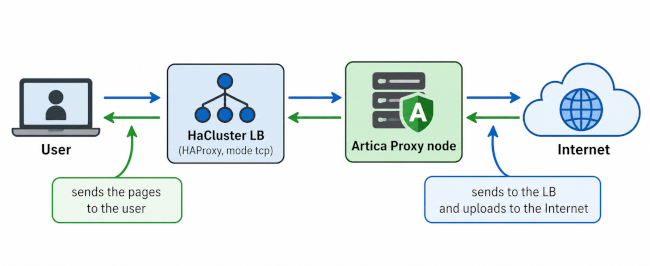
- What users receive is sent by the load-balancer.
This is the leg that crosses WAN links, VPNs and Wi-Fi, where BBR brings the largest gain. - The proxy nodes send to the load-balancer (usually a fast local network) and send uploads to Internet servers.
Enabling BBR only on the nodes would leave the most important leg on CUBIC.
The cluster setting therefore applies to the load-balancer and to all its nodes at once.
¶ Desired state, not a one-shot command
The load-balancer stores a desired state and pushes it to the nodes immediately after you save, then again every two minutes with the rest of the cluster configuration.
A node that was offline or rebooting receives it as soon as it answers again. Nothing has to be replayed by hand.
The setting has three states:
| Manage TCP BBR on the cluster | Enable TCP BBR on the load-balancer and its clients | Result on the load-balancer and on each node |
|---|---|---|
| Off (default) | (hidden) | Not managed. Every machine keeps its own local choice. |
| On | On | Forced on. BBR everywhere, whatever the local choice. |
| On | Off | Forced off. CUBIC everywhere, whatever the local choice. |
The cluster never overwrites a machine's local choice: it only takes precedence while it manages BBR.
As soon as you switch Manage off, each machine goes back to the value it had before.
¶ What each node does
- The HaCluster Client receives the mode with the cluster configuration and stores it.
- If the mode changed, or if the kernel does not match it yet, it asks the local Artica service to rebuild the kernel settings.
- The node reports the algorithm it really runs in its next status report (every minute).
A node whose kernel cannot run BBR reports Not supported and stays on CUBIC; it does not prevent the other nodes from applying the setting.
A node that fails to apply the setting retries three times, then stops retrying until the mode changes, so it never loops.
¶ Performance benefits
- Faster delivery to remote users.
The load-balancer sends the pages and downloads to users with BBR:
throughput holds on lossy or long-distance links (branch offices, VPN, Wi-Fi, 4G/5G) instead of collapsing at the first packet loss. - Lower latency on a busy uplink.
BBR keeps router queues short, so interactive browsing stays responsive while large downloads run through the cluster. - Faster uploads.
The proxy nodes send uploads to Internet servers (cloud storage, backups, attachments) with BBR. - One behavior for the whole pool.
With a single switch, every node behaves the same way. Users no longer get different performance depending on the node the load-balancer picked for them. - No restart.
New connections use the new algorithm at once; HAProxy and the proxies keep running and established connections are not cut.
¶ Use cases
| Situation | Recommended setting |
|---|---|
| Central cluster serving branch offices over MPLS, SD-WAN or VPN tunnels | Forced on. This is where the gain is largest. |
| Remote workers reaching the cluster through a VPN | Forced on. Home and mobile links lose packets. |
| Cluster in a data center serving users on other continents | Forced on. Long round-trip times are where CUBIC is slowest. |
| Nodes added over time, with different local settings | Forced on (or off) to make the pool consistent without visiting each node. |
| Troubleshooting a performance issue and comparing algorithms | Switch between forced on and forced off: The whole pool changes in seconds, and switching Manage off restores each node's previous choice. |
| Users on the same fast LAN as the cluster | Little gain, no harm. Not managed is fine. |
¶ Enabling TCP BBR on the cluster
- On the load-balancer console, open Status in the left menu, then the Parameters tab.
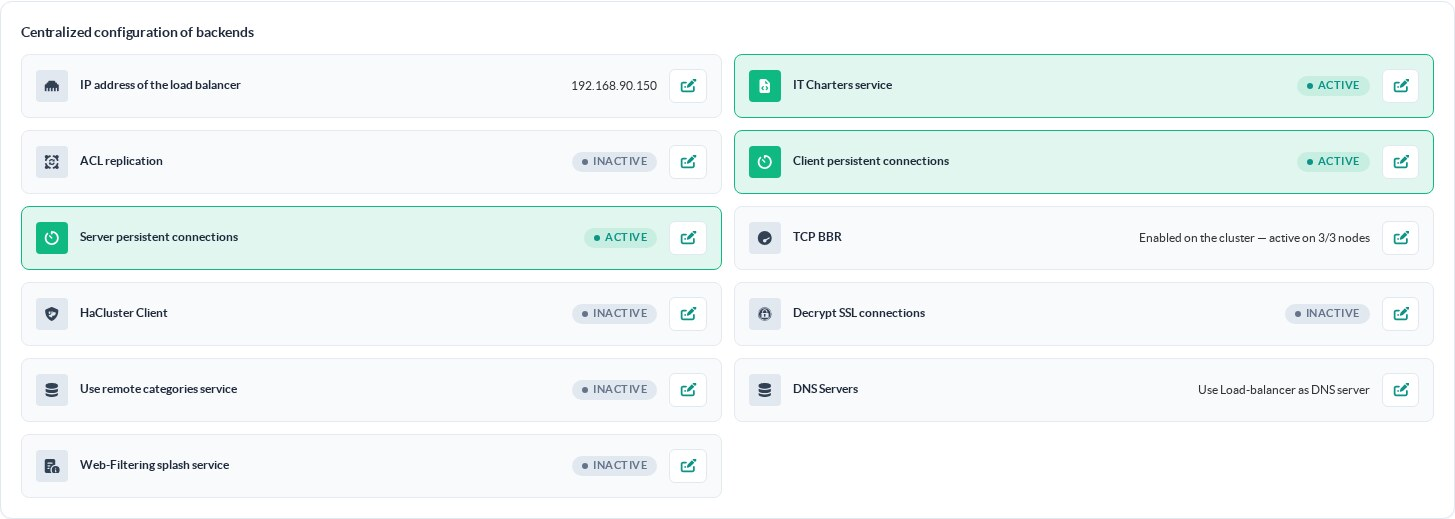
The TCP BBR entry is in the Centralized configuration of backends section.
By default it shows Not managed.
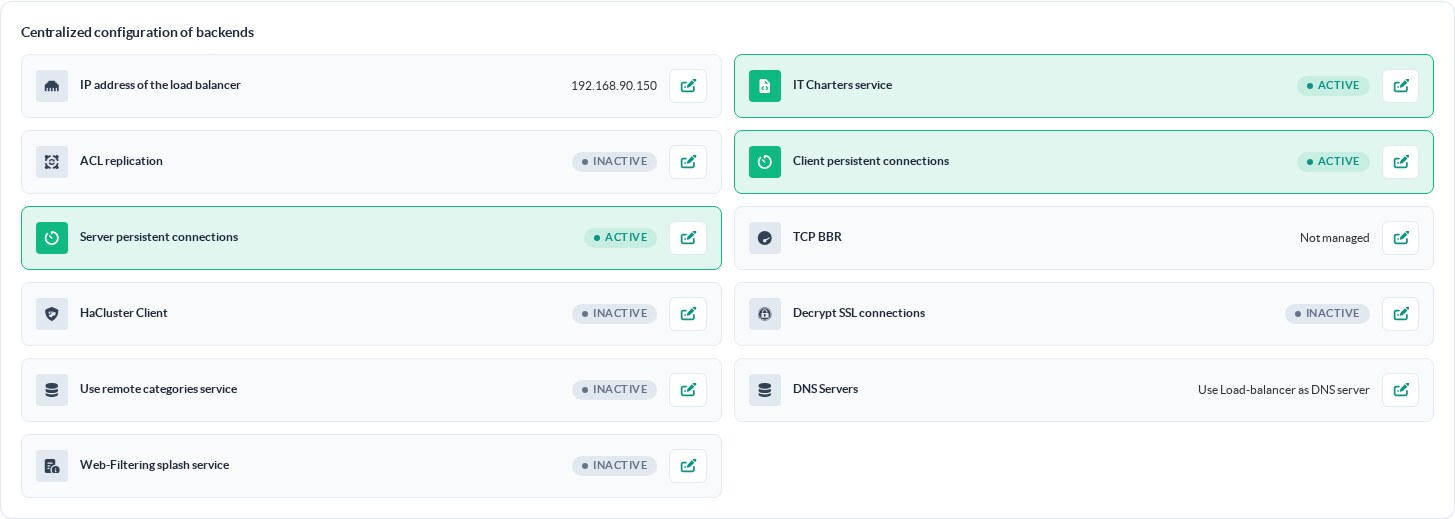
- Click on the TCP BBR entry.
Only the Manage TCP BBR on the cluster switch is shown while the cluster does not manage BBR.
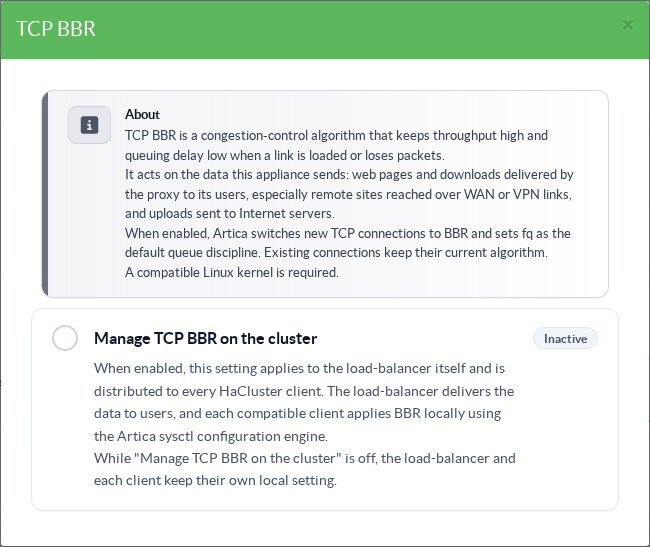
- Turn on Manage TCP BBR on the cluster, then Enable TCP BBR on the load-balancer and its clients.
Each click is saved at once: the load-balancer applies the setting to itself and pushes it to the nodes right away.
- Within a minute or two, every node has applied the setting and reported it.
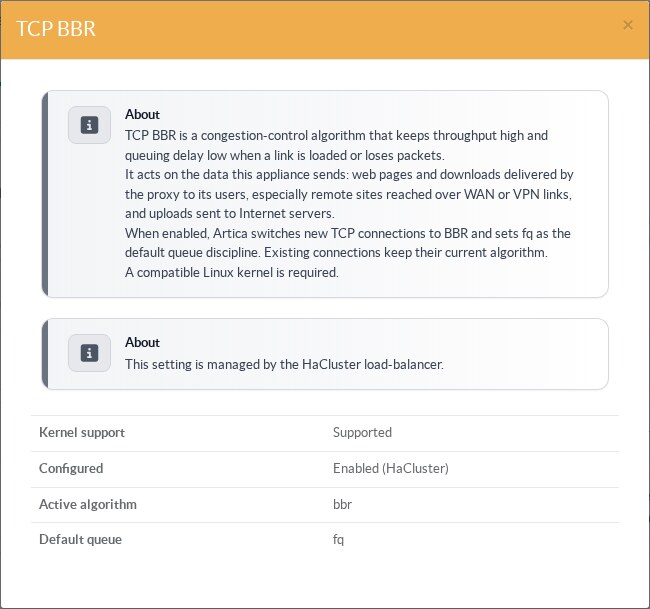
The table at the bottom of the dialog lists the load-balancer (This server) and each node with its real state.
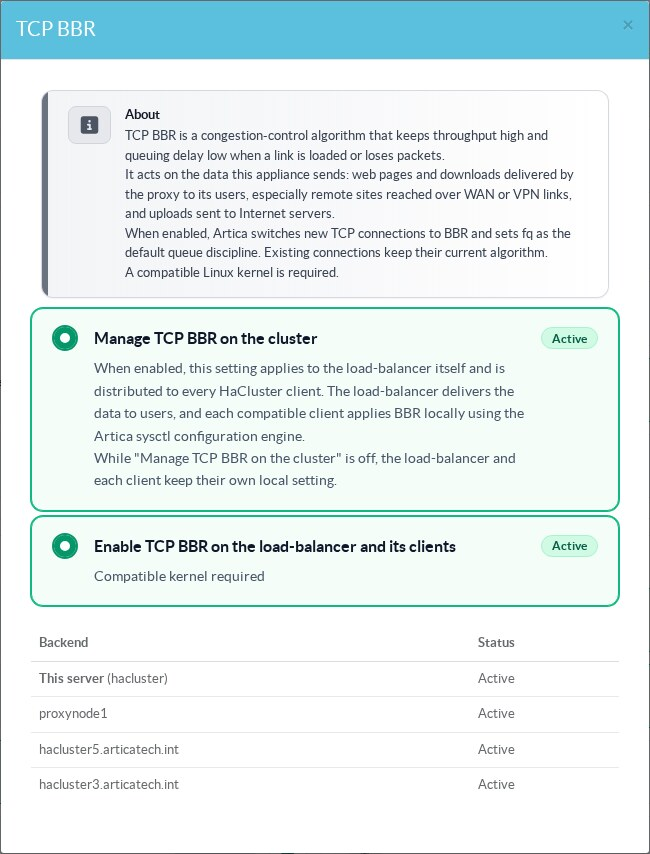
- The parameters entry now summarizes the cluster:
Enabled on the cluster — active on 3/3 nodes.
Tip: Enable TCP BBR on the load-balancer and its clients is off by default.
If you turn Manage on first, the cluster is briefly in forced off until you turn Enable on.
Turn both on one after the other; the nodes converge on the final value.
¶ Checking the nodes
¶ Node list
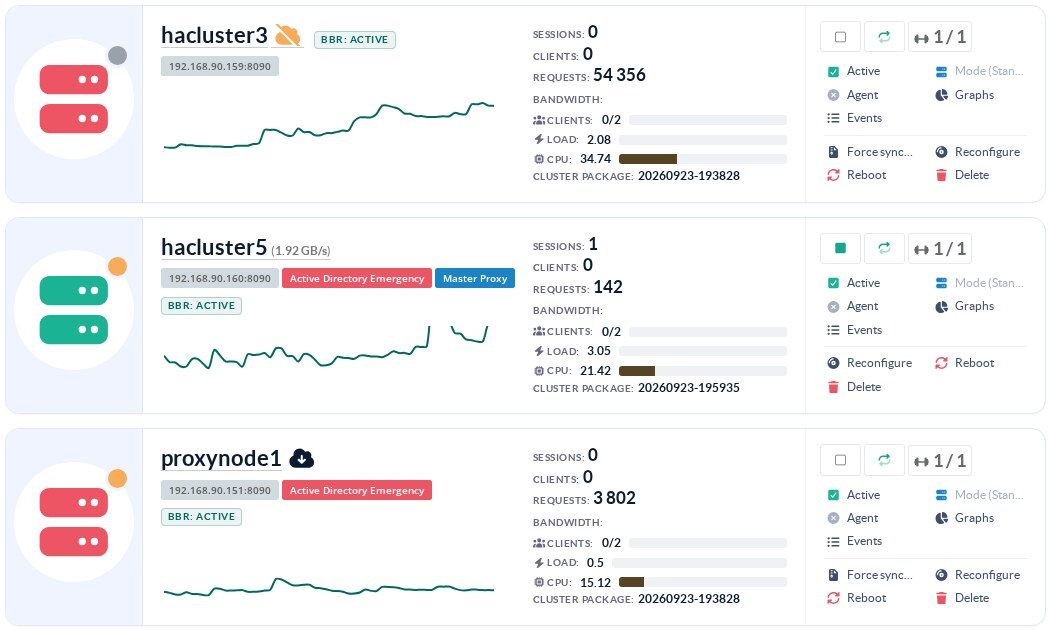
While the cluster manages BBR, each node card of the Backends page (left menu of the load-balancer) shows a BBR badge with the node's real state.
¶ Node states
| State | Meaning | What to do |
|---|---|---|
| Active | The node runs BBR for new connections. | Nothing. |
| Inactive | The node runs CUBIC. Expected in forced off. | Nothing, unless the cluster is in forced on. |
| Pending synchronization | The node has not received or not yet reported the current mode: it is offline, rebooting, or the last report is older than the change. |
Wait one or two minutes. If it stays pending, check that the node answers and runs HaCluster Client 1.1.20 or later. |
| Not supported | The node's kernel cannot load tcp_bbr. It stays on CUBIC. |
Update the node's kernel. The other nodes are not affected. |
| Node software too old | The node reports its status but its Artica version does not know BBR. | Update Artica on the node. |
| Configured but could not be applied | The node received the mode but its kernel value differs. | Check the node's /var/log/articarest.log (lines starting with BBR:). |
¶ On a node itself
On each proxy, the TCP BBR tile of Your proxy / Status shows HaCluster in front of the values in use.
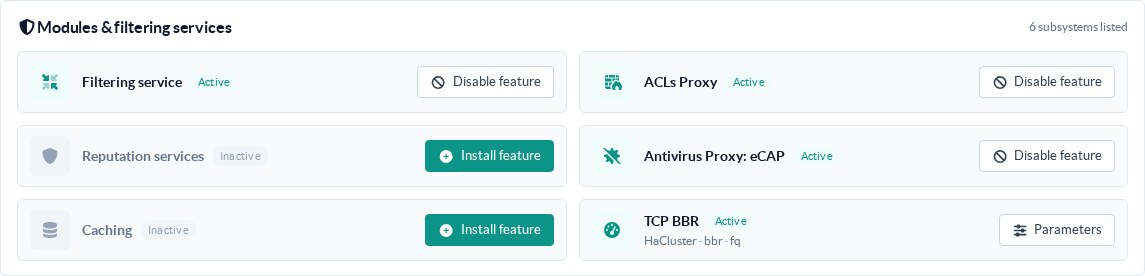
Its dialog no longer offers the switch: the setting is managed by the load-balancer, and the diagnostic shows Enabled (HaCluster).
The same protection applies to the kernel options of the network page, where the Bottleneck Bandwidth and RTT checkbox is hidden while the cluster manages BBR, and to the REST API (see below).
¶ Command-line examples
Read the state through the REST API (Unix socket of the Artica service):
# curl -s --unix-socket /usr/share/artica-postfix/bin/run/articarest.sock http://localhost/system/bbr/status
{
  "success": true,
  "data": {
    "configured": true,
    "cluster_managed": true,
    "cluster_mode": 1,
    "supported": true,
    "active": true,
    "state": "active",
    "available": ["reno", "cubic", "bbr"],
    "current_cc": "bbr",
    "current_qdisc": "fq",
    "message": ""
  }
}cluster_mode is the mode received from the load-balancer:
0 not managed, 1 forced on, 2 forced off.
While the cluster manages BBR, a local change is refused, on a node as on the load-balancer:
# curl -s -X POST --unix-socket /usr/share/artica-postfix/bin/run/articarest.sock http://localhost/system/bbr/0
{"error":"TCP BBR is managed by the HaCluster load-balancer","success":false}
HTTP 409Each change is logged once in /var/log/articarest.log of the machine that applies it:
BBR: applying congestion_control=bbr qdisc=fq source=cluster
BBR: disabled, congestion_control=cubic qdisc=pfifo_fast source=localThe load-balancer also logs each node whose state changes (HaCluster: node 2 BBR active), once per change.
¶ Troubleshooting
¶ A node stays "Pending synchronization"
- Check that the node is up and that the load-balancer can reach it: the configuration is pushed every two minutes to every reachable node.
- Check the HaCluster Client version on the node (
/usr/sbin/HaClusterClient -version): versions older than 1.1.20 ignore the setting.
¶ A node shows "Not supported"
Run on the node:
# modprobe tcp_bbr
# sysctl net.ipv4.tcp_available_congestion_controlIf bbr does not appear, the kernel lacks BBR support. All Debian 10 to 13 kernels include it; a custom kernel may not.
¶ Going back
Switch Manage TCP BBR on the cluster off. The load-balancer and every node return to their own local setting within seconds; nothing else needs to be undone.