The Captive Portal API lets the HotSpot announce itself to phones, tablets and computers the moment they join the guest network.
The DHCP server gives them the address of a small HTTPS service (RFC 8910, DHCP option 114).
The device asks that service whether it is behind a portal and where to sign in (RFC 8908). No guessing is involved.
This page explains the concept, the prerequisites, how to enable the feature, how to read its status, and how to check it from the command line.
In short: enable HTTPS on the portal with a certificate issued by a public authority (for example Let's Encrypt) for a public host name, tick Captive Portal API (RFC 8908).
Then click Reconfigure all.
Artica checks the certificate itself and publishes the API only when devices will accept it.
¶ Concept
The classic way: probes
Without this feature, every operating system detects a captive portal by probing.
It requests a well-known HTTP address (connectivitycheck.gstatic.com/generate_204, captive.apple.com, www.msftconnecttest.com/connecttest.txt, edge-http.microsoft.com/captiveportal/generate_204, …) and compares the answer with the expected one.
The HotSpot answers these probes on port 80:
it sends a 302 redirect to the login page for devices that are not signed in yet, and the genuine answer for signed-in devices (see Enable automatic browser redirection).
This works, but it is indirect:
- The device only finds out after its probe has been answered, and the timing depends on each operating system;
- Meanwhile, applications open HTTPS connections that the portal can only refuse, which produces certificate errors and retries;
- The device never knows how long its session will last.
The modern way: RFC 8910 + RFC 8908
- When the device obtains its address, the DHCP answer carries option 114, the URI of the API, for example
https://hotspot.example.com:8026/captive-portal/api(RFC 8910). - The device calls this URI over HTTPS and checks the certificate like any web site.
- The API answers a small JSON document (
application/captive+json, RFC 8908):captive:truewhile the device must sign in,falseafter;user-portal-url: the HTTPS login page to open;seconds-remaining: the time left in the session, once signed in and when the session is limited.
- The device opens the login page by itself. After sign-in, it asks again and sees
"captive": false.
¶ What Artica does
| Component | Role |
|---|---|
| Artica daemon | Decides whether the API can be published. It requires HTTPS enabled on the portal, a public host name in the certificate, and a certificate that verifies against the public authorities of the appliance, chain included. It records the API URL, or the reason why it is not published. |
| DHCP server (ISC or Kea) | Sends option 114 on the HotSpot network, and only with an HTTPS API address. |
| DNS cache (Unbound) | Answers the API host name with the HotSpot IP address for the guests, whatever the public DNS says. Only that exact name is pinned: the other names of the domain keep resolving normally. |
| HotSpot web service | Serves GET /captive-portal/api on the portal HTTPS port. It asks the proxy engine (Go-Shield) whether the device is signed in, which is the same decision used for the probes. |
The probes keep working as before. Devices that do not support RFC 8908 simply ignore option 114.
¶ Benefits
¶ Performance
- Immediate detection.
The portal is known from the DHCP answer onwards:
The device does not wait for its probe schedule or for a probe to time out before it shows the sign-in screen. - Less wasted traffic before sign-in.
A device that knows it is captive opens the portal instead of letting every application try its HTTPS connections through the proxy.
Fewer refused TLS handshakes, fewer certificate errors, fewer retries. - A tiny, local request.
The API answer is a few hundred bytes served by the appliance itself: no proxy, no filtering chain, no Internet round trip.
TheCache-Control: privateheader keeps it out of shared caches. - Fewer reconnection storms.
Withseconds-remaining, the operating system knows when the session ends and can warn the user,
instead of discovering it through failures and repeated probes.
¶ User experience and security
- The login page opens automatically, over HTTPS, with a certificate the device trusts.
- Compatible devices can tell the user how much session time is left.
- Nothing needs to be installed on the devices.
¶ Supported devices
| Platform | RFC 8910 / 8908 | What happens |
|---|---|---|
| Android 11 and later | Yes | Uses option 114 and the API, keeps its probes as a fallback. |
| iOS / iPadOS 14 and later, macOS 11 and later | Yes | Uses option 114 and the API. |
| Windows 10/11, Microsoft Edge | No documented support | Unchanged: detection through the probes (NCSI and Edge), answered by the HotSpot with a 302 to the login page. |
| Linux (NetworkManager), Firefox | Probes | Unchanged: detection through the probes. |
¶ Use cases
- Hotels, campsites, residences.
Guests mostly arrive with smartphones.
The login page appears as soon as they join the Wi-Fi, and compatible phones can show the time left in their voucher/room session. - Conferences and events.
Hundreds of devices join within minutes. Announcing the portal in the DHCP answer avoids a burst of probes and refused HTTPS connections through the proxy. - Public places, municipalities, WIFI4EU.
A trusted HTTPS login page and a clear "sign in to network" prompt reduce support calls ("the Wi-Fi does not work"). - Mixed fleets.
Android and Apple devices use the API while Windows laptops keep using the probes:
Both paths lead to the same login page and the same session decision. - Healthcare and corporate guest networks.
Visitors' devices never see a certificate warning on the portal, which avoids teaching users to click through security warnings.
When not to use it: the portal is published through the reverse proxy (the API is then not available), the HotSpot has no public DNS name, or the guest network is not served by the Artica DHCP server and you cannot set option 114 on your own DHCP server.
¶ Prerequisites
- Artica with the HotSpot web service 5.1.11 or later.
The version is shown in the page title "Web portal authentication v5.1.x". - The HotSpot web service answers the guests directly.
The portal must not be published through the reverse proxy (see Reverse-Proxy service compatibility). - HTTPS enabled on the portal (Use the SSL encryption, port 8026 by default).
- A certificate for a public host name, for example
hotspot.example.com:- issued by a public authority trusted by phones, for example Let's Encrypt;
- with its intermediate certificates;
- not expired.
- The guest network gets its addresses from the Artica DHCP server (ISC or Kea) on the HotSpot interface.
With another DHCP server, set option 114 there yourself (see the examples below). - The guests use the Artica DNS cache (Unbound), so that the API name resolves to the HotSpot address.
With another DNS server, create an A record for the API name that points to the HotSpot IP address on the guest network. - Guests that are not signed in yet can reach the HotSpot on the HTTPS port (8026 by default), exactly like they already reach the HTTP login page on port 8025.
¶ Enable the Captive Portal API
1. Prepare the certificate
In the Certificates Center, request a Let's Encrypt certificate (or import one issued by your authority) for the public name of the HotSpot.
When the chain is stored separately, Artica serves the certificate with its chain, like nginx does:
Android does not download a missing intermediate certificate.
¶ 2. Configure the service
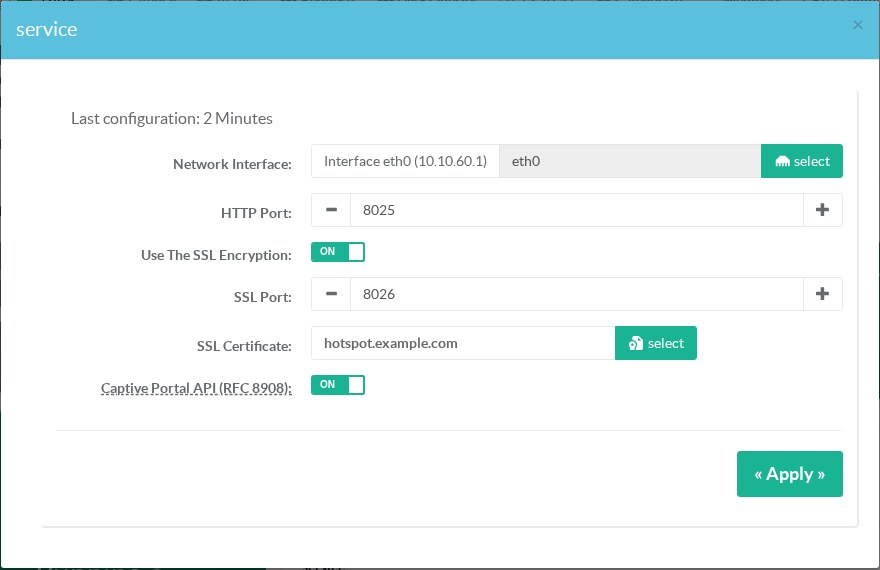
Go to HotSpot > Web portal authentication > General settings, then click the service section (or any of its lines):
- turn Use The SSL Encryption ON;
- keep or change the SSL Port (8026);
- choose the SSL Certificate;
- turn Captive Portal API (RFC 8908) ON.
Click Apply.
The HotSpot service restarts and the card shows the result.
¶ 3. Reconfigure all
The DHCP and DNS configurations must be rebuilt so that they carry the API.
Go to HotSpot > Status and click Reconfigure all.
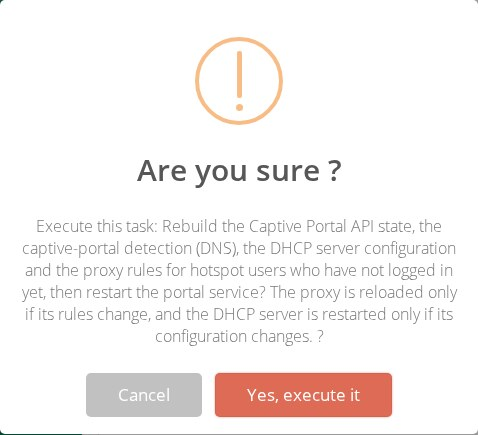
The task runs these steps in order, each one checked on the file it produces:
- the Captive Portal API state;
- the DNS (probes and API name);
- the DHCP server: option 114. ISC dhcpd is restarted only if its configuration changed;
- the proxy rules for devices not signed in yet (one reload at most);
- the restart of the portal service.
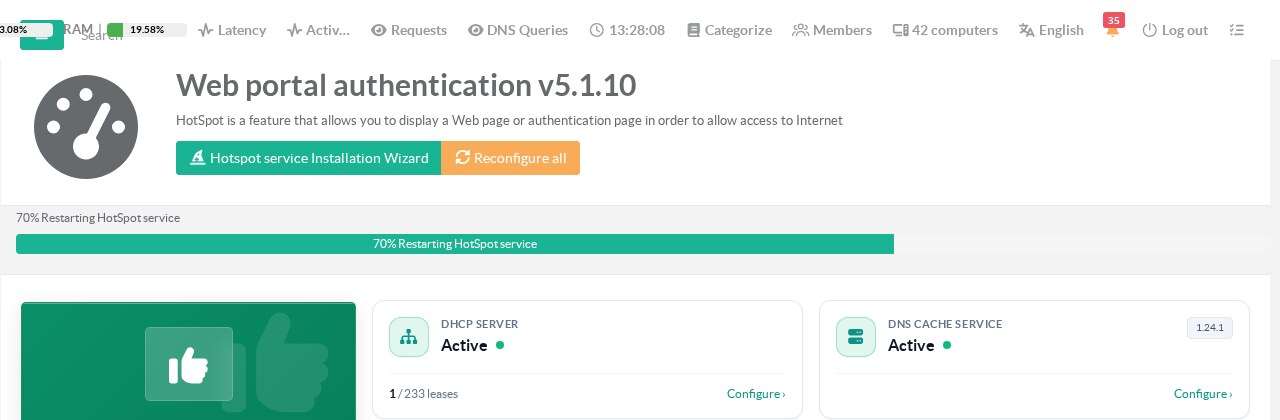
Run Reconfigure all again after each change of certificate, host name or SSL port.
¶ Read the status
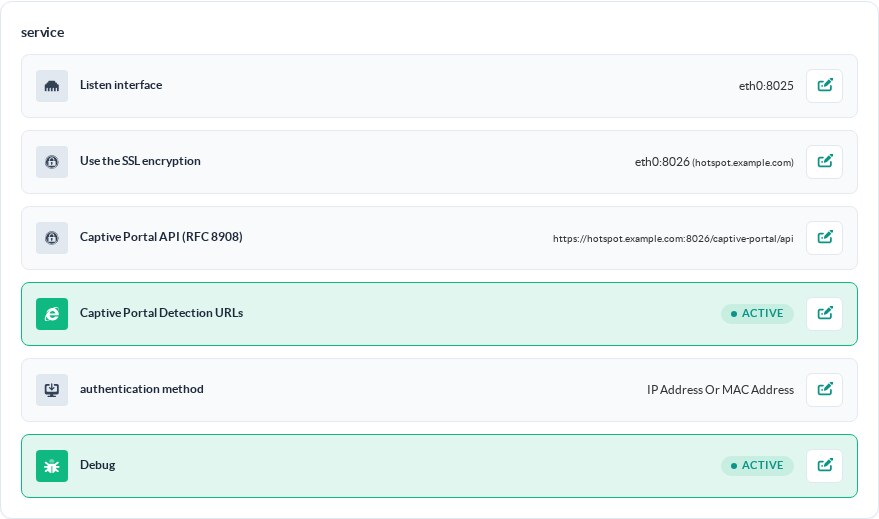
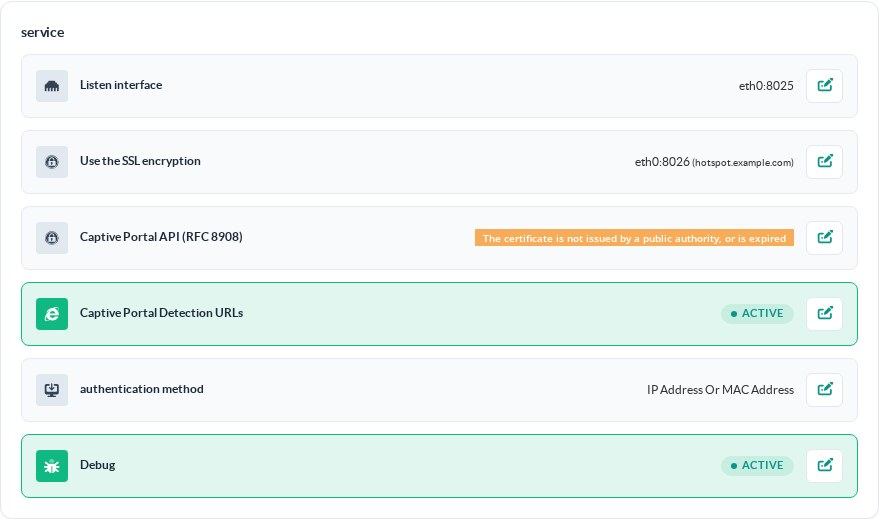
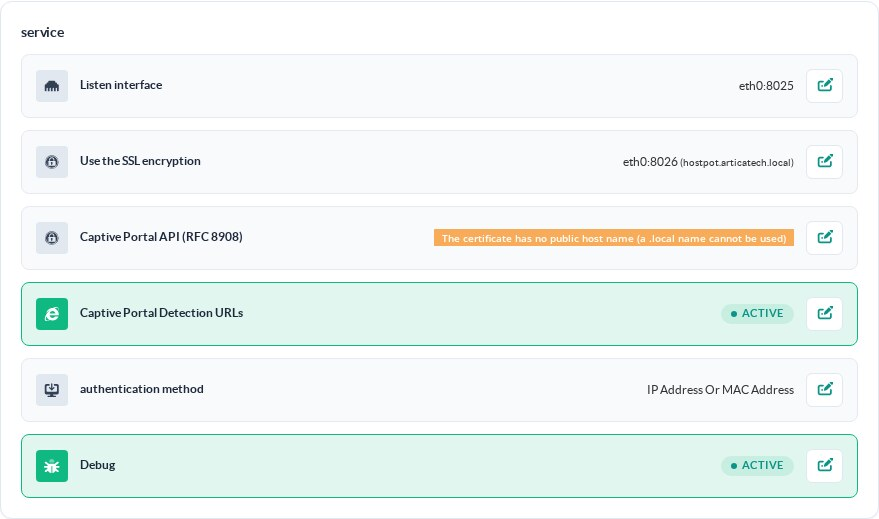
The Captive Portal API (RFC 8908) line of the service section shows either the published API address or, in orange, why it is not published.
Published: the API address shown here is the one DHCP option 114 carries.
Certificate not trusted: a self-signed certificate, or one from a private authority, even with a public name.
Private name: the default certificate of the HotSpot wizard uses a .local name.
| Message | Cause | What to do |
|---|---|---|
| INACTIVE | The switch is off. | Turn on Captive Portal API (RFC 8908) in the service form. |
| HTTPS must be enabled on the portal | SSL is off. | Turn on Use The SSL Encryption. |
| No certificate selected for HTTPS | No certificate, or it cannot be read. | Select a certificate. |
| The certificate has no public host name (a .local name cannot be used) | Only private names, IP addresses or wildcards. | Use a certificate for a public name such as hotspot.example.com. |
| The certificate is not issued by a public authority, or is expired | Self-signed, private authority, missing intermediate, expired, or the name does not match. |
Use a Let's Encrypt or commercial certificate, with its chain. |
| Not available when the portal is published by the reverse proxy | The portal is behind the reverse proxy. | Not supported in this mode. |
¶ Troubleshooting
- Status published but phones do not open the portal:
- check that the guest got option 114, with a packet capture of the DHCP answer on the HotSpot:
tcpdump -i eth0 -n -vvv port 67; - check that TCP 8026 on the HotSpot is reachable from the guest network before sign-in;
- check that the device uses the Artica DNS.
- check that the guest got option 114, with a packet capture of the DHCP answer on the HotSpot:
- "Not issued by a public authority" with a Let's Encrypt certificate:
the certificate has expired, the name selected does not match, or the chain is missing from the certificate entry.
Renew the certificate or re-import it with its chain, then run Reconfigure all.
- The status did not change after Apply:
The line is refreshed when the portal service has restarted.
Reload the page, or run Reconfigure all. - Windows laptops:
They do not use the API.
Their detection relies on the probes, see Enable automatic browser redirection.
¶ Limitations
- The API is announced over DHCPv4 only.
The IPv6 equivalents (DHCPv6 option 103, Router Advertisement option 37) are not sent. - One API per HotSpot, on the interface the HotSpot listens on.
- Not available when the portal is published through the reverse proxy.
References: RFC 8910 – Captive-Portal Identification in DHCP and Router Advertisements, RFC 8908 – Captive Portal API, RFC 8952 – Captive Portal Architecture.