MMC is designed as a reverse proxy and will not function if it is placed behind a forward proxy with caching enabled by default or requiring absolute-form URLs.
To ensure compatibility, you need to enable a dedicated option.This feature is available Artica v4.50 Service Pack 7 or Artica v4.50 Service Pack 6 Hotfix 20260410-22
On the left menu, choose Your Proxy > Global settings.
Click on the grey link “Microsoft Connected Cache”
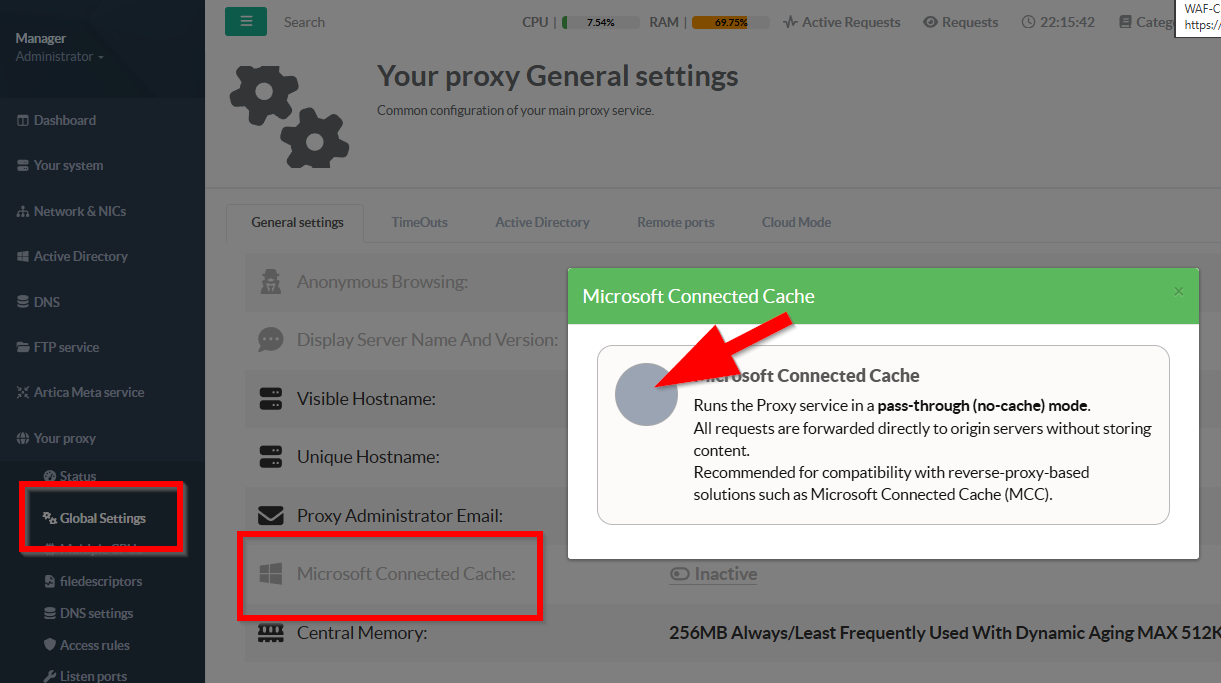
By turn to green the option the proxy will change its behavior with:
- Disables object storage for all requests, so Squid behaves like a non-caching forward proxy.
- Prevents use of in-memory cache for response objects, reducing RAM used for caching.
- Reinforcing the no-cache behavior.
Together, these three directives effectively turn off Proxy caching both in RAM and on disk.
This reduces cache-related I/O and avoids serving stale cached content, but removes bandwidth-saving and acceleration benefits.
- keeps TCP connections open between client and the proxy, lowering connection setup overhead.
- Keeps upstream connections open too, improving performance and reducing latency for repeated requests.
- Allows the proxy to fetch and forward range requests directly without forcing a full-object cache strategy.
This is useful for video streaming, partial downloads, and reverse-proxy-like compatibility scenarios where byte ranges matter.
Overall, this configuration makes the proxy act as a pass-through proxy optimized for connection reuse, not for caching.