Artica can automatically sign outbound e-mail with S/MIME (Secure/Multipurpose Internet Mail Extensions) at the gateway level.
Messages leaving your organization are signed with the sender's certificate after they are queued by Postfix, without installing anything on workstations or configuring mail clients.
The feature also distributes each sender's public certificate to external recipients automatically — exactly once per recipient — so their mail clients can verify signatures and encrypt replies.
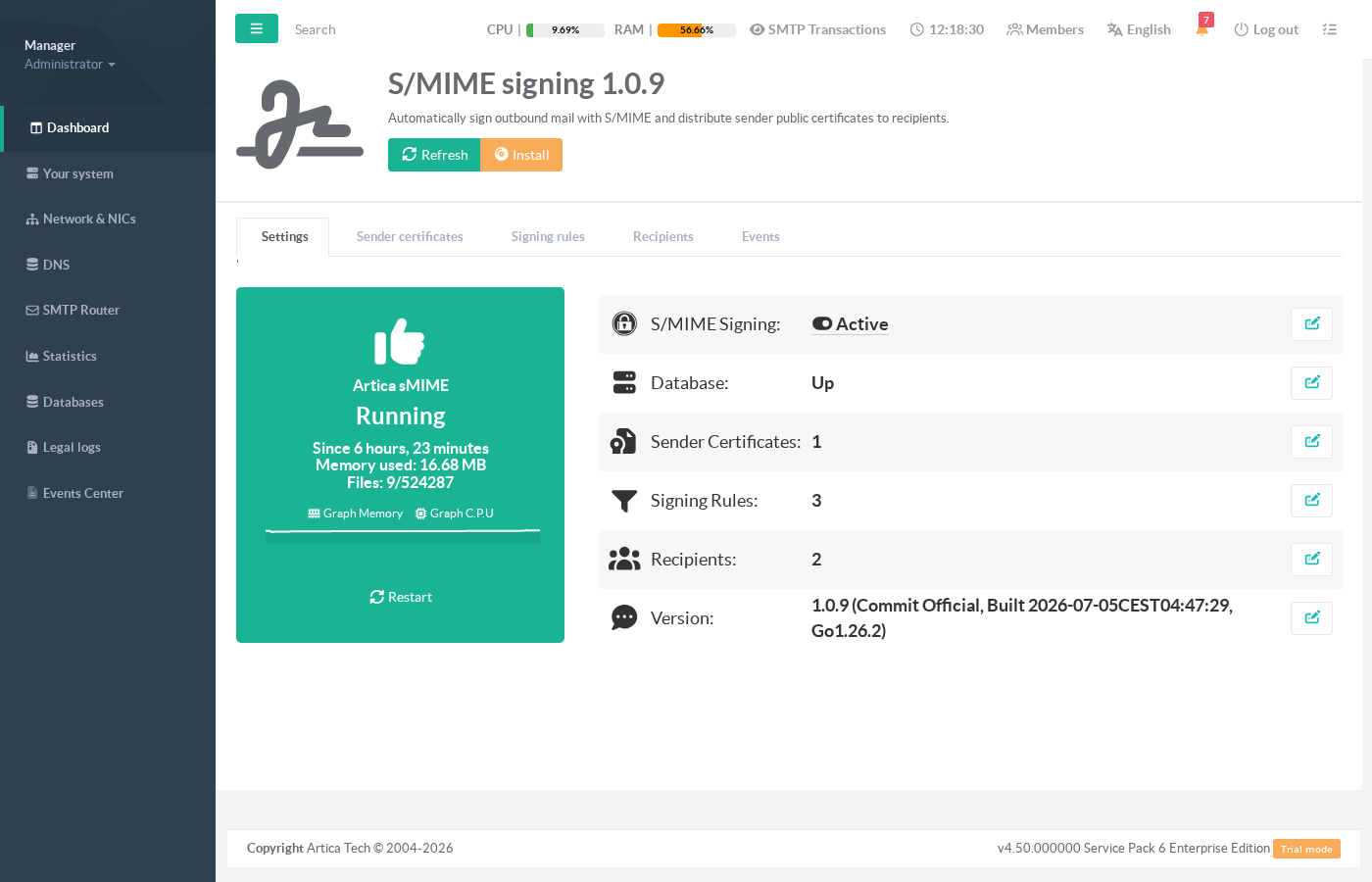
The management interface is available in the Web Console under SMTP Router > Outgoing rules > S/MIME signing.
¶ Why sign outbound mail at the gateway?
- Authenticity & anti-spoofing.
A valid S/MIME signature proves the message really originates from your organization.
Recipients (Outlook, Apple Mail, Thunderbird…) display a verified-signature indicator, which makes impersonation attempts and Business E-mail Compromise (BEC) fraud immediately visible.
- Integrity.
The cryptographic signature covers the message body: any alteration in transit — even a single character in an IBAN or an invoice amount — breaks the signature and is flagged by the recipient's client.
- Non-repudiation.
Signed messages provide legal-grade evidence of origin, a common requirement in regulated exchanges (contracts, purchase orders, HR documents).
- Zero client-side deployment.
Signing happens centrally in the SMTP flow.
No certificate roll-out on laptops or phones, no user training, no forgotten configuration: every message that matches a rule is signed, consistently.
- Automatic certificate distribution.
The first time a sender writes to a given recipient, Artica sends that recipient a one-time notification containing the sender's public certificate.
The state is tracked per (sender, recipient) pair and is rotation-aware: when you renew a certificate, correspondents receive the new one automatically — and only once.
- Mail always flows.
The filter is designed fail-open: a database outage, an expired certificate or a signing error never blocks or loses business mail — the message is delivered unsigned (or deferred for retry) instead. Only an explicitrejectpolicy rule can refuse a message.
- Complements SPF/DKIM/DMARC.
Those mechanisms authenticate the sending server for receiving MTAs; S/MIME authenticates the message itself end-to-end, all the way to the human reader — the two work together.
¶ Typical use cases
- Finance and invoice fraud prevention.
Sign every message sent by the accounting department so customers can trust payment instructions.
With arejectrule, mail fromfinance-*@yourdomainis refused if it cannot be signed — a hard guarantee that no unsigned payment instruction ever leaves the gateway.
- Legal, HR and executive correspondence.
Contracts, official notices and board communications carry proof of origin and integrity, with zero effort from the people sending them.
- B2B partner exchanges.
EDI notifications, purchase orders and quality certificates exchanged with partners are systematically signed; partners' clients validate them automatically after the one-time public-certificate hand-shake.
- Regulatory compliance.
Sector rules and customer contracts increasingly require message-level authenticity (financial services, health, public tenders).
Gateway signing gives auditors a single enforcement point and a searchable event log.
- Progressive roll-out.
Start with anotifyrule to distribute public certificates without touching the mail, then switch the rule tosignonce your correspondents are ready.
Usebypassrules to exclude mailing lists, ticketing systems or internal-only traffic.
¶ How it works
The signer is a Postfix after-queue content filter. The flow for each outbound message is:
- Postfix accepts the message on the submission service and hands it to the Artica S/MIME filter.
- The filter evaluates the signing rules (highest priority first) against the envelope sender and every recipient. The single best-matching rule decides the action for the whole message:
sign,bypass,notifyorreject. - For
sign, the message body is signed in-process (detached CMS signature,multipart/signed, SHA-256) with the sender's certificate. Private keys are stored encrypted (AES-256-GCM) and are never displayed once uploaded. - If the matched rule has Send Public Certificate enabled, each external recipient that has not yet received the sender's current certificate gets a one-time notification e-mail carrying it.
- The (possibly signed) message is re-injected into Postfix for normal delivery, and the decision is recorded in the Events log.
Messages that are already signed or encrypted are never modified. A loop-protection header guarantees each message is processed only once.
¶ Step 1 — Enable the service
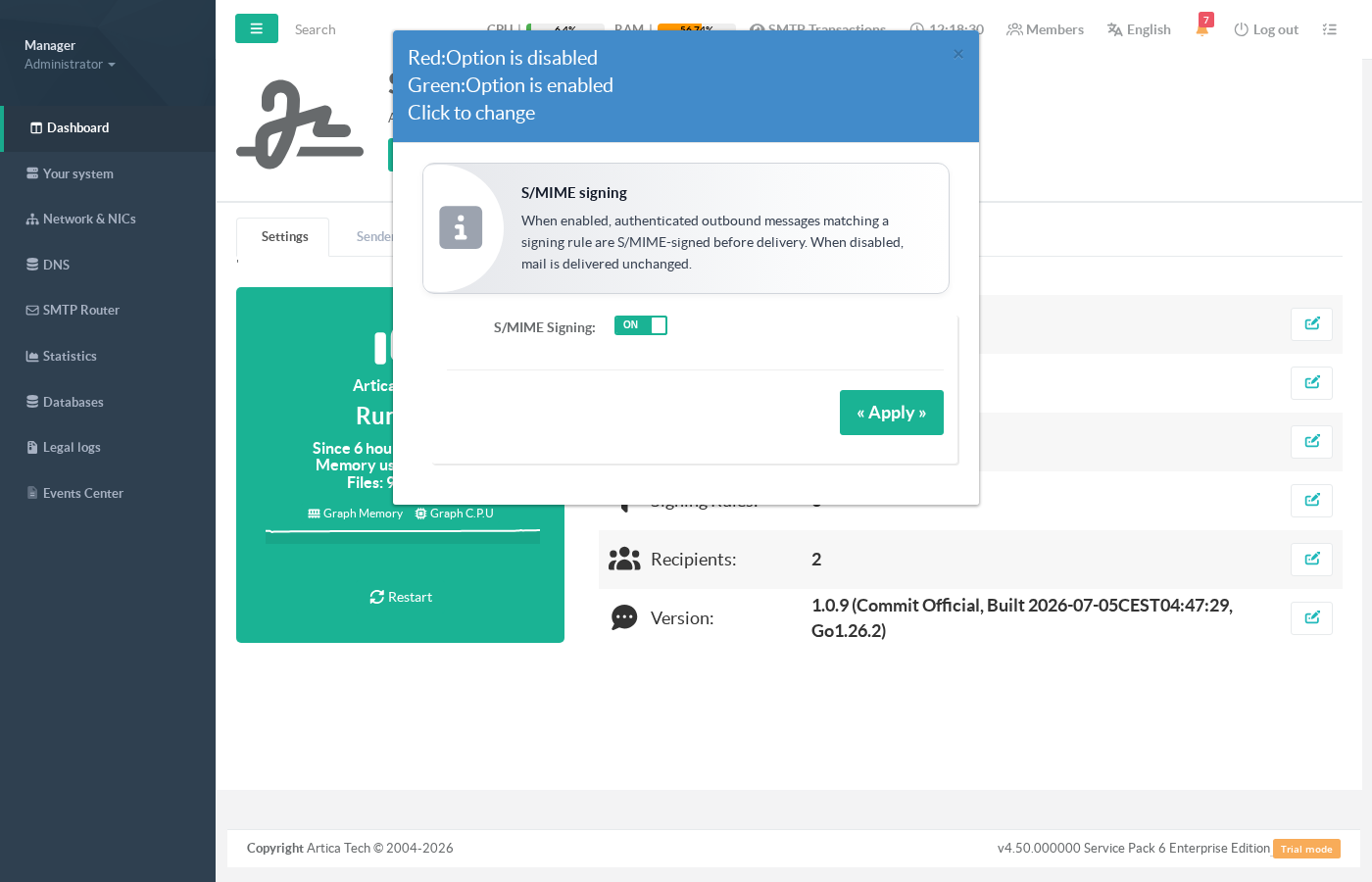
Open SMTP Router » S/MIME signing. The Settings tab shows the daemon status (running time, memory), whether signing is globally active, database connectivity, and the number of configured objects. Click the S/MIME Signing row (or the edit button) to open the on/off dialog:
¶ Step 2 — Add sender certificates
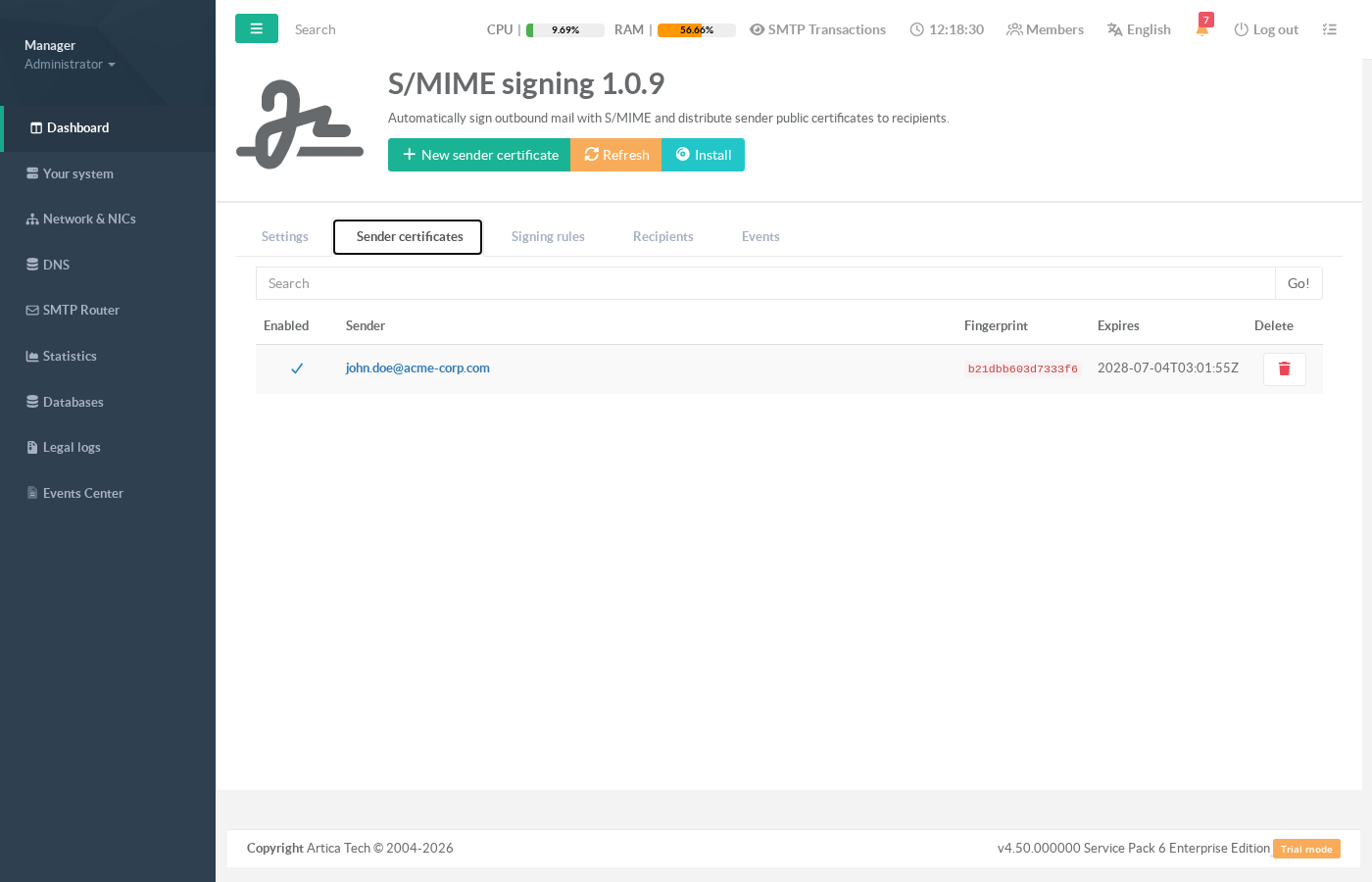
Open the Sender certificates tab. Each entry binds one sender address to one signing identity (certificate + private key).
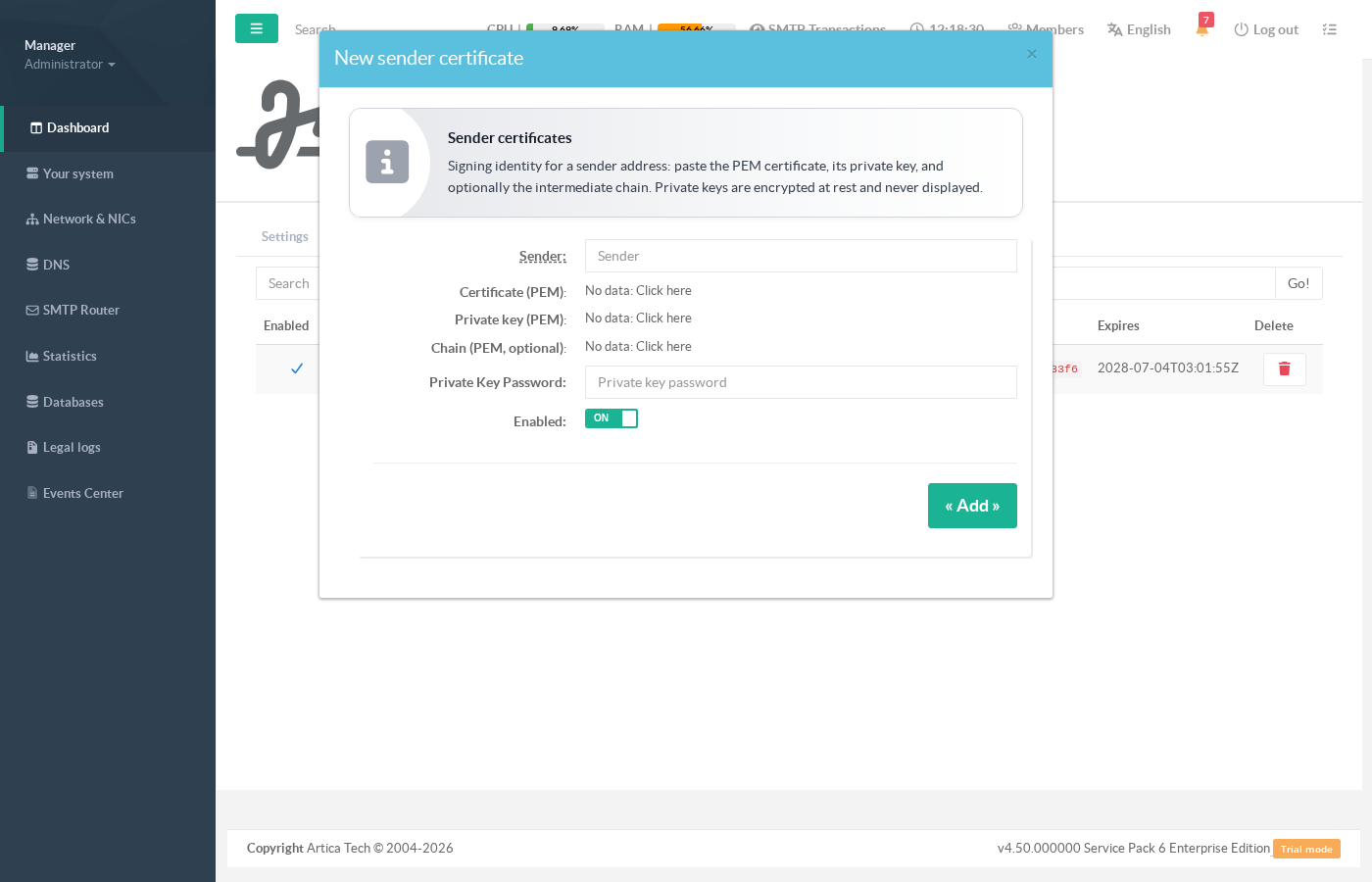
Click New sender certificate and provide:
- Sender — the e-mail address whose outbound messages will be signed (e.g.
john.doe@acme-corp.com); - Certificate (PEM) — the X.509 certificate, which should carry the E-mail protection extended key usage and the sender's address;
- Private key (PEM) — the matching private key (a password can be supplied for legacy encrypted keys);
- Chain (PEM, optional) — intermediate CA certificates, recommended so recipients can build the trust path.
For signatures to be trusted by recipients without manual steps, use certificates issued by a public CA (or a CA your partners trust). Self-signed certificates work technically but recipients will be prompted to trust them first.
¶ Step 3 — Define signing rules
The Signing rules tab holds the policy: an ordered list of rules evaluated by priority (highest number wins; first match decides).
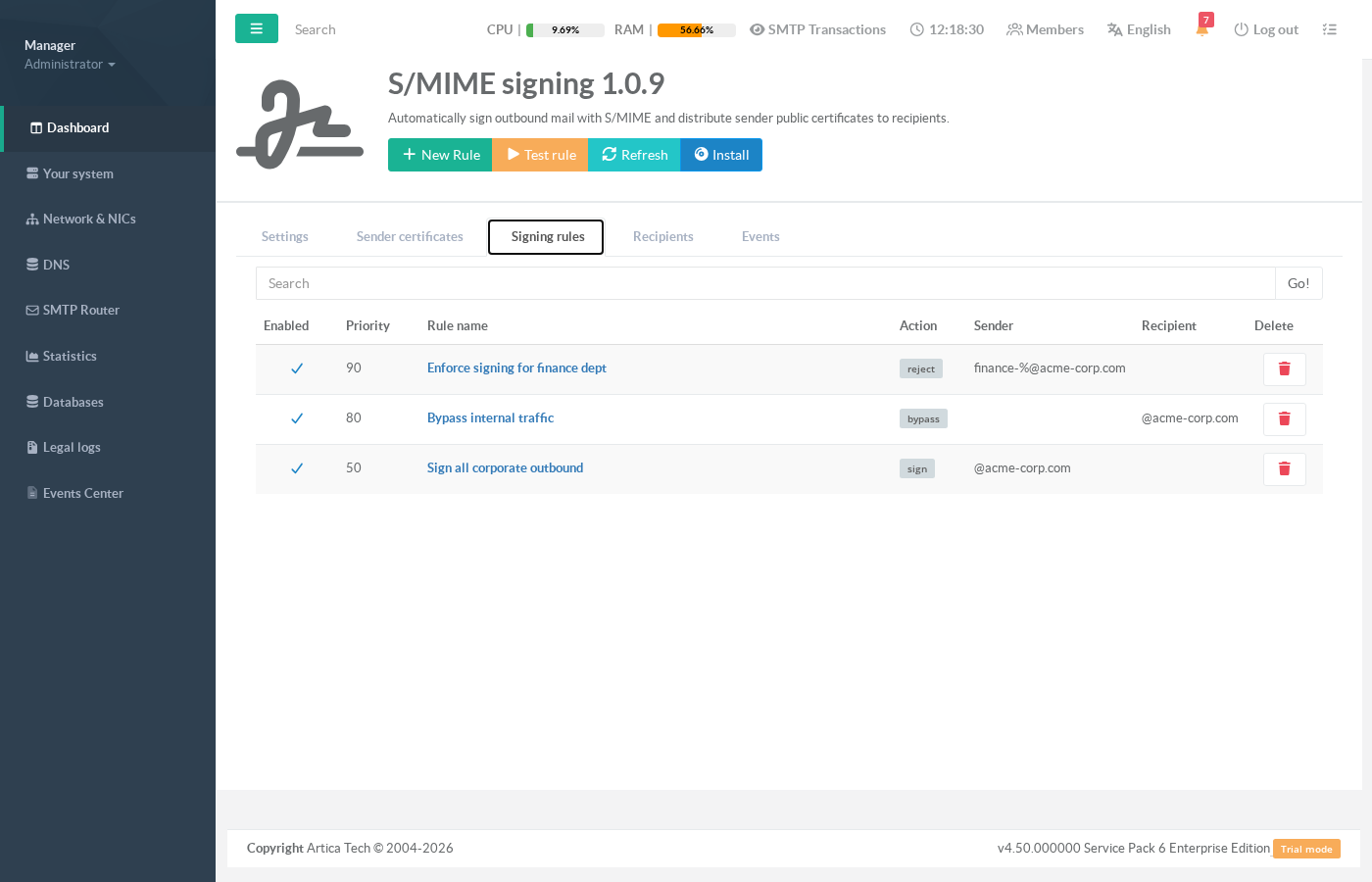
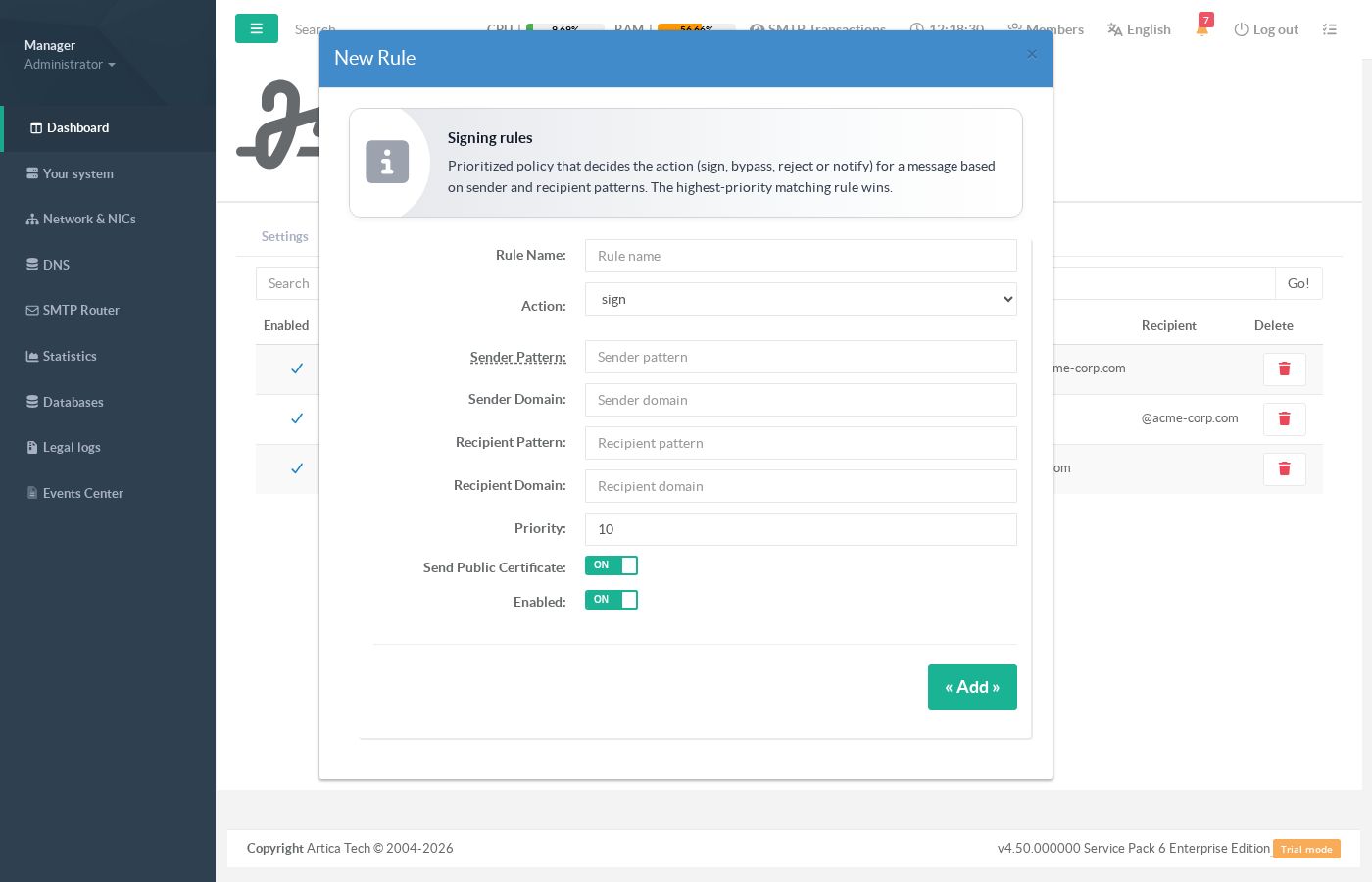
Rule fields:
| Field | Meaning |
|---|---|
| Rule name | Free label shown in the list and the logs. |
| Action | sign — sign the message; bypass — deliver unchanged; notify — deliver unchanged but distribute the sender's public certificate; reject — refuse the message if it cannot be signed (use for mandatory-signing policies). |
| Sender / Recipient pattern | SQL-style pattern matched against the full address, case-insensitive: % matches any sequence, _ a single character. Example: finance-%@acme-corp.com. Empty = match any. |
| Sender / Recipient domain | Exact domain match (simpler alternative to a pattern). Empty = match any. |
| Priority | Higher values are evaluated first. The single highest-priority matching rule decides the action for the whole message. |
| Send Public Certificate | When on, recipients matched by this rule receive the sender's public certificate once (per certificate rotation). |
| Enabled | Disabled rules are ignored by the engine but kept in the list. |
If no rule matches, the configured default action applies (bypass out of the box: unmatched mail is delivered untouched).
¶ Step 4 — Test your policy
Use the Test rule button to dry-run the rule engine against any sender/recipient pair — no e-mail is sent:
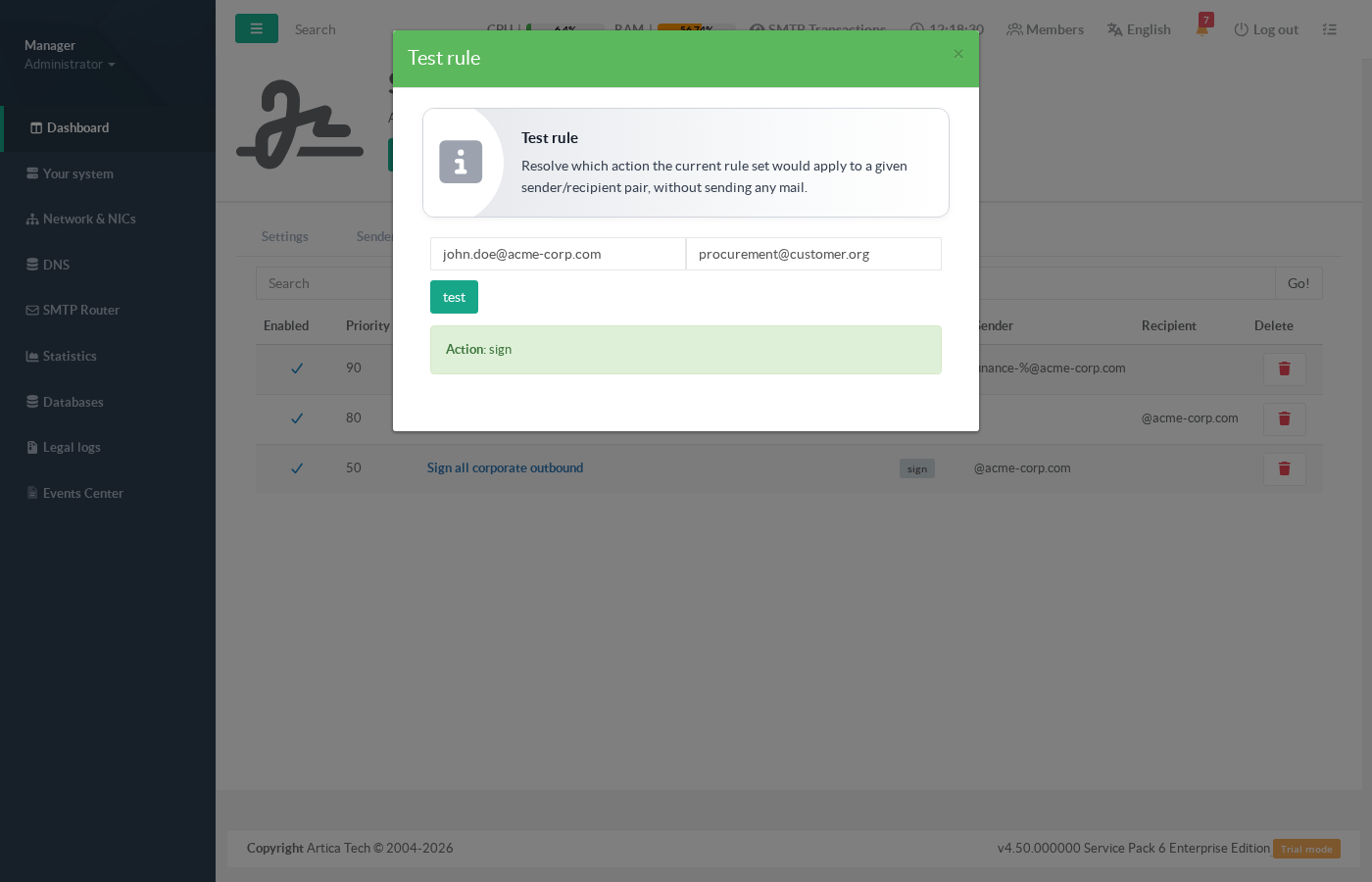
sign for a corporate sender writing to an external customer.¶ Step 5 — Monitor certificate distribution
The Recipients tab tracks which external correspondents already received each sender's public certificate:
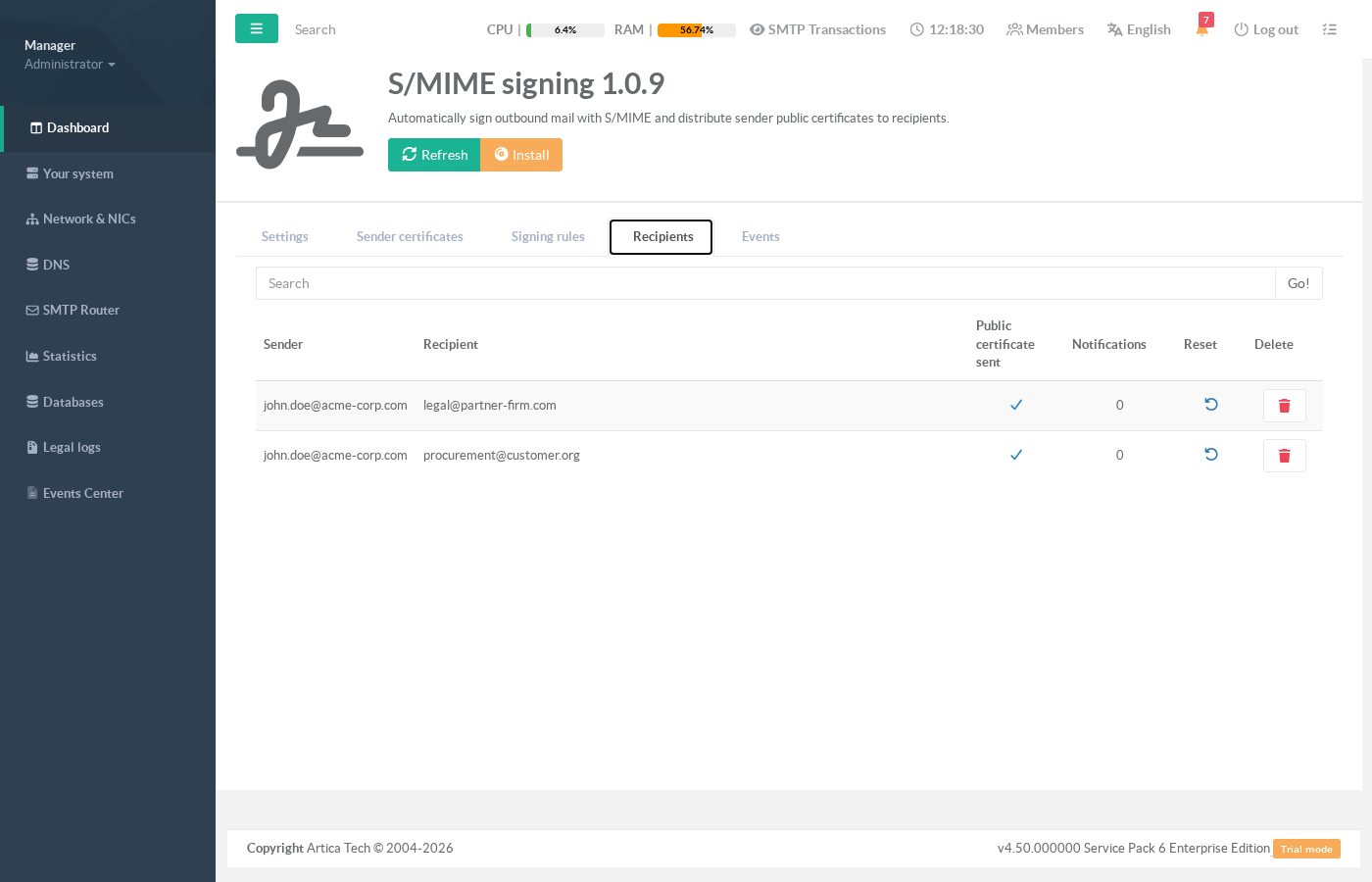
¶ Step 6 — Audit the activity
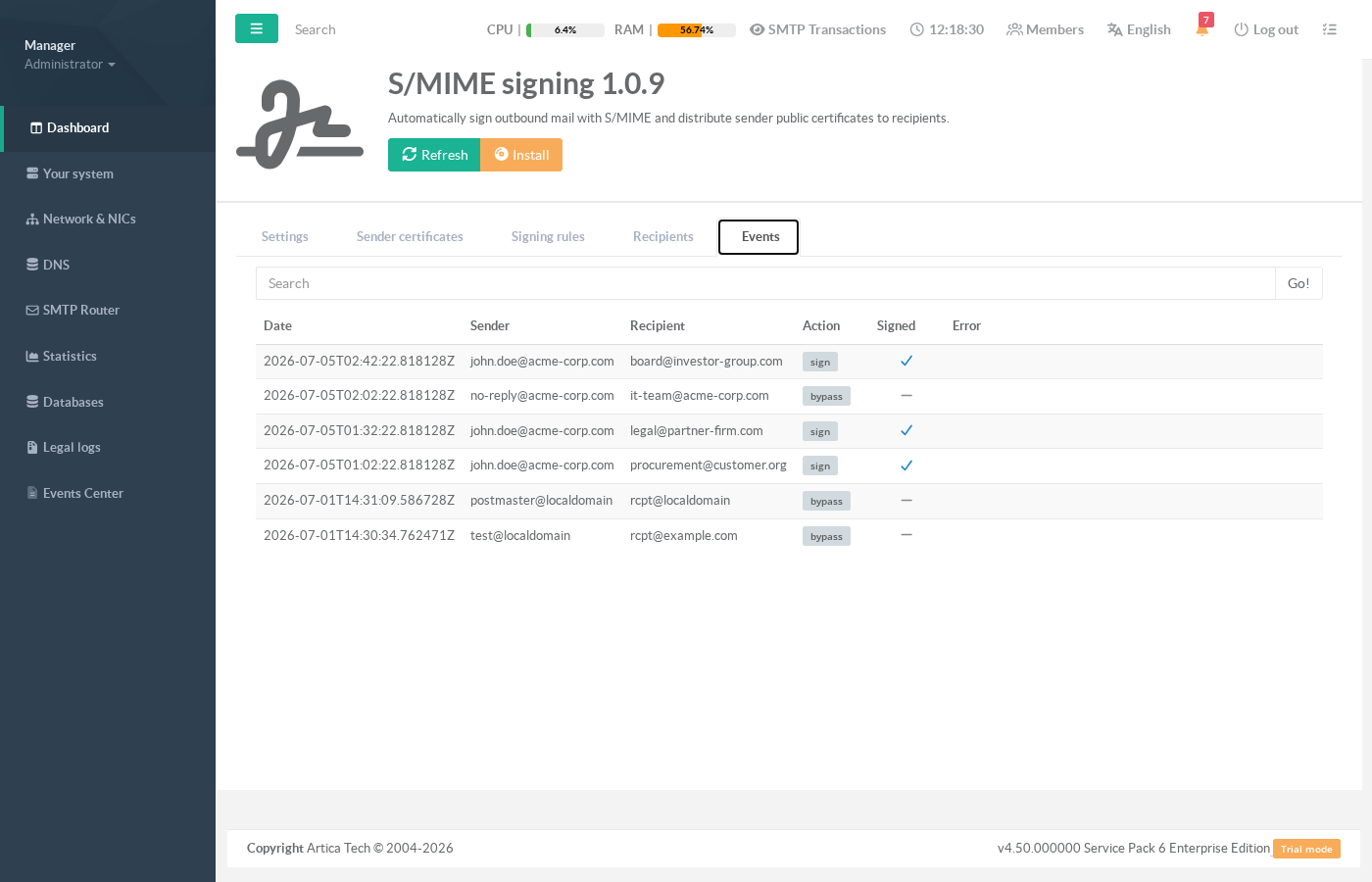
The Events tab records every processing decision: date, sender, recipient, action taken, whether the message was signed, and any error:
¶ Operational guarantees
| Situation | Behaviour |
|---|---|
Certificate missing, expired or unusable under a sign rule |
The message is delivered unsigned (fail-open) and the error is recorded in Events. |
Certificate missing or expired under a reject rule |
The message is refused — the sender receives a bounce. This is the only case where mail is stopped, and it is always the result of an explicit policy choice. |
| Temporary infrastructure failure (database, key store) | The message is deferred: Postfix keeps it queued and retries automatically. Nothing is lost or bounced. |
| Message already signed or encrypted by the sender's client | Delivered untouched — the gateway never breaks an existing signature. |
| Oversized message (default limit 25 MB) | Delivered untouched. |
¶ Best practices
- Give
bypassrules for internal or automated traffic a higher priority than your broadsignrules, so they win the match. - Reserve
rejectfor addresses where signing is a hard compliance requirement, and monitor the Events tab after enabling it. - Renew certificates before expiry: expired identities cause fail-open (unsigned) delivery under
signrules. The expiry date of every identity is visible in the Sender certificates tab. - After renewing a certificate, no action is needed for distribution: the rotation is detected by fingerprint and correspondents automatically receive the new public certificate once.
- Use Test rule after every policy change — it exercises the exact engine used in production.