Back to the Proxy Cache section
HyperCache Dedup (cache deduplication) makes the proxy store one copy of an object that the Internet serves under many different addresses: Windows updates, Linux packages, game downloads, images and videos spread over CDN servers. Users get it from the local cache instead of downloading it again from the Internet.
¶ Functional benefits
- Less Internet bandwidth. A Windows update, a Debian package or a Steam game downloaded once by the first user is served from the cache to everyone else, whichever mirror the other computers are sent to.
- Faster downloads for users. Objects come from the local disk at LAN speed.
- A better use of the disk cache. The same file is stored once instead of once per mirror, so the cache keeps more different objects.
- Nothing to install on the computers. HyperCache works inside the proxy: clients, browsers and update agents are not changed.
- Safe by design. The proxy still downloads each object from its real server; HyperCache only changes the name under which the object is stored. A broken or crashing component never stops the proxy: HyperCache switches itself off (emergency mode) and the proxy keeps working without deduplication.
¶ Concepts
¶ The problem: one object, many addresses
Websites that serve many images or large files use a CDN (Content Delivery Network): the downloads are spread over many servers and countries. Microsoft, Apple, Google, Steam and Linux distributions work this way.
A proxy stores each object under its address (its URL). With a CDN, the same file is reachable through many addresses, for example:
http://cdn1.images.domain.tld/picture.pnghttp://cdn2.images.domain.tld/picture.pnghttp://cdn3.images.domain.tld/picture.pnghttp://cdn4.images.domain.tld/picture.png
Without HyperCache, the proxy sees four different objects: it downloads and stores the same picture four times, and a user sent to cdn3 gets nothing from the copy fetched through cdn1.
¶ The solution: a common cache key
For each request, the proxy asks HyperCache under which name (the cache key) the object must be stored. HyperCache answers with the same internal key for all the addresses of the same object:
http://cdn1.images.domain.tld/picture.png => http://images.SQUIDINTERNAL/picture.pnghttp://cdn2.images.domain.tld/picture.png => http://images.SQUIDINTERNAL/picture.pnghttp://cdn3.images.domain.tld/picture.png => http://images.SQUIDINTERNAL/picture.pnghttp://cdn4.images.domain.tld/picture.png => http://images.SQUIDINTERNAL/picture.png
Keys always end in .SQUIDINTERNAL: they are names, never addresses the proxy connects to. The download itself still goes to the real server; only the storage and the lookup in the cache use the key. When HyperCache does not know an address, it leaves it unchanged and the proxy behaves as usual.
¶ How it works
- HyperCache is a small program,
storeid_file_rewrite, that the proxy starts as a helper (Squidstore_id_program). Up to 20 copies run in parallel, 5 of them started in advance. - It evaluates its rules in order and the first rule that matches wins:
- addresses that are never rewritten: IP addresses,
wpad.dat/proxy.pac, Microsoft connectivity checks, webmails, ads servers, Artica's own servers; - the built-in rules, shipped with the helper and updated with Artica;
- the rules of the rule table (Artica defaults and administrator rules), in their order.
- addresses that are never rewritten: IP addresses,
- The rules only trust the host name: an address such as
http://other-site.example/x.microsoft.com/a.jsnever receives Microsoft's key, so another website cannot place its own file in the cache under Microsoft's name. - For CDNs shared by many customers (Amazon CloudFront, Amazon S3, Akamai, Rackspace, Blogspot…), the host name stays in the key: two customers of the same CDN never share a key. For whole websites (Microsoft, NVIDIA, eBay…), only static files (images, scripts, archives, installers…) are rewritten, never web pages or API answers.
- An object stored under a HyperCache key is kept for a long time, even if the website marked it private or not cacheable. This is what makes deduplication worthwhile, and the reason why rules are limited to static, public content.
- HTTPS: the proxy only sees the address of an HTTPS download when SSL inspection (decryption) is enabled for that website. Without it, an HTTPS download is a tunnel that is neither cached nor deduplicated. Most update services (Windows Update, Debian, Steam content servers) still download their large files over HTTP, where HyperCache works without SSL inspection.
¶ Emergency mode
If the HyperCache helpers die faster than the proxy can restart them (the proxy logs "Too few store_id processes"), the Artica daemon switches HyperCache to emergency mode: the proxy is restarted without HyperCache and keeps serving users normally, without deduplication. The top bar of the console then shows "The HyperCache is in Emergency mode". See Managing HyperCache below to leave it.
¶ Automatic updates of the helper
Artica updates ship new versions of the helper. Every 5 minutes, the Artica daemon checks whether a newer helper was delivered, installs it and, when HyperCache is running, reloads the proxy so that the helpers restart on the new version. No action is needed: allow up to 5 minutes after an update.
¶ Use cases
- Windows fleets. Windows Update and Microsoft downloads come from many servers (
windowsupdate.com,download.microsoft.com, Delivery Network shards). Each update is downloaded from the Internet once per site instead of once per mirror. This is the main gain on networks of tens to thousands of Windows computers. - Linux servers and workstations. Debian and Debian-based packages (
debian/…,debian-security/…) are deduplicated whichever Debian mirror the machines use. - Schools, universities, gaming rooms. Steam game content, Apple software updates, Android and Chrome updates, NVIDIA drivers, Kaspersky updates: large, identical files downloaded by many machines.
- Remote sites with a small Internet link. A branch office proxy downloads each update once and serves it locally, which frees the link for business traffic.
- Media and social networks (when visible to the proxy): video segments of Akamai, Brightcove, Dailymotion; images of Facebook, Instagram, Gravatar, eBay; WordPress and jQuery libraries shared by many websites.
- Your own software mirrors. If your users download the same files from several mirrors of an editor, a rule can give them a common key (see Deduplication rules).
¶ Requirements: when HyperCache is inactive
HyperCache only works when the proxy stores objects on disk. It is inactive, and its configuration file /etc/squid3/StoreID.conf only contains a comment giving the reason, in these cases (checked in this order):
| Comment in StoreID.conf | Reason |
|---|---|
DISABLED | the feature is disabled |
Enable Intel Celeron | the Intel Celeron (low resources) mode is enabled |
SquidCacheLevel == 0 | the proxy has no disk cache |
SquidDisableCaching == 1 | caching is temporarily disabled |
Emergency mode! | the whole proxy is in emergency mode |
Temporary disabled | deduplication is paused |
StoreID Emergency mode | HyperCache is in emergency mode |
Not a 3.5 or 4.x and later version | the Squid version is too old |
Update binary failed | the helper could not be installed |
¶ Managing HyperCache
¶ Enable or disable
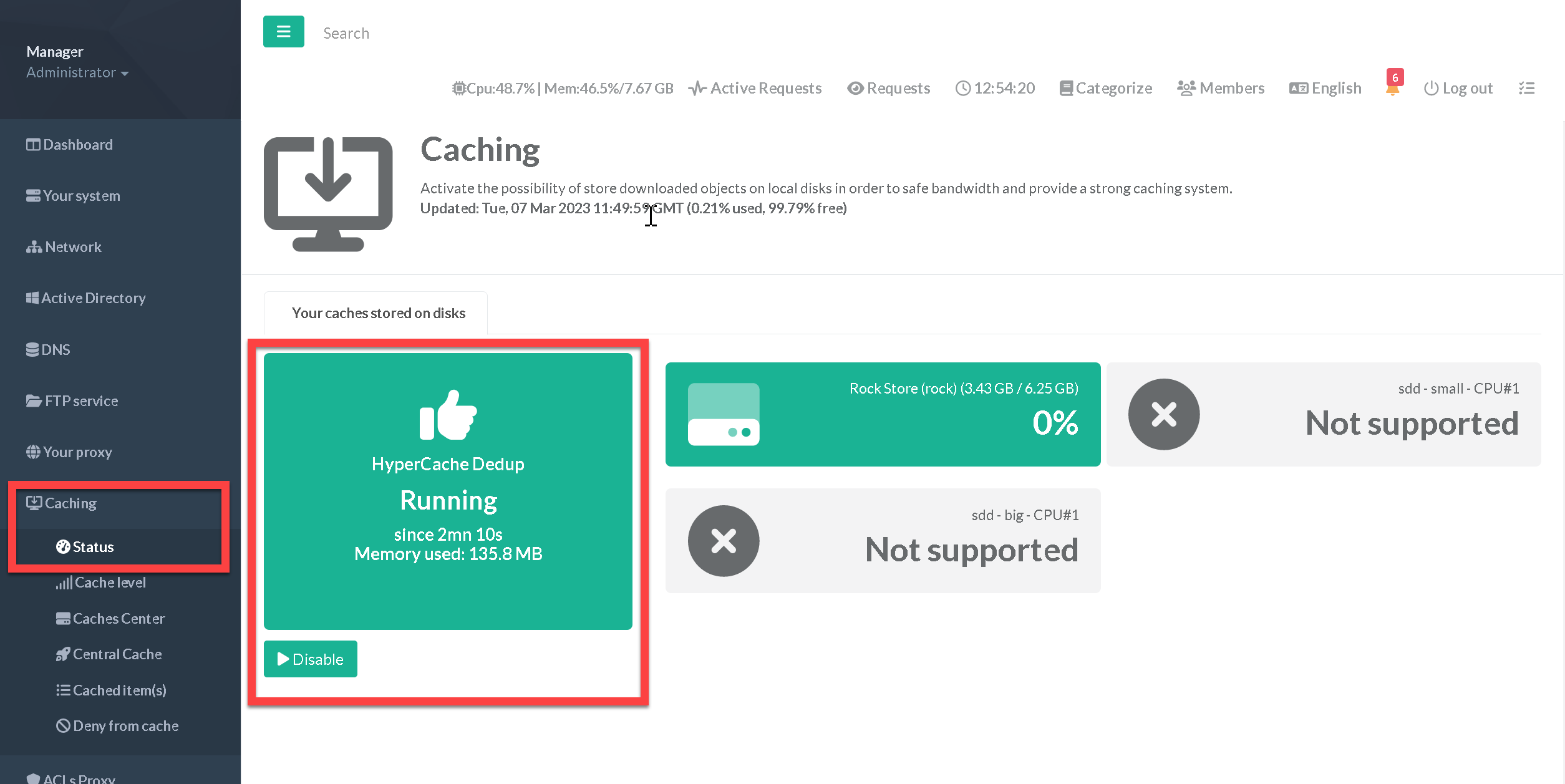
- Open the left menu
Caching>Status. The HyperCache Dedup tile shows the status of the service. - Use Disable or Enable the feature in this tile. The caches are checked again and the proxy is reloaded.
¶ Pause and resume
Pausing stops the deduplication without disabling the feature (for example while investigating a caching problem). In the proxy Actions window, the HyperCache button pauses the deduplication ("Disable Hypercache") or resumes it ("Enable HyperCache"). The configuration is rebuilt, checked by the proxy and applied; if the proxy rejects it, the previous configuration is kept. Objects already in the cache stay there.
¶ Leave the emergency mode
- Fix the cause first, otherwise the emergency mode comes back: most often a faulty helper, replaced by an Artica update (wait up to 5 minutes after the update).
- Click the message "The HyperCache is in Emergency mode" in the top bar, then Disable Emergency mode.
¶ With the Artica AI assistant
The Artica AI assistant knows HyperCache. Ask it in plain language, for example "Is HyperCache working?", "Why is HyperCache inactive?", "Which deduplication rules are ignored?". It reads the real state from the appliance: active or not and why, helper version and pending update, running helpers, emergency mode and when leaving it will be allowed, rules loaded and ignored.
It can also act, always through verified transactions that can be rolled back:
| Action | Approval |
|---|---|
| Apply the configuration (rebuild, check by the proxy, reload only when something changed) | can run on its own (Autopilot, runbooks, agent) |
| Leave the emergency mode: refused while no up-to-date helper is installed and during the 30 minutes after the emergency started; checked again 60 seconds later | approval, or on its own only for the agent investigating an incident, once |
| Enable, disable, pause or resume HyperCache | always approved by an administrator |
| Add, change, enable, disable, move or remove a deduplication rule | always approved by an administrator |
Each change is proven by reading the state back (helpers running, rule loaded by the helper). If the proof fails, the previous state is restored and read back. Changes are refused on an Artica cluster slave (its settings and rules are replaced by the master's: make them on the master) and on a HaCluster load-balancer.
¶ Deduplication rules
A rule is a pair: a pattern (a regular expression that recognizes the addresses) and a key (the common name, with $1, $2… for the parts captured by the pattern). Artica ships default rules; administrator rules are managed through the Artica AI assistant. Example, for an editor whose files come from many download servers:
Pattern: ^https?://[^/?#]*\.example\.net/(.*)
Key: http://example-downloads.SQUIDINTERNAL/$1
With this rule, http://dl1.example.net/setup/v2.exe and http://dl7.example.net/setup/v2.exe share the key http://example-downloads.SQUIDINTERNAL/setup/v2.exe.
To protect the cache, a rule is refused before anything is changed when:
- the pattern does not start with
^https?://followed by the host name, closed by/,?,#or the end of the address. A pattern such as.*\.example\.com/or^https?://[^/]*\.example\.com/would also matchhttp://attacker.example/x.example.com/, and that website could replace the files ofexample.comin the cache. Use[^/?#]*\.for "any sub-domain"; - the pattern is an alternation at the top level (
a|b): group the alternatives,(?:a|b); - the key does not start with
http://<name>.SQUIDINTERNAL/, or uses$1… in its host name; - the key cites a part (
$2) that the pattern does not capture, or the pattern does not compile; - the rule is identical to an existing one, or is on the helper's list of rules known to mix different objects.
Good practices: keep the query string in the key unless it is only a signature; on shared CDNs keep the host name in the key; put specific rules before generic ones (a new rule is placed first). An Artica default rule cannot be deleted, because it would come back at the next rebuild: disable it instead. Changing a default rule creates an administrator rule at its place and disables the default.
¶ Monitoring and troubleshooting
- Helper version:
/lib/squid3/storeid_file_rewrite -version(2.0.0 or later). - Helper log:
/var/log/squid/storeid.log, one JSON line per event. Thestartingline gives the total number of rules the helper evaluates (its built-in rules included);invalid file rule ignoredlines name the table rules it ignored. Set theSTOREID_DEBUGtoken to 1 to log every address and its key. - Running helpers: the
(storeid_file_rewrite)processes, children of the proxy. - After a reload,
/var/log/squid/cache.logshows "Processing Configuration File: /etc/squid3/StoreID.conf" and "Starting N/M 'storeid_file_rewrite' processes". - Three default jQuery rules are reported as ignored ("output references group 2…"): this is expected.