DHCP lease monitoring
Artica Meta allows you to visualize DHCP leases in real time, enabling you to identify which IP addresses have been assigned to client devices by your DHCP server.
Artica Meta allows you to visualize DHCP leases in real time, enabling you to identify which IP addresses have been assigned to client devices by your DHCP server.
The Status leases tab in the DHCP management panel
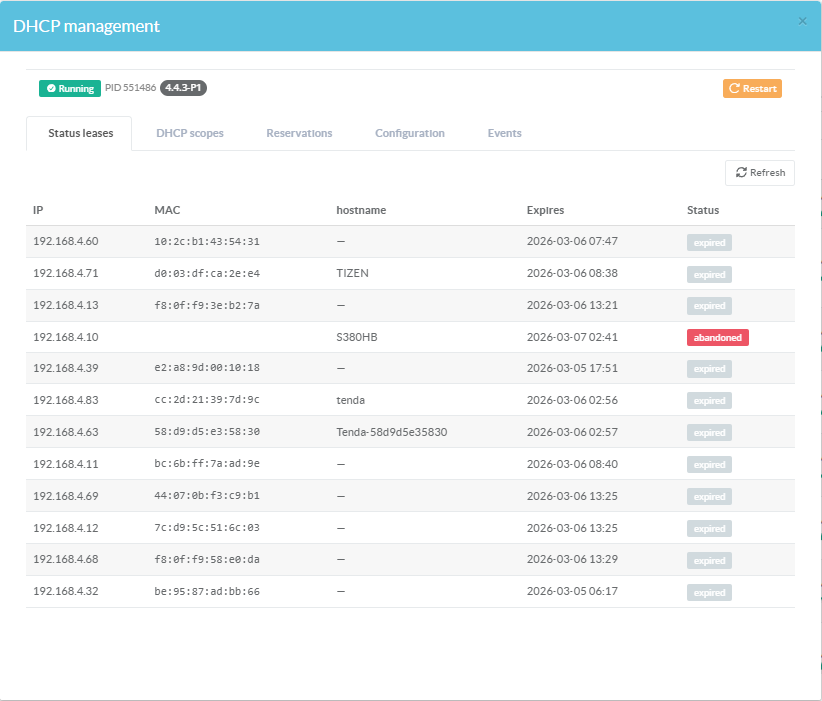
The status give 3 colors:
- Green: active - Lease is currently held by the client
- Grey: expired- Lease was active but has since lapsed or client released the lease or it expired naturally
- Red : abandoned - Client sent
DHCPDECLINE— IP was in use on the network when offered.
Server will not re-offer this IP until the abandon lease time elapses or it is manually cleared
What "abandoned" means ?
When a DHCP client receives an offer, it ARPs the proposed IP before accepting it.
If it gets a response (meaning another device already uses that IP), it sends a DHCPDECLINE back to the server.
The server marks the lease abandoned to avoid offering a conflicting address again.Common causes:
- A device has that IP statically configured
- A stale ARP entry made the client think the IP was taken
- A previous DHCP server left a ghost lease behind