Turning to 503 error if system capacity exceeded
This feature monitors memory usage (including swap partition), processor load and average system requests response time of , as well as processor utilization. If any of the monitored guidelines exceed the set threshold...
This feature monitors memory usage (including swap partition), processor load and average system requests response time.
If any of the monitored guidelines exceed the set threshold, the current request is redirected to a 503 error.This feature is available on the reverse-proxy version 1.25.3.1 and Artica v4.50 Service Pack 1 or Artica v4.50 Hotfix xxx
- Open a reverse-proxy website rule
- Select the “
General settings” tab. - Open the “
Limits” option
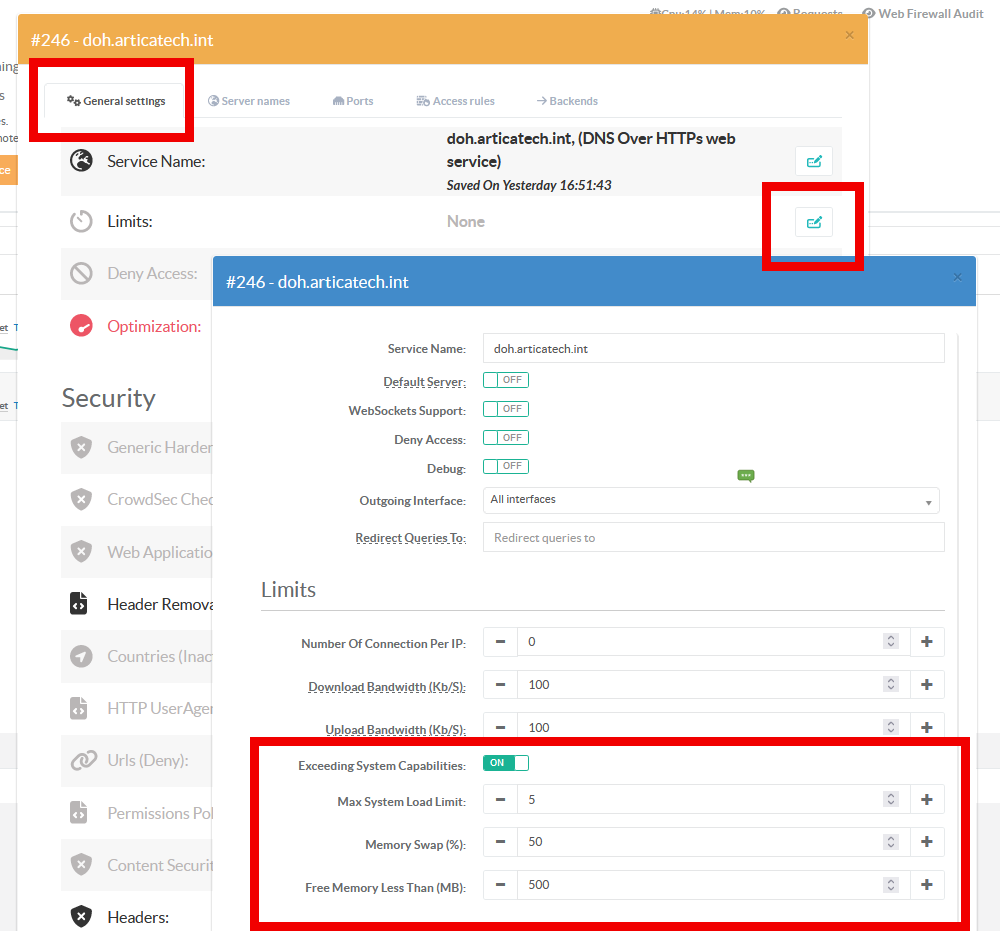
- Turn on the
Exceeding system capabilitiesoption - Max System Load limit: This option protects the system by monitoring the system load.
If the system load reaches the value specified by 'number' within one minute, the incoming request will be redirected to error 503.. - Memory swap: This option is used to specify how many percent of the system's swap partition is used.
- Free memory less than: This option returns a 503 error if the free memory falls below the specified value in MB.