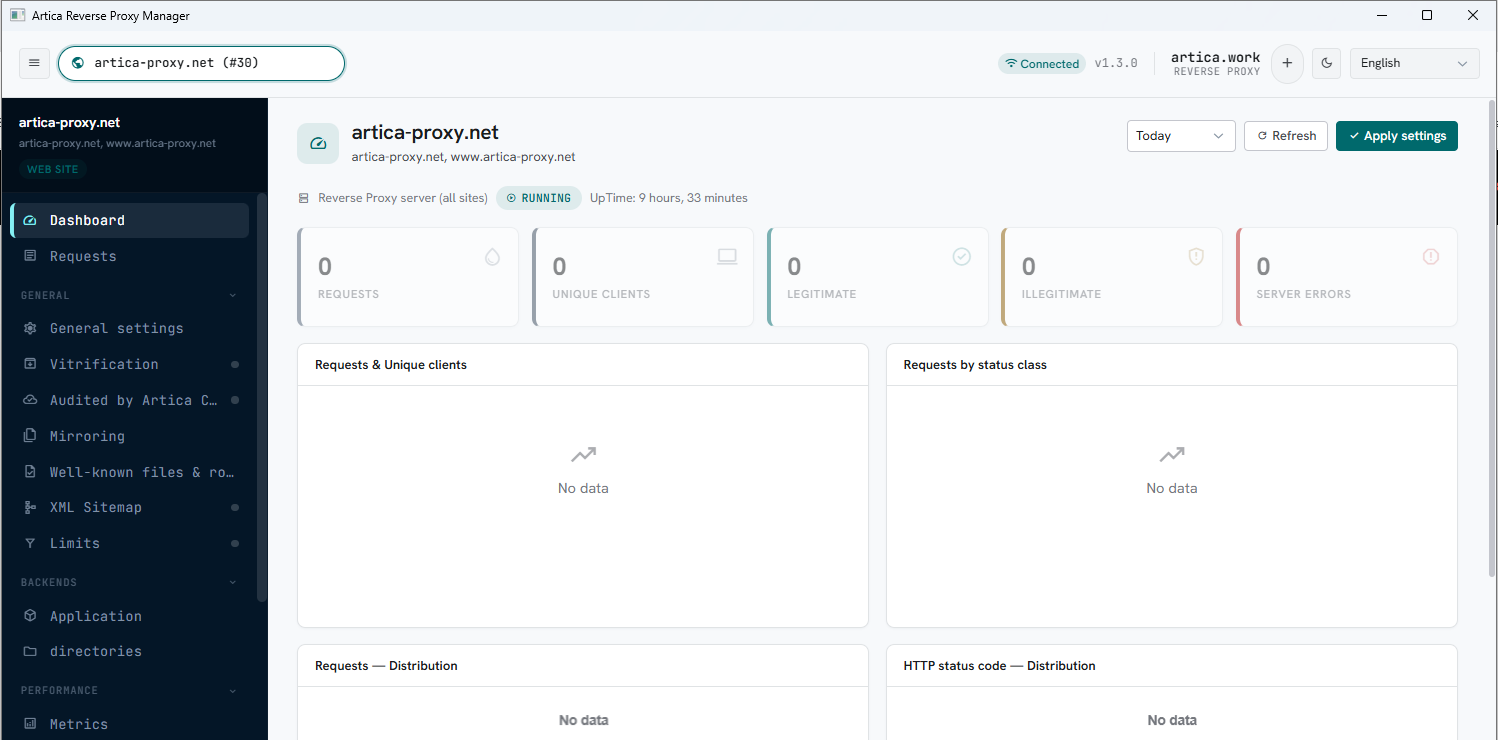
The Artica Reverse Proxy Manager is a Microsoft Windows application that administers a reverse proxy remotely.
It does not use a login and a password: it presents a client certificate and talks to a dedicated mTLS administration service on the appliance.
That service listens by default on TCP port 8080, on every interface — a port that most corporate firewalls will never let through.Download : ArticaReverseProxyManager.exe ( 1.3.0 )
The Administration redirector removes that constraint.
It publishes the very same service on a path of a website you already publish, so the desktop application reaches it on 443, under the site's own certificate and its own public name: https://gateway.example.net/rp-admin/ instead of https://appliance.example.net:8080/.
Nothing extra is opened on the network — and the administration port can even be taken off the network entirely.
¶ Concept
Two objects are involved, and it is worth separating them clearly before configuring anything.
- The mTLS administration service.
It is the reverse-proxy daemon's own administration API, served over TLS with mandatory client-certificate verification.
It is what the Windows application calls to read a site, save it, apply it, fetch metrics, and so on. - The client configuration.
An encrypted.encfile that Artica generates for one administrator.
It carries the appliance address, the port, the list of rules (websites) that administrator works on, and the client certificate together with its private key.
The administrator opens it once in the desktop application, and never types a credential again.
The redirector adds a third piece: a virtual directory — one of the paths you already define on a website — that acts as the endpoint of that service.
¶ Two mTLS legs, not a tunnel
nginx cannot forward a mutual-TLS connection while preserving the client's TLS identity.
As soon as the feature is a location, nginx terminates TLS.
So the chain is deliberately cut in two:
- The desktop application connects to
https://gateway.example.net/rp-admin/…on port 443 and presents its client certificate.
reverse-proxy service verifies it against the mTLS certificate authority of the appliance, and refuses with403when there is no certificate, or when the certificate was signed by a different authority. - the reverse-proxy service opens a second connection to the administration service and presents a service certificate of its own.
The administration service only ever talks to reverse-proxy service, from the loopback interface or from a Unix socket.
The trailing slash of the relay removes the prefix: the client asks for /rp-admin/reverse-proxy/capabilities, and the daemon receives /reverse-proxy/capabilities.
The desktop application does not need to know it is behind a redirector — it only stores the prefix once.
¶ What a client certificate grants
This point governs every precaution described further down.
A valid client certificate is a pass to the whole administration API of the reverse proxy.
The list of rules engraved in the certificate is used by the Windows application to limit what it shows; it is not enforced by the appliance.
Treat a .enc file exactly as you would treat an administrator password, and delete the entry when the person no longer needs it.
¶ Why publish the service on a virtual directory
| Benefit | What it changes in practice |
|---|---|
| One port, and it is already open | Administration travels on 443, next to the site's normal traffic. No firewall request, no NAT rule, no VPN to administer a hosted appliance. |
| The administration port can disappear | Once every administrator uses a path, switch the service to a Unix socket. Nothing listens on the network any more: the only way in is through the paths you published, each of them guarded by a certificate. |
| It reuses what the site already has | The public DNS name, the certificate, the HTTP/2 stack, the load balancer in front of it. Nothing to renew separately, nothing to publish in DNS. |
| IP filtering still applies | The Deny list of the path is emitted inside the relay location. You can require both a valid certificate and a known source address. |
| Nothing changes for existing installations | A configuration generated without a path keeps its historical content, byte for byte, and keeps reaching port 8080. You can migrate one administrator at a time. |
| Removing a path is never silent | Before you un-publish or rename a path, the console asks the daemon how many client configurations depend on it, and tells you the number. |
¶ Use cases
- Appliance hosted at a provider, reachable on 443 only.
The classic case.
You publish/rp-adminon one of the sites the appliance already serves and administer it from the office, with no change on the hosting side. - Administering from outside the data centre.
A travelling administrator, a home office, a customer's guest network:
as long as the site is reachable, the desktop application works, and the certificate is what proves who is calling. - Hardening an appliance that is already administered locally.
Publish the path, migrate the existing configurations, then switch the service to a Unix socket.
The administration API is then unreachable from the network — even from inside. - A service provider delegating one website.
Generate a configuration restricted to that customer's rules, published on a path of the customer's own site.
The customer administers their site from the Windows application, over their own domain name. - Administration restricted to known addresses.
Combine the path with the Deny list of that path: the certificate authenticates, the address list narrows.
Two independent conditions instead of one.
¶ Before you start
A path is only relayed when the website that carries it can genuinely serve it.
Four conditions, all verified by the appliance:
- the rule is a reverse-proxy website (the Paths tab only exists on that type);
- the website has a usable SSL frontend: an SSL certificate and a listening port in SSL, typically 443;
- the website does not already require a client certificate of its own.
The two certificate authorities cannot coexist on one virtual host, and the console says so instead of silently overwriting your TLS settings; - the Admin clients feature is enabled on the appliance.
¶ Step 1 — Enable the Admin clients feature
Go to Web services > your reverse-proxy service > Status.
The Admin clients widget switches the feature on and off.
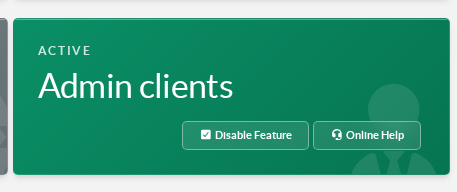
Enabling it starts the mTLS administration service, creates the certificate authority dedicated to these client certificates, and adds an Admin clients entry to the left menu.
As long as the feature is off, the Administration redirector checkbox of a path stays locked, and says why.
¶ Step 2 — Choose where the administration service listens
On the Admin clients page, the Parameters button decides where the service itself listens.
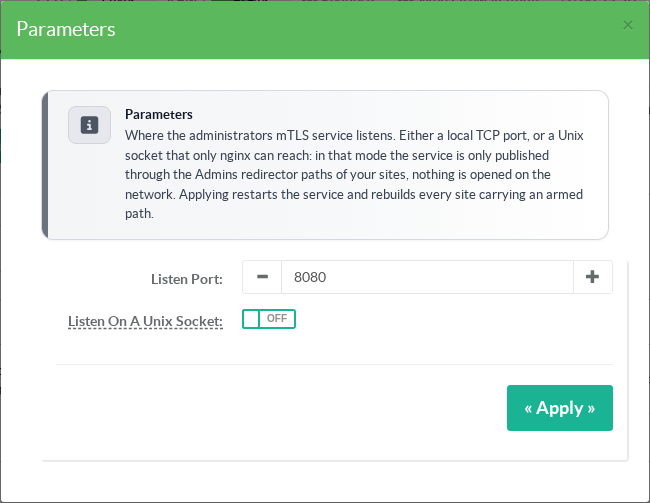
| Mode | What it means |
|---|---|
Listen port (default 8080) |
The service listens on that TCP port, on every interface. Both direct access and redirector paths work. Ports already used by the appliance — SSH, the web console, the metrics virtual host and the daemon API — are refused with an explicit message. |
| Listen on a Unix socket | The TCP port is closed. The service is reachable only through /var/run/nginx/mtls-admins.sock, which only nginx can open. Administration is then exclusively through the redirector paths, and Direct access to the service port disappears from the generation form. |
Applying is not a simple setting change:
the appliance restarts the service and rebuilds every website that carries a published path, so their relay points at the new listening address in the same operation.
If one of those rebuilds fails, the console names the rules concerned instead of closing silently.
¶ Step 3 — Publish the service on a virtual directory
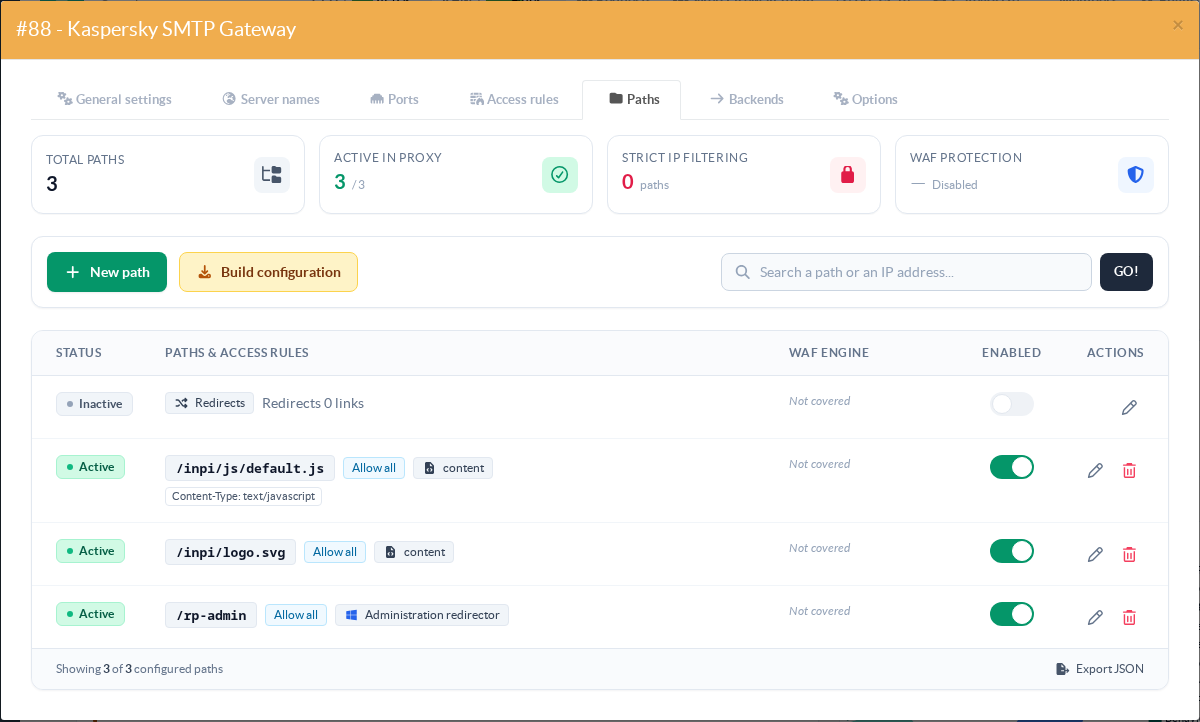
Open the website that will carry the endpoint — Web services > Websites > your rule — and go to the Paths tab, then New path.
Give the path a name of its own. It must not collide with a path your application serves, it cannot be the root /, it cannot be a regular expression, and /.well-known is reserved.
A short, unambiguous name such as /rp-admin is the right choice.
In the Security section, turn on Administration Redirector.
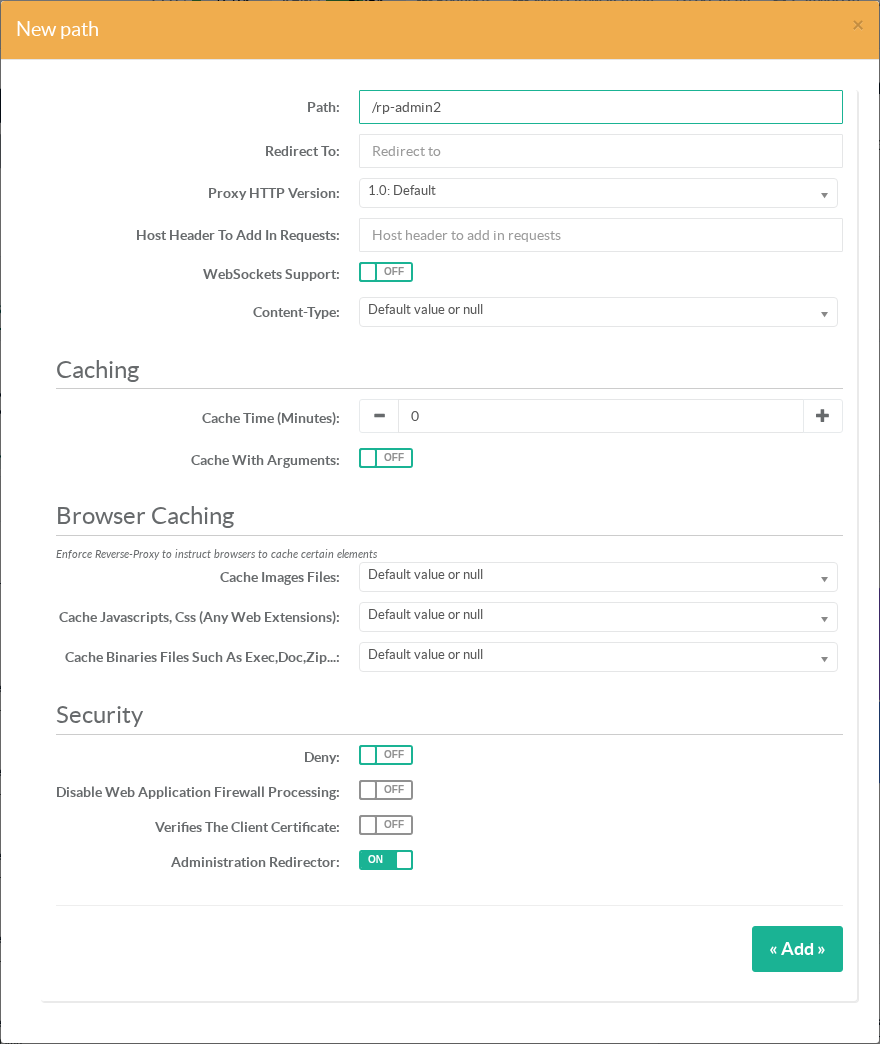
Two remarks on that section:
- Verifies the client certificate and Administration Redirector are mutually exclusive.
A published path always verifies the certificate, with the mTLS authority; the generic option no longer applies to it. - The Deny list of the path is still honoured.
Leave it empty to accept any address, or fill it to require a known source address in addition to the certificate.
Save, then Build configuration.
The path appears in the list with a Administration redirector badge.
¶ Step 4 — Generate a client configuration
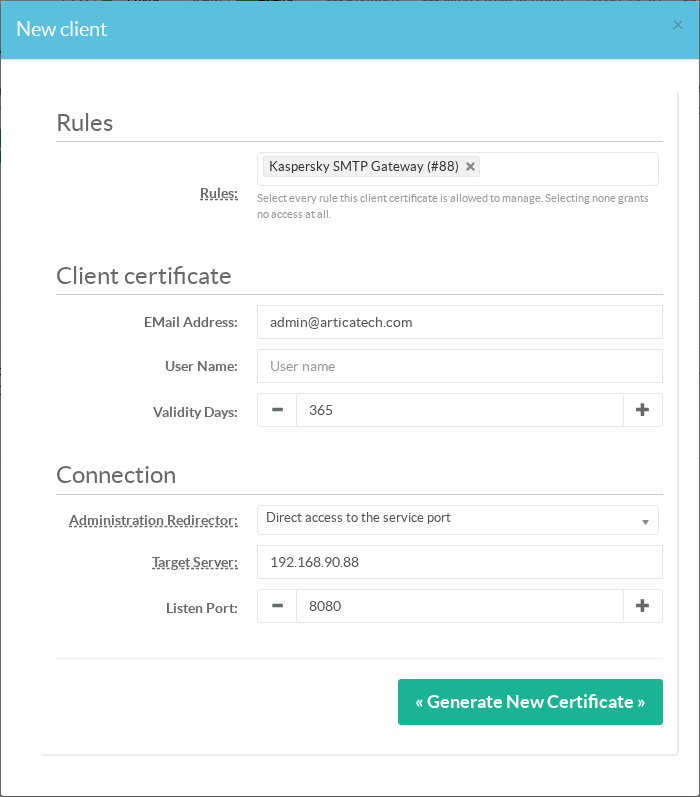
Go to Admin clients in the left menu, then New client.
| Field | What to enter |
|---|---|
| Rules | Every website this administrator works on. Selecting none grants nothing at all. The Windows application shows exactly this list in its site selector. |
| eMail address | Identifies the holder. It is what you will look for later when revoking the configuration. |
| User name | Optional. Left empty, the e-mail address is used as the certificate's common name. |
| Validity days | Lifetime of the certificate, 365 days by default. These certificates are not renewed automatically: plan the reissue. |
The Connection section is where the redirector comes in.
The Administration Redirector list offers Direct access to the service port and every path published on the appliance, named after the website that carries it.
Pick your path: Artica fills in the target server with the site's own host name and the listen port with its SSL port.
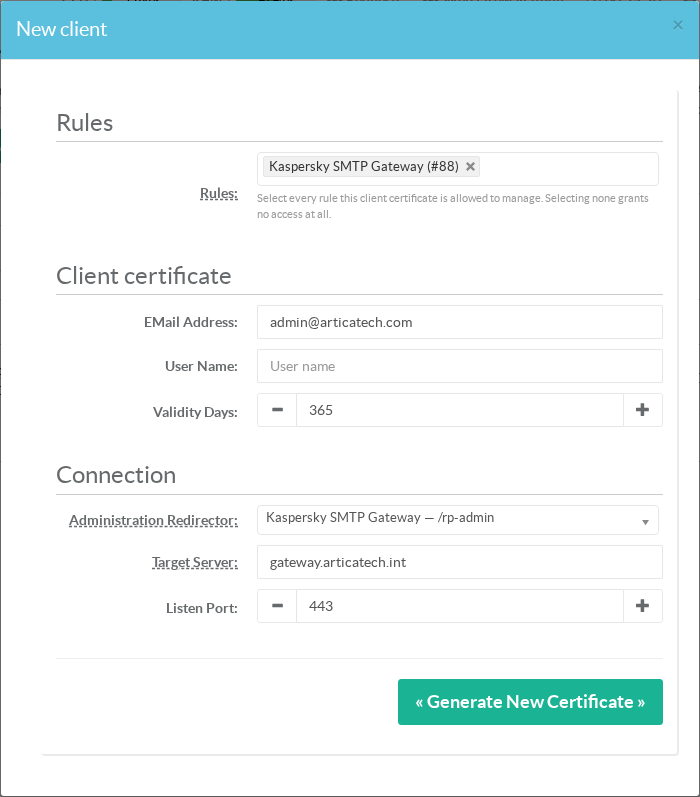
Both fields stay editable — change the target server when the administrator reaches the site through a different name (a public alias, a load balancer) than the one stored on the appliance.
¶ Step 5 — Hand over the file
The generated configurations are listed on the same page.
The Connection column shows, for each one, the path it goes through — or Direct access to the service port.
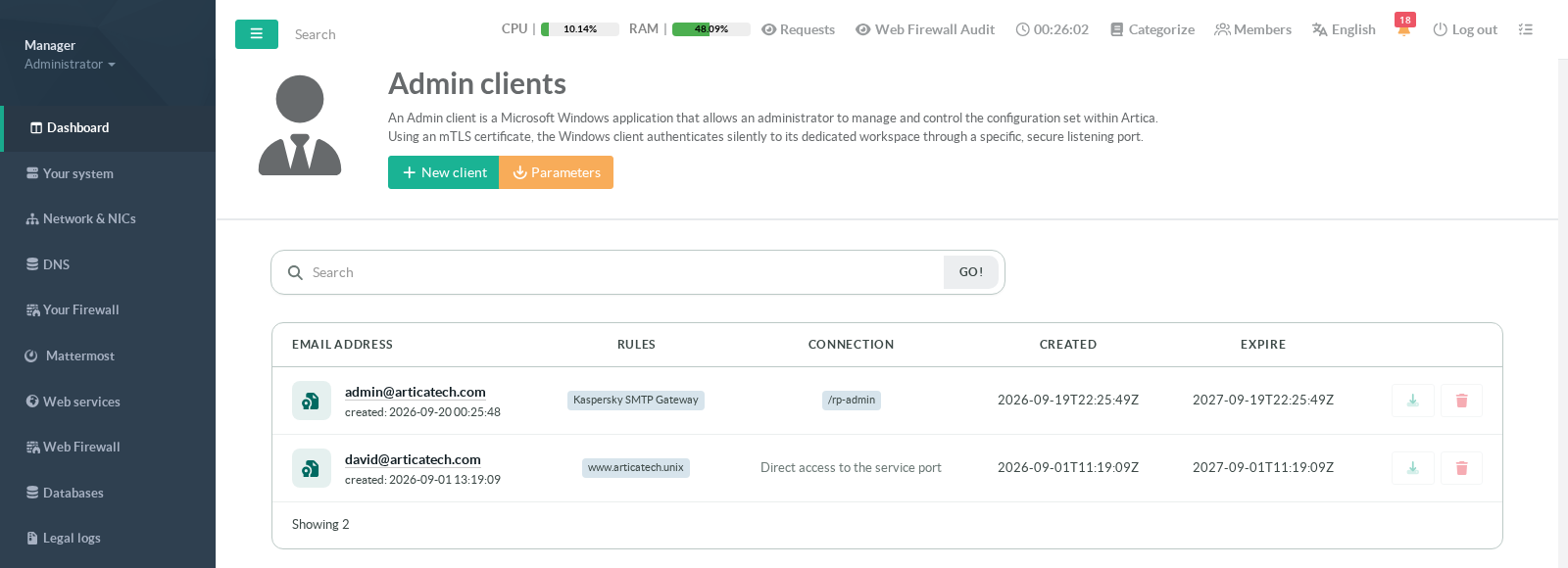
The download icon produces a mtls-config-<id>.enc file.
Send it to its holder over a channel you trust: it contains the private key.
In the desktop application, the administrator adds it once — it then appears in the appliance selector, next to any other appliance they administer.
Decrypted, the file is an INI whose network section reads:
[network]
server = gateway.example.net
port = 443
basepath = /rp-adminWithout a redirector, the basepath line is simply absent, and the file is exactly what earlier Artica versions produced.
That is why an existing deployment is never disturbed by this feature.
The clicking icon on the e-mail address opens the certificate itself — issuer, validity, fingerprint — when you need to check what was issued.
¶ Changing or removing a published path
Un-publishing a path, disabling it, deleting it or renaming it breaks every client configuration that carries it — silently, on the administrators' side, since their .enc file still points at the old prefix.
The console therefore asks the appliance how many configurations depend on that path, and asks for confirmation with the number:
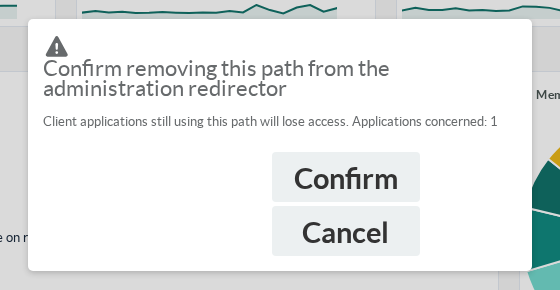
If the count cannot be obtained, the console says so and still asks — it never presents an unknown as a reassuring zero.
When the answer is a number greater than zero, reissue the configurations concerned before confirming: the Connection column of the Admin clients page tells you exactly which ones they are.
¶ When nothing is published: the refusals
Artica never emits an approximate relay. When one of the conditions is not met, it writes a comment and no directive at all into the site's configuration: the path is simply handed to your backend as before, and the website keeps working. Read that comment in the generated configuration of the site to know which case you are in.
| Situation | What to do |
|---|---|
| The Admin clients feature is disabled | Enable it on the reverse-proxy status page (step 1). |
| The mTLS authority is missing or unreadable | The service has never started. Disable and re-enable the feature. |
| The website has no usable SSL frontend | Give the rule a certificate and an SSL listening port. Without them the relay would refuse every request, with no way to diagnose it. |
| The website already requires a client certificate | Publish the endpoint on another website. Two client authorities cannot coexist on one virtual host. |
| The path is refused (root, regular expression, forbidden character, traversal) | Rename it. Use a simple, absolute path such as /rp-admin. |
The path collides with another one, or with /.well-known |
Choose a name that no other path of the site serves. |
| The service certificate cannot be produced | Check the free space and the permissions of /etc/artica-postfix/reverse-proxy. |
¶ Security notes and limits
- Optional client verification applies to the whole virtual host, and to its HTTP-to-HTTPS redirection blocks, because the directive does not exist at path level.
Concretely: the list of accepted authorities is announced in the TLS handshake to every visitor of that site.
Browsers only offer a certificate chooser to users who actually hold a matching certificate, so the practical impact is small — but if that is unacceptable on a public site, publish the endpoint on a site with a narrower audience. - The service certificate is a key.
/etc/artica-postfix/reverse-proxy/redirector-client.{pem,key}is what nginx presents to the administration service.
It is stored read-only for root, and renewed automatically when it expires or when the authority changes — but it is one more secret living on the appliance. - Reissuing the mTLS authority requires rebuilding the sites.
The expected issuer is written into the nginx configuration at build time.
After a reissue, already-deployed configurations keep comparing against the previous authority and refuse legitimate clients with403until the websites are rebuilt. - There is no per-site authorisation on the appliance.
The list of rules in a certificate limits what the Windows application displays, not what the API accepts.
This is true of direct access to port 8080 as well; the redirector neither adds nor removes anything here. - An older desktop application fails without explanation when it receives a configuration carrying a path:
it ignores the unknown key, calls the site root and gets a403or a404.
Make sure administrators run a version that supports the redirector before you issue them a path-based configuration. - What this crosses is a port filter, not an outbound proxy.
The desktop application connects directly and ignores the system proxy settings.
An environment that forces an intercepting HTTP proxy is not covered — and such a proxy would terminate TLS, which would break the client-certificate authentication anyway.
¶ Reference
| Item | Value |
|---|---|
| Administration service, default listening address | 0.0.0.0:8080 (TLS, client certificate required) |
| Unix socket mode | /var/run/nginx/mtls-admins.sock |
| Ports refused as a listening port | SSH, the web console, the metrics virtual host, the daemon API |
| Certificate authority of the client certificates | /etc/artica-postfix/reverse-proxy/mtls-ca.pem |
| Service certificate presented by nginx | /etc/artica-postfix/reverse-proxy/redirector-client.{pem,key} |
| Key added to the client configuration | [network] basepath, absent when there is no redirector |
| Downloaded file | mtls-config-<id>.enc — contains the private key |
- Reverse proxy paths — everything else a path can do
- Client-Side Certificate Authentication (mTLS) — client certificates for your visitors, a different feature
- Back to Artica reverse-proxy main section