Debian Agents: Reverse-proxy compliance
If you want to use a reverse proxy, the Meta server can be configured to route its connections to the network agent through this reverse proxy.
How to configure the Debian Agent to work behind a reverse proxy like Nginx.
The Debian Agent supports reverse proxy deployments with:
- Real IP extraction from
X-Forwarded-ForandX-Real-IPheaders - Path prefix stripping for sub-path deployments (e.g.,
/debian-agent/api/v3/status) - Unix socket listening for efficient local communication with Nginx
Add the following to /etc/debian-agent/config.json:
{
"proxy": {
"enabled": true,
"trusted_proxies": ["127.0.0.1", "::1"],
"path_prefix": "/debian-agent"
}
}
Configuration Options
| Field | Type | Description |
|---|---|---|
enabled |
boolean | Enable reverse proxy mode |
trusted_proxies |
array | List of trusted proxy IPs or CIDR ranges |
path_prefix |
string | Path prefix to strip (e.g., /debian-agent) |
Security Notes
- Trusted Proxies: Only requests from IPs in
trusted_proxieswill have theirX-Forwarded-For/X-Real-IPheaders trusted - If
trusted_proxiesis empty butenabledis true, defaults to localhost (127.0.0.1,::1) - Requests from untrusted IPs will use the direct connection IP
Nginx configuration for a remote network agent
server {
listen 443 ssl;
server_name agent1.example.com;
ssl_certificate /etc/nginx/ssl/server.crt;
ssl_certificate_key /etc/nginx/ssl/server.key;
# Optional: Client certificate verification (mTLS passthrough)
ssl_client_certificate /var/lib/debian-agent/pki/ca.crt;
ssl_verify_client optional;
location / {
proxy_pass https://1.2.3.4:28811;
proxy_ssl_verify off; # Trust backend's self-signed cert
# Pass real client IP
proxy_set_header X-Real-IP $remote_addr;
proxy_set_header X-Forwarded-For $proxy_add_x_forwarded_for;
proxy_set_header X-Forwarded-Proto $scheme;
proxy_set_header Host $host;
# Pass client certificate to backend (for mTLS)
proxy_ssl_certificate $ssl_client_certificate;
proxy_ssl_certificate_key $ssl_client_key;
}
}
Unix Socket (Recommended for Local Nginx)
Agent listens on Unix socket for efficient local communication.
Agent config (/etc/debian-agent/config.json):
{
"listen_socket": "/run/debian-agent/https.sock",
"proxy": {
"enabled": true,
"trusted_proxies": ["127.0.0.1", "::1"]
"path_prefix": "/debian-agent"
}
}
Nginx config (/etc/nginx/sites-available/debian-agent):
upstream debian_agent {
server unix:/run/debian-agent/https.sock;
}
server {
listen 443 ssl;
server_name agent.example.com;
ssl_certificate /etc/nginx/ssl/server.crt;
ssl_certificate_key /etc/nginx/ssl/server.key;
location /debian-agent/ {
proxy_pass https://debian_agent";
proxy_ssl_verify off;
# Pass real client IP
proxy_set_header X-Real-IP $remote_addr;
proxy_set_header X-Forwarded-For $proxy_add_x_forwarded_for;
proxy_set_header X-Forwarded-Proto $scheme;
proxy_set_header Host $host;
}
}
Using Artica Reverse-Proxy
If you want to manage an Artica Reverse-Proxy edition, just simply create a dedicated rule.
- On the left menu, choose
Web services > Services - Click on the New service button.
- Select the Debian-Agent redirector option
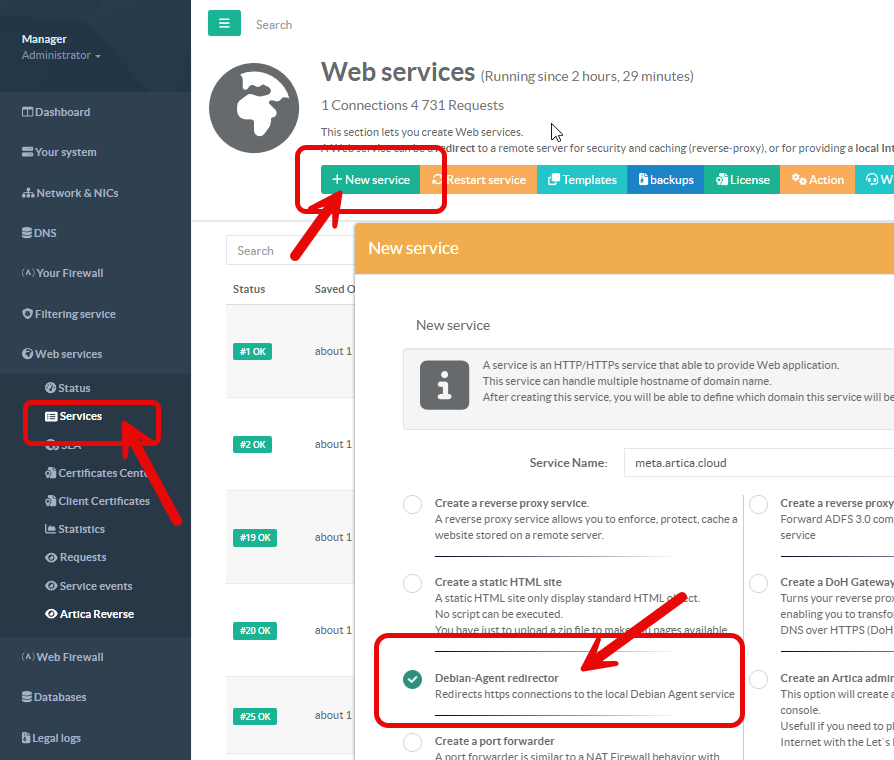
- Select the new created website rule and click on the button “Create a self-signed Certificate” button
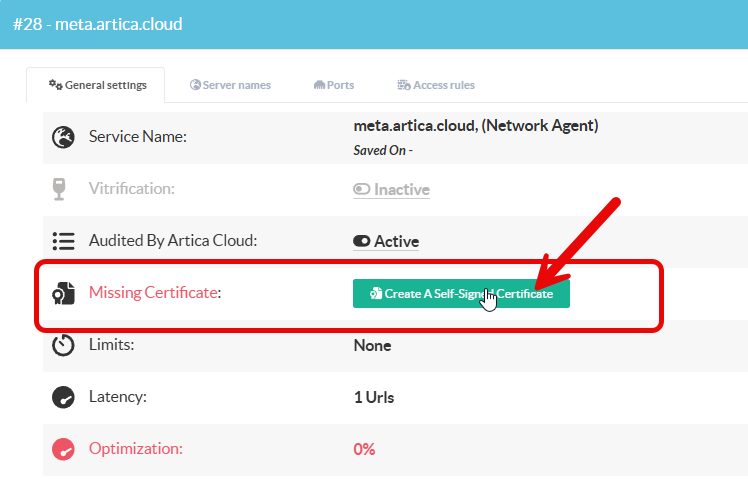
- Then compile your Web site
