With Artica Meta, you can centrally manage and modify the DNS configuration of your managed nodes — either individually on a per-node basis or collectively through node groups for consistent, cluster-wide settings.
¶ Change DNS on a single node
When modifying the DNS settings of a single node, you can also update the machine’s hostname.
- On the Agents List section, click on the link of a managed node

- Select the DNS tab.
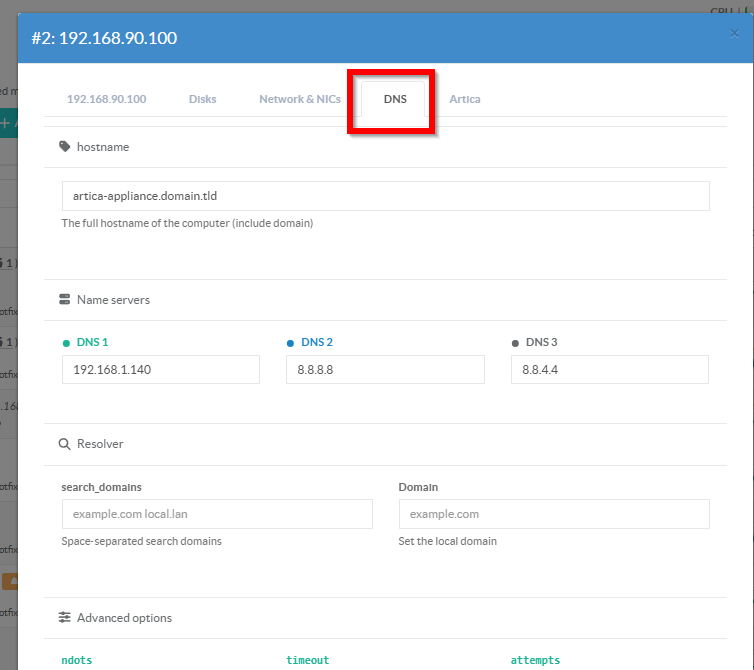
- Nameservers
Three separate text inputs, colour-coded (green / blue / grey).
Empty inputs are stripped before.
At least one nameserver is required. - Search domains
search Space-separated list of domains appended to short hostnames during lookup.
E.g. corp.local example.com means host is tried as host.corp.local, then host.example.com.
Mutually exclusive with domain. - Domain
Sets the local domain name. Short hostnames without a dot are resolved within this domain first.
If bothdomainandsearchare set,searchtakes precedence. - ndots:
A name containing fewer dots than this value is tried via the search list before being looked up as an absolute name.
Default: 1. Increase to 5 in large corporate environments. - Timeout:
Maximum time in seconds the resolver waits for a reply from each nameserver before trying the next one.
Default: 5. Lower values speed up failover but may cause spurious retries on slow links. - Attempts:
Number of times each nameserver is retried before the resolver gives up and returns an error.
Default: 2. - Rotate:
Round-robins through the nameserver list on each query to spread load.
Without this option, queries always start from the first nameserver and only fall through to the next on failure. - edns0
Enables EDNS0 (Extension Mechanisms for DNS), raising the UDP payload limit to 4096 bytes.
Required for DNSSEC responses and large TXT/SPF records. - Trust ad:
Sets the AD (Authenticated Data) bit on outgoing queries and trusts it in responses.
Only meaningful when the upstream resolver performs DNSSEC validation. - use-vc:
Forces all DNS queries over TCP instead of UDP.
Use when UDP is blocked by a firewall, or when responses are frequently truncated. - no-check-names
Disables the resolver's built-in check for invalid characters in hostnames and mail addresses.
Allows non-standard names (e.g. underscores) to be queried without error. - inet6
Sends AAAA queries before A queries and returns IPv6 addresses preferentially.
Falls back to IPv4 if no AAAA record is found. - single-request
Sends A and AAAA queries sequentially rather than in parallel.
Use when a NAT device or stateful firewall cannot handle two simultaneous outbound DNS queries from the same source port. - no-reload
Disables automatic re-reading of resolv.conf when the file changes.
Requires glibc 2.26+.
Use in container environments where the file is managed externally. - Sortlist
Accepting space-separated address/mask pairs.
Controls the order in which the resolver sorts returned addresses.
Example: 130.155.160.0/255.255.240.0 130.155.0.0.
Leave empty to use the default system ordering.
¶ Change DNS on a group of nodes
By using a group, you will standardize the configuration across all nodes associated with that group.
Please ensure that the nodes are intended to use identical settings before proceeding.
- In the Agent Groups section, click the icon in the “NET” column.
- Then select the DNS tab.

The system will load the DNS configuration of the first node in the group as a reference.
Since group settings must remain consistent, all nodes will share the same configuration.
The available parameters are identical to those of a single agent configuration.
