Artica AI appliance
A local language model (Ollama and Qwen 2.5) served by one Artica appliance to the Artica AI service of the others: concepts, prerequisites, performance and use cases.
An Artica appliance can become an AI appliance.
It runs a local language model and serves it to the other Artica appliances of your network.
The model is Qwen 2.5 7B Instruct, served by Ollama.
No graphics card is needed: the processor and the memory do all the work.
The appliances that use it run Artica AI, the assistant of the Web console.
Their questions, logs and configuration extracts never leave your network.
- Installing an Artica AI appliance.
Step-by-step installation of an Artica AI appliance.
Authorization of the client appliances and connection of Artica AI to it.
- Optimizing the Artica AI Appliance
Where the time of an Artica AI appliance goes.
What Artica does for speed, and how to tune the model server, the hardware and the client appliances.
Concepts
- A server for the other appliances

The AI appliance is a server.
Each client appliance keeps its own Artica AI service.
Only the language model moves to the AI appliance.
- Artica AI does not let the model decide anything.
- The model writes the chat answers, explains incidents and suggests diagnostics.
- Every change on an appliance still goes through the Artica AI policy and its approvals.
One click, from the official sources
- The installation is fully automatic.
- Ollama comes from its official GitHub releases.
- The model comes from the official Ollama registry.
- The archive checksum is verified before anything is installed.
Downloads resume where they stopped.
A network cut, a restart of the Web API service or a reboot never downloads again what is already on disk.
The Artica AI client leaves this appliance
An appliance is either an AI appliance or an Artica AI client, never both.
The installation removes the Artica AI client from the AI appliance.
Its settings in /etc/artica-ai are kept.
While the AI appliance is installed, the Artica AI client cannot be installed on it.
Security
- Ollama listens on
127.0.0.1:11434only.
It is never reachable from the network. - The other appliances go through a gateway built into the Artica Web API service.
- The gateway accepts TLS 1.3 only.
- Only the addresses and networks you allow can connect.
An empty list refuses everybody. - The address checked is the one of the TCP connection.
Headers such asX-Forwarded-Forare ignored. - Only two requests reach the model:
POST /v1/chat/completionsandGET /v1/models.
Any other request is answered 404. - A request body is limited to 1 MB.
- Ollama runs under a dedicated
ollamaaccount, not as root.
There is no API key.
The list of allowed addresses is the only authentication.
Certificates
The AI appliance creates its own certificate authority.
It is valid for 10 years and is never replaced automatically.
The client appliances trust it through its ca.pem file, downloaded from the Status tab.
The server certificate is valid for one year and is renewed 30 days before it expires.
It carries the name of the appliance, all its addresses and the extra names you add.
It is issued again when one of them changes.
The client appliances have nothing to do: they trust the authority, not the certificate.
Uninstalling keeps the certificate authority.
After a reinstallation, the client appliances still trust the AI appliance.
Prerequisites
The page checks the machine before the installation.
Each criterion gets a verdict: Suitable, Slow, Blocking or Not verifiable.
A blocking criterion disables the Install button.
A criterion that cannot be measured is never shown as suitable.
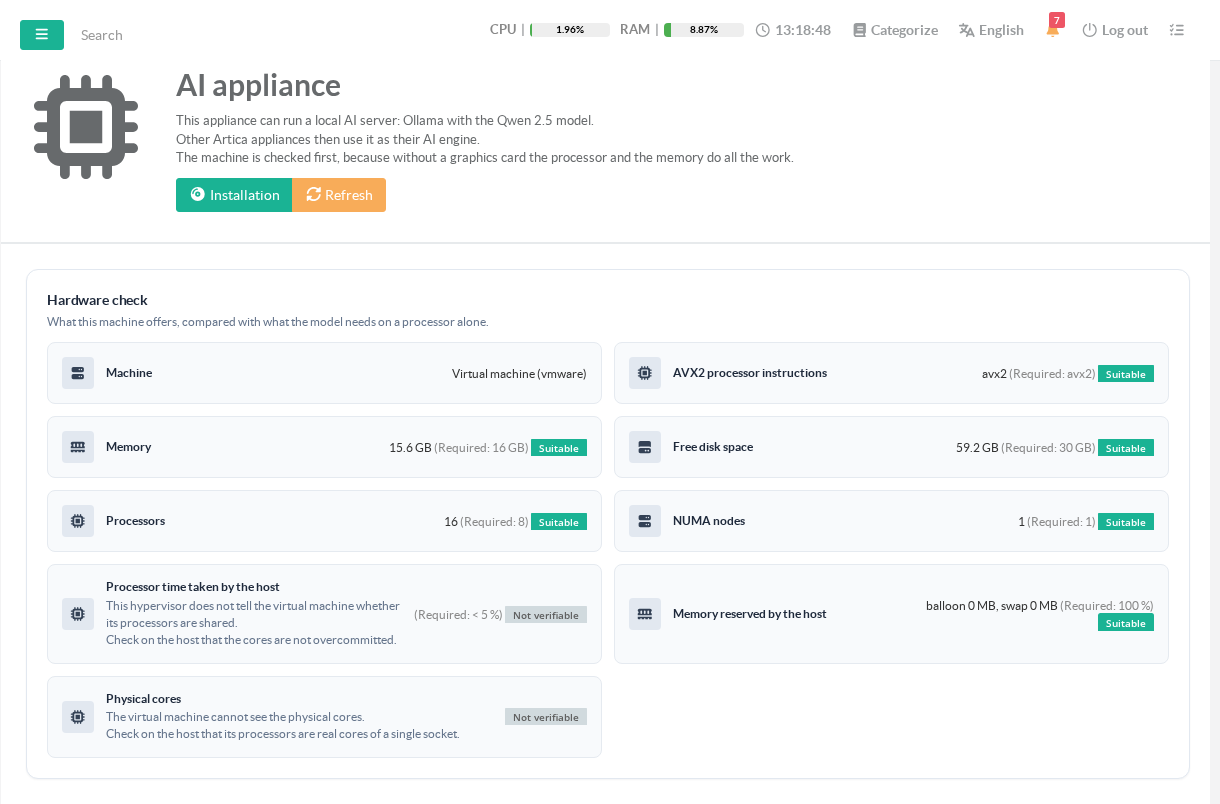
| Criterion | Required | Below the requirement |
|---|---|---|
| AVX2 processor instructions | present | Blocking. On a virtual machine, the message points at the CPU compatibility mode (EVC) of the host. |
| Memory | 16 GB | Slow under 16 GB. Blocking under 8 GB. |
| Free disk space | 30 GB | Blocking. |
| Processors | 8 | Slow. |
| NUMA nodes | 1 | Slow. |
A machine sold as 16 GB shows about 15.6 GB to the system.
This value is accepted as 16 GB.
After the installation, the model is on disk.
The disk criterion then only requires a safety margin of 2 GB.
On a virtual machine
The checks also run on a virtual machine.
The page names the hypervisor (VMware, KVM, Hyper-V, Xen).
Three more criteria apply.
| Criterion | Required | How it is measured |
|---|---|---|
| Processor time taken by the host | less than 5 % | Measured on KVM and Xen, which expose it. Not verifiable on the other hypervisors. |
| Memory reserved by the host | 100 % | Measured on VMware when the VMware tools are installed (balloon and host swap). Not verifiable elsewhere. |
| Physical cores | real cores of a single socket | Never visible from inside a virtual machine. Check it on the host. |
Recommended virtual machine
| Resource | Recommendation |
|---|---|
| vCPU | 8, or 12 if possible. Physical cores, not overcommitted, on a single socket. |
| Memory | 16 GB, reserved at 100 %. |
| Disk | 30 GB free, on SSD. |
| CPU compatibility mode (EVC) | Off, or set to a generation that exposes AVX2. |
- Without memory reservation, the host reclaims the memory of the model.
Each answer then reloads the model from disk. - Overcommitted cores slow down every answer.
The model uses all the processors of the machine while it writes.
Network
- Outbound HTTPS to
api.github.com,github.comand its download servers (*.githubusercontent.com) for Ollama, about 1.3 GB. - Outbound HTTPS to
registry.ollama.aiand its download servers for the model, about 4.7 GB. - The downloads use the proxy of the appliance when one is configured.
- Inbound TCP port 11443 from the client appliances, if the firewall of the AI appliance is enabled.
Internet access is needed only during the installation.
The model then answers without any outside connection.
Performance
Without a graphics card, the model writes a few tokens per second.
A token is about three quarters of a word.
The last installation step measures the real speed of the machine.
The result is shown in the Status tab, with a Measure again button.
Below 2 tokens per second, the page warns that the host is probably overcommitted.
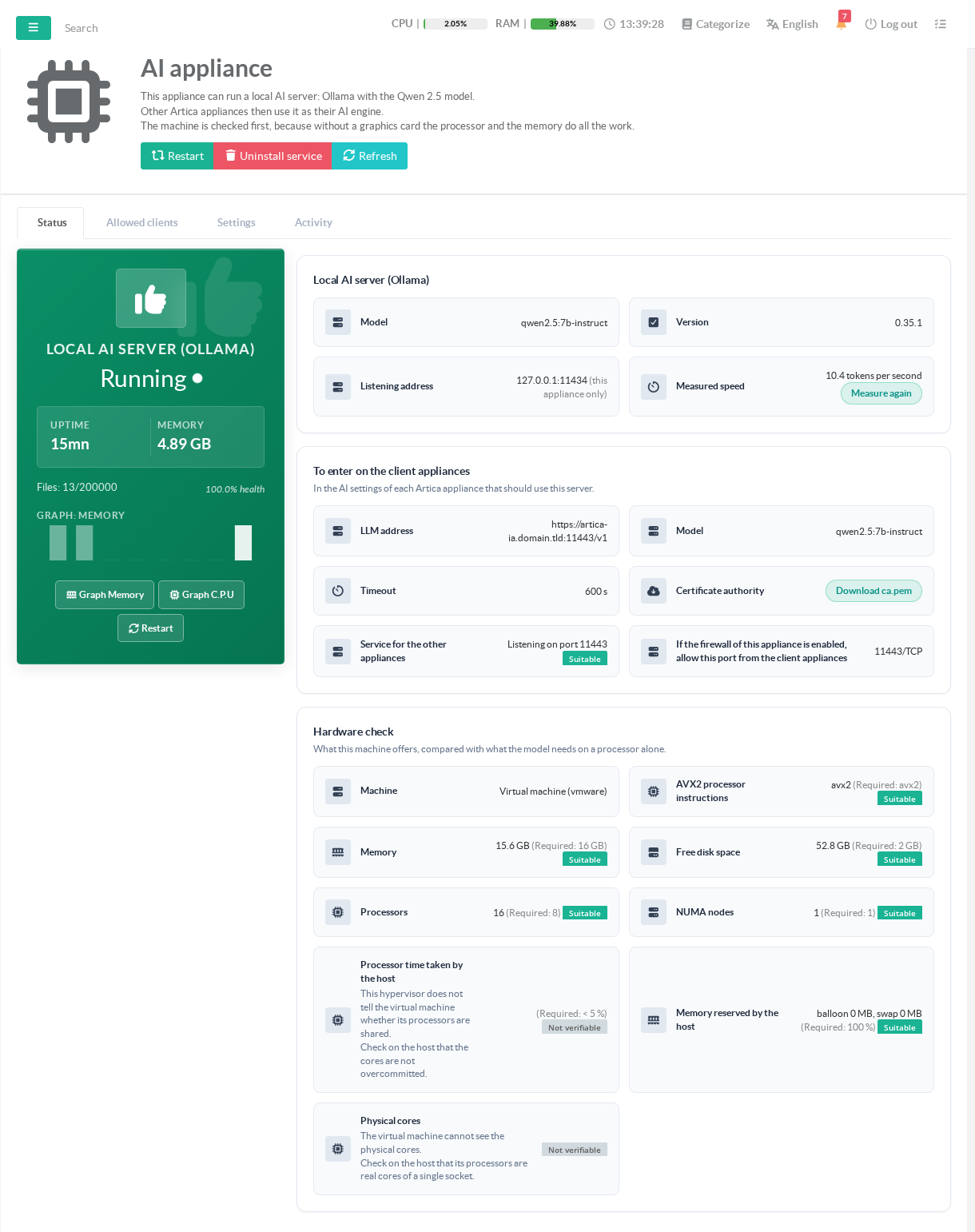
VMware virtual machine, 16 vCPU with AVX2, 16 GB → 9 to 10 tokens per second
At 10 tokens per second, an answer of 150 words takes about 20 seconds.
An investigation by the Artica AI agent chains several answers.
This is why the client appliances use a timeout of 600 seconds.
By default, the model answers one request at a time.
The other requests wait in a queue of 16.
Answering more requests at the same time costs memory and makes each answer slower.
The Settings tab shows the memory needed before you save.
Where the time goes, what Artica does for speed and how to tune the model server, the hardware and the client appliances: see Explaining and optimizing the Artica AI appliance.
Use cases
- Keep your data inside your network
Artica AI sends logs, events and configuration extracts to the model.
With an AI appliance, they never go to a cloud provider.
This suits regulated sectors, public bodies and any company that cannot send its logs outside.
- One AI engine for a whole fleet
A single AI appliance serves all the Artica appliances of a site.
Proxies, mail gateways, firewalls and reverse proxies share the same model.
Allow their addresses one by one, or a whole network in CIDR notation.
- Isolated networks
Once installed, the AI appliance needs no Internet access.
The client appliances reach it on the local network only.
- A predictable cost
There is no billing per request or per token.
The cost is the virtual machine that runs the model.
- When another engine is a better fit
A model running on a processor alone stays slow.
For many users chatting at the same time, or for a larger model, prefer a server with a graphics card.
Artica AI can use any OpenAI-compatible server for that.
Next step : Installing an Artica AI appliance